Author: Mike Taylor

  • AI Literacy Isn’t a Tool Demo

    AI Literacy Isn’t a Tool Demo

    A lot of AI training feels like a tour of a fancy new kitchen.

    Here’s the oven.
    Here’s the blender.
    Here’s the drawer full of tiny tools nobody understands.
    Good luck making dinner.

    That may help people find the buttons. It doesn’t help them cook. And that is the problem with a lot of AI literacy training right now. It teaches people how to open the tool, type a prompt, and act impressed when a tidy answer appears twelve seconds later.

    Useful? Sure. Enough? Not even close.

    AI literacy is not memorizing five prompts. It is not watching someone demo ChatGPT for 45 minutes. And it is definitely not learning that if you type “act as an expert,” the machine suddenly becomes one.

    That last one would be nice, though.

    Real AI literacy is knowing what AI is good at, where it gets shaky, how to guide it, how to check it, and when to leave it sitting quietly in the corner. Because AI makes it very easy to create work that looks finished before anyone has thought deeply about whether it is good.

    A course outline.

    A policy summary

    The Real AI Skill Is Judgment

    A set of quiz questions.
    A manager email.
    A slide deck with 44 bullet points and the word “leverage” nine times.

    AI can produce all of that in seconds.

    So the better question is not:

    Can people use AI?

    Most people can figure out the basics.

    The better question is:

    Can they judge what comes back?

    That’s the gap.

    The Real AI Skill Is Judgment

    The U.S. Department of Labor recently released an AI Literacy Framework. The part I like most is that it does not treat AI literacy like basic software training.

    It points to a better set of skills: understand what AI can and cannot do, explore where it fits in real work, direct it with clear context, evaluate what it produces, and use it safely and responsibly.

    That is a much better map.

    Because people do not usually fail with AI because they forgot which button opens the sidebar. They fail because they trust the confident answer. They fail because they ask vague questions and get vague sludge. They fail because they paste sensitive data into the wrong place.

    And they fail because the output sounds polished, so their brain takes a nap.

    That last one is sneaky.

    Polish creates trust.

    Even when it should not.

    We have all seen it. The AI answer arrives neat, fast, and strangely confident. It has headings. It has bullets. It has the rhythm of someone who owns a blazer and says “circle back” without shame.

    And because it looks competent, we treat it as competent.

    That is where training has to get sharper.

    Don’t Teach Prompts First

    I am not anti-prompt.

    A good prompt is useful.

    So is a good wrench.

    But if I hand you a wrench, you are not suddenly a plumber. You are a person holding a wrench near a future insurance claim.

    Same with AI.

    Prompting matters, but it is not the main event. The main event is helping people understand the work well enough to know what good looks like.

    That means AI literacy training should focus less on magic phrases and more on real decisions:

    • Should AI be used for this task?
    • What context does it need?
    • What would a good answer include?
    • What could be wrong, missing, biased, outdated, or risky?
    • Who needs to review this before it goes anywhere important?
    • What part still requires human judgment?

    That is not tool training.

    That is work training.

    And L&D should be leading it.

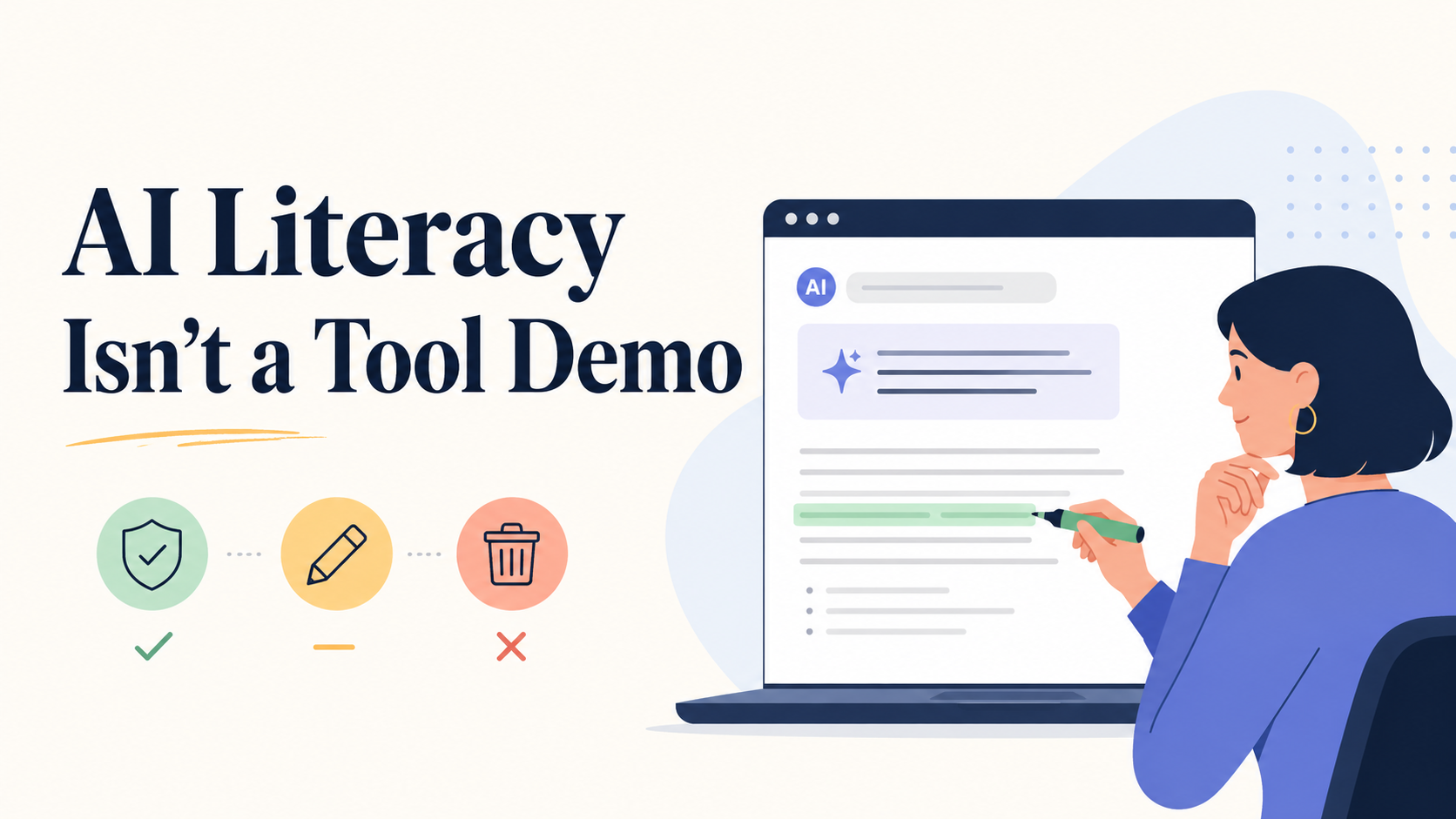
    Try the Trust, Tweak, or Toss Test

    Here is a simple way to make AI literacy more practical.

    Teach people to sort AI output into three buckets:

    • Trust it.
    • Tweak it.
    • Toss it.

    Trust it when the output is accurate, useful, safe, and matched to the task.

    Tweak it when the bones are good, but it needs better context, clearer language, stronger evidence, or a more human point of view.

    Toss it when it is wrong, risky, generic, biased, made up, or pretending to know something it does not know.

    That tiny habit does a lot of work.

    It slows people down. It gives them a decision path. It reminds them that AI output is not a finished product.

    It is raw material.

    Sometimes useful raw material.

    But still raw.

    A Better Way to Design AI Literacy Training

    Instead of building a generic “Intro to AI” course, start with the work people actually do.

    Pick one task your audience touches every week. Not glamorous work. Real work.

    Summarizing meeting notes. Drafting customer responses. Creating first drafts of training materials. Reviewing data. Preparing manager talking points. Writing status updates that do not make people want to walk into the sea.

    Then build the training around that moment.

    Show the messy version. Add AI as a helper, not the hero. Show a good output. Show a bad output. Ask people to decide: trust, tweak, or toss?

    This is where the learning happens.

    Not when the AI answers.

    When the human evaluates.

    That is the muscle we need to build.

    The Friday Find

    This week’s find is the Department of Labor’s AI Literacy Framework.

    I do not usually recommend government PDFs as light weekend reading. I have boundaries.

    But this one is worth a look because it gives L&D teams a cleaner way to think about AI training.

    The big takeaway:

    AI literacy is not about creating power users of a tool.

    It is about creating better thinkers, reviewers, and decision-makers in AI-shaped work.

    That is a very different design challenge.

    And a much more interesting one.

    Worth Your Attention

    Start Here: The AI Literacy Framework

    This is the cleanest map I’ve found for what AI literacy should actually include. Not just prompts and tool tips, but the bigger skills people need: knowing what AI can do, where it fits, how to guide it, how to check it, and how to use it responsibly.

    Short on time? Here’s the infographic version.

    See the AI literacy framework →


    AI Should Make Learning Design Better, Not Just Faster

    Dr. Philippa Hardman nails the bigger opportunity: AI is not a shortcut around learning design. It is a chance to get more serious about it.

    Use AI to design better, not just faster →


    How to Use AI Without Handing Over Your Judgment

    A smart look at where AI can help instructional designers with research, ideas, critique, and production while keeping the human in charge of the decisions that matter.

    Keep the human in the loop →


    The Bottom Line

    AI literacy is not about turning people into prompt wizards.

    It is about helping them become better thinkers, reviewers, and decision-makers in AI-shaped work.

    The tool can draft, summarize, and suggest, and it sounds very confident while doing so. But the human still has to decide whether the answer is useful, accurate, safe, and worth putting their name on.

    That is the skill to build.

    Not just:

    “How do I use AI?”

    But:

    “Should I trust it, tweak it, or toss it?”

    That is where AI literacy gets real.


    🎵 Today I’m listening to Arcy Drive​


    📍Where I’ll be next

    ​ATD Core4, Sept 29-Oct 1(Indianapolis, IN)

    Found this useful? Forward it to someone else who’d also get something out of it.

  • Attention Isn’t Given. It’s Spent.

    Attention Isn’t Given. It’s Spent.

    Learners aren’t losing the ability to pay attention.

    They’re making rational decisions about where to spend it.

    That’s not a capacity problem. It’s a design problem.

    Attention Is a Resource. Not a Reflex.

    Herbert Simon saw it coming in 1971. A wealth of information creates a poverty of attention. His point was precise: information doesn’t just compete for your learners’ attention. It consumes it. And attention, like money, gets allocated — not lost.

    Daniel Kahneman confirmed the mechanism two years later. His research showed that people direct their focus based on perceived importance – not randomly, not based on elapsed time, but on whether the next moment seems worth it.

    This isn’t attention deficit. It’s rational economics.

    The Numbers Everyone Gets Wrong

    Two numbers often drive the attention conversation in L&D right now. One is fabricated. One is real and widely misread.

    The real one: 47 seconds. 
    Gloria Mark at UC Irvine tracked screen-switching behavior for two decades. In 2004, people averaged 2.5 minutes on a task before switching. Today: 47 seconds, replicated across five independent studies. Philip Guo analyzed 6.9 million edX video sessions and found engagement collapses at 6 minutes — videos over 12 minutes got roughly 3 minutes of actual watch time.

    The fabricated one: 8 seconds, shorter than a goldfish.
    A 2015 Microsoft report cited a nonexistent source. It spread because it felt true. It wasn’t.

    These numbers get called attention limits. They aren’t. They’re exit decisions.

    A learner who switches screens at 47 seconds has made a judgment: not worth it. The one who stops a video at 3 minutes has made the same call. Attention followed value until the value ran out. Then it went somewhere that offered more.

    That behavior has a name. L&D built a model around it in the 1980s. Then mostly forgot it.

    L&D Had the Answer. Forgot It Anyway.

    ​John Keller’s ARCS model — Attention, Relevance, Confidence, Satisfaction — was built directly on Expectancy-Value Theory. The equation is blunt: motivation equals expectancy times value. Either factor hits zero, engagement hits zero. Not a drift. A cliff.

    Research on relevance interventions confirms it.

    When learners understand why content matters to them personally, engagement jumps across every measure.

    Keller wasn’t describing good design. He was describing the entry fee.

    The field had this for forty years and reached for a 10-minute timer instead anyway.

    Marketers didn’t have that luxury. Their feedback loops — click rates, bounce rates, conversion data — made getting attention wrong immediately visible and immediately painful. That forced one rule above all others: earn attention before you spend it. L&D never faced that reckoning. So myths filled the void.

    The Harder Question

    Before you build anything, ask this:
    ​
    why would a learner believe the next 45 seconds is worth their attention?

    Not whether the content matters. You know it does. Whether they’ll feel it in the opening moment, before you’ve done anything to earn their focus.

    That’s your actual design problem. Not length. Not format. Not which authoring tool.

    For eLearning: lead with stakes, keep it short (ideally under 6 minutes, if possible), and cut anything that doesn’t earn its place. Your learner is running a live cost-benefit call. Win it early or don’t win it.

    For ILT and VILT, the research is consistent: attention in live learning tracks the instructor, not the clock. Relevance, interactivity, and stakes. Those are the levers. A timer is not.


    Worth Your Attention

    Interest Matters: The Importance of Promoting Interest in Education

    This research highlights that fostering learner interest is not a superficial “nice-to-have” but a core engine for deep cognitive processing, persistence, and performance.

    ​Discover the 4 Interventions Driving Real Engagement →


    Designing Organizations for an Information-Rich World

    Worth reading, not because it’s practically actionable, but because it reframes the whole problem: attention isn’t something that’s been damaged by technology. It was always scarce. Technology just made the competition for it visible. Short, readable, historically significant.

    ​Learn Why Attention Was Always Scarce →


    Keller’s ARCS Model of Motivational Design

    This outlines a systematic blueprint for shifting the instructional focus from purely environmental rewards to a learner’s active desire to learn.

    ​Explore the ARCS Model to Design for Motivation →

  • The Art & Science of eLearning

    The Art & Science of eLearning

    I recently presented at the iSpring 2026 online conference. The session was called The Art & Science of eLearning, and the core idea was pretty simple:

    Anyone can do eLearning.
    Not just anyone can do it well.

    Here’s a quick rundown of what we covered.

    Anyone Can Build It. That’s the Problem.

    The tools have never been more accessible. But accessible isn’t the same as effective. Good eLearning sits at the intersection of a lot of disciplines — instructional design, neuroscience, graphic design, storytelling, and marketing. When you hand powerful tools to people without the right foundation, the results are usually… not great.

    Key 1: The Right Thing

    Before you build anything, ask yourself: is this actually a training problem?

    Most of the time, it isn’t. Look at the real performance factors, and you’ll usually find the culprits are unclear expectations, missing tools, bad incentives, or broken processes. Carl Binder’s Six Boxes Model makes this visual. Only one box points directly to training: skills and knowledge.

    Ron Zemke had a great line about this — management demanding a course right now isn’t a valid excuse for lousy training. Push back. Do the analysis. Mager and Pipe’s Analyzing Performance Problems is still one of the best tools for this work, and it holds up.

    Key 2: The Right Way

    This is where most eLearning falls apart. The most common mistake? Too much information, not enough time to actually process it. Dr. John Medina called it force feeding with very little digestion in Brain Rules.

    The problem is working memory. It’s a tiny bottleneck between what your learner sees and what actually sticks. Cram too much through that bottleneck and you’ve lost them.

    A few principles that help: reduce cognitive load, lead with curiosity before content, and remember — telling ain’t training. If your course is just a series of narrated bullet points on a screen, it’s a document. Not learning.

    Key 3: The Right Visuals

    This one gets underestimated. Design isn’t decoration — it’s function. Research shows 94% of first impressions are tied to visual design. And those first impressions impact the perception of your course’s credibility, trust and even usability. Also, pictures beat text for recall..

    You don’t need to be a designer. You do need to understand a few principles: coherence, redundancy, and modality. Connie Malamed’s Visual Design Solutions is a great place to start.

    Where It All Comes Together

    The session closed with a three-circle Venn diagram. Right Stuff. Right Way. Right Visuals. Where all three overlap? That’s where the amazing eLearning lives.

    Most courses nail one or two. Getting all three is the goal — and it’s absolutely doable.

    Grab the Slides and Resources

    I built a landing page with the downloadable slides and links to every book and resource mentioned in the session.

    Check it out here: art-science-elearning.lovable.app

  • Friday Finds — Tools Edition: AI slide tools are finally getting good

    It’s ‘Tool Time’ again! This month, I want to share some new AI slide tools. And if you haven’t been following, some of these are getting pretty good.

    I’m not ready to break up with PowerPoint yet. But the blank-page problem? That time before anything exists? Some of these new tools have helped that become much less painful. And a couple have already earned a permanent spot in my workflow.

    Let’s dig in.

    Supported by iSpring

    Think your instructional design skills are sharp? Prove it in the iSpring Course Creation Contest. Build a course you’re proud of, get personalized feedback from expert judges, compete for prizes, and showcase your work to a global L&D audience. Best part: it’s free to enter.

    Join the contest →

    Tools Worth Your Attention

    Claude → PowerPoint

    Paste in an outline, describe the structure, and do whatever other prompting magic you want, then tell Claude to generate an editable .pptx file. That alone makes it useful. No new platform to learn. No rebuilding slides somewhere else.

    It isn’t going to give you a completely polished finished deck. But if you want a solid first draft in PowerPoint and plan to do the real polishing yourself, this is a pretty good start.

    ​Get Claude for PowerPoint →


    Claude → Gamma

    This is the first AI slide workflow I’ve used where the result made me pause before reaching for redesign tools.

    Gamma is an AI-native presentation platform, and the Claude integration is smooth. You stay in Claude, describe the deck, and Gamma handles the layout and hierarchy far better than most AI tools do. So far I’ve been pretty impressed with the design decisions with this one.

    ​See how Gamma works with Claude →


    Claude → Canva (via MCP)

    Claude can also connect you to Canva. Work your prompting in Claude, then when you’re ready, it will build a slide deck for you right inside Canva’s editor. You can even export the results directly to PowerPoint.

    Then you’re off to the races inside Canva, where editing, refining, and finishing the design is much easier. If you’re a Canva person, this one’s for you!

    ​Try Canva with Claude →


    Chronicle

    Chronicle’s strength is in turning rough ideas into polished slides fast. Drop in notes, an outline, a document, or even a prompt, and it generates a structured deck with layouts, visuals, and a logical narrative flow. In my testing, it handled messy source material surprisingly well. I’ve only explored what’s available in the free tier so far, but the early results are promising.

    ​Explore Chronicle →


    Canva Magic Layers

    This one is different. Magic Layers doesn’t build slides. It does something that may be even more useful in day-to-day design work: it converts a flat image into editable layers in Canva. (Which you can export directly to PowerPoint by the way!)

    That is a total game-changer and may be the most practical feature on this whole list.


    video preview
    Also supported by Neovation

    Growing a business (in any economy) isn’t easy. The values that made you great can quietly slip through the cracks as you scale. Join us on March 18 for a live demo of how you can use AI and digital learning to preserve your culture as your organization grows.

    ​Register​ for the Protect Your Company DNA webinar →

    ​The Bottom Line

    If I had to sum up the current landscape:

    Best design output: Gamma

    Best fit for a PowerPoint workflow: Claude → PowerPoint

    Best fit for Canva users: Claude → Canva

    Most promising tool to watch: Chronicle

    Most practically useful new feature: Canva Magic Layers


    Know someone who could use any of these tools? Forward this their way.


    📍Where I’ll be next

    • iSpring 2026, April 15-17 (Online)
    • ​LearnTec, May 5-7 (Karlsruhe, Germany)​
    • ATD International Conference, May 17-20 (Los Angeles, CA)
    • Canadian eLearning Conference (Niagra Falls, ON)
  • The Best Free Illustration Libraries for Designers (2026 Edition)

    The Best Free Illustration Libraries for Designers (2026 Edition)

    If your eLearning slides feel slightly off — and you can’t quite put your finger on why — visuals are often the culprit.

    A stock photo on slide three. A cartoon character on slide seven. A flat icon set that clashes with both. You built the course in pieces, and it looks like it.

    The problem isn’t your taste. It’s that nobody told you how visual consistency actually works — and what it costs learners when it breaks down.

    Here’s what’s at stake: when learners encounter mismatched visuals, their brain spends a small fraction of its attention resolving the inconsistency. Individually, that’s trivial. Multiply it across fifty slides, and you’ve introduced real cognitive friction. The research on this goes back to Sweller’s Cognitive Load Theory. The implication for eLearning designers is straightforward — every visual element either earns its place by supporting learning, or it costs something.

    Good illustration libraries help you avoid that cost. The libraries below are free, beginner-accessible, and worth understanding before you build your next course.


    Character Libraries for Scenario-Based eLearning

    Humaaans (humaaans.com) and Open Peeps (openpeeps.com) are the two most useful free character sets for eLearning designers building scenario-based training.

    Both are mix-and-match systems. You can adjust poses, skin tones, outfits, and expressions to build a cast of characters that feel like they belong in the same world. That consistency matters more in eLearning than designers usually expect — when characters look like they came from the same visual universe, learners read your course as intentional. When they don’t, something feels off, even if learners can’t articulate what.

    Licensing note: Humaaans is free for personal and commercial use under Creative Commons CC BY 4.0, which requires attribution. Open Peeps is public domain (CC0) — no attribution required. If you’re building courses for a client or employer, that distinction matters.

    Format and compatibility: Both are available as SVG and PNG files, which import cleanly into Storyline and Rise. Humaaans also offers a Figma component library if you’re doing more advanced customization.


    3D Icon Libraries for Technical and Abstract Topics

    Some topics don’t photograph well. Cybersecurity threats, data flows, network infrastructure — these are abstract by nature, and stock photos of people staring at laptops don’t communicate much.

    Shapefest (shapefest.com) offers a large library of 3D icons and objects that work well for technical and systems-focused content. The aesthetic is clean and modern, the library is searchable, and the free tier is generous enough for most eLearning projects.

    Use 3D icons when your content is abstract enough that literal photography doesn’t help — and when you want a tech-forward visual feel without building anything in a 3D tool yourself. The constraint is the same as any other visual system: pick it, and stick with it throughout the course. Don’t use 3D icons on some slides and flat icons on others.

    Licensing: Free for personal and commercial use. Check individual asset pages for specifics before using in client work.


    Motion Libraries for Micro-Interactions

    LottieFiles (lottiefiles.com) is a library of small, lightweight animations — the kind that signal progress, confirm a correct answer, or give subtle feedback after an interaction.

    Motion in eLearning is easy to misuse. Full-screen animations that play on every slide entry add stimulation without adding meaning. That’s the wrong kind of motion. The right kind is small and purposeful: a checkmark animation after a correct response, a brief loading indicator, a gentle visual cue that something happened.

    Lottie files are JSON-based and lightweight, which matters if you have any file size limits. Storyline 360 supports Lottie animations natively via the Lottie widget. Rise doesn’t support them directly, but you can embed them through a custom block workaround.


    The Real Problem Isn’t Finding Libraries — It’s Knowing When to Stop

    Most eLearning designers don’t struggle to find free illustrations. They struggle to stop finding them.

    You save Humaaans to a folder. Then you find a great icon set. Then a 3D library. Then a texture pack. You’re collecting — and collection feels like progress because you’re building resources. But it isn’t design. It’s accumulation.

    Curation is different. Curation means you’ve looked at five options and deliberately chosen one. It means you’ve decided what your course needs and said no to everything that doesn’t serve that need. That discipline — not the number of libraries you’ve bookmarked — is what separates a polished-looking course from a scattered one.

    The mental model is simple: choose one visual system per project, the same way you’d choose one typeface. Everything in that course should feel like it came from the same creative decision. When it does, learners don’t notice the visuals — and that’s exactly right. They should be focused on the content.


    Where to Go Next

    Oleg Frolov at muz.li published a thorough roundup of free illustration libraries for 2026 that goes well beyond what’s covered here — worth bookmarking if you want the full landscape: muz.li roundup.

    But don’t start there if you’re new to this. Start with one library from this list. Open your current project. Replace the mismatched visuals with a single consistent style. Then look at the before and after.

    That’s the exercise. Everything else follows from it.

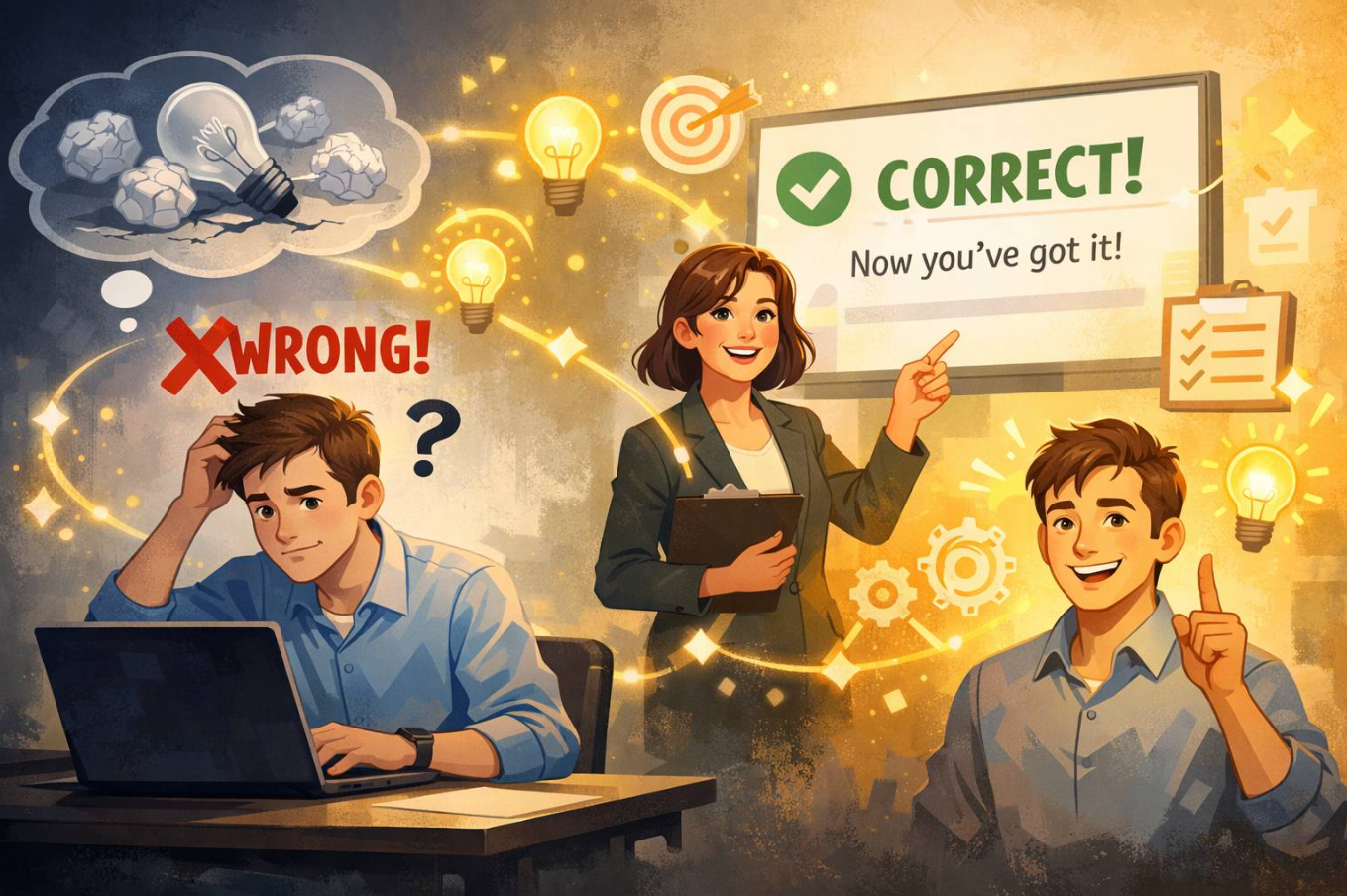
  • Getting it wrong is the whole point

    Getting it wrong is the whole point

    Before you read another word:

    During a typical 20-minute video lecture, what percentage of learners are actively mind-wandering at any given moment?

    Take a guess.


    Research consistently finds that a third to more than half of learners are mind-wandering during a video lecture — and the rate climbs as the session goes on.

    You’ll remember that number better because you tried to retrieve it first.

    That tension you felt? That tiny flicker of uncertainty?

    That’s the mechanism.

    And if your courses don’t create that feeling on purpose, you’re designing for comfort — not retention.


    The uncomfortable truth for L&D

    Most training starts like this:

    • Objectives.
    • Agenda.
    • Definitions.
    • “Here’s what you need to know.”

    Translation: cognitive sedative.

    If your course begins with a content dump, you’re actively suppressing attention. If your SME says, “They need the information first,” that’s not rigor. That’s risk avoidance.

    Brains don’t wake up for information.

    They wake up for problems.


    The Pretesting Effect (and why failure works)

    Here’s the counterintuitive finding:

    Students who attempt to answer questions before studying consistently outperform students who spend that same time just reading.

    Not students who guess correctly.

    Students who guess wrong.

    In a landmark 2009 study, Richland, Kornell, and Kao had participants answer questions about a passage before reading it. Most got nearly everything wrong. After reading, the pretest group dramatically outperformed the group that had simply studied longer — even when researchers analyzed only the questions participants got wrong on the pretest.

    Let that sink in.

    Protecting learners from wrong answers might be exactly backwards.


    Quick prediction

    Why do you think guessing wrong helps?

    A) It increases effort
    B) It activates prior knowledge
    C) It boosts confidence
    D) It reduces anxiety

    Here’s what’s actually happening.


    What’s happening in the brain

    When someone guesses incorrectly, three things fire before they ever see the right answer.

    1. Activation.
    The wrong guess lights up related concepts already stored in memory. Those become hooks. When the correct answer arrives, it has something to attach to.

    2. Prediction error.
    The mismatch between guess and reality registers as “this matters.” The brain treats it as a learning signal stronger than passively reading a fact.

    3. Attention stabilization.
    Pan, Sana, Schmitt, and Bjork (2020) measured attention during online lectures. Learners who took pretests beforehand wandered significantly less. They weren’t passively watching. They were hunting.

    The wrong answer primes the brain.
    The right answer completes the circuit.


    And here’s the business implication

    Mind-wandering isn’t just a learning problem.

    It’s a performance cost.

    If half your workforce is zoning out during compliance, onboarding, or product training:

    • Ramp-up slows.
    • Errors rise.
    • Rework increases.
    • Stakeholder trust erodes.

    Attention is the most expensive resource in your organization.

    And most training spends it carelessly.


    Two design myths to retire immediately

    Myth 1: Learners are blank slates.
    They’re not. They arrive with fragments, assumptions, half-formed models. Pretesting activates them.

    Myth 2: Wrong answers waste time.
    They don’t. They create the conditions for durable learning.

    Let me push this further:

    If your opening slide is a learning objective instead of a question most learners will miss, you’ve already lost the brain.


    Try this before your next module goes live

    Pick the single most important concept in your course — the one that actually drives behavior change.

    Now ask yourself:

    If they had to answer a question about this right now, would most of them get it wrong?

    If the answer is “no,” your content probably isn’t specific enough to matter.

    Write one question most learners won’t answer correctly.

    Not a trick.
    Not unfair.
    Just specific enough to require a real attempt.

    Put it:

    • In the intro email
    • On the first slide
    • At the top of the pre-work
    • Anywhere learners first encounter the experience

    Tell them there’s no penalty.

    Then deliver a clear, satisfying answer.

    One rule: don’t skip the reveal.

    The question opens the loop.
    The content must close it.


    Want to amplify it?

    Use tools like Mentimeter or a simple Google Form to collect guesses and display the group distribution before revealing the answer.

    Now you’ve layered in social curiosity:

    • “Was I the only one who thought that?”
    • “Why did most people choose B?”

    That tension compounds attention.


    Final challenge

    Before you scroll, answer this:

    In your last course, did learners encounter a meaningful question they were likely to miss before they saw the content?

    If not, you’re choosing clarity over impact.

    And impact is what your stakeholders actually pay for.


    Want to go deeper?

    The foundational study
    Richland, Kornell, and Kao (2009). The research that launched modern pretesting work. Start here if you need to persuade a skeptic.

    → Read the original pretesting research

    Plain-English science
    Faria Sana breaks down the mind-wandering findings without jargon.

    → Read the researcher’s explainer

    Pretesting vs. retrieval practice
    A practical comparison of when to place questions before vs. after study.

    → Read the practical comparison

  • Untitled post 27579

    The 3-Question Test Every L&D Pro Should Use

    Why Most Resource Libraries Fail — and What Real Curation Looks Like Instead

    There’s a folder. You know the one.

    It lives in your bookmarks, a shared drive, or a Teams channel someone created with good intentions in 2021. It’s called something like “Learning Resources” or “Good Stuff” or — the tell — “TO SORT.”

    Inside: a TED Talk on psychological safety. Three articles on microlearning you meant to read. A LinkedIn post from someone whose name you can’t quite place. A PDF from a conference two years ago. A YouTube video your manager forwarded with the message “could be useful?”

    This is not a curated collection. This is a content landfill.

    The distinction matters more than most L&D professionals realize. The difference between the two isn’t the content. It’s everything surrounding it. And confusing them is costing learners more than we’d like to admit.

    Collection vs. curation: a three-question test

    Pick any item from your folder. Answer these three questions honestly:

    1. Why is this here? Not “it seemed good” or “someone sent it.” What specific learner need does it address? What performance gap does it help close?
    2. Why this instead of something else? What did you consider and reject? What makes this the right resource for this person, in this context?
    3. What does a learner do with it? Where does it fit in their experience? What comes before and after? What should they think, do, or question as a result?

    If you can answer all three, you have a curated resource. If you’re reaching — if any answer is honestly “I’m not sure, it just seemed relevant” — you have a collected item.

    Neither is wrong as a starting point. The problem is when we stop there and call it curation.

    The inversion that changes everything

    Accidental collection happens when we’re paying attention. We read something sharp and save it. We encounter a framework that would have helped us five years ago and file it away for the learner who’s five years behind us now. Good instinct.

    The problem is what happens next. Usually: nothing.

    The item sits in the folder. The folder grows. When a need arises, we either dig through it hoping something fits — or we ignore it entirely and search from scratch. Which is how the folder got so large in the first place.

    Intentional curation starts somewhere different.

    Not “I found something worth saving” but “I have a learner with a specific need.” That inversion — need first, content second — is what separates a curator from an aggregator. It sounds small. It isn’t.

    Starting with the learner’s need means defining it with precision before touching a single resource. It means asking what success looks like — not for the content, but for the person. It means the first act of curation happens before any content is involved at all.

    Most of us skip this. Content is visible and concrete. The learner’s need is abstract and requires work to define. So we go straight to the resources and call it done. This is why our SharePoint sites look the way they do.

    The judgment that makes it professional

    Here’s what actually separates a curated collection from a content dump: the presence of someone’s judgment, visible throughout.

    Not just in the selection — though selection matters — but in the arrangement. The framing. The connective tissue between pieces. The explicit reasoning for why this resource and not that one.

    Consider the difference between these two entries in a leadership development pathway:

    Option A: “Why Leaders Eat Last — Simon Sinek (YouTube, 45 min)”

    Option B: “Why Leaders Eat Last — Simon Sinek (YouTube, 45 min). Start here. Sinek’s framing on safety and trust sets up everything that follows. If you’re short on time, watch the first 15 minutes and come back to the rest.”

    Same resource. Different experience. The second version carries a fingerprint — evidence that a thinking person made a decision on the learner’s behalf. That fingerprint is the value. The content is just the material it works with.

    This is also why “AI can curate for us” deserves scrutiny. AI scans breadth efficiently. It surfaces volume in minutes that would take a human researcher days. What it cannot do is make the call about what’s right for this learner, in this context, with this performance gap and this organizational culture. That requires someone who knows the learner. Which is you.

    What learners actually experience

    Learners are more perceptive than we give them credit for. They know the difference between a collection designed for them and one assembled in their general direction.

    A designed collection has a point of view. It makes choices visible. It tells the learner not just what to engage with but why this matters to you specifically — and that framing often determines whether they engage at all.

    A dumped collection does the opposite. Open a SharePoint folder with forty-seven unorganized resources and no guidance. The experience is not “I have so much to learn from.” It’s “I don’t know where to start, so I’ll close this tab.” 

    Nielsen Norman Group research on information overload consistently finds that users presented with undifferentiated content lists abandon them at high rates — not because they lack curiosity, but because the cognitive cost of navigation exceeds the perceived reward.

    More content, less learning. The irony is real.

    Every resource that doesn’t belong is a tax on every learner who has to look past it to find the one that does. The curator’s job is to eliminate that tax — to reduce the cost of getting to the right thing so much that getting there feels effortless.

    Try this before your next project

    Before you open a browser tab, write one paragraph. Who is this learner? What do they need to be able to do? What does a successful outcome look like — not for the content, but for the person?

    Then find content that serves that description. Evaluate what you find against it. Arrange what you keep in an order that creates a progression, not a list. Tell the learner why each piece is there.

    That’s the whole shift. It takes longer than grabbing the first three things that seem relevant. It produces something that actually works.

    More than that: it produces something learners can tell was made for them. In an environment drowning in content, that feeling is rare. It’s also what makes them come back.

    The folder can wait. The learner can’t.

  • The Dual Coding Problem: Why Your Learners Keep Tuning You Out

    The Dual Coding Problem: Why Your Learners Keep Tuning You Out

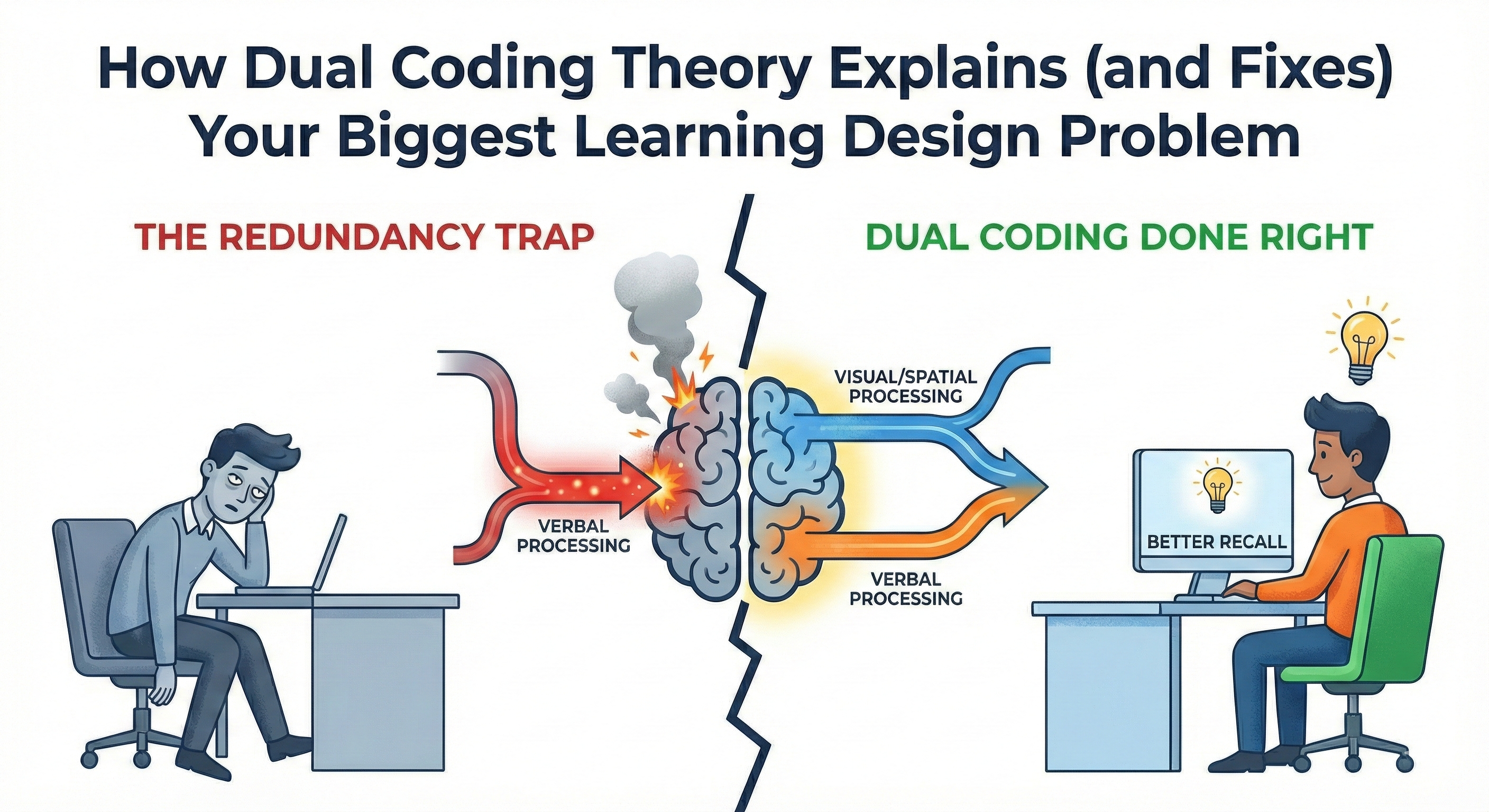
    How Dual Coding Theory Explains (and Fixes) Your Biggest Learning Design Problem

    Your learners look glazed over. They’re reading ahead while you talk. Or they’ve checked out entirely.

    You know what they’re doing? Choosing.

    Read the slide or listen to you. Not both. They can’t. And it’s not their fault—it’s your design.

    Your Brain Processes Information Through Two Separate Systems

    In 1971, psychologist Allan Paivio proposed dual coding theory. The core insight: your brain has two distinct processing channels. One handles visual and spatial information—images, diagrams, animations. The other handles verbal information—language and words.

    The critical detail most people miss? It’s not about eyes versus ears.

    Text on a slide gets processed through the verbal channel, even though you see it with your eyes. Your brain recodes written words into linguistic form. So when you put bullet points on screen and read them aloud, you’re forcing the verbal channel to process identical information from two sources simultaneously.

    Think of two conveyor belts feeding into working memory. One carries visual representations. The other carries language. When each belt carries complementary information, learning compounds. You get multiple retrieval pathways, stronger encoding, better recall.

    But pack identical information on both belts? The system jams.

    Richard Mayer’s multimedia learning research confirmed this. People learn better from words and pictures together than from words alone—but only when those words and pictures complement rather than duplicate each other.

    The Redundancy Trap

    Most training designers make the same mistake: text on slide, narration reading that text.

    You’ve seen it. Probably done it.

    The problem isn’t repetition for emphasis. The problem is cognitive cost. Your verbal processing system has limited capacity. Force it to handle the same information from two sources—reading and listening—and you max out that capacity on redundant processing. No room left for understanding.

    This is the redundancy effect. Your learners have to choose: read or listen. They read faster than you speak, finish the slide, then wait. You’re talking to people who’ve mentally moved on.

    For novice learners especially, this matters. Experts can handle more complexity. But people learning something new need clean separation between visual and verbal channels.

    Dual Coding Done Right

    This BrightCarbon video demonstrates the difference perfectly.

    First, they show the problem: slides packed with text while narration repeats those exact words. Then they flip it. Visual sequences—diagrams, animations, process flows—paired with narration that explains rather than repeats.

    Watch how it works. The visuals aren’t decorative. They’re not self-explanatory either. You need both channels. What you see plus what you hear creates the complete understanding.

    That’s dual coding working as designed.

    Redesigning Your Materials

    Stop treating slides as a script. They’re a visual partner to your narration.

    Instead of bullet points repeating your words:
    Show diagrams illustrating relationships. Use process flowcharts while you walk through steps verbally. Display before/after comparisons while you explain what changed.

    Instead of definitions on screen:
    Show examples or illustrations while you speak the definition. Visual representation through the eyes, explanation through the ears.

    Instead of spelling out your message:
    Let visuals do visual work and narration do verbal work. Explaining why customer complaints spike in Q4? Show the graph of complaint volume over time. Don’t write “complaints spike in Q4” on the slide. Your words explain why. The visual shows what.

    The principle: related but distinct information through each channel. They support each other, don’t duplicate.

    Try This

    Find one slide where you’re reading on-screen text verbatim.

    Remove that text. Replace it with a visual—diagram, icon, image, data visualization. Practice delivering it with the visual carrying its message while your narration carries yours.

    You’ll know it works when the slide alone doesn’t tell the full story and your narration alone doesn’t paint the full picture. Together, they create understanding neither could achieve alone.

    That’s how your learners’ brains want to process information. Stop fighting it.


    References:

    • Paivio, A. (1971). Imagery and Verbal Processes. New York: Holt, Rinehart & Winston.
    • Paivio, A. (1986). Mental Representations: A Dual Coding Approach. Oxford University Press.
    • Clark, J. M., & Paivio, A. (1991). Dual coding theory and education. Educational Psychology Review, 3(3), 149-170.
    • Mayer, R. E. (2009). Multimedia Learning (2nd ed.). Cambridge University Press.
  • Less Noise, More Signal: My Most Popular Posts of the 2025

    They all argue for doing less

    I took a quick peek at the past year of activity here—not to overanalyze it, just to see what people actually spent time with. What shook out was a short list of posts that consistently rose to the top. I thought I’d share those most-viewed pieces, along with a few observations about why these resonated and what they might say about where learning design is headed right now.

    The posts that people read, saved, and shared the most all made the same quiet argument:

    Stop adding. Start subtracting.

    Less content.
    Less clutter.
    Fewer distractions.
    More respect for how people actually think, notice, and learn.

    That’s not the advice most of us expect—or want—to hear. But judging by what people actually engaged with, it’s the advice they’ve been looking for.

    Here are my five most popular posts of the year—and what I think they reveal.


    1. Stop Overloading Your Learners’ Brains

    A practical guide to minimizing extraneous cognitive load

    This one struck a nerve because it names something many learning experiences quietly suffer from: helpfulness overload.

    Too many explanations.
    Too many callouts.
    Too many “just in case” details added to protect ourselves from questions later.

    Most learning doesn’t fail because it’s too hard. It fails because it’s cluttered.

    What surprised me wasn’t agreement. It was how often people said, “I know this… but I needed permission to act on it.”

    Bottom line: If it doesn’t help the learner understand the point right now, it’s not support. It’s noise.


    2. Why Harder Is Better

    The surprising science of desirable difficulties

    This post pushes back on a deeply ingrained instinct: that good learning should feel smooth, easy, and immediately satisfying.

    The research says otherwise.

    The right kind of struggle—designed on purpose—helps learning stick. Discomfort isn’t a design flaw. It’s often a signal that something durable is happening.

    For L&D teams under pressure to make everything fast and frictionless, this idea is both freeing and uncomfortable.

    Bottom line: If learning feels too easy, it may be disappearing in real time.


    3. The Six Things Our Primal Brains Pay Attention To

    A guide for L&D pros

    This is the oldest post on the list—and still one of the most read.

    Why? Because it says the quiet part out loud.

    Learners don’t show up as calm, rational brains ready for instruction. They arrive as humans with attention systems tuned for survival, novelty, and social cues—not slide decks.

    When learning designers start with attention instead of content, everything changes. Structure improves. Examples land better. Pacing tightens. Tone shifts.

    Bottom line: Design for the animal, not the org chart.


    4. The L&D Detective

    Solving performance mysteries with Mager’s Flowchart

    This one is a sleeper hit.

    No trends. No hype. Just a reminder that before we design training, we should confirm there’s actually a learning problem to solve.

    Sometimes the issue isn’t knowledge. It’s unclear expectations. Missing tools. Broken processes. Or a system that makes good performance impossible.

    In a moment when AI can generate training at the push of a button, this post quietly argues for slowing down and asking better questions.

    Bottom line: Training isn’t the default solution. Diagnosis is.


    5. The Dangerous Allure of Distraction

    Why seductive details are killing your learning content

    If there’s a villain across these posts, it’s this: content that feels engaging but actively undermines learning.

    Stories that steal attention from the point.
    Visuals that entertain but don’t instruct.
    Extras that feel “nice” but dilute meaning.

    This resonated because many of us feel this tension and struggle to push back on it. Naming seductive details gives designers language to defend clarity over cleverness.

    Bottom line: If it entertains but doesn’t instruct, it’s sabotage.


    The pattern hiding in plain sight

    Taken together, these posts don’t point toward more content, more tools, or more complexity.

    They point toward restraint.

    Fewer words.
    Sharper intent.
    Better questions.
    A deeper respect for how people actually learn.

    That’s not flashy. But it’s effective.

    And honestly, it’s where a lot of L&D work needs to go next.


    If you missed these, start here

    Each of these posts stands on its own. Together, they sketch a clear direction.

    • Want more engagement? Start with attention.
    • Want cleaner design? Start with cognitive load.
    • Want learning that sticks? Start with desirable difficulties.
    • Want to stop building the wrong thing? Start with diagnosis.

    If this way of thinking resonates, you’ll find more of it here on the site—and in the newsletter—where I share ideas I’m actively wrestling with before they harden into frameworks or talks.

    Start anywhere.
    Just don’t start by adding more than you need.


  • The Best L&D Books Are Not L&D Books

    The Best L&D Books Are Not L&D Books

    (A reading list that makes you useful, fast)

    When someone new to learning design asks a reasonable question:

    “What L&D books should I read?”

    They usually get a long list of L&D books.
    Models. Methods. Frameworks. More models.

    Helpful… up to a point.

    Because the real job of learning design isn’t “build a course.”

    It’s help people do something differently—inside messy systems, with limited time, and zero patience for fluff.

    That’s why the books that make you better at L&D often aren’t labeled “L&D.”

    This list is built for one thing:

    To help you stop building training that changes nothing—and start designing work that gets used.


    Learning sits downstream

    Learning doesn’t live on an island. It lives inside:

    • incentives
    • tools
    • culture
    • managers
    • time pressure
    • bad processes
    • and human laziness (the normal kind)

    So if you only read learning books, you’ll get good at packaging information.

    But behavior doesn’t move because information is well packaged.

    Behavior moves because the situation changes.


    Tier 1: Books that make you useful early

    These are the books I’d hand to a new learning designer because they prevent the classic rookie mistake:

    You build the thing you were asked for… instead of the thing that would help.

    Performance & diagnosis

    • Performance Consulting — Dana & Robinson
      When you’re handed “we need training,” this teaches you how to ask, “Do we?”
    • Good Strategy / Bad Strategy — Richard Rumelt
      When leaders give you goals and call it strategy, this shows you the difference.

    Behavior & action

    • Behavior Change — Susan Michie et al.
      When people “know better” and still don’t do it, this tells you why.
    • Designing for Behavior Change — Stephen Wendel
      When you need action, not awareness, this gives you levers you can actually pull.

    Learning (when learning really is the lever)

    • Design for How People Learn — Julie Dirksen
      When learning is part of the solution, this keeps it focused, practical, and humane.

    Communication & clarity

    • The Pyramid Principle — Barbara Minto
      When your content feels bloated, this teaches you how to think clearly first.
    • Made to Stick — Chip & Dan Heath
      When your message doesn’t land, this shows you what makes ideas memorable.

    Discovery & listening

    • The Mom Test — Rob Fitzpatrick
      When your “needs analysis” is basically polite guessing, this fixes it.

    Tier 1 outcome:
    You stop being an order-taker. You become a problem-solver.


    Bridge Books: translating insight into practice

    Some books aren’t foundations, and they aren’t slow-burn theory either.

    They’re translation layers. They help you change your posture before you change your deliverables.

    They move you from:

    • content-first → audience-first
    • delivery → demand
    • push learning → create pull

    A few that do this well:

    • Think Like a Marketer, Train Like an L&D Pro
      When you’re tired of “mandatory training” energy, this helps you earn attention and design for real humans.
      https://www.amazon.com/Think-Like-Marketer-Train-Pro/dp/1960231197
    • The Power of Moments — Chip & Dan Heath
      When learning feels forgettable, this shows how to design moments people remember—and use.

    Tier 2: Books that make you less naïve

    Tier 2 is what you read after you ship good work… and still watch behavior resist.

    These books teach you the limits.
    And that’s a gift.

    • Nudge — Thaler & Sunstein
      When environment beats explanation (which is often), this shows how to design the path of least resistance.
    • Noise — Kahneman, Sibony, Sunstein
      When inconsistency breaks trust and performance, this helps you see the hidden problem.
    • How Behavior Spreads — Damon Centola
      When adoption stalls, this shows why broadcasting information isn’t enough.
    • The Art of Gathering — Priya Parker
      When workshops and cohorts feel flat, this helps you design the social container.
    • Seeing Like a State — James C. Scott
      When an organization wants a grand rollout, this teaches humility before you scale.

    Tier 2 outcome:
    You stop over-promising what learning can do on its own.


    A note on the L&D classics

    None of this is new.

    Gilbert made environment and supports central to performance.
    Mager & Pipe warned us not to reach for training first.
    Clark & Mayer formalized how cognitive limits shape design.

    So why recommend newer, non-L&D books?

    Because most practitioners don’t struggle with theory.
    They struggle with translation, influence, and getting results in modern workplaces.

    These books often travel further because the language lands with more people.

    This isn’t a replacement of the classics.
    It’s an extension.


    This isn’t anti-L&D

    L&D books matter.

    But they work best as integrators—books that help you apply ideas from behavior, systems, and communication to learning.

    If you treat L&D as the whole world, you end up building content in a vacuum.

    If you treat learning as one lever inside a system, you get much better results.


    How to use this list (without turning it into homework)

    1. Start with Tier 1. Pick two and read with a project in mind.
    2. Add one bridge book. Use it to reshape how you pitch and package learning.
    3. Earn Tier 2. Read it after you’ve shipped work and want sharper judgment.

    Don’t binge. Sequence.

    Because the goal isn’t to be well-read.
    It’s to be effective.