Picture this: I’m fresh on the scene as a new learning designer, proud of my first course about the pH of water systems in a coal-fired power plant. To ‘spice things up,’ I throw in a fun fact about the pH of beer. The result? A confused audience and a diluted message. It’s a pitfall many novice designers fall into—the lure of making things ‘interesting’ at the cost of clarity and focus. Welcome to an exploration of a guideline that would have saved me from this rookie mistake. This brings us to an essential rule of thumb for anyone invested in crafting compelling learning modules—the Coherence Principle.
The Underpinnings of the Coherence Principle
The Coherence Principle asserts that learners can be distracted by extraneous material. In simpler terms, don’t serve a five-course meal when the learner ordered only an appetizer. Your training program may be a marvel of multimedia, but if it’s flooded with irrelevant content—be it text or visuals—it’s doing more harm than good.
A Tale of Cognitive Overload
Your learners’ brains are not infinite vessels; they have a limit on how much they can process at a given time, a concept explored by cognitive load theory. Irrelevant pictures, gratuitous use of color, and redundant bullet points are like cognitive speed bumps, slowing down the assimilation of essential information. This results in cognitive overload, where a learner’s working memory is so bogged down with unnecessary elements that they fail to grasp the core ideas.
Scientific Backing: The Proof is in the Pudding
Don’t take my word for it. In a 2006 study by Richard E. Mayer and Roxana Moreno, learners who were exposed to educational material aligned with the Coherence Principle performed significantly better in retention tests than those who received ‘embellished’ learning materials[1]. Another study led by Paul Ayres in 2013 established that learners who faced excessive cognitive load exhibited a decline in performance[2].
The Right Way to Use Visuals
Let’s be clear: this principle doesn’t discourage the use of images or multimedia. In fact, pictures can aid in learning, a phenomenon encapsulated in the adage, “A picture is worth a thousand words.” The trick is to use images that serve as cognitive aids and are directly relevant to the material at hand. For instance, if you’re explaining the water cycle, an accompanying diagram can cement the concept. A random picture of a beach, however lovely, serves no purpose.
The Convergence of Learning and Marketing
If we delve into the world of marketing, a field I’ve often argued needs to merge its wisdom with educational strategies, you’d see a similar adherence to coherence. The most effective ad campaigns don’t bombard you with information. They give you what’s relevant and serve it in a way that your primal brain, a nod to Daniel Kahneman’s Dual Processing model, can digest and act upon.
Parting Words
The Coherence Principle isn’t just a theory; it’s a call to arms to respect the cognitive limits of your learners. In an age of information overload, less is often more. We, as instructional designers, owe it to our learners to serve them a perfectly curated learning experience, devoid of distractions.
As you embark on this journey of streamlining and coherence, remember, you’re not just an instructional designer; you’re an architect of minds. Build wisely.
Sources:
Richard E. Mayer and Roxana Moreno, “Nine Ways to Reduce Cognitive Load in Multimedia Learning,” Educational Psychologist 38, no.1 (2003): 43-52.
Paul Ayres, “Can the use of cognitive load theory and deliberate practice explain the performance patterns of novices learning to suture?” Medical Education 47, no. 9 (2013): 922–930.
Let’s dive deep into Jane Hart’s “Top 100 Tools for Learning 2023“, an annual treasure trove that curates the crème de la crème of learning tools. With 2,022 votes from around the world, this year’s list has seen an increase in votes from the education sector, which is a factor in reshaping the rankings in some interesting ways.
ChatGPT (Rank 4): This AI chatbot’s debut at such a high rank is a testament to AI’s burgeoning role in education. 2023 seems to be the year where AI isn’t just knocking on education’s door; it’s confidently stepping in.
Notion (Rank 63): A testament to the power of organized thought, Notion’s inclusion underscores the rising importance of structured information processing. For content creators, it’s rapidly becoming an indispensable ally.
ClassPoint (Rank 80): Making PowerPoint presentations interactive? ClassPoint’s entry may point to a demand for engaging and interactive content delivery in classrooms.
Climbers and Tumblers:
Grammarly (Rank 24): Jumping a staggering 57 places, Grammarly’s climb underscores the emphasis on polished content. As I often say, writing is a superpower, and tools like Grammarly are the capes we don!
DeepL (Rank 26) & TikTok (Rank 27): With leaps of 38 and 39 places respectively, DeepL’s rise highlights the global nature of learning, while TikTok’s surge is a nod to the growing appeal of bite-sized, visual content.
Zoom (Rank 10), X (formerly Twitter) (Rank 22), & Slack (Rank 31): Their descents, while subtle, might be indicative of evolving preferences in virtual collaboration and communication. Or maybe it could be more like a natural market share drop with so many new competitors that have been created.
Reading Between the Lines:
Diversification of Learning Platforms: The list paints a vivid picture of the convergence of traditional and unconventional learning tools. Who’d have thought TikTok, the realm of dance challenges, would emerge as a learning powerhouse?
AI’s Grand Entrance: ChatGPT’s high rank and the inclusion of Synthesia, an AI video platform, are clear indicators. AI is not just knocking; it’s reshaping the learning landscape. I’d be there will be a lot more AI tools on next year’s list.
The Rise of the Autonomous Learner: Tools like Notion and Grammarly are not just tools; they’re enablers, empowering learners to steer their own learning journey.
Collaboration is Key: The modern learner isn’t just a sponge soaking up knowledge but an active participant in a vibrant learning community. Platforms like Microsoft Teams and WhatsApp are testament to this collaborative spirit.
Flexibility Over Rigidity: The subtle decline of specialized tools like Zoom in favor of multifaceted platforms like Microsoft Teams speaks volumes. The modern educator and learner seek tools that wear many hats seamlessly.
Social Media’s Classroom Evolution: TikTok’s rise offers a glimpse into the evolving role of social media in education. It seems bite-sized, visual content is gaining popularity.
The Missing Pieces:
While the list is a comprehensive snapshot of the current favorites, it’s equally crucial to spotlight the absentees:
AR and VR Tools: Their potential for immersive learning is undeniable, yet they’re conspicuously missing.
Gamified Learning Platforms: Beyond Kahoot, where are the platforms turning learning into an engaging game?
Adaptive Learning Platforms: Tailored, real-time learning seems to be underrepresented.
LMS/LXPs: Their absence is intriguing. Are we witnessing a shift towards more informal, self-directed learning? Or is it the rise of #NoCode tools, empowering anyone to craft their personalized learning ecosystems, reducing the need for traditional LMS platforms?
The “Top 100 Tools for Learning 2023” is more than a list; it’s a reflection of the evolving learning tech landscape of the global learning community. As educators and L&D pros, it’s a valuable guide to help navigate the ever changing future of learning, one tool at a time!
What did I miss or mess up? I’m curious to hear your thoughts and insights as well.
I fear that I’ve missed the deadline for Jane Hart’s annual Top 10 Learning Tools survey. But just in case, and to keep my streak alive here are my personal top 10 learning tools for this year.
We’re all on a journey of discovery, and along the way, we pick up tools that make that journey smoother, more efficient, and downright enjoyable. Today, I’m sharing my personal top 10 tools for learning. These are the digital companions that have transformed my daily grind into a dance of productivity.
Feedly: If there’s one tool that’s revolutionized how I consume content, it’s Feedly. It’s the most efficient way to keep up with what I want to keep up with, hands down. No more endless scrolling or missing out on crucial updates. Everything I need, all in one place. feedly.com
WordPress: The backbone of my digital presence. It powers my website, my blog, and even my email newsletter. It’s the canvas where I paint my thoughts and share them with the world. wordpress.com
Canva: Oh, Canva! I find myself in Canva every single day, and it never ceases to amaze me. From designing graphics to crafting presentations, videos, and more – Canva’s ever-evolving features make it a joy to use. It’s a creative’s dream come true. canva.com
PowerPoint: Some tools stand the test of time, and PowerPoint is one of them. It remains a powerful and flexible option in my toolkit. And if you’re a PowerPoint user, do yourself a favor and get the BrightSlide add-in. It’s a game-changer! office.com
Google Docs/Drive: The simplicity and efficiency of Google Docs and Drive are unmatched. Writing, collaborating, and sharing have never been easier. It just works, without any of the usual tech hassles. docs.google.com
Zapier: Work smarter, not harder. That’s the mantra Zapier embodies. With its easy automation capabilities, it’s like having a digital assistant that takes care of all the mundane tasks for you. zapier.com
Craft.do: Digital notes have never looked so good. Craft.do is perfect for jotting down ideas, creating presentation takeaways, and so much more. It’s note-taking, but elevated. craft.do
Brave: In a world where privacy is becoming a luxury, Brave stands out as my web browser of choice. It’s fast, private, and secure. Browsing the web feels safe again. brave.com
xtiles: For note-taking and curation, xtiles is a gem. It’s intuitive, sleek, and makes organizing thoughts a breeze. xtiles.app
ChatGPT: Last but certainly not least, ChatGPT has been a revelation. Whether I need help summarizing, writing, rewriting, or just some intellectual assistance, ChatGPT is there, ready to assist. chat.openai.com
Twitter, has been a valued tool for such a long time, has sadly lost its charm. It’s disheartening to see something that was once so valuable turn into what feels like a digital dumpster fire. It’s a stark reminder that not all platforms age gracefully. I’m still there but it just isn’t the same as it used to be. 8-)
The digital landscape is vast, and the tools we use shape our experiences. These are my top 10, the ones that have made a difference in my learning journey. What are yours? Let’s keep the conversation going and continue to learn from each other.
But first, if the spacing effect is a new concept to you here’s a little background.
The spacing effect demonstrates that learning is more effective when repeated in spaced-out sessions. By repeating and spacing out information individuals learn, they can better recall that information in the future. The spacing effect occurs when information is repeatedly learned over a spaced-out long period, resulting in an individual being about to recall better and remember the information being learned.
If you’d like a deeper dive and more details satisfy your curiosity check out this post.
I this video, I give a brief intro about the spacing effect and demonstrate how to use the new learning paths feature in 7taps. Learning paths significantly simplifies the process of managing and delivering spaced repetitions to learners via email, SMS, text, and soon Slack and Microsoft Teams.
Imagine writing a set of emails just once that is sent to different people at different times when they need it most.
Despite all the hype for social networks and messaging apps, there’s only one online platform that everyone uses: email. You can send an email using any email service or application, and you’ll know it will reach the recipient. That makes email a great place to share your learning messages so they’ll be seen.
Among the most powerful and useful features of email marketing tools is email automation. You only have to set it up once, and it runs on its own. After that, you are able to send triggered emails without lifting a finger. It sounds complicated, but it is actually quite simple to set up.
Email automation involves sending emails automatically, without the sender having to do anything. There are a variety of “triggers” that cause the emails to be sent, such as something the subscriber does (a behavioral trigger) or a certain date or time frame (a time-sensitive trigger). You can use automated processes like these to send targeted emails at just the right moment..
Instead of manually sending an email to everyone who signs up for your learning program, you could set up a trigger so that every time a new participant registers, a welcome email is sent automatically.
You write the email once, but it continues to work hard and reach all your subscribers exactly when they need it.
You can send more personalized emails: In addition to taking the manual work off your plate, automated emails allow you to personalize your messages in a timely and relevant manner. .
Automated emails are opened more often: According to Epsilon, these types of triggered emails get 199% higher click-through rates than mass emails. .
If you’re not familiar with email marketing tools and what they can do, Zapier’s Ultimate Guide to Email Marketing is a nice place to get a good foundational understanding.
MailerLite
I recommend MailerLite as an email marketing tool to anyone who is just getting started. MailerLite makes it easy for you to automate your emails in the same way that huge companies like Amazon and many others personalize their emails to reach their customers.
Here are just a few examples of what you can do with email marketing tools like MailerLite:
An automated email message is the best way to acknowledge someone who signed up for content, make a positive first impression, and extend engagement by offering additional value.
Welcome emails can dramatically improve engagement metrics if they’re done right. Just remember—first-time impressions are powerful, so be thoughtful about what you want to say.
Automate an onboarding sequence
You can create automated sequences in which multiple emails are sent sequentially. A series of triggered emails allows you to break up your messaging and feed people information in a way that is timely and based on their actions.
Example: Onboarding Sequence
Step 1 – A new subscriber receives a welcome email.
Step 2 – Two days later an email is automatically sent with a product tour video.
Step 3A – If the subscriber watches the video, they receive an email one week later with a coupon.
Step 3B – If they don’t watch the video, they receive a different email sequence to re-engage them.
Whenever a new subscriber (or learner) is added, these sequences are automatically sent on whatever cadence you specify. If you find that part of a sequence is not effective, it’s easy to change specific parts without having to build a new sequence.
Automate educational content/online courses:
The great thing about online courses is that you make them once, and then people can sign up whenever they want. Your work is done!
When someone signs up for your course, an automated workflow can deliver the content at the right times. You can be the teacher at any given time and date! Your emails will be sent out automatically.
Automated emails guide your audience during every step of their journey—from the moment they get to know you until the conversion and beyond. Whether it’s just one person or thousands, you can easily engage with each individual subscriber.
If you’re just getting started these tools will help you get some traction without requiring a big investment or conquering a steep learning curve:
MailerLite
Full feature set including autoresponders for drip campaigns for up to 1,000 subscribers for free and a great email editor for creating great-looking emails. http://mailerlite.com
Since I haven’t written a blog post in a while, I thought it was time to dust off the cobwebs. I wanted to answer one of the questions I get asked the most. In this post, I’ll share a bit about my curation process and how I choose the things I share in my weekly newsletter.
While that may sound like a lot and something that consumes massive amounts of time – it really isn’t. Not if you know some of the tools and strategies I’m about to share with you. The good news is that even if you’re not looking to publish a newsletter, these concepts can help anyone who would like to improve their own personal process for consuming content from the web more efficiently.
Seeking is finding things out and keeping up to date.
Sensing is how we personalize information and use it. (Including managing & organizing)
Sharing includes exchanging our resources, ideas, and experiences with others.
The most effective thing you can do to keep up with whatever you’re interested in is to make the process as efficient as possible. Obviously, most of us have jobs and other responsibilities that limit the amount of time we have to spend on keeping up. We never have as much time to spend on it as we’d like. Fortunately, with a good process you can do very well in whatever small windows of time you’re able to manage a few times a week.
There are 3 key steps you can take to significantly reduce the amount of time you need to spend on keeping up:
Don’t go looking for information–let it come to you.
Filter out as much noise as possible.
Consolidate the number of “inboxes” you use.
Information Delivery & Filtering
The first step is to change the way you consume information. Instead of going out and looking for stuff, having the stuff you want come to you is WAAAAYY better. The most efficient way to make that happen is to use an app like Feedly. (Inoreader is another good option.) This step alone is a big step in the right direction towards efficiency.
Note: I’m on a free account but it is a grandfathered version that is no longer available. The current free version will give you up to 100 sources and 3 boards. Which is plenty for most people just starting out. If you need more than that, it is absolutely worth the few dollars a month to upgrade to a paid plan.
Consolidate Your Inboxes
Think about how many different places you look for information. Most of us visit a fairly large number of places daily including: our email inboxes (work & personal), social media sites, Amazon, news sites, weather sites, financial information sites and I could go on. You get the idea.
Most of these sites have a feed you can subscribe to which eliminates the need for you to go visit all these sites individually. Instead, by subscribing to their feeds, you can create a personalized information consumption system and organize it any way you like.
RSS is the magic that enables us to consolidate so many information sources into a single “inbox” (Feedly). Whether the information you want comes from a blog, a news site, Twitter, YouTube, newsletters, Reddit, podcasts or just about anything else, you can follow them in Feedly. (You can learn more here: 11 types of sources you can add on Feedly)
Here is how it works with Feedly. (Other feed reading tools work similarly.)
Following a new source
Here is a short video showing how you can find and follow new sources. You can discover feeds right from within Feedly which is great when you’re first starting out. Or more commonly for me, just add a site that you already know.
Here is a short video showing how you can find and follow new sources. You can discover feeds right from within Feedly which is convenient when you’re first starting out. Or more commonly for me, just add a site that you already know.
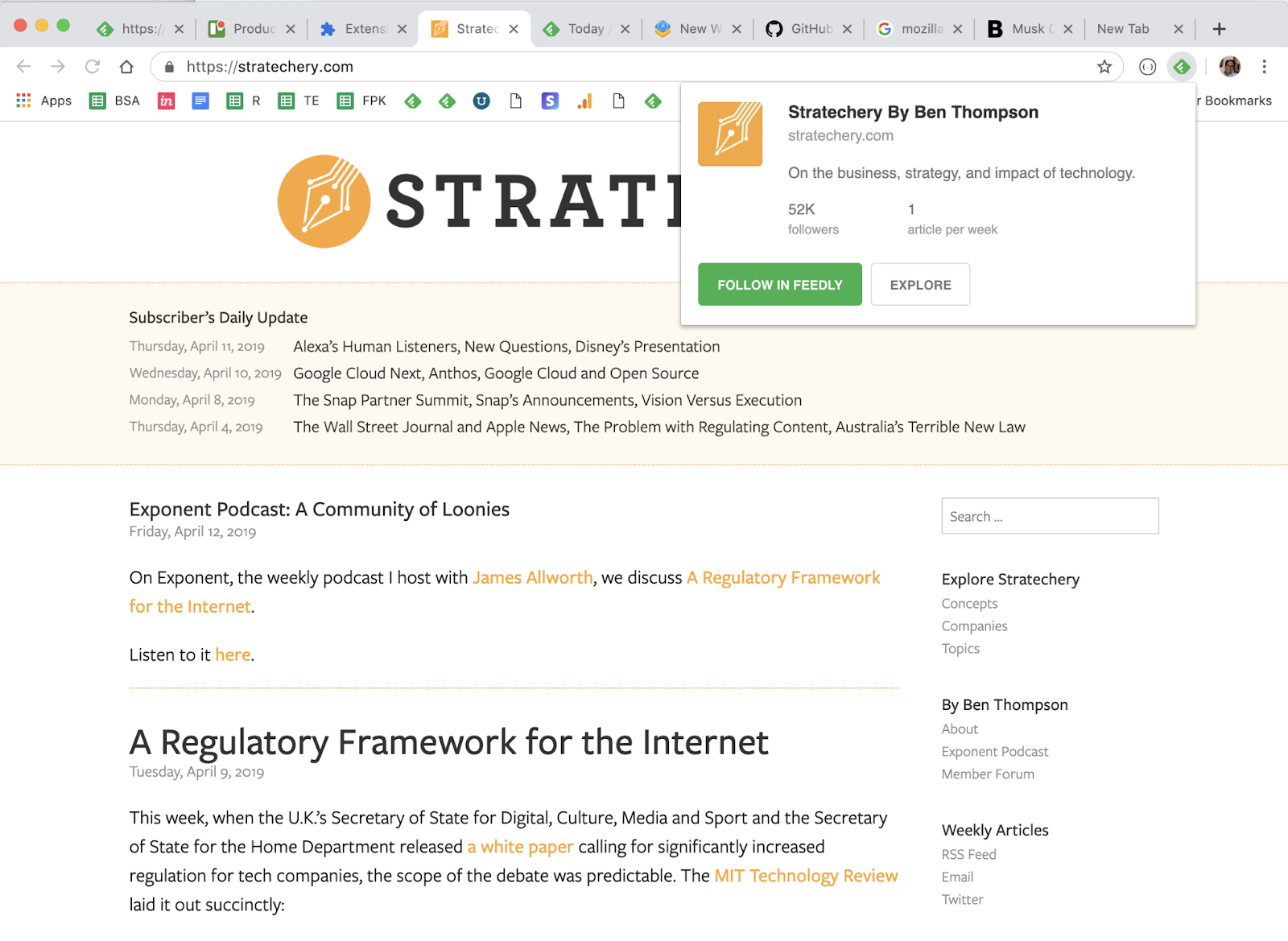
For starters, I highly recommend using the Feedly browser extension. It makes following sources quick & easy.
For the majority of sites the Feedly mini browser extension is all you need. Feedly Mini is a Chrome and Firefox extension. It automatically detects the RSS feed of the site/blog you are browsing and gives you the option to open it in Feedly, and add it to your feeds.
*Note that you can also save things to your Boards from anywhere with Feedly Mini. We’ll talk about those shortly.
Imagine that you are browsing the Web and you find a new source you want to follow in Feedly. When you click on the Feedly Mini icon, Feedly Mini will automatically discover the RSS feed for the page you are reading. It will show you a popup with information about that source. You can click on Follow in Feedly to preview the RSS in Feedly and add it to one of your feeds.
Sometimes you’ll run into a site that isn’t quite so “friendly” and the feed is hidden from the Feedly extension. This is where the RSS Subscription Extension comes in handy.
The RSS Subscription Extension auto-detects RSS feeds on the page you are reading and upon finding one will display an RSS icon in the Omnibox, allowing you to click on it to preview the feed content and subscribe. The extension comes with a few feed readers predefined (including Feedly) and it also allows you to add any web-based feed reader of your choice to the list.
If you ever find a site that neither of the extensions above can identify a feed or the site simply doesn’t have one, there are tools like Fetch RSS and others that let you generate a feed yourself that you can use to follow updates for that site.
Email Newsletters
The ability to subscribe to email newsletters and keep them out of my inbox is one of my favorite things to do with Feedly. This allows me to control when I want to read a newsletter and find it much easier than if it is in my inbox. Who doesn’t want to declutter their inbox, right?!?!
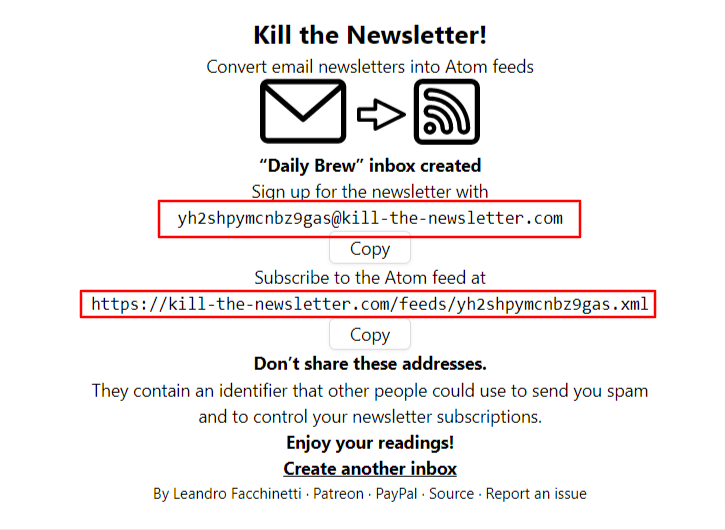
If you’re on the free version, don’t worry, you can still read your email newsletters in Feedly by using Kill the Newsletter. This site converts any email newsletter subscription into an RSS feed you can subscribe to in Feedly.
Instead of using your personal email address to subscribe to email newsletters, go to the Kill the Newsletter site and enter the name of the newsletter. This will generate a custom email to subscribe with along with the feed where all the newsletters will be sent.
Efficiency + Serendipity
This type of setup is very efficient. 90-something percent of the things I consume come through Feedly. But I also want to retain an element of serendipity. That is why I’ll occasionally dip into some of the “randomness” from places like Twitter and LinkedIn. Not everyone publishes to a blog or website and there are some super smart people who only share their knowledge via social media.
SIDE NOTE: Using Twitter Lists allows you to customize, organize and prioritize the Tweets you see in your timeline similar to how Feedly does that for everything else.
Discovering new stuff
I try to intentionally find content and avoid getting stuck in a ‘filter bubble’ by using some sites and tools to help me discover new things including:
Refind is a cool service that serves up 7 new links to you every day based on your interests. .
The Sample will pick a newsletter to deliver to you every day—sometimes related to your current interests, sometimes completely different. If you find one you like, it only takes one-click to subscribe. .
Deep Culture is a great weekly newsletter that gives you 20 interesting things in each issue.
Organizing & Prioritizing Your Feeds
Another great thing about Feedly is how it enables me to organize and prioritize all of my feeds. In essence I have organized all of my subscriptions in a way that prioritizes them into three categories:
A-List A small number of feeds that I want to see every day. These are my favorites and the best of the best.
B-List A larger number of feeds that I read if I have a bit of extra time. I probably get to these 2-3 times a week.
Everything Else These are the “nice to have” feeds. Maybe they are just for fun, or maybe there are a few random things to add that sense of serendipity I mentioned earlier. I read these whenever I get to them. Maybe on a weekend or sometimes never and that’s ok.
So now that you know how I keep up with things, the next step is keeping track of the good stuff so I can find it later. For the newsletter, I use a Feedly board to save the collection of things I’m considering each week.
Boards are like libraries of high-value content. When you find something that’s valuable, save it to a Board for future reference. You can create multiple boards to collect related items you want to save. Sort of like your browser bookmarks.
I also save things for other purposes like projects, workshops, research, conference sessions, etc using Bublup and Walling.App. There are tons of options for saving links, notes, etc. Way too many to cover here. I feel like I’ve tried almost all of them, so if you have any questions feel free to send them my way.
An important part of curating things for a newsletter or any other purpose is to provide some context about why it is important and how it relates to the people in your audience. For my newsletter, that happens as part of writing the content in a Google Doc that I’ll touch on in more in the section below.
For some people, this last step is the one that may be the hardest – myself included. Once upon a time, I had a thought in my head that went something like this: “I don’t know anything special…why would anyone want to see what I say/share?” And that is exactly NOT the point. The thing that changed the game for me was when I realized that the things I find valuable may also be valuable to others. So if you find something that helps you, share it so it might help others.
As long as you’re learning, you’ll always have valuable things to share no matter who you are.
Depending on what you want to share and who you want to share it with, sharing can literally happen with the click of a button. so time should not be an issue. With tools like Buffer and others, you can click a button to quickly queue up a post that includes the url and title from the site you want to share. It will often serve up an image you can include along with an opportunity for you to add a note on why you think it is valuable. Quick, easy – done! It doesn’t need to be anything more than that.
Some forms of sharing may require long-form options such as creating blog posts, videos, etc. This obviously takes more time and commitment than simply sharing links but it is also an opportunity to add more value and infuse more of your personal thoughts and knowledge.
There are too many options for sharing to list and new ones cropping up every day. I can tell you from experience that sharing what you learn is a valuable thing to do. It has given me opportunities that I could never have imagined were even possible.
Not only are you helping others when you share. You’re also helping yourself by building your visibility and the credibility of being a professional. Simply sharing one thing per week on LInkedIn can raise your visibility and potential opportunities. For example, people who share content on LinkedIn at least once a week are nearly 10 times more likely to be contacted for new opportunities than people who don’t share. (1)
Putting the Newsletter Together
Usually sometime on Wednesday or Thursday I’ll start pulling together the contents of the newsletter using the items I’ve saved to my Newsletter board in Feedly. There are almost always more than enough items so it is just a matter of selecting the best ones. The newsletter recipe I use is five articles, 3 podcasts and 5 new tools with a playlist of the music I’m listening to while I work.
Some people may wonder how the heck music got into a newsletter about learning, design and technology and it is an interesting story. As a reader of many newsletters, I’m always on the lookout for good ideas for mine and the “What I’m Listening To” idea comes from Tim Ferris’ “5-Bullet Friday” newsletter. I thought it was neat and tried it out…then not long after that I thought it was a bit silly and was going to take it out. Before I did, I took a peek at the statistics and was surprised to learn that the music list is consistently among the most clicked links in the newsletter. So the music lives on!
Anyway, I have a Google Doc template that I use to create posts for my website which runs on WordPress. For a long time, I used a plugin that would publish this Google Doc directly to WordPress as a new post. But that has stopped working and until I find a replacement, I just do a simple Copy/Paste into a new post.
During the week prior, I save the best things I find to my newsletter board in Feedly. Then when it is time to assemble the newsletter, all I have to do is browse the small number of candidates from the current week and pick the best. It usually takes me about 30 minutes to pull everything together into a post.
When I started sending out my newsletter back in 2015, I simply posted it to my WordPress website. Shortly after that I connected it up via RSS with a free Mailchimp account. This is easy to set up and automated once it is up and running. Mailchimp looks at my website every morning at 8am and if it finds any new posts, sends them out to my email subscribers.
Tips to Help You Get Started
If this sounds like something you’d like to try (I think everyone should!) here are a few helpful tips to give you a head start:
Signup for Feedly and follow your ‘must see’ sources. This could be your favorite authors, top experts in your field, a professional/industry organization, or anything else that always want to see. You don’t need a lot. Think quality over quantity. Even just five really good ones is a nice start.
Curate the curators If you want a bigger bang for the buck, follow really good curators. They’re already covering a lot of ground, which means you’re also covering a lot.
Strive for 25 If you can smartly select 25 good sources on any topic, you’ll be far ahead of most people with similar interests.
Use browser extensions and mobile apps Looking for ways to be ruthlessly efficient and tapping into your windows of opportunity (like waiting in line, riding the bus, etc.) can have a big impact.
Block time on your calendar Make it a habit. Trust me. Even if you can only spare 10 minutes a day, it is an investment that you’ll reap great returns on.
Share what you learn When you find something helpful, pass it along to your network with a note about how it helped. You’ll be surprise how valuable this can be.
Whether you’re just starting to think about your own process or looking to improve what you’re already doing, I’m happy to help in any way I can. Please feel free to send me any questions or comments you have.
Whew! That was a lot more than I thought it would be when I started it. Thanks for sticking with me all the way to the end.
What do you think? Do you do any of this? Do you have any better ideas or things that work better for you? What tips can you share? What questions do you have?
It is time once again for Jane Hart’s annual top tools for learning survey. And since I’ve been adding my contributions from the beginning (over a decade ago) I’ve got to keep my streak alive. Here are my top learning tools for 2020.
Here are my personal top 10 learning tools for this year.
1. Feedly
Feedly is the foundation of my personal approach to knowledge management and helps me efficiently keep up with all the things I’m interested in.
Twitter is another important tool for finding, connecting, and learning along with other smart generous professionals. For me, it continues to be one of the best ways to connect with great people for conversations on relevant, professional topics.
Given the current state of the world, there isn’t any way I could leave Zoom off of this year’s list. I doubt this needs much explanation as we’ve all likely spent a fair amount of time in Zoom sessions this year.
PowerPoint is another tried and tested tool for me. Beyond slide decks and presentations, I use it for graphics, print projects, videos and more. Microsoft has been adding tons of great updates and it just keeps getting better and better.
We live in a visual world and when you need graphic design, Canva is the place to start. There are a lot of options for design tools out there but none that can top Canva for its combination of usability, breadth of content types, and great looking designs.
This connected collection of tools makes it super easy to keep in touch and collaborate. By using some really useful add-ins (like Google Docs for WordPress) you can expand what you can do even further.
Zapier is an online automation tool that connects your apps and services. You can connect two or more apps to automate repetitive tasks without coding or relying on developers to build the integration. I use Zapier to do time-saving things like connecting user registration info from an online form to automatically enroll people in a webinar and/or related MailChimp learning campaigns.
Email marketing tools are a great way to create automated data-driven campaigns to support learning and performance efforts. (Side Note: There is a great-looking new campaign tool built specifically for L&D called Sparks that I’m excited about.)
Bublup is a recent discovery that lets you save a whole host of things in a place that is easy to navigate at a glance with pictures and titles. Keep links in the same folders as PDFs, photos, videos, GIFs, notes, and other files. It all looks good together, it’s easy to share and collaborate with others and more. You can see one of my pages from Bublup here.
I’m a big fan of learning campaigns and have done a number of them with marketing email tools like MailChimp and MailerLite. Sparks is a tool made specifically for use in learning contexts that has a lot of great things going for it.
I curate a lot of things and have tried tons of tools looking for an efficient process. If you ever have any interest in curating a newsletter, you should definitely consider Revue. I’ve just launched a new daily-ish “L&D Toolbox” newsletter experiment sharing new apps and tools for L&D pros. There are lots of benefits to writing a newsletter and Revue handles everything beautifully.
The spacing effect is one of the oldest and best-documented phenomena in the history of learning and memory research. Research has repeatedly shown that using these techniques can increase the retention of new knowledge and skills. By basing your own learning designs off of these principles you can increase what your audience will remember.
The spacing effect is one of the oldest and best-documented phenomena in the history of learning and memory research.
However, the time and effort involved with managing the delivery of the repetitions can be a major challenge. In this post, we’ll explore tools and techniques that can help you craft campaigns that enable you to tap into the benefits of spaced learning in a way that is easy, efficient, and effective.
Related Links & Resources
Will Thalheimer
For anyone who wants to learn about spaced learning, Will Thalheimer is *THE* place to start.
Here are a few of his resources to get you started:
Brain Science: Enable Your Brain to Remember Almost Anything by Art Kohn
Repeat Rule of Thumb:
2 days – “recognition boosters.”
2 weeks – generative boosters.”
2 months – “integrative boosters.”
Five Second Rule: “boosters do not need to re-teach the material. Indeed, you have already taught it once and the learner does not need to encode the information a second time. Instead, the secret to effective boostering is simply to provide a retrieval opportunity that signals the brain that the information is important and should be retained.”
Give ordinary people the right tools, and they will design and build the most extraordinary things. -Neil Gershenfeld
In the course of reading and curating my weekly newsletter, I discover lots of new tools and apps. Last week I shared my top 3 favorite tools from 2019. While those three stand out heads and shoulders above the crowd for me, there were many more you might also want to check out.
Here are 100 more that you’d already have if you subscribed to my weekly newsletter. If you’d like a regular and more digestible serving of these you can subscribe for free here.
What about you? Have you found any good ones? Leave a comment and share your favorites!
For many, this is a time to pause and take a look back at the past year. You might already know that I’m a big fan of working smarter over working harder. One of the ways I approach this type of mindset is keeping a constant lookout for new ways of working and new tools to work with. As I look back over the numerous finds I made during 2019, there are a few that stand out from the crowd. Here are three of my favorite new discoveries from this year that have earned a place in my tool kit.
BrightSlide
Most of us work in PowerPoint at some time or another. All of us can benefit from the time and sanity-saving improvements that BrightSlide has to offer. Created for PC users by Jamie Garroch and Taavi Drell of BrightCarbon, this free add-in will help you create, polish, and edit presentations faster and more efficiently than ever before.
There are too many features to cover them all but my favorite is the visual typography adjustment capability. If you do nothing else, go grab this now. You’ll be glad you did.
I’ve tried a boatload of “easy” app creation tools and none of them can hold a candle to Glide. You can literally be up and running with a professional grade app in minutes. I’ve seen so many cool ways to use this including performance support, portfolio and professional online presence, sports team management and more. You’re only limit is your creativity.
This one is a recent discovery that I’m super excited about. Sparks takes a page out of the marketing playbook and automates data-driven learning campaigns to help maximise the impact of your L&D activities and provide powerful performance support.












You must be logged in to post a comment.