Category: learning

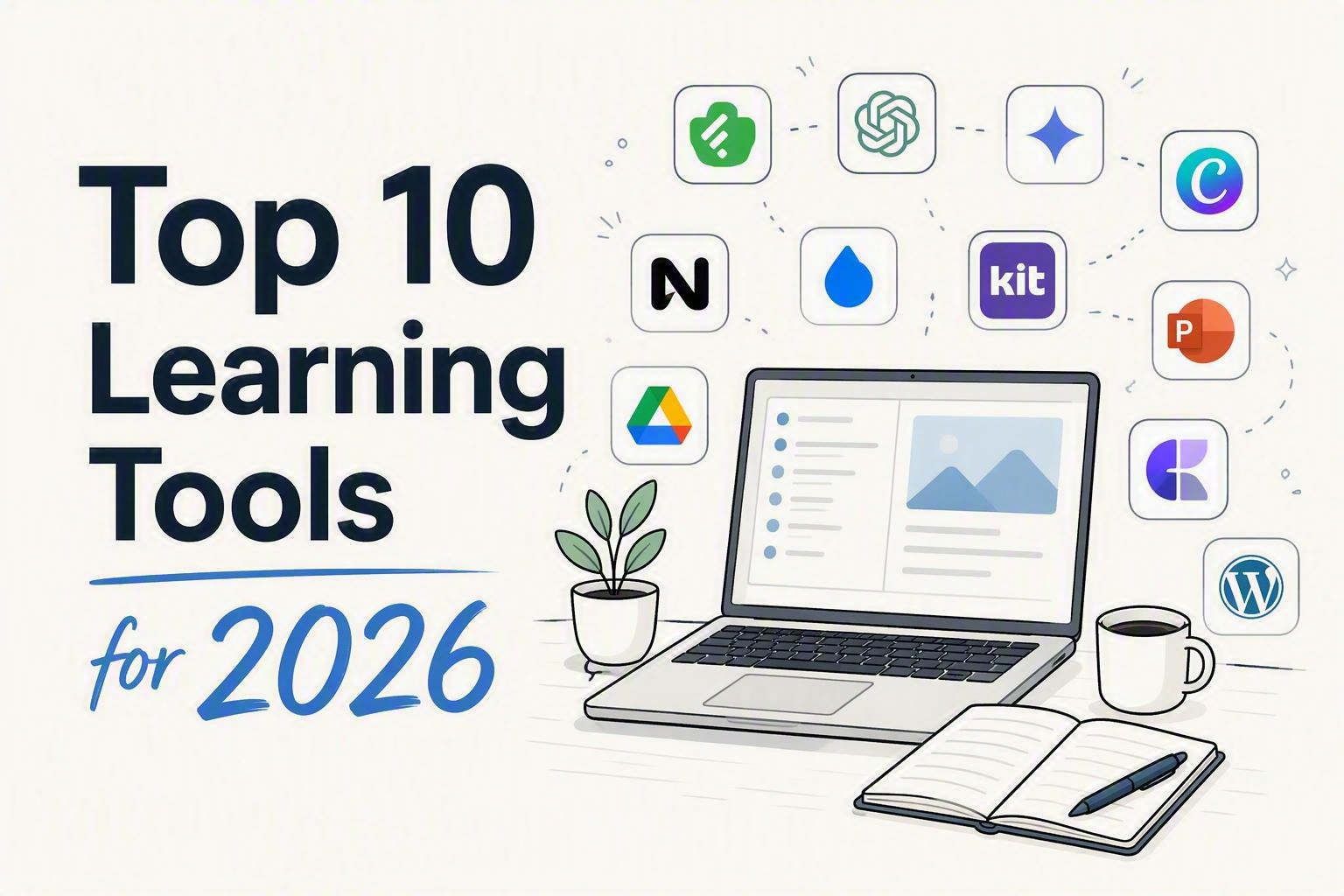
  • My Top 10 Learning Tools for 2026

    My Top 10 Learning Tools for 2026

    It’s survey time again.

    Every year, Jane Hart asks people around the world to share the tools they use to learn. I always enjoy seeing the results. The tools change, but what interests me most is how people fit them together.

    Here is my list for 2026.

    These are not the newest or flashiest tools. They are the ones that keep earning a place in my workflow. They help me discover ideas, organize what I find, think more clearly, create useful things, collaborate with other people, and share the finished work.

    Looking at the list, I realized I had not chosen ten isolated apps. I had chosen a system:

    Discover. Organize. Think. Create. Collaborate. Share.

    The tools are not ranked. Asking whether Feedly is better than PowerPoint is like asking whether a hammer is better than a refrigerator. The answer depends on what you are trying to do.

    One more thing: none of these tools replaces sound judgment or a strong idea. I will spare you that disclaimer ten more times.

    Here are my top learning tools for 2026.

    1. Feedly

    Feedly helps me build my own information stream instead of letting an algorithm build it for me.

    I follow sources across learning, design, technology, marketing, behavioral science, cybersecurity, and several other rabbit holes. Feedly brings them into one place where I can scan broadly without spending all day bouncing between sites.

    I am not trying to read everything. That way lies madness and several thousand unread articles.

    I am looking for patterns and unexpected connections. A marketing article might spark a better plan for promoting a learning program. Research on attention might change the opening of a workshop. A visual-design example might offer a clearer way to explain a complex idea.

    Some of my best L&D ideas start outside L&D. Feedly makes those useful collisions more likely.

    2. Claude, ChatGPT, Gemini, and Microsoft Copilot

    Yes, I am grouping the major AI assistants together. No, that is not cheating.

    There is no single “best” AI assistant for every job. Their strengths keep changing, so I choose based on the task, where the source material lives, how much context is needed, and what I plan to do with the result.

    I might use one to challenge a workshop outline, generate alternatives for a headline, turn a transcript into reusable content, or find gaps in an early draft. Copilot is especially useful when my work already lives inside Microsoft 365.

    I think of these tools as thought partners, not answer machines.

    They are most helpful when I bring them a real problem, useful context, and clear standards. A vague prompt can still produce polished prose, but polished is not the same as useful.

    AI helps me reach a stronger first draft faster. The expertise, judgment, and final decisions are still mine.

    3. NotebookLM

    General AI assistants help me think beyond the source material. NotebookLM helps me stay grounded inside it.

    That makes it especially valuable when I am working with a defined collection of articles, notes, transcripts, slides, or research. I can explore themes across those sources, identify gaps, generate a first pass at questions, or examine how the material might be organized.

    One of my favorite uses is preparing for workshops and live events. I can load the relevant materials, generate possible questions, and then refine the best ones for a poll or discussion.

    It is also useful during presentation planning. I do not need NotebookLM to design the final slides. I need it to help stress-test the story before I spend hours building them.

    Is the sequence clear? Am I burying the useful part? What have I overlooked?

    NotebookLM earns its place by helping me answer those questions while staying connected to the original sources.

    4. Canva

    Canva is my graphics superpower.

    I use it for social posts, workshop assets, banners, promotional graphics, handouts, and the dozens of smaller pieces that surround a learning experience.

    Those pieces matter. A course or workshop does not exist in isolation. People encounter an invitation, a title, a reminder, a community post, or a follow-up resource before and after the event itself.

    Together, those touchpoints shape how the experience feels.

    Canva helps me create that supporting material quickly and keep it visually consistent. It is especially useful when a good idea needs to become several related assets instead of one lonely graphic.

    My favorite rule still applies: bad thinking with nicer graphics is still bad thinking.

    When the idea is solid, though, Canva helps it look clear, connected, and worth someone’s attention.

    5. Raindrop.io

    I have lost enough good articles inside folders called “Read Later” to know that saving and curating are not the same thing.

    Raindrop.io is where I organize articles, research, examples, visual inspiration, tools, and resources I may want for a newsletter, workshop, class, or presentation.

    Its real value appears later.

    When I need an example of a strong course title, research on attention, or a visual that explains an idea well, I can find it without reconstructing six months of browsing history.

    That ability to retrieve matters more than the size of the collection.

    A giant pile of bookmarks is not a personal knowledge system. It is a digital attic. Raindrop gives the collection enough structure to make it useful when a real project arrives.

    6. Kit

    Kit is the engine behind my Friday Finds newsletter.

    It handles the machinery around subscriptions, publishing, and email delivery so I can focus on finding useful ideas and writing something readers can use.

    The platform also reinforces a lesson L&D should borrow from marketing: creating good content is not enough. People still need to notice it, understand why it matters, and know what to do next.

    That applies to newsletters, courses, workshops, job aids, and nearly everything else we make.

    Kit helps me think beyond a single issue. It supports an ongoing relationship with readers. What do they find useful? What earns a click? What makes them come back next Friday?

    Distribution is not an administrative step added after the “real” work. It is part of helping the work reach people.

    7. PowerPoint

    Yes, PowerPoint is still on the list. And no, I am not apologizing for it.

    PowerPoint remains one of the most flexible creative tools available to learning professionals. I use it for presentations, visual explanations, workshop activities, prototypes, storyboards, job aids, and documents designed to be read rather than projected.

    The blank slide can be a stage, a canvas, or a lightweight design environment. It gives me the control to turn an abstract idea into something people can see and understand.

    AI slide tools have improved. They can help with outlines, initial structures, and the uncomfortable period before anything exists. But when the final product needs to be editable, precise, accessible, and genuinely mine, I still return to PowerPoint.

    Old tools are sometimes still around because they work.

    8. Craft

    A presentation is built for the moment. A good handout is built for what happens next.

    I use Craft to create digital notes and resources for workshops, classes, and presentations. These pages bring together the key ideas, links, examples, references, and next steps in a format people can use after the session ends.

    That is important because slides and handouts perform different jobs.

    Slides help me guide attention and tell the story in the room. They may rely on narration, timing, and context that disappear once the session is over. A handout needs to stand on its own.

    Craft gives me a clean way to build that second experience. Participants do not receive a slide deck stripped of its presenter. They receive a useful resource designed for review and action.

    The workshop may end at 3:00. The learning should not.

    9. WordPress

    WordPress powers my home base online and the website for my book “Think Like a Marketer, Train Like an L&D Pro”.

    Social platforms are useful, but they are rented space. Algorithms change. Formats change. Reach changes. A website gives me a place I control for articles, workshop resources, downloads, and the growing collection of ideas I have shared over the years.

    It also connects the different parts of my work: speaking, workshops, Friday Finds, my book, and the broader intersection of learning, design, and technology.

    A social post may disappear from view in a few days. A useful article on my site remains searchable and available when someone needs it months or years later.

    WordPress is not always elegant behind the scenes. There is usually a plug-in asking for attention or a setting hidden inside an elaborate scavenger hunt.

    Still, it gives me flexibility, ownership, and a durable home for my work. That keeps it on the list.

    10. Google Workspace + Microsoft 365

    Not every valuable tool needs to be exciting.

    Google Drive, Docs, Sheets, and Slides, along with OneDrive, Word, Excel, Teams, and the rest of Microsoft 365, are where much of my everyday work gets done.

    Workshop outlines take shape there. Drafts collect comments. Campaign assets get tracked. Project plans become more concrete. Collaborators add ideas, flag problems, and occasionally create four competing rewrites of the same sentence.

    These tools provide the shared workbench for a project.

    The choice between the Google and Microsoft ecosystems usually comes down to where the work already lives, what the organization supports, and what collaborators can access. I use both because real projects rarely respect software loyalties.

    Most importantly, they save us from emailing files named something like Final_v6_REALLY_FINAL_UseThisOne.docx.

    Yes, PowerPoint technically appears twice. Microsoft 365 is here for everyday work and collaboration. PowerPoint gets its own spot because, for me, it is also a distinct creative tool.

    Honorable Mention: Zapier

    Zapier helps with the repetitive work between tools. If information needs to move from one place to another, a routine action needs to trigger, or I am repeating the same mechanical task, automation may be able to give me some time back.

    I do not want to automate everything. I want to automate the copying, pasting, transferring, and reminding that keeps me from doing more valuable work.

    A bad process running faster is still a bad process. A useful process that no longer needs babysitting is a win.

    The Real Tool Is the Workflow

    The most useful part of this list is not any one app. It is how the pieces fit together.

    Feedly helps me discover ideas. Raindrop helps me keep and retrieve them. NotebookLM and the AI assistants help me explore, test, and develop them.

    Google Workspace and Microsoft 365 provide the shared space where ideas become projects. PowerPoint and Canva help make those ideas visible. Craft turns the live experience into a resource people can revisit.

    WordPress and Kit help the finished work reach an audience.

    That is the bigger lesson for L&D.

    A pile of apps is not a learning ecosystem. A connected workflow is.

    Start with the problem. Decide what good looks like. Then choose the smallest set of tools that can help you get there.

    No tool can rescue a weak idea. The right tool can help a strong one travel much farther.

    Which tools would you genuinely miss if they disappeared tomorrow? Those are probably your real top learning tools.

  • The LinkedIn Feature Nobody Tells You About: How to Build a Feed of Only the People Worth Your Attention

    The LinkedIn Feature Nobody Tells You About: How to Build a Feed of Only the People Worth Your Attention

    You open LinkedIn, looking for one person’s take on one topic. Twenty minutes later, you’ve read four unrelated hot takes, a humble-brag about a promotion, and an AI-generated poem about “leadership.” The person you actually wanted to hear from? Buried three scrolls back, if you find them at all.

    That’s not an accident. It’s not even really a feed — it’s a guess, made fresh every time you open the app, about what will keep you scrolling the longest. Sometimes that guess overlaps with what you actually wanted to read. Often it doesn’t.

    Here’s the fix, and it’s been sitting inside LinkedIn’s search bar the whole time.

    What we’re actually building

    A feed made of only the people you chose — bookmarked, one click away, refreshed every time you open it. It’s not an official LinkedIn feature; there’s no button that says “Save My Custom Feed.” What you’re doing is building a very specific search, then bookmarking the URL it produces. LinkedIn doesn’t advertise this, but it works, and once it’s set up, it feels like cheating.

    The real reason this is worth five minutes

    Your feed is optimized to grab the fast, reactive part of your brain — the part that reacts to a bold claim or a hot take before you’ve decided whether it’s worth your time. That’s useful for the platform. It’s not useful for you.

    A curated feed flips who’s in charge of that decision. Instead of your attention getting grabbed post by post, you decide up front, once, whose thinking is worth more of your time. Then the feed just… does that. Every time. That’s a small decision that keeps paying off — less noise, more signal, and twenty minutes back that used to disappear into the scroll.

    How to build it

    You’ll need two things: a list of names and about five minutes.

    Step 1: Open a search.
    Click into the LinkedIn search bar at the top of the page and hit enter without typing anything — or type a + and hit enter. Either tells LinkedIn: don’t filter by keyword, just give me a raw search I can build on.

    Step 2: Filter to Posts.
    You’ll land on a results page with tabs across the top — People, Jobs, Companies, and so on. Click Posts. Without this, you’ll get a mix of profiles and posts, and the feed you’re building needs to be posts only.

    Step 3: Change the sort to Latest.
    By default, LinkedIn sorts by “Top Match” — the algorithm making judgment calls again. Switch it to Latest so you’re seeing things in the order they were posted, not the order LinkedIn thinks you’ll like.

    Step 4: Add your people.
    Open All Filters and look for From Member (sometimes labeled “Posted by”). Start typing a name and select the right match — LinkedIn will often show several people with the same name, so check the photo or headline before you click. Repeat for everyone you want in the feed. There’s no cap most people will ever hit.

    Step 5: Bookmark the result.
    Once your filters are set, you’ll see your custom feed. Bookmark that exact URL. That bookmark is now a live, standing search — click it any time, and LinkedIn re-runs it fresh, pulling in new posts from your list automatically.

    That’s it. Five minutes, and LinkedIn is now working for you instead of the other way around.

    What to know before you rely on it

    A workaround has edges. This one lives in a bookmarked URL, not an account setting, so two things follow. First: it can break if LinkedIn changes how its search URLs are structured, which platforms do periodically — you’ll know because the bookmark dumps you on an error page or a blank results screen instead of quietly failing. Don’t panic, just rebuild the search; same five minutes it took the first time. Second: adding someone new means updating that URL yourself — right-click the bookmark, choose Edit, paste in the refreshed link, or just rebuild the whole filter from scratch once your list has grown enough to be worth it.

    Make it work harder

    Build more than one of these. A feed of five industry voices you trust. A separate one for people talking specifically about your niche topic. A third for competitors or peers you want to keep half an eye on — each is its own bookmark, and none of them cost you more than the five minutes it took to build the first.

    You can also pair a feed with a keyword instead of the blank search: start with a topic — “instructional design,” in quotes for an exact match — then layer the From Member filters on top. Now you’re seeing only your chosen people, talking about only the topic you actually care about.

    Check it on a schedule, not a compulsion. The whole point here is breaking the scroll habit, not building it a new home. Once a day, on purpose, beats the general feed on autopilot.

    The bigger point

    This is a small hack standing in for a bigger habit: deciding, on purpose, what gets your attention instead of letting a feed decide for you. LinkedIn happens to be where this particular trick lives right now. The instinct behind it — curate before you consume — is the same one worth applying everywhere your attention is for sale. Twenty minutes back, every time you open the app, adds up faster than you’d think.

  • Stop Calling It Mandatory Training

    Stop Calling It Mandatory Training

    An email lands in your inbox with the subject line Mandatory Annual Compliance Training—Complete by Friday.

    Before you open it, you already know the plot: a slow march through policy slides, a quiz designed to prove you were technically present, and perhaps a cheerful stock photo of coworkers pointing at a laptop.

    The course may surprise you. But the label may already be working against it.

    “Mandatory” tells people why the organization needs the training completed. It does not tell them why the training matters, what problem it will help solve, or what they will be able to do afterward.

    That is an administrative fact, not a value proposition. And yet we keep putting it in the headline.

    The Requirement Is Fixed. The Framing Is Not.

    People do not approach training as blank slates. They make fast judgments before the first screen loads. Will this be useful or irrelevant? Worth my attention or safe to skim?

    The word mandatory makes that judgment easier. It places the training in the same mental bucket as expense reports, password resets, and forms that need three signatures. It answers the organization’s question—Do you have to do this?—while ignoring the learner’s question: What will this help me do, avoid, or understand?

    A mandate may secure participation. It does not guarantee the motivation needed to learn or apply anything.

    That is why required learning still needs positioning. Marketers rarely lead with the least appealing part of an offer. A gym does not advertise, “Pay us to sweat before work.” A financial planner does not promise, “Several forms and an uncomfortable discussion about death.” They lead with the outcome: more energy, less stress, a safer future.

    Learning teams should do the same. You do not need to hide the requirement. You simply need to demote it. Lead with the reason to care, then include the deadline and completion rules as supporting details.

    Change the Frame

    Compare these announcements:

    Before: Complete Cybersecurity Training
    After: Protect Your Team From the Attacks Employees See Most Often

    Before: Annual Code of Conduct Training
    After: Know What to Do When the Right Choice Is Not Obvious

    Before: Required Manager Training
    After: Handle Difficult Performance Conversations Without Making Them Worse

    Before: Mandatory Data Privacy Course
    After: Avoid the Small Data Mistakes That Create Big Problems

    Nothing about the requirement changed. The stronger versions simply make a more useful promise.

    They give people something concrete to care about: a threat, a decision, a mistake, or an action they will be better prepared to take. The message shifts from “the company wants this” to “this could help me.”

    Of course, the promise must also be true. Do not advertise the “most common attacks” if the course never identifies them. Positioning is not decoration. It is a clear and honest connection between what people need and what the learning experience delivers.

    Four Better Ways In

    When you write your next training announcement, try entering through one of these four doors. They overlap, and that is fine. Choose the one that offers the strongest truthful reason to care.

    Relevance: Where will people use this?
    Spot the phishing tactics appearing in employee inboxes.

    Risk: What costly mistake can they avoid?
    Learn the warning signs that can prevent one rushed click from exposing customer data.

    Benefit: What becomes easier, safer, or less painful?
    Prepare for performance conversations that are clearer and fairer for everyone.

    Action: What will people be able to do?
    Submit expenses correctly the first time and avoid delays or rejected reports.

    Notice that none of these promises fun. They promise usefulness, which is a much better bargain.

    Positioning cannot turn a bad course into a good one. Clever copy attached to a bloated click-through course is not marketing; it is camouflage. But poor positioning can make genuinely useful training feel worthless before it begins.

    The Five-Second Test

    Before you publish your next announcement, remove the words mandatory, required, compliance, and complete. Then read what remains.

    Can someone tell why the training matters? Can they picture a situation where it might help? Is there a clear risk, benefit, or useful action?

    Most importantly, would the message have any pull if nobody were tracking completion?

    If not, you have written an instruction rather than a reason to pay attention. You may still get a green completion dashboard, but do not confuse that with learning.

    Try This This Week

    Find one announcement that begins with Required, Mandatory, or Complete. Rewrite its headline around relevance, risk, benefit, or action.

    Keep the requirement in the message. Just stop asking it to do the work of the value proposition.

    The course may have to be mandatory. The boredom does not.

    Go Deeper

    The Evidence on Mandatory Training Is Thinner Than You Think
    This government review examines whether required workplace training in areas such as cybersecurity, privacy, ethics, and harassment actually changes performance.

    Why “You Must” Can Make People Push Back
    Explore the research on psychological reactance and why controlling language can create resistance to a message.

    A Better Way to Communicate Requirements
    See how meaningful explanations and autonomy-supportive language can preserve motivation even when a request is not optional.


    Want to Train Like a Marketer?
    If this kind of thinking hits home, you’ll probably enjoy our book Think Like a Marketer, Train Like an L&D. It’s packed with practical, real-world ideas to help you make your learning clearer, sharper, and a whole lot more effective.

  • The Art & Science of eLearning

    The Art & Science of eLearning

    I recently presented at the iSpring 2026 online conference. The session was called The Art & Science of eLearning, and the core idea was pretty simple:

    Anyone can do eLearning.
    Not just anyone can do it well.

    Here’s a quick rundown of what we covered.

    Anyone Can Build It. That’s the Problem.

    The tools have never been more accessible. But accessible isn’t the same as effective. Good eLearning sits at the intersection of a lot of disciplines — instructional design, neuroscience, graphic design, storytelling, and marketing. When you hand powerful tools to people without the right foundation, the results are usually… not great.

    Key 1: The Right Thing

    Before you build anything, ask yourself: is this actually a training problem?

    Most of the time, it isn’t. Look at the real performance factors, and you’ll usually find the culprits are unclear expectations, missing tools, bad incentives, or broken processes. Carl Binder’s Six Boxes Model makes this visual. Only one box points directly to training: skills and knowledge.

    Ron Zemke had a great line about this — management demanding a course right now isn’t a valid excuse for lousy training. Push back. Do the analysis. Mager and Pipe’s Analyzing Performance Problems is still one of the best tools for this work, and it holds up.

    Key 2: The Right Way

    This is where most eLearning falls apart. The most common mistake? Too much information, not enough time to actually process it. Dr. John Medina called it force feeding with very little digestion in Brain Rules.

    The problem is working memory. It’s a tiny bottleneck between what your learner sees and what actually sticks. Cram too much through that bottleneck and you’ve lost them.

    A few principles that help: reduce cognitive load, lead with curiosity before content, and remember — telling ain’t training. If your course is just a series of narrated bullet points on a screen, it’s a document. Not learning.

    Key 3: The Right Visuals

    This one gets underestimated. Design isn’t decoration — it’s function. Research shows 94% of first impressions are tied to visual design. And those first impressions impact the perception of your course’s credibility, trust and even usability. Also, pictures beat text for recall..

    You don’t need to be a designer. You do need to understand a few principles: coherence, redundancy, and modality. Connie Malamed’s Visual Design Solutions is a great place to start.

    Where It All Comes Together

    The session closed with a three-circle Venn diagram. Right Stuff. Right Way. Right Visuals. Where all three overlap? That’s where the amazing eLearning lives.

    Most courses nail one or two. Getting all three is the goal — and it’s absolutely doable.

    Grab the Slides and Resources

    I built a landing page with the downloadable slides and links to every book and resource mentioned in the session.

    Check it out here: art-science-elearning.lovable.app

  • Getting it wrong is the whole point

    Getting it wrong is the whole point

    Before you read another word:

    During a typical 20-minute video lecture, what percentage of learners are actively mind-wandering at any given moment?

    Take a guess.


    Research consistently finds that a third to more than half of learners are mind-wandering during a video lecture — and the rate climbs as the session goes on.

    You’ll remember that number better because you tried to retrieve it first.

    That tension you felt? That tiny flicker of uncertainty?

    That’s the mechanism.

    And if your courses don’t create that feeling on purpose, you’re designing for comfort — not retention.


    The uncomfortable truth for L&D

    Most training starts like this:

    • Objectives.
    • Agenda.
    • Definitions.
    • “Here’s what you need to know.”

    Translation: cognitive sedative.

    If your course begins with a content dump, you’re actively suppressing attention. If your SME says, “They need the information first,” that’s not rigor. That’s risk avoidance.

    Brains don’t wake up for information.

    They wake up for problems.


    The Pretesting Effect (and why failure works)

    Here’s the counterintuitive finding:

    Students who attempt to answer questions before studying consistently outperform students who spend that same time just reading.

    Not students who guess correctly.

    Students who guess wrong.

    In a landmark 2009 study, Richland, Kornell, and Kao had participants answer questions about a passage before reading it. Most got nearly everything wrong. After reading, the pretest group dramatically outperformed the group that had simply studied longer — even when researchers analyzed only the questions participants got wrong on the pretest.

    Let that sink in.

    Protecting learners from wrong answers might be exactly backwards.


    Quick prediction

    Why do you think guessing wrong helps?

    A) It increases effort
    B) It activates prior knowledge
    C) It boosts confidence
    D) It reduces anxiety

    Here’s what’s actually happening.


    What’s happening in the brain

    When someone guesses incorrectly, three things fire before they ever see the right answer.

    1. Activation.
    The wrong guess lights up related concepts already stored in memory. Those become hooks. When the correct answer arrives, it has something to attach to.

    2. Prediction error.
    The mismatch between guess and reality registers as “this matters.” The brain treats it as a learning signal stronger than passively reading a fact.

    3. Attention stabilization.
    Pan, Sana, Schmitt, and Bjork (2020) measured attention during online lectures. Learners who took pretests beforehand wandered significantly less. They weren’t passively watching. They were hunting.

    The wrong answer primes the brain.
    The right answer completes the circuit.


    And here’s the business implication

    Mind-wandering isn’t just a learning problem.

    It’s a performance cost.

    If half your workforce is zoning out during compliance, onboarding, or product training:

    • Ramp-up slows.
    • Errors rise.
    • Rework increases.
    • Stakeholder trust erodes.

    Attention is the most expensive resource in your organization.

    And most training spends it carelessly.


    Two design myths to retire immediately

    Myth 1: Learners are blank slates.
    They’re not. They arrive with fragments, assumptions, half-formed models. Pretesting activates them.

    Myth 2: Wrong answers waste time.
    They don’t. They create the conditions for durable learning.

    Let me push this further:

    If your opening slide is a learning objective instead of a question most learners will miss, you’ve already lost the brain.


    Try this before your next module goes live

    Pick the single most important concept in your course — the one that actually drives behavior change.

    Now ask yourself:

    If they had to answer a question about this right now, would most of them get it wrong?

    If the answer is “no,” your content probably isn’t specific enough to matter.

    Write one question most learners won’t answer correctly.

    Not a trick.
    Not unfair.
    Just specific enough to require a real attempt.

    Put it:

    • In the intro email
    • On the first slide
    • At the top of the pre-work
    • Anywhere learners first encounter the experience

    Tell them there’s no penalty.

    Then deliver a clear, satisfying answer.

    One rule: don’t skip the reveal.

    The question opens the loop.
    The content must close it.


    Want to amplify it?

    Use tools like Mentimeter or a simple Google Form to collect guesses and display the group distribution before revealing the answer.

    Now you’ve layered in social curiosity:

    • “Was I the only one who thought that?”
    • “Why did most people choose B?”

    That tension compounds attention.


    Final challenge

    Before you scroll, answer this:

    In your last course, did learners encounter a meaningful question they were likely to miss before they saw the content?

    If not, you’re choosing clarity over impact.

    And impact is what your stakeholders actually pay for.


    Want to go deeper?

    The foundational study
    Richland, Kornell, and Kao (2009). The research that launched modern pretesting work. Start here if you need to persuade a skeptic.

    → Read the original pretesting research

    Plain-English science
    Faria Sana breaks down the mind-wandering findings without jargon.

    → Read the researcher’s explainer

    Pretesting vs. retrieval practice
    A practical comparison of when to place questions before vs. after study.

    → Read the practical comparison

  • Less Noise, More Signal: My Most Popular Posts of the 2025

    They all argue for doing less

    I took a quick peek at the past year of activity here—not to overanalyze it, just to see what people actually spent time with. What shook out was a short list of posts that consistently rose to the top. I thought I’d share those most-viewed pieces, along with a few observations about why these resonated and what they might say about where learning design is headed right now.

    The posts that people read, saved, and shared the most all made the same quiet argument:

    Stop adding. Start subtracting.

    Less content.
    Less clutter.
    Fewer distractions.
    More respect for how people actually think, notice, and learn.

    That’s not the advice most of us expect—or want—to hear. But judging by what people actually engaged with, it’s the advice they’ve been looking for.

    Here are my five most popular posts of the year—and what I think they reveal.


    1. Stop Overloading Your Learners’ Brains

    A practical guide to minimizing extraneous cognitive load

    This one struck a nerve because it names something many learning experiences quietly suffer from: helpfulness overload.

    Too many explanations.
    Too many callouts.
    Too many “just in case” details added to protect ourselves from questions later.

    Most learning doesn’t fail because it’s too hard. It fails because it’s cluttered.

    What surprised me wasn’t agreement. It was how often people said, “I know this… but I needed permission to act on it.”

    Bottom line: If it doesn’t help the learner understand the point right now, it’s not support. It’s noise.


    2. Why Harder Is Better

    The surprising science of desirable difficulties

    This post pushes back on a deeply ingrained instinct: that good learning should feel smooth, easy, and immediately satisfying.

    The research says otherwise.

    The right kind of struggle—designed on purpose—helps learning stick. Discomfort isn’t a design flaw. It’s often a signal that something durable is happening.

    For L&D teams under pressure to make everything fast and frictionless, this idea is both freeing and uncomfortable.

    Bottom line: If learning feels too easy, it may be disappearing in real time.


    3. The Six Things Our Primal Brains Pay Attention To

    A guide for L&D pros

    This is the oldest post on the list—and still one of the most read.

    Why? Because it says the quiet part out loud.

    Learners don’t show up as calm, rational brains ready for instruction. They arrive as humans with attention systems tuned for survival, novelty, and social cues—not slide decks.

    When learning designers start with attention instead of content, everything changes. Structure improves. Examples land better. Pacing tightens. Tone shifts.

    Bottom line: Design for the animal, not the org chart.


    4. The L&D Detective

    Solving performance mysteries with Mager’s Flowchart

    This one is a sleeper hit.

    No trends. No hype. Just a reminder that before we design training, we should confirm there’s actually a learning problem to solve.

    Sometimes the issue isn’t knowledge. It’s unclear expectations. Missing tools. Broken processes. Or a system that makes good performance impossible.

    In a moment when AI can generate training at the push of a button, this post quietly argues for slowing down and asking better questions.

    Bottom line: Training isn’t the default solution. Diagnosis is.


    5. The Dangerous Allure of Distraction

    Why seductive details are killing your learning content

    If there’s a villain across these posts, it’s this: content that feels engaging but actively undermines learning.

    Stories that steal attention from the point.
    Visuals that entertain but don’t instruct.
    Extras that feel “nice” but dilute meaning.

    This resonated because many of us feel this tension and struggle to push back on it. Naming seductive details gives designers language to defend clarity over cleverness.

    Bottom line: If it entertains but doesn’t instruct, it’s sabotage.


    The pattern hiding in plain sight

    Taken together, these posts don’t point toward more content, more tools, or more complexity.

    They point toward restraint.

    Fewer words.
    Sharper intent.
    Better questions.
    A deeper respect for how people actually learn.

    That’s not flashy. But it’s effective.

    And honestly, it’s where a lot of L&D work needs to go next.


    If you missed these, start here

    Each of these posts stands on its own. Together, they sketch a clear direction.

    • Want more engagement? Start with attention.
    • Want cleaner design? Start with cognitive load.
    • Want learning that sticks? Start with desirable difficulties.
    • Want to stop building the wrong thing? Start with diagnosis.

    If this way of thinking resonates, you’ll find more of it here on the site—and in the newsletter—where I share ideas I’m actively wrestling with before they harden into frameworks or talks.

    Start anywhere.
    Just don’t start by adding more than you need.


  • Most Instructional Designers Put This at the Start. Here’s Why YOU Shouldn’t!

    Most Instructional Designers Put This at the Start. Here’s Why YOU Shouldn’t!

    You spent three weeks on that compliance module. Got the objectives perfectly clear. Slide two, exactly where Gagne said they should be. Your instructional design was textbook.

    Then you watched what happened: Learners skimmed the objectives and jumped ahead. Exit interviews revealed the pattern: “I knew what I was supposed to learn, so I didn’t pay attention to how.” Poor retention. Minimal application on the job.

    Meanwhile, your colleague’s module—the one that starts with no objectives, just a failure scenario—had learners leaning forward, engaged, completing it in one sitting. Quiz performance was stronger. Six months later, managers reported better application.

    It breaks every rule you were taught.

    It works anyway.

    Why?

    The answer isn’t about engagement tactics or making training “fun.” It’s about something most instructional designers fundamentally misunderstand about how curiosity affects learning.

    We think curiosity is the appetizer. It’s actually the main course.


    The Conventional Wisdom Makes Perfect Sense

    Robert Gagne’s Nine Events of Instruction have anchored systematic design for 40 years. For good reason. Event #2—”State the Objectives”—makes logical, ethical sense:

    Learners deserve to know what’s expected. Objectives reduce anxiety. Clear expectations help learners organize information. Transparency respects their time.

    Every instructional design certification teaches this. Every ADDIE process includes it. Lead with learning objectives? You’re being a responsible designer.

    You’re also sabotaging the learning.

    Not for the reason you think.


    What We Got Wrong About Curiosity

    Most of us carry the same assumption: Curiosity is an engagement tactic. Gets attention. Makes training feel less boring. It’s the motivational wrapper around the real content.

    Curiosity = appetizer.
    Learning = main course.

    That’s backwards.

    What if curiosity isn’t decoration for learning—what if curiosity is how learning happens?


    What Loewenstein Actually Discovered

    In 1994, Carnegie Mellon psychologist George Loewenstein published research that should have changed everything.

    Most people know the sound bite: curiosity is a “cognitive itch.”

    They miss why that matters.

    Loewenstein showed that curiosity isn’t a personality trait. Not a motivational boost. It’s a specific cognitive state triggered by a knowledge gap—the uncomfortable distance between what you know and what you realize you must know.

    The itch only happens when you perceive something’s missing.

    The critical insight: Curiosity requires just enough knowledge to recognize that the gap exists.

    Too little knowledge? Confusion.
    Too much knowledge? No gap.
    Curiosity lives in between.

    Most training never enters that zone.

    Lead with learning objectives? You fill the hole before learners know there’s a hole to fill. You answer questions they haven’t asked yet. You solve problems they don’t feel.

    The gap closes before it opens.


    The Thing We’ve Been Getting Wrong

    The conventional wisdom: Curiosity captures attention, then objectives structure the learning.

    Curiosity = motivation.
    Objectives = learning architecture.

    The research tells a different story.

    Twenty years after Loewenstein’s psychological framework, neuroscientists at UC Davis finally measured what curiosity does to memory. Matthias Gruber, Bernard Gelman, and Charan Ranganath put people in a brain scanner and had them learn trivia facts—some they were intensely curious about, others they didn’t care about at all.

    The results were clear.

    When people were curious, their brains showed two things: First, the same reward circuits that activate for food or money lit up for information. Curiosity isn’t just mental—it’s rewarding at a neurological level.

    Second, and more importantly, the brain regions involved in memory formation showed dramatically enhanced activity.

    Curious brains form stronger memories.

    But here’s the finding that changes everything:

    The memory enhancement wasn’t limited to the information they were curious about. When learners were in a curious state, they formed stronger memories for related information too—including details they weren’t specifically trying to learn.

    Your compliance module just changed.

    When you open with a knowledge gap about the $2M invoice error—before you explain the approval process—you’re potentially creating the same memory-enhancing state Gruber observed in the lab. While the research tested trivia, the underlying mechanism appears domain-general: the brain doesn’t distinguish between “curiosity about Beatles trivia” and “curiosity about approval checkpoints.” It responds to the knowledge gap itself.

    The evidence suggests that curiosity-driven learning creates conditions where information sticks more effectively—not just the answer to the question, but the surrounding procedures, policies, and protocols you teach while learners are actively working to close the gap.

    Loewenstein predicted this in 1994. Psychology.
    Neuroscience confirmed it in 2014. Biology.
    Most instructional designers still haven’t caught up.

    Watch what happens in real time:

    The learner sees three URLs. Almost identical. One cost $2M.

    I know URLs. I know phishing. But I don’t know WHICH character matters.

    Prior knowledge: activated.
    Gap: perceived.

    They lean forward. Character by character. Domain by domain. What am I missing?

    Questions generated.
    Attention locked.

    When they spot it—that tiny subdomain difference—resolution floods in.

    There.

    That’s when memory formation happens most effectively. Not when they read the objectives slide listing “three types of phishing patterns to identify.” When they discover the pattern themselves while actively hunting for it.

    That’s not engagement theater.

    That’s learning.

    The curiosity gap creates the conditions for deep processing—the productive mental work of building understanding that lasts.

    Lead with objectives? Learners passively receive information.
    Lead with gaps? They actively construct meaning.

    This is why the “wrong” design wins.

    Not because it’s more engaging. Because the design creates the cognitive conditions where memory formation is most effective.


    The Gagne Question: Is This a Contradiction?

    If you’re a Gagne loyalist—and if you’ve been trained in systematic instructional design—this sounds like throwing out proven frameworks for trendy engagement tactics.

    It’s not.

    Loewenstein didn’t disprove Gagne. He updated him with 30 years of neuroscience Gagne didn’t have in 1985.

    Gagne was right that learners need objectives. Right that systematic design matters. Right that structure reduces cognitive load.

    He just put Event #2 in the wrong spot.

    Gagne assumed learners needed the destination before they’d take the first step. Loewenstein proved they need to want the destination first.

    The objectives aren’t wrong.
    The timing is.

    The synthesis instructional design has been missing:

    Keep Gagne’s structure. Create Loewenstein’s gap. Flip the sequence.

    Traditional approach:

    1. State objectives (Event #2)
    2. Present content
    3. Practice
    4. Assess

    Updated approach:

    1. Activate schema (give just enough context to perceive the gap)
    2. Open the gap (present the failure, anomaly, or question)
    3. Sustain the gap (reveal information gradually as they work to close it)
    4. Close the gap (NOW state the objectives—as the earned answer)
    5. Transfer the gap (create a new scenario where they apply the pattern)

    The objectives still exist. Still provide structure and clarity.

    They’re just repositioned as the answer to a question the learner is already asking.


    The Implementation Problem: Why Most Designers Get This Wrong

    Some designers try this once and fail.

    What usually goes wrong? They confuse mystery with confusion—threw learners into a vague scenario where nobody knew what domain they were in, what to pay attention to, or whether they could even solve the problem, and working memory collapsed under the weight of too many unknowns competing for too few cognitive resources.

    The training didn’t just fail to engage. It actively overwhelmed.

    Then they concluded: “Curiosity gaps don’t work. Gagne was right all along.”

    But that’s like saying vegetables don’t work because you served raw, unwashed potatoes.

    The implementation was wrong. Not the principle.

    Loewenstein’s research was clear. Curiosity only works when the gap is:

    • Perceivable (learners can tell what they don’t know)
    • Specific (the missing information is bounded, not infinite)
    • Closeable (learners believe they can find the answer)

    You can’t just throw learners into ambiguity and hope curiosity emerges. You need just enough frame to direct attention without spoiling the answer.

    The frame prevents confusion. The gap triggers curiosity.

    Compare these:

    Bad gap (creates confusion):

    “Here’s a $2M invoice error. Figure out what went wrong.”

    What domain? Accounting? Data entry? Fraud?
    What am I looking for? Everything? One thing?
    Can I even solve this with what I know?

    Anxiety spikes. Working memory overloads.

    Good gap (creates curiosity):

    “Three people approved this invoice before it went out. The amount was wrong from the first click. Your job: find which approval checkpoint failed—and why everyone missed it.”

    Domain: clear (approval process)
    Task: specific (identify the failed checkpoint)
    Scope: bounded (it’s about process, not everything)
    Gap: present (I don’t know which checkpoint or why it failed)

    The second version gives learners orientation without answers. They know what to pay attention to. They don’t know what they’re going to discover.

    That’s where curiosity lives.


    Why Your SME Will Hate This (And How to Win Them Over)

    The SME conversation usually goes like this:

    “Why waste time on mystery? Just tell them what they need to know.”

    Fair objection.

    Here’s the reframe:

    When you lead with answers, you’re adding to the pile of 2,000 things they’re supposed to remember. Most of it disappears within a week—you’ve seen the post-training assessment data.

    When you lead with the problem, something different happens. The information you give them isn’t competing with 2,000 other facts. It’s the answer to a question they’re actively trying to solve. Research shows memory formation is more effective when learners encounter information in a curious state—when they’re working to close a knowledge gap.

    The SME’s content doesn’t change. The sequence does.

    You’re still giving them all five vulnerability types. Still covering every approval checkpoint. Still delivering the same expertise.

    We’re just repositioning it from “information to memorize” to “answer to a problem they’re trying to solve.”

    And the sequence determines whether their expertise becomes information that fades or knowledge that sticks.


    The Working Memory Question You Can’t Ignore

    Picture your learner staring at that objectives slide.

    Their brain is working. But on what?

    Reading the bullet points. Trying to figure out why this matters. Wondering when the real content starts. Checking Slack.

    That’s mental effort. But it’s not productive mental effort. It’s not building understanding. It’s just… busy work for the brain.

    Cognitive load theory has a name for this: extraneous load. Mental effort wasted on poor design instead of directed toward learning.

    Now picture the same learner encountering the $2M invoice error scenario.

    Their brain is still working. But now it’s working on: What checkpoint failed? Why did everyone miss it? What pattern am I not seeing?

    That’s also mental effort. But this time, the effort IS the learning.

    Current cognitive load theory distinguishes between two types of load:

    Intrinsic load (inherent complexity of the material)—UNAVOIDABLE
    Extraneous load (wasted mental effort from poor design)—ELIMINATE THIS

    The goal isn’t to reduce all cognitive load. It’s to eliminate wasteful load so learners can direct their limited working memory toward productive cognitive processing.

    Create a boring objectives slide? Extraneous load.

    Create a confusing, unbounded mystery? Also extraneous load.

    Create a bounded, directed knowledge gap? You minimize extraneous load while creating optimal conditions for learning.

    The critical factor: Working memory capacity is limited. Research suggests we can hold about four chunks of information at once. During a curiosity gap, learners are holding:

    1. The question or problem
    2. Their activated prior knowledge
    3. Attention to relevant cues
    4. Meta-cognitive monitoring

    Manageable—if you’ve provided the frame.

    Without the frame? Add uncertainty about domain, confusion about task, anxiety about solvability. Working memory exceeds capacity. Extraneous load spikes. Confusion replaces curiosity.

    The design principle:

    Bounded + directed + solvable = optimal conditions for learning.


    From Theory to Monday Morning: Redesigning Your Next Module

    You probably have a module you’re working on right now.

    Compliance training. Technical onboarding. Soft skills development.

    Right now, it probably starts with objectives. A dutiful list of what learners will know and be able to do.

    Your redesign framework:

    Phase 1: Don’t Delete the Objectives—Delay Them

    Your objectives aren’t wrong. Just premature. Move them from slide 2 to the moment after learners have encountered the problem the objectives solve.

    Phase 2: Replace Event #2 with “Frame the Gap”

    Open with three elements:

    1. Domain specification (what realm are we in?)
    2. Specific question (what don’t I know?)
    3. Bounded scope (how big is this problem?)

    Traditional objectives: “By the end of this module, you will identify three types of phishing URLs and explain how each exploits user behavior.”

    Framed gap: “Three employees clicked three different links last month. One lost their password. One leaked quarterly forecasts. One triggered a $2M breach. The URLs looked almost identical. Your job: find what the security team missed.”

    Same learning outcome. Different entry point.

    One spoils the answer. One creates the itch to know.

    Phase 3: Reveal Information Gradually

    Don’t dump the content. Unfold it.

    Let learners predict before you explain. Show examples before you give the pattern. Make the resolution earned rather than delivered.

    Phase 4: State Objectives as Resolution

    NOW—after they’ve wrestled with the problem—tell them what they just learned:

    “Those are the three phishing patterns most employees miss: subdomain spoofing, homograph attacks, and URL parameter injection. You just learned to identify all three in context. Now let’s practice on new examples.”

    The objectives become the answer, not the assignment.


    The One Thing to Audit Right Now

    You don’t need to redesign your entire curriculum today.

    Start with one diagnostic question:

    In your next module, are you answering questions learners haven’t asked yet?

    If yes, you’ve found your gap opportunity.

    The fix isn’t complicated. It’s sequential. You’re not removing information. You’re reordering when it appears.

    I’ve built a tool that walks you through exactly how to audit your modules for curiosity gaps—and how to redesign them without starting from scratch.

    Try the Curiosity Audit:

    curiosity-audit.lovable.app

    It’ll show you where you’re spoiling answers, where you’re creating confusion instead of curiosity, and where you’re missing opportunities to turn passive content into active problem-solving.


    The Bigger Picture

    This isn’t about making training “fun.”

    Not about engagement metrics or completion rates.

    It’s about designing for how memory actually works.

    The research is clear: Curiosity creates conditions where memory formation is enhanced. When you create the gap first, you’re not just capturing attention—you’re creating the conditions where the information you worked so hard to design actually sticks.

    The question isn’t whether to use systematic design or curiosity-first design.

    It’s how to synthesize both.

    Structure that creates productive cognitive processing instead of passive information consumption.

    If you aren’t digging holes before you fill them, you aren’t teaching. You’re just reciting.

    Your next module starts Monday.

    Slide two is waiting.

    What will you do with it?


    References

    Gagné, R. M., Briggs, L. J., & Wager, W. W. (1992). Principles of instructional design (4th ed.). Fort Worth, TX: Harcourt Brace Jovanovich College Publishers.

    Gruber, M. J., Gelman, B. D., & Ranganath, C. (2014). States of curiosity modulate hippocampus-dependent learning via the dopaminergic circuit. Neuron, 84(2), 486-496. https://doi.org/10.1016/j.neuron.2014.08.060

    Loewenstein, G. (1994). The psychology of curiosity: A review and reinterpretation. Psychological Bulletin, 116(1), 75-98. https://doi.org/10.1037/0033-2909.116.1.75

    Sweller, J., van Merriënboer, J. J. G., & Paas, F. (2019). Cognitive architecture and instructional design: 20 years later. Educational Psychology Review, 31(2), 261-292. https://doi.org/10.1007/s10648-019-09465-5


    Want more like this? The thinking in this post comes from Think Like a Marketer, Train Like an L&D Pro—a deeper dive into applying behavioral science and marketing psychology to learning design.

    #TrainLikeAMarkter #InstructionalDesign #LearningScience #CuriosityGap #CognitivePsychology

  • Stop Building Courses. Start Fixing Problems.

    Stop Building Courses. Start Fixing Problems.

    A practical crash course in performance-first thinking


    It’s Tuesday at 2:47 PM when the Slack message arrives.

    “We need a two-hour eLearning course on communication skills. By Friday.”

    If you’re in L&D or instructional design, you probably fire back: What content should it include? Video or scenarios? Self-paced or instructor-led?

    Here’s the uncomfortable truth: those questions, though they feel responsible, are the wrong starting point.

    By asking them, you’re not diagnosing a problem. You’re taking an order.

    I spent the first few years of my career as an order taker. Built beautiful courses. Stakeholders loved them—at first. Then nothing happened. The training became shelfware. And I couldn’t figure out why.

    The answer had been sitting in performance improvement research for decades. Thomas Gilbert, Robert Mager, Peter Pipe, Roger Kaufman, Geary Rummler—these researchers documented a simple, counterintuitive insight:

    Training is almost never the problem. So it’s rarely the solution.

    What follows are the frameworks that help you figure out when training will actually work—and when it won’t.


    The Big Idea: Performance Over Courses

    Training is not the goal. Performance is.

    That sounds obvious. But the implications are radical: if performance is the goal, then training is just one intervention among many—and usually not the most powerful one.

    The Human Performance Technology (HPT) movement emerged from a frustrating pattern: organizations kept throwing training at problems, and the problems kept not getting solved.

    What researchers found changed how I think about my entire job.

    Part 1:
    Start With Results, Not Courses (Roger Kaufman)

    Needs vs. Wants

    Roger Kaufman had a gift for dismantling comfortable language.

    In organizations, we say: “We need a leadership workshop.” “We need communication training.” “We need a new LMS.”

    Kaufman would stop you. Those aren’t needs, he’d say. They’re wants—preferred solutions dressed up as problems.

    Here’s the distinction:

    A Want: A specific solution (training, tools, systems)
    A Need: A measurable gap between current results and desired results

    When a stakeholder requests a course, they’re handing you a solution before anyone has defined the gap. Your job is to backtrack and find the actual result that’s missing.

    The Outside-In Mindset

    Kaufman’s Organizational Elements Model gives you a map for thinking backward from outcomes:

    Mega: What value are we delivering to customers or society?
    Macro: What must the organization produce to deliver that value?
    Micro: What do people need to do daily to make that happen?

    Most training starts at Micro—”employees need to learn X”—without confirming X actually drives results.

    Here’s an example: A client asked for “better presentation skills training” for account managers. When I pushed to Macro level, the real organizational result they wanted was shorter sales cycles. When we dug into the data, presentations weren’t the problem. The proposal approval process was taking 18 days on average.

    Takeaway: Never start with the course. Start with the measurable result the organization is missing.

    Part 2: Check the Environment First (Thomas Gilbert)

    You’ve identified a real performance gap. Now comes the next trap: assuming the gap exists because people don’t know how to do something.

    Thomas Gilbert spent years studying human performance and landed on a blunt conclusion:

    Most performance problems are caused by the environment, not the individual.

    He’d measured it. Environmental factors drive performance roughly 75% of the time. Knowledge and skill? About 25%.

    The Behavior Engineering Model

    Gilbert organized this into six factors:

    The Environment (fix these first):

    1. Data – Do people know what’s expected? Do they get clear, fast feedback?
    2. Instruments – Do they have the tools, systems, time, and resources to do the job?
    3. Incentives – Are we rewarding the right behaviors? Or accidentally punishing them?

    The Individual (address these last):

    1. Knowledge – Do they know how to do the task?
    2. Capacity – Are they physically and mentally capable?
    3. Motives – Do they personally value the outcome?

    Training primarily targets Box 4: Knowledge.

    If Boxes 1, 2, or 3 are broken, training makes people better informed and still stuck.

    Carl Binder adapted Gilbert’s original model to make it usable in real workplaces. The six boxes translate performance theory into a fast, practical diagnostic—so teams can spot the real constraint without becoming performance experts.
    Learn more at sixboxes.com

    What This Looks Like

    A sales team was consistently missing quota. Leadership wanted “advanced negotiation training.”

    But when we mapped the situation to Gilbert’s model, the problem was in Box 2—Instruments.

    The CRM required 47 clicks to generate a customer proposal. By the time a salesperson assembled the pricing data, prospects had often moved on or gone around them to customer support.

    We didn’t build a negotiation course. We fixed the CRM workflow and reduced proposal generation to eight clicks.

    Quota problems disappeared within a quarter.

    Takeaway: You can’t train your way out of unclear expectations, broken tools, bad incentives, or sabotaged workflows.


    Part 3: Decide If It’s “Can’t Do” or “Won’t Do” (Mager & Pipe)

    You’ve checked the environment. The tools work. Expectations are clear. Incentives align.

    But the performance gap persists.

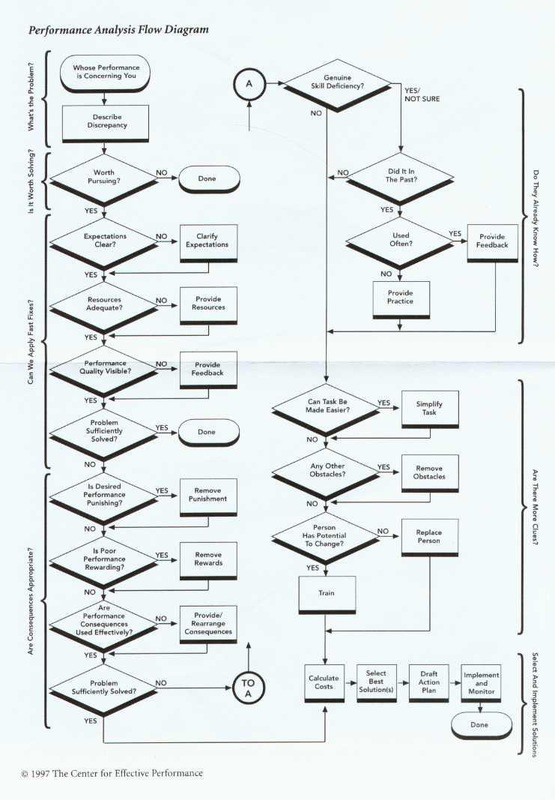
    Robert Mager and Peter Pipe gave us something rare: a practical diagnostic tool you can use in real time. A flowchart. (I think it is the best flowchart of all time!)

    I keep a copy on my desk. It’s saved me from building useless training more times than I can count.

    The Mager & Pipe Performance Flowchart

    The genius of this flowchart is how it systematically walks you through a performance problem, ruling out non-training solutions one by one. Training only appears at the very end.

    Here’s how it works:

    Q1: Is the gap worth fixing? If the cost of fixing exceeds the cost of ignoring it, stop.

    Q2: Could they do it if their life depended on it? (The “Gun Test”)

    • If YES → It’s a “won’t do” problem. Check consequences and obstacles.
    • If NO → It’s a “can’t do” problem. Continue below.

    Q3: Are consequences aligned? Is doing it right rewarding? Is doing it wrong punishing? Or is it backwards?

    Q4: Are there obstacles? Policies that contradict performance? Workflows that make the right thing harder? Remove obstacles first.

    Q5: Did they ever do it correctly? If yes, they need practice or feedback—not necessarily training.

    Q6: Can the task be simplified? Job aids, checklists, or workflow redesign often beat training.

    Q7: Do they have the potential to learn it? Now training makes sense—with practice and feedback built in.

    The Flowchart That Saved $200,000

    A logistics company asked for “forklift safety recertification” for 400 warehouse workers. Budget: $200K. Reason: rising accident rates.

    Here’s what walking the safety director through the flowchartmight look like.

    Q1: Worth fixing? “Yes—insurance and damaged inventory are costing us more than training would.”

    Q2: Could they do it safely if their life depended on it?

    Long pause. “Actually… yes. When OSHA inspectors are on site, accidents drop to zero.”

    Boom. That’s “won’t do,” not “can’t do.”

    Q3: Consequences aligned?

    Not even close. Productivity bonuses rewarded speed. Safe operation was slower—and therefore financially punished. Accidents had no real consequences.

    Q4: Obstacles?

    Several: tight warehouse corners, poor lighting, overdue forklift maintenance.

    They didn’t build training.

    Instead they:

    • Fixed incentives (tied bonuses to productivity and safety)
    • Improved lighting and warehouse layout
    • Provided visible daily safety scoreboards

    Cost: $35,000.
    Results: 60% drop in accidents within three months.
    Training budget: $0.

    How to Use This

    Get the flowchart from Mager and Pipe’s Analyzing Performance Problems (Chapter 2) or search “Mager Pipe performance flowchart” online. Print it. Keep it visible.

    Next time someone requests training, walk through it together. Takes a little bit of time but saves months of wasted effort.

    The flowchart turns “I think we need training” into an objective diagnostic. And here’s what you’ll discover: training is the solution to exactly one branch of that tree.

    Takeaway: Training fixes “can’t do.” Management, systems, incentives, and workflow design fix “won’t do.” The flowchart tells you which one you’re dealing with.


    Part 4: Fix the Workflow, Not Just the Worker (Geary Rummler)

    Even with skilled people and clear goals, performance can still crater. Why?

    Geary Rummler pointed out what most organizations miss: the structure fights the work.

    Mind the White Space

    Organizations are designed vertically—departments, functions, reporting lines. But work happens horizontally, across handoffs.

    Marketing hands off to Sales. Sales hands off to Operations. Operations waits on IT. Everyone waits on approvals.

    The gaps between these handoffs are what Rummler called the “white space” on the org chart. And they’re where work goes to die.

    You can have brilliant performers, but if the process they’re trapped inside is broken, performance will suffer.

    A Quick Example

    An onboarding team was consistently missing deadlines. HR wanted “time management training.”

    But when they mapped the workflow:

    • HR completed paperwork (3 days)
    • IT provisioned accounts (7 days)
    • Facilities ordered equipment (5 days)
    • The new hire’s manager was never told when to expect them

    Total: 15+ days. Time management training wouldn’t have saved a single day—the problem wasn’t individual time management. It was a sequential process with no coordination.

    They redesigned the workflow so steps happened in parallel and added automated notifications.

    Onboarding time dropped to 5 days. No training required.

    Takeaway: Before blaming individuals, look at the process they’re trapped inside.


    When Training Actually Works

    Let me be clear: I’m not anti-training.

    Training can be the right solution—when conditions support it.

    Training tends to work when:

    • The task or system is genuinely new
    • People get practice and feedback after training
    • The environment already supports correct performance
    • The problem is truly a knowledge or skill gap

    Training is often necessary. It’s just rarely sufficient on its own.


    A Simple Performance-First Decision Path

    Here’s how to pull these frameworks together:

    1. What result is missing? (Kaufman)
    Define the measurable gap in performance—not the training, the outcome.

    2. Is the environment set up for success? (Gilbert)
    Check Data, Instruments, and Incentives before assuming it’s a knowledge problem.

    3. Under ideal conditions, could people do the task? (Mager & Pipe)
    If yes, fix the system. If no, consider training.

    4. Is the workflow sabotaging performance? (Rummler)
    Look at handoffs, delays, and white space—not just individual tasks.

    Only then should you even think about opening your authoring tool.


    Real-World Example: Communication Training That Wasn’t

    A client contact center was drowning in customer complaints. The operations VP requested “communication skills training” for all 120 agents. Urgent, two-week turnaround.

    They could have built it. Would’ve been a nice project fee.

    But they used the frameworks:

    Kaufman: The real result wasn’t “better communication”—it was a 30% reduction in repeat complaints within 60 days.

    Gilbert (Data): Agents had no shared definition of “good communication.” Some were measured on call speed, others on satisfaction. The metrics conflicted.

    Gilbert (Instruments): The CRM hid key customer information three clicks deep. Agents were asking customers to repeat information the company already had.

    Gilbert (Incentives): Fast call resolution was rewarded. Thorough problem-solving wasn’t.

    Mager & Pipe: When we asked, “Could agents resolve issues well if conditions were perfect?” the answer was yes—they already did when supervisors were watching.

    Rummler: The workflow required agents to log issues in one system, but solutions were stored in another. No integration.

    They didn’t build a communication course.

    Instead:

    • Defined clear communication standards
    • Fixed the CRM interface
    • Aligned metrics to prioritize resolution quality
    • Integrated the ticketing and knowledge systems

    Complaints dropped dramatically in a matter of weeks. Not a single PowerPoint slide required.

    The Job You Were Actually Hired to Do

    Moving from “course builder” to “performance consultant” can feel uncomfortable. It means asking harder questions, pushing back on stakeholders, sometimes saying “Training won’t fix this.”

    But the pioneers of HPT taught us something crucial:

    Our job isn’t to fill heads with knowledge. Our job is to improve performance.

    Sometimes that means training. More often, it means fixing the world people work in.

    The next time someone asks you for a course, pause.

    Ask about the result they’re missing. Check the environment. Test whether it’s “can’t do” or “won’t do.” Look at the workflow.

    You might still build training. But if you do, it’ll be the right training, at the right time, with the environment ready to support it.

    And that’s when learning finally sticks.


    Further Reading: 
  • Debunking Learning Styles: What The Research Really Says

    Debunking Learning Styles: What The Research Really Says

    You’re in a kickoff meeting. Someone suggests, “Let’s find out everyone’s learning style first. Then we can tailor the training.”

    Heads nod. It sounds thoughtful. It sounds learner-centered.
    And you feel that small, nagging voice: Is this actually a thing?

    If you’ve been in L&D for a while, you’ve probably been in that room.

    It felt like good practice.

    Here’s the hard part:
    Decades of research say it doesn’t actually improve learning.

    This is not a “you’ve been doing everything wrong” moment. It’s a “the field has moved on—and now we get to move with it” moment.

    Let’s unpack why learning styles are so tempting, what the research really says, and what to use instead that does help people learn.

    Why Learning Styles Feel So Right

    The core promise of learning styles is simple and attractive:

    “If we know how someone learns best, we can design just for them.”

    Who wouldn’t want that?

    It also fits a story we like to tell about ourselves:
    “I’m a visual learner.”
    “I’m an auditory learner.”
    It sounds like knowing your Hogwarts house. It gives you an identity.

    From an L&D point of view, it can feel:

    Human.

    Personalized.

    Modern.

    The problem is that the evidence never caught up with the marketing.

    Large reviews—like Coffield et al. (2004) and a widely cited paper from Pashler and colleagues in 2008—have looked for a “learning styles boost” over and over again.

    They didn’t find it.

    What the Research Actually Tested

    Researchers didn’t just ask, “Do people have preferences?” That answer is easy: yes, they do.

    They asked a tougher question:

    “If we match instruction to a person’s preferred learning style, do they learn better than if we don’t?”

    This is sometimes called the “meshing hypothesis.”

    To support learning styles, we’d need to see a clear pattern:

    • Label learners by style (visual, auditory, etc.).
    • Teach some people in their preferred style and some in a non-preferred style.
    • See better test results for the “matched” group.

    Across many studies and reviews, that pattern just doesn’t appear.

    Learners often feel better when things match their preference. But when you look at performance—recall, problem solving, transfer—the “style match” doesn’t provide a consistent boost.

    The careful conclusion from these reviews is:

    There is no strong evidence that designing training to match learning styles improves learning outcomes.

    That’s the myth-busting part.

    Now let’s talk about what to do with it.

    The Hidden Cost of Chasing Styles

    You might be thinking, “Okay, fine. But what’s the harm? Isn’t it at least harmless?”

    Not always.

    Here’s what happens in real L&D work:

    • We spend time building “What’s your style?” quizzes instead of tightening our examples.
    • We create three versions of content—visual, audio, and kinesthetic—instead of creating one clear, well-designed flow.
    • We talk about “styles” in stakeholder meetings instead of talking about spacing, practice, or how this connects to real work.

    The problem isn’t that learning styles are evil.
    The problem is opportunity cost.

    Every hour we invest in a model that doesn’t add value is an hour we don’t spend on things that do.

    So What Should We Do Instead?

    The good news:
    We are not starting from scratch. Learning science has a lot to offer us here.

    We have decades of evidence for strategies that help most learners, across jobs and contexts, without trying to label them.

    Here are a few of the heavy hitters.

    Combine Words and Visuals (Dual Coding)

    People tend to learn better when we pair clear visuals with clear words.

    A simple diagram plus a short explanation.

    A screenshot with a brief, focused caption.

    A process map plus a short story that walks through it.

    Not decoration. Not stock photos.
    Visuals that actually carry meaning.

    Use Worked Examples

    Before you ask a novice to “jump in and try it,” show a complete example.

    A finished email with comments on why it works.

    A full call script with callouts for each step.

    A solved problem with the thinking made visible.

    Research shows that worked examples reduce overload and help people build mental models faster than throwing them into full problems too soon.

    Manage Cognitive Load

    Our learners aren’t broken. Their attention is just busy.

    You can help by:

    • Making one key point per slide.
    • Cutting cute but irrelevant details.
    • Removing extra animations and noise.
    • Using plain language instead of jargon.

    You don’t need a style label to do this. You just need to respect the limits of working memory.

    Use Spaced and Retrieval Practice

    Cramming feels productive. It’s not.

    Two simple shifts make a big difference:

    • Spaced practice: Spread learning over days or weeks instead of one long hit.
    • Retrieval practice: Ask learners to recall information (mini-quizzes, quick scenarios) instead of only re-reading or replaying.

    Meta-analyses on practice testing and spacing show reliable benefits for long-term retention. They’re not flashy, but they work.

    How to Talk About This Without Shaming Anyone

    Here’s the most important part for our field culture:
    Most people who use learning styles do it because they want to help.

    So when you talk about this with stakeholders or peers:

    • Assume good intent.
    • Aim for curiosity, not “gotcha.”
    • Focus on the upgrade: “Here’s something that works even better.”

    You don’t have to call anyone out. You can simply say:

    “The research on learning styles never really held up. Instead of investing in that, we can use strategies like examples, visuals plus words, and spaced follow-ups that have a much stronger track record.”

    You’re not taking something away.
    You’re offering an upgrade.

    The Bottom Line

    Learning styles feel intuitive and kind. They give us labels and the illusion of precision.

    But large reviews—from Coffield and colleagues, from Pashler and others—keep telling us the same thing: matching instruction to a preferred style doesn’t reliably improve learning.

    The real opportunity is not arguing about who is a “visual learner.”
    It’s designing for how learning works:

    • Clear, meaningful visuals plus words.
    • Worked examples before solo practice.
    • Spaced and retrieval practice.
    • Respect for cognitive load.

    You don’t need a style quiz to do that. You just need to shift your time and energy away from labels and toward strategies that actually pay off for your learners.

    Future-you—and your learners—will be glad you did.

  • Take Back Your Feed: A Simple Guide to Getting Started With RSS (Even If Tech Intimidates You)

    Take Back Your Feed: A Simple Guide to Getting Started With RSS (Even If Tech Intimidates You)

    Most of us are drowning in information.

    Emails. Social feeds. Notifications piling on notifications.

    You look away for one minute and miss three posts from a writer you actually wanted to read—because an algorithm decided you needed fourteen kitchen remodeling hacks instead.

    There’s a better way to keep up with the things you care about. No fuss. No overwhelm.

    It’s called RSS.

    If the name sounds technical, relax. This guide is for regular humans, not engineers.

    Let’s get you set up in the next few minutes.


    What RSS Actually Is (In Plain English)

    RSS is basically a “follow” button for the entire internet.

    Any time a site you follow publishes something new, RSS quietly pulls it into one clean feed. You stay in control.

    No algorithm deciding what you see. No ads wedged between articles. No emotional manipulation engineered to keep you scrolling.

    Just updates from the places and people you choose.


    If you want the technical backstory, here’s a solid explainer: https://www.w3.org/RSS/

    But you don’t need any of that to use it.


    Why RSS Is the Best Way to Keep Up With What Matters

    You never miss posts from your favorite creators.

    Everything shows up in order. Nothing gets buried by a feed curated for engagement metrics instead of your interests.

    You get a quieter, calmer reading experience.

    No autoplay videos. No “recommended for you” rabbit holes. No rage-bait in your peripheral vision.

    You can ditch email for newsletters (if you want).

    Some RSS readers let you follow newsletters directly inside the app. That means you enjoy your favorite writers without choking your inbox. This feature usually costs a few bucks a month (Feedly, Inoreader, and Readwise Reader all offer it), but even free RSS plans give you the bigger win: clarity and control.

    You build your own personal internet.

    Your interests. Your pace. Your feed.


    Step 1: Pick Your Reader

    Here are my three favorites:

    Feedly — Best for most people. Simple, works everywhere, beginner-friendly.

    Inoreader — Great if you love organizing. Powerful filters and folders once you’re comfortable.

    Readwise Reader — Premium “everything in one place” tool. Combines RSS, newsletters, YouTube, PDFs, and highlights.

    Any of these will work beautifully. Pick one and create a free account. You can’t go wrong.


    Step 2: Add Your First Site

    This is where it gets fun.

    In your reader’s search bar, type the name of a site you love. Or paste the full URL. The reader will find the feed automatically.

    To test it out, here is one you can add right now:

    mike-taylor.org — Hand-picked research, tools, tech, and weekly discoveries.

    You just built the foundation of your feed.


    Step 3: Add a YouTube Channel (Optional)

    Copy the link to any YouTube channel you follow. Paste it into your reader.

    Done.

    Every new video from that creator will now show up like a regular post. No ads. No “Up Next” spiral. No algorithm trying to keep you watching.


    Step 4: Add a Newsletter (Optional—Usually a Paid Feature)

    If your reader supports it, you can follow email newsletters directly in RSS.

    Just paste the newsletter signup link or use your reader’s “Add Newsletter” option. Future issues arrive in your RSS feed instead of your email inbox.

    Your inbox stays clean. Your brain stays focused.


    Step 5: Create a Few Simple Folders

    Don’t overthink this part. Start with something like:

    A-List — Sources you’d actually miss if you skipped a day.

    B-List — Great content, but you won’t lose sleep if you fall behind.

    News

    Learning & Ideas

    Creators I Follow

    This structure keeps RSS from becoming its own kind of overwhelm. You’re curating as you go, not drowning in a new flood.


    Step 6: Let It Run

    Give it a day.

    Tomorrow, you’ll open your reader and see a clean feed of exactly the things you care about—and none of the things you don’t.

    RSS feels like magic once the posts start flowing in.


    How to Use RSS Comfortably Every Day

    Here’s a routine that keeps things peaceful:

    Daily (10 minutes)

    Scan your A-List folders for anything new. If you have extra time, browse your B-List and explore.

    As you discover new sites, creators, and sources you like, add them. You’re building your own personal internet, one feed at a time.


    What This Actually Feels Like

    You open your reader.

    Twelve new posts.

    Every single one from someone you chose to follow.

    No ads wedged between you and the ideas. No algorithm guessing what you want. No dopamine-engineered infinity scroll.

    Just signal. Just substance.

    It’s your internet now—built by you, for you.


    If you start using RSS after reading this, I’d love to hear what feeds you added first. Drop me a note and tell me what you’re following.