Category: learning

  • Friday Finds — Robert Bjork, John Sweller, Reading Speed

    Friday Finds — Robert Bjork, John Sweller, Reading Speed

    sponsored by iSpring

    Sign up here to get Friday Finds in your inbox every Friday.

    “Pour your finite time and energy into something infinitely more absorbing than trying to keep life under control, which is actually living it.”

    — Oliver Burkeman

    I’ve been test-driving parta.io, and when I talked with Andrew, one of the co-founders, he told me about their vision for great products: a blend of modern IT architecture and deep L&D expertise. He is offering subscribers of this newsletter (that’s you!) 3 months to try it out for yourself for free and even get a personal welcome call with him as well. Click here to get started now

    DevLearn is also just around the corner, and it’s going to be a packed week! I have a full-day workshop on Tuesday with Bianca, followed by four other sessions on Wednesday and Thursday. Who else is going to be there? Let’s connect!

    Thanks for reading!


    🎶 What I’m Listening To

    Today is a Hozier day. I bet he may be a ‘mystery musician’ – you know his tunes, but not his name.


    👆 Last Week’s Most Clicked

    Thinking Fast, Learning Faster: 10 L&D Insights From Daniel Kahneman


    📰 News & Notes

    Robert Bjork on Long-Term Memory

    This is for all my fellow learning nerds! Dr. Robert Bjork, a leading expert in applied memory research, discusses his groundbreaking theory of long-term memory. He explains how losing access to memories, a process he calls “disuse,” is essential for forming stronger, longer-lasting ones. This theory illuminates the benefits of learning strategies like spaced repetition, interleaving practice, and active recall.

    🎯 Takeaway: Forgetting is a crucial step in the memory formation process, making techniques like spaced repetition and active recall essential for robust long-term learning.


    Beyond Words: The Brain’s Rapid Grasp of Sentence Structure

    The human brain can rapidly process short messages, detecting basic sentence structure in as little as 130 milliseconds. This ability, similar to how we quickly grasp visual scenes, suggests our language processing capabilities are much faster than previously thought. This research challenges traditional word-by-word models of language comprehension, revealing the brain’s capacity to understand language at a glance, even with grammatical errors or nonsensical content.

    🎯 Takeaway: The human brain can rapidly process short messages, detecting basic sentence structure in as little as 130 milliseconds.


    AI Tutors Double Rates of Learning in Less Learning Time

    Dr. Philippa Hardman shares new Harvard research that demonstrates the potential of AI in education. AI tutors significantly outperformed human instructors in terms of student learning gains, time efficiency, and engagement. Students tutored by AI learned twice as fast, reached competency quicker, and reported higher levels of motivation and engagement compared to those in traditional classroom settings.

    Takeaway: AI tutors outperform human instructors, doubling learning gains and boosting student engagement


    Hire your next instructional design superstar!

    If you’re looking to develop an eLearning program for your organization, hiring an instructional designer is one of the ways you can go. But what skills should you look for? What process should you follow? We explore all this and more so you can be confident in your choice.


    🧰 Tech Tools & Tips

    If tools are your jam, check out my new Work Smarter newsletter.

    Stockpress | Refreshingly Simple Digital Asset Management

    Find what you need, when you need it – Stockpress helps marketers and creatives organize, find, collaborate on, and share digital files – from one shared workspace.

    stockpress.co

    .

    Free Image Vectorization

    Automatically convert JPG, PNG and BMP raster images into scalable SVG vector images.

    vectorizer.com


    Tired of the Same Old eLearning?

    For too long, eLearning has been stuck in the past. Slow, expensive, and inflexible tools have held back innovation.

    Introducing Parta:
    A new era of eLearning is here. We’re bringing the power of design tools like Figma and Miro to the L&D world. Take advantage of a special offer for newsletter subscribers and test drive it yourself — three months free and a personal welcome call with the founder!


    🎧 Podcast

    This is the conversation that caught my ear this week. Check out previous episodes in the Friday Finds podcast playlist.

    Dr. John Sweller: Why Johnny Can’t Read

    Dr. Sweller discusses how inquiry-based learning undermines student preparedness for college. He explains Cognitive Load Theory, the distinction between working and long-term memory, and why ineffective teaching persists.


    From Selecting the Right Type to Editing Videos Like a Pro

    Start creating training videos that learners watch to the end. Download this comprehensive guide to discover six types of videos for each training occasion, step-by-step instructions on creating and editing them, and tips for making videos look visually appealing and engage the audience.


    🧳 Where’s Mike?

    If you or your event needs a speaker or workshop that is highly interactive and super practical, we should talk.


    Like this post? Share it with someone you love. Don’t like it? Share it with someone you don’t!

    Friday Finds is an independent publication that I produce in my free time. You can support my work by sharing it with the world, booking an advertising spot, or buying me a coffee.

  • Friday Finds — Thinking Fast & Slow, Google Notebook for L&D, Learning in Microlearning

    Friday Finds — Thinking Fast & Slow, Google Notebook for L&D, Learning in Microlearning

    sponsored by iSpring

    Sign up here to get Friday Finds in your inbox every Friday.

    “Time you enjoy wasting is not wasted time.”

    – Marthe Troly-Curtin

    Fall is in full swing around here, and it’s my absolute favorite season! The leaves are turning bright colors, the weather is crisp and perfect, and the sun has been shining all week. Where can I live that has this type of weather year-round? What are you most excited about this fall?

    Thanks for reading!


    🎶 What I’m Listening To

    Tame Impala from last week’s playlist.


    👆 Last Week’s Most Clicked

    What are Interactive Emails & Why You Should Send Them?


    📰 News & Notes

    Thinking Fast, Learning Faster: 10 L&D Insights From Daniel Kahneman

    Have you read Daniel Kahneman’s “Thinking, Fast and Slow”? It’s a must-read for anyone interested in understanding the nuances of human cognition. Kahneman’s dual-process theory—System 1 (intuitive) and System 2 (deliberate)—provides a framework for understanding how we think. By recognizing the strengths and limitations of both systems, L&D professionals can design training programs that effectively engage learners, reduce cognitive overload, and foster better decision-making. I’ve put together 10 key insights from it and how they can be applied to Learning & Development (L&D).

    🎯 Takeaway: Daniel Kahneman’s “Thinking, Fast and Slow” offers valuable insights for L&D professionals, providing strategies to engage learners & reduce cognitive overload,


    Five Easy Ways Instructional Designers Can Use Google NotebookLM

    Google’s NotebookLM is a groundbreaking tool for instructional designers, offering a fresh way to organize and synthesize vast amounts of information. Connie Malamed explores how NotebookLM can streamline content development, helping designers quickly draw insights from multiple sources and improve workflow efficiency. Have you tried this yet?

    🎯 Takeaway: Google’s NotebookLM empowers instructional designers by using AI to streamline content organization, making eLearning development faster and more efficient.


    Let’s focus on ‘Learning’ in MicroLearning

    In this Learning Scientist post, Nidhi Sachdeva lays out how to supercharge your training programs with retrieval practice and spaced learning. These powerhouse techniques don’t just boost performance—they ensure critical information sticks. Nidhi tells us that by weaving these evidence-based strategies into your training, you’ll see a remarkable improvement in learning outcomes and knowledge retention.

    Takeaway: Implementing retrieval practice and spaced learning can significantly boost the effectiveness of training programs.


    Is your current training giving you nightmares?

    With the right partner, you can improve learner engagement, convert in-person training into online courses, and finish the existing eLearning initiatives you’ve already started. Whether your organization needs big wins or minor project support, learn how we can help you reach your L&D goals.

    You’re invited to an action-packed webinar on Wednesday, October 30, at 12 noon CT.


    🧰 Tech Tools & Tips

    If tools are your jam, check out my new Work Smarter newsletter.

    Elai.io – Advanced & Intuitive AI Video Generator

    Discover Elai: The leading AI video generation platform. Effortlessly create professional-grade videos with real people in minutes, no editing skills needed.

    elai.io

    .

    HeyForm: the Best Open-Source Form Builder

    Create surveys, quizzes, and polls with HeyForm’s free form builder. Sign up now to craft beautiful, interactive online forms easily and quickly for FREE.

    heyform.net


    Gain an edge with Shortform’s in-depth book summaries on tech, business, economics, and more.

    For the cost of 1 book a month, you get access to thousands, along with additional features like podcast and article guides. It’s the smartest way to learn.

    <img scr=https://vpdae.com/open/5602a72f.gif?opens=1" width="1" height="1">

    🎧 Podcast

    This is the conversation that caught my ear this week. Check out previous episodes in the Friday Finds podcast playlist.

    ID on a Shoestring with Brian Washburn

    Brian Washburn talks about his book ID on a Shoestring and shares insights on how to be a great instructional designer with little or no budget PLUS the joys and pains of writing a book!


    Take part in two days of exclusive training on course creation

    Need to create an online course ASAP? Join us on November 19th and 21st for iSpring’s intensive online training on AI-powered course creation! No fluff or irrelevant information — just focused, expert knowledge to help you quickly create well-structured, scrollable courses, even if you’ve never done it before.


    🧳 Where’s Mike?

    If you or your event needs a speaker or workshop that is highly interactive and super practical, we should talk.


    Like this post? Share it with someone you love. Don’t like it? Share it with someone you don’t!

    Friday Finds is an independent publication that I produce in my free time. You can support my work by sharing it with the world, booking an advertising spot, or buying me a coffee.

  • Friday Finds — Interactive Emails, Content Compass, AI in L&D

    Friday Finds — Interactive Emails, Content Compass, AI in L&D

    sponsored by iSpring

    Sign up here to get Friday Finds in your inbox every Friday.

    “Success isn’t measured by your lack of stumbles but by the quality of your recoveries.”

    — Matt Blumberg

    October is Cybersecurity Month, making it the perfect time to remind you that weak or reused passwords are one of the biggest threats to your online security. If you’re not already using one, consider a password manager to create strong, unique passwords for each of your accounts. My family and I use 1Password for just a few dollars a month—totally worth it! Bitwarden is a great free option. Do you use a password manager? Which one?

    Thanks for reading!


    🎶 What I’m Listening To

    This morning, I’m listening to one of my favorite band names of all time – Artic Monkeys.


    👆 Last Week’s Most Clicked

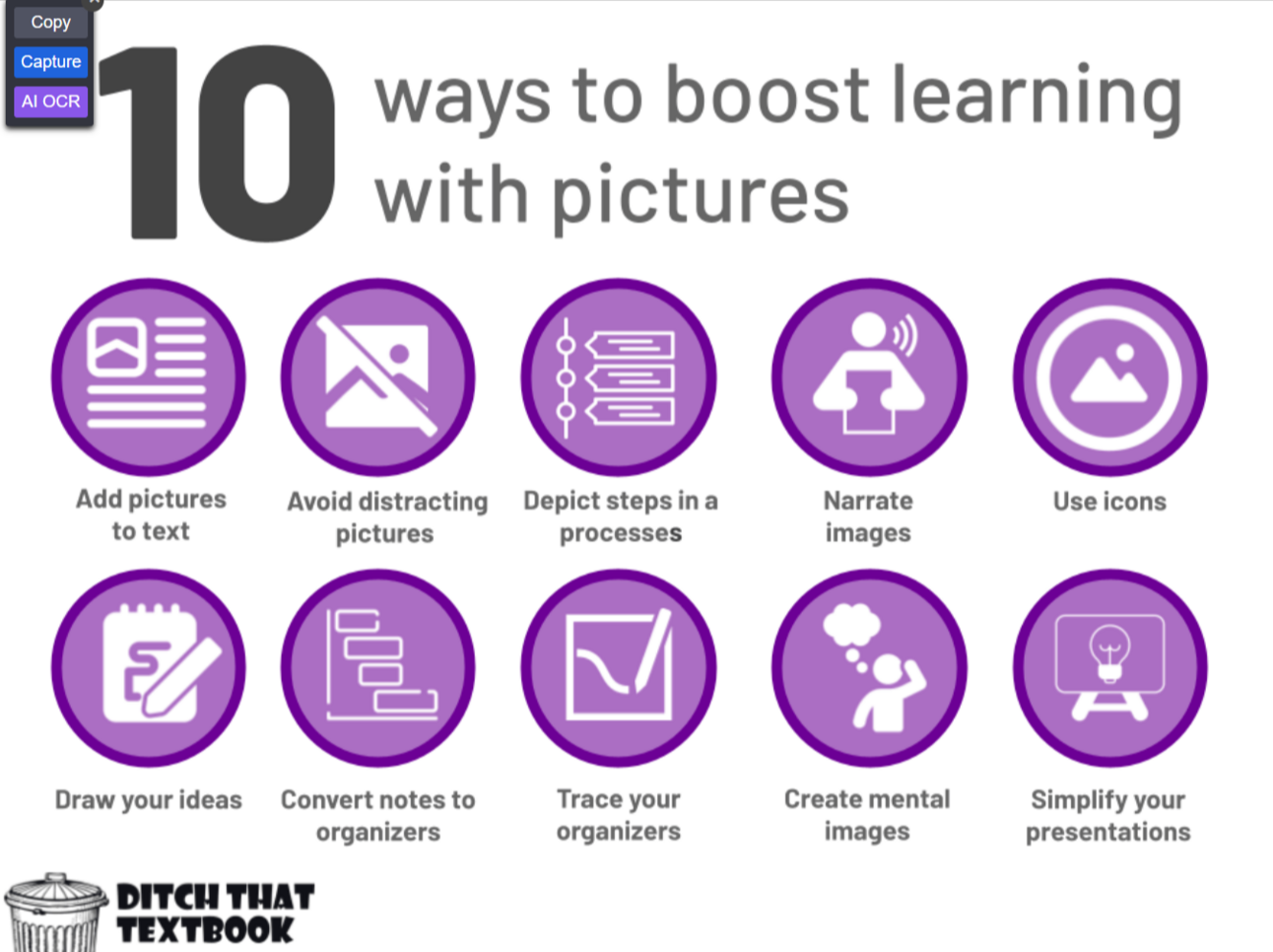
    Ten Ways Pictures Boost Learning: Dual Coding Theory Introduction


    📰 News & Notes

    What are Interactive Emails & Why You Should Send Them?

    Interactive emails are another thing L&D should ‘steal’ from marketing. They make emails more engaging by adding features like polls, quizzes, videos, and buttons. This improves user interaction, retention, and provides valuable data. L&D teams can use interactive emails to create more engaging and accessible learning content, boosting engagement and learning outcomes.

    🎯 Takeaway: Interactive emails increase engagement by turning passive communication into an active, user-driven experience.


    Set Your Content Compass and Purpose

    This article is a good reminder of the importance of defining a clear content purpose to align content with business goals and audience needs. By crafting a “content compass” — a purpose statement or framework — L&D professionals can ensure that content creation remains focused, helping decision-makers evaluate existing materials and future ideas based on strategic alignment. The process involves collaborative brainstorming, revision, testing, and practical application through examples, ultimately guiding content decisions and improving effectiveness.

    🎯 Takeaway: A well-defined content purpose ensures all content aligns with organizational goals, helping make smarter content decisions.


    AI in L&D: Intention and reality

    This report by Donald Taylor and Eglė Vinauskaitė finds that L&D’s current AI adoption often prioritizes speed over quality, limiting its strategic value. To maximize AI’s potential, L&D must shift from internal efficiency to external impact by addressing specific business challenges and integrating learning with broader organizational goals.

    Takeaway: L&D should move beyond superficial AI use and embrace its potential to solve real business problems and drive strategic value.


    You’re Invited: Demystify Custom Course Creation

    Have you ever wanted to know what goes into creating custom eLearning courses? Register for our webinar to get a “behind the scenes” look and see if custom eLearning is right for your next project. We’ll cover many real-life examples, dive into processes and best practices, and review solutions to project scenarios!


    🧰 Tech Tools & Tips

    If tools are your jam, check out my new Work Smarter newsletter.

    Clixie.ai – Interactive Video

    Make any video interactive in seconds with our no-code platform. Use AI to enhance your videos with hotspots, quizzes, and more! Try it for free.

    www.clixie.ai

    Tiiny Host

    Tiiny Host is the simplest way to share your work online.

    tiiny.host


    Gain an edge with Shortform’s in-depth book summaries on tech, business, economics, and more.

    For the cost of 1 book a month, you get access to thousands, along with additional features like podcast and article guides. It’s the smartest way to learn.


    🎧 Podcast

    This is the conversation that caught my ear this week. Check out previous episodes in the Friday Finds podcast playlist.

    AI Learning: the Rubber Hits the Road with Saskia Huussen, Sanne Mateman, and Callum Clark

    The Learning Hack AI-powered learning is revolutionizing healthcare. A groundbreaking project at Alrijne Healthcare Group has shown how AI can dramatically improve efficiency and reduce training time for surgical assistants. By implementing AI-driven performance support, the team achieved a 70% reduction in SME time and a 40% decrease in project timelines. This episode offers valuable insights for anyone interested in leveraging AI for workplace training.


    Learn the ins and outs of developing and launching effective eLearning

    Welcome to five hands-on sessions packed with advanced tips and tricks for designing eLearning content using iSpring’s world-renowned eLearning tools. Learn how to create interactive quizzes, produce high-quality training videos, develop immersive role-play simulations, and deliver them to your learners through an LMS.


    🧳 Where’s Mike?

    If you or your event needs a speaker or workshop that is highly interactive and super practical, we should talk.


    Like this post? Share it with someone you love. Don’t like it? Share it with someone you don’t!

    Friday Finds is an independent publication that I produce in my free time. You can support my work by sharing it with the world, booking an advertising spot, or buying me a coffee.

  • Friday Finds — Dual Coding Theory, Curiosity+Failure, Power of Naps

    Friday Finds — Dual Coding Theory, Curiosity+Failure, Power of Naps

    Sponsored by iSpring

    Sign up here to get Friday Finds in your inbox every Friday.

    “When you arise in the morning, think what a precious privilege it is to be alive, to breathe, to think, to enjoy, to love”

    — Marcus Aurelius

    Who else out there is a pickleball player? I finally jumped on the bandwagon, and I think I might be hooked. I feel like I’m the last person on earth to try it, but hey, better late than never, right? Let’s hit the court if you’re in the Columbus area and looking for a playing partner! I’m ready to dink, dunk, and my favorite erne!

    Thanks for reading!


    🎶 What I’m Listening To

    There is something about Alec Benjamin’s songs that get stuck in my head in a good way.


    👆 Last Week’s Most Clicked

    How I use Notebook LM: Google’s Killer AI Note-Taking & Research Assistant


    📰 News & Notes

    Ten Ways Pictures Boost Learning: An Introduction to Dual Coding Theory

    Dual Coding Theory suggests that combining verbal and visual information boosts learning by engaging both verbal and non-verbal cognitive channels. Techniques like adding relevant pictures to text, simplifying visuals, and using icons or mental imagery help deepen understanding and memory retention. However, distractions from unrelated images or overcomplicated visuals can impair comprehension, highlighting the need for the purposeful use of visual aids.

    🎯 Takeaway: Using visuals effectively alongside text can significantly enhance learning and recall.


    Curiosity plus failure is a passport to brilliance

    Are curiosity and failure the ultimate brainpower duo? Research shows that when we’re curious, our brain lights up with anticipation, and if we get the answer wrong, we actually learn better. Failure boosts memory consolidation, meaning those answers stick with us longer. So, L&D professionals should encourage learners to embrace curiosity and even enjoy a few wrong answers—they’re making brilliance stick!

    🎯 Takeaway: Curiosity combined with failure enhances learning by strengthening memory retention.


    The Brain’s Twilight Zone: When You’re Neither Awake Nor Asleep

    Neuroscientists are demystifying this in-between state, uncovering its role in memory processing and its creative potential. Turns out, the twilight zone between wake and sleep isn’t just for weird dreams—it’s prime time for your brain to mix memories and unleash creativity! Whether it’s recalling your last game of Tetris or crafting wild new ideas, this snoozy state might just be the ultimate hack for learning and problem-solving. So next time you nap, channel your inner Edison and see what brainy magic you can catch!”

    Takeaway: Embrace the nap—your most creative (and productive) work might happen right before you fully doze off!


    Get help for your custom eLearning projects!

    Are you looking at your L&D course wish list and realizing you need help, or are you wondering what’s possible but unsure where to start? Join us on Wednesday, October 30, as we explore the many ways we can help your team that lead to big wins!

    Attend this webinar if:

    • You want to improve your learners’ engagement rate
    • You need to convert in-person training into online courses
    • You’re just curious about what’s involved in building custom eLearning

    🧰 Tech Tools & Tips

    If tools are your jam, check out my new Work Smarter newsletter.

    Airtable Cobuilder

    Create custom apps without needing any coding knowledge with the help of AI

    www.airtable.com/platform/app-building

    .

    Practical Introduction to ChatGPT

    Struggling to get the best results from ChatGPT? Don’t worry, you’re not alone. In this free course, Gianluca Mauro shares a practical framework to help you get the most out of ChatGPT every single time.

    www.ai-academy.com/courses/practical-introduction-to-chatgpt


    Gain an edge with Shortform’s in-depth book summaries on tech, business, economics, and more.

    For the cost of 1 book a month, you get access to thousands, along with additional features like podcast and article guides. It’s the smartest way to learn.


    🎧 Podcast

    This is the conversation that caught my ear this week. Check out previous episodes in the Friday Finds podcast playlist.

    From Tool to Teammate: Understanding AI Agents with Mike Hruska

    AI agents are becoming crucial in L&D. Mike Hruska explains how to integrate AI strategically and overcome skepticism. Tune in to learn more.


    Discover What’s Inside the eLearning Toolbox of Seasoned Pros

    Join an exclusive, hands-on roundtable with eLearning and instructional design experts. On Thursday, October 24th, at 12:00 PM ET, Holly Owens, Tom McDowall, and Heidi Kirby will share their top tools that boost productivity, streamline workflows, and help them create impactful online courses quickly without compromising quality.


    🧳 Where’s Mike?

    If you or your event needs a speaker or workshop that is highly interactive and super practical, we should talk.


    Like this post? Share it with someone you love. Don’t like it? Share it with someone you don’t!

    Friday Finds is an independent publication that I produce in my free time. You can support my work by sharing it with the world, booking an advertising spot, or buying me a coffee.

  • Unearthing Hidden Gems: Master Content Curation with the CURATE Model

    Unearthing Hidden Gems: Master Content Curation with the CURATE Model

    If you’ve been following along with my blog, you know we’ve been diving deep into the art of content curation, especially through the CURATE model. Today, we’re going to zoom in on the “U” – Unearth Content. This part of the model is all about digging up those hidden gems that can make your learning resources shine. So, grab your virtual shovel, and let’s start unearthing!

    The Treasure Hunt of Content Curation

    Think of content curation as a treasure hunt. The internet is a vast landscape filled with valuable resources, but finding the best ones requires a keen eye and a strategic approach. Here’s how you can become an expert content archaeologist and uncover the most precious pieces of content for your learners.

    1. Diversify Your Sources

    When you’re on the hunt, don’t stick to the same old maps. Explore new territories! Here are a few places to start:

    • Social Media: Platforms like Twitter, LinkedIn, and even TikTok can be gold mines for fresh content. Follow thought leaders in your industry and keep an eye on trending hashtags.
    • Aggregators: Tools like Feedly and Flipboard can help you gather articles, blogs, and news from a wide array of sources, all in one place.
    • Niche Communities: Sites like Reddit and specialized forums can provide unique insights and content that you won’t find in mainstream channels.

    2. Use Advanced Search Techniques

    Sometimes, finding the best content requires a bit more precision. Here are a few tips:

    • Boolean Operators: Use AND, OR, and NOT to refine your search results. For example, searching “eLearning AND gamification” will give you results that include both terms.
    • Site-Specific Searches: If you know a particular site has great content, use Google’s site-specific search. For example, “site.org CURATE model” will show you all the relevant posts from Mike Taylor’s blog.
    • Advanced Filters: Make use of advanced search filters to narrow down your results by date, type of content, and more.

    3. Leverage Your Network

    Your professional network is a powerful tool for unearthing great content. Don’t be shy—reach out and ask for recommendations.

    • Engage on LinkedIn: Join groups and participate in discussions. You’ll often find that other professionals share valuable resources that you might have missed.
    • Ask for Recommendations: When you come across a particularly knowledgeable colleague or connection, ask them what resources they find most valuable.

    4. Stay Organized

    As you unearth content, it’s crucial to keep it organized. Tools like Raindrop, Aboard, Pocket, Evernote, or a simple spreadsheet can help you catalog your finds for easy access later. Tagging and categorizing your content ensures you can quickly find exactly what you need when you need it.

    Putting It All Together

    The “Unearth Content” phase of the CURATE model is all about being curious, resourceful, and methodical. By diversifying your sources, using advanced search techniques, leveraging your network, and staying organized, you’ll be well on your way to discovering the best content for your learners.

    Try It Out!

    Ready to put the CURATE model to the test? Start unearthing some hidden gems today and see how it transforms your learning resources. And hey, if you found this post helpful, why not subscribe to my newsletter? You’ll get more tips, tricks, and insights on mastering content curation delivered straight to your inbox.

    Happy hunting, fellow content curators! Let’s dig up some treasure together.


    Links and Resources:

  • Friday Finds — A/B Testing, AI Thought Partner, Getting Started with NoCode

    Friday Finds — A/B Testing, AI Thought Partner, Getting Started with NoCode

    Sponsored by iSpring

    Sign up here to get Friday Finds in your inbox every Friday.

    “There is only one success – to be able to spend your life in your own way.”

    — Christopher Morley

    A huge thank you to everyone who shared a testimonial last week. Your kind words mean the world to me – you are AWESOME! (You can still add yours here.)

    In case you missed it, I have some exciting events coming up. For those in or near central Ohio, I’ll be speaking at our local ATD chapter’s annual event next week. And for everyone else, Bianca and I are thrilled to be leading a full-day workshop at DevLearn again this year. We also have a regular conference session and are still cooking up a few other things our there as well. If you or anyone you know will be in Las Vegas for DevLearn, please reach out. I’d love to connect with you in person!

    Thanks for reading!


    🎶 What I’m Listening To

    I’m feeling upbeat today with this Upbeat Mix that kicks off with a little Duran Duran. 8)


    👆 Last Week’s Most Clicked

    The “Pain Map Of Learning”: How Trainers Can Make Learning Fun Again


    📰 News & Notes

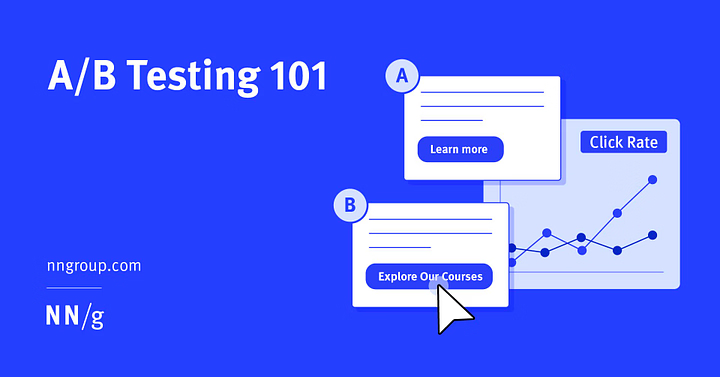
    A/B Testing 101

    A/B testing, a technique widely used in marketing, can be adapted by L&D professionals to improve the effectiveness of their learning designs. By comparing two versions of a learning module or instructional material, such as different formats for delivering content or varying question types in assessments, L&D teams can gather data on which version better engages learners and enhances learning outcomes. This data-driven approach allows for continual refinement, ensuring that learning experiences are not only effective but also tailored to meet the specific needs of learners.

    🎯 Take away: L&D professionals can use A/B testing to refine learning designs by comparing versions and using data to boost engagement and effectiveness.


    Thought Partner

    The initial hype surrounding AI has given way to skepticism as investors and companies find its real-world applications underwhelming. Despite the concerns, AI’s real potential lies not in replacing search engines or being a novelty tool, but as a thought partner, enhancing our decision-making and creativity. Successful use cases include using AI as a strategic advisor in business scenarios and for personal decision-making. As AI’s capabilities mature, dismissing it as a fad overlooks the profound opportunities it presents for augmenting human intelligence and productivity.

    🎯 Take away: AI’s true value lies in its potential as a thought partner, not just a tool, to enhance decision-making and creative thinking.


    What is no-code? Examples and how to get started

    No-code tools are revolutionizing the way we work by enabling users to create apps, websites, and automate workflows without needing to write any code. For L&D professionals, this means you can quickly develop custom learning platforms, build interactive content, and streamline administrative tasks with ease, all without relying on IT. This empowers you to deliver more personalized and agile solutions, making it easier to adapt to your ever-changing needs.

    🎯 Take away: No-code tools empower anyone to create and automate custom solutions quickly and efficiently without needing technical expertise.


    Do you continue evaluating your training program after launch?

    Discover five impactful areas to monitor and evaluate your training program beyond course completion rates. These insightful areas help bridge the connection to training ROI and can help you improve your training along the way.


    🧰 Tech Tools & Tips

    If tools are your jam, check out my new Work Smarter newsletter.

    AudioMass

    AudioMass is a free, full-featured web-based audio & waveform editing tool

    audiomass.co

    .

    Bean Heads · Easily generate avatars for your projects

    Combine expressions, clothing, hairstyles, and colors into billions of different unique characters.

    beanheads.robertbroersma.com

    .


    🎧 Podcast

    This is the conversation that caught my ear this week. Check out previous episodes in the Friday Finds podcast playlist.

    Optimal Protocols for Studying & Learning

    Learn faster and better with science-backed techniques. This episode covers the neuroscience of learning and shows how self-testing can boost memory. You’ll get practical tips to improve your learning and retention.


    Overcome the biggest obstacles in education today.

    Feeling overwhelmed by the demands of modern education? You’re not alone. Join us on Tuesday, September 10, for an online conference designed to address precisely the challenges you’re facing. From finding innovative teaching methods with limited resources to balancing the administrative load that eats into your teaching time, this event offers practical solutions and fresh perspectives.


    🧳 Where’s Mike?

    If you or your event needs a speaker or workshop that is highly interactive and super practical, we should talk.


    Like this post? Share it with someone you love. Don’t like it? Share it with someone you don’t!

    Friday Finds is an independent publication that I produce in my free time. You can support my work by sharing it with the world, booking an advertising spot, or buying me a coffee.

  • Top 10 Learning Tools for 2024

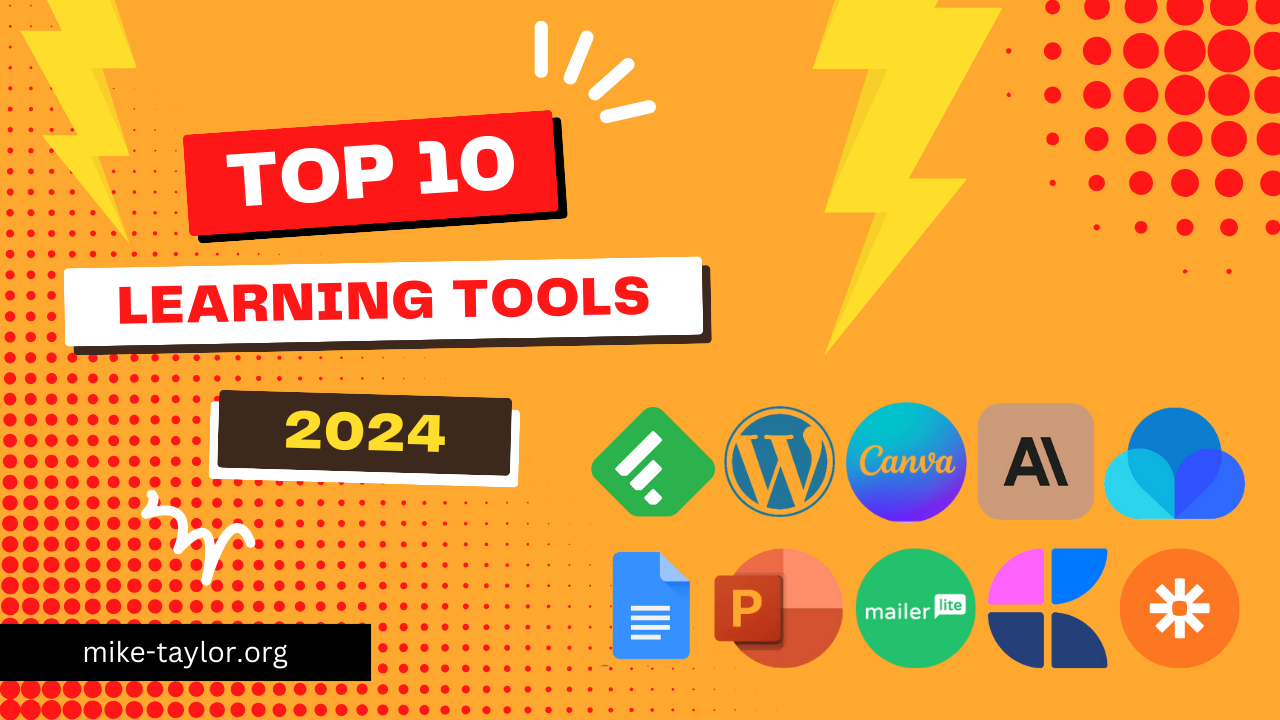
    Top 10 Learning Tools for 2024

    Today is a holiday for those of us here in the US. This gives me a little bit of extra time to share my top 10 learning tools for 2024. I’m dishing out the good stuff as part of Jane Hart’s yearly roundup. So, grab a seat, and let’s see what did and didn’t make my list this year!

    Feedly

    Want to stay on top of your game without drowning in info? Feedly is your new best friend. It’s like a buffet for your brain, serving up all the good stuff from blogs and websites you love. No more jumping from site to site – Feedly brings it all to you in one spot. Just pick your faves, sort them how you like, and boom! You’ve got a custom news feed that keeps you in the know without the headache. It’s my secret weapon for staying up on everything I want to know.

    Use these with Feedly, and it gets even better!

    • Buffer – share what you learn via social media
    • Kill the Newsletter – get your email newsletters via RSS/Feedly
    • FetchRSS – create an RSS Feed for sites that don’t provide one

    https://feedly.com

    WordPress

    WordPress is like the Swiss Army knife of websites, and it is super easy to use. I’ve hosted my website/blog there for what seems like forever now. For most uses, you can even start with their free version.

    https://wordpress.com

    Canva

    Canva is my go-to tool. I use it almost daily. It’s great for making slides, graphics, websites, and stuff to print. No other tool can do so much so well. Once you start using Canva, you’ll wonder how you ever lived without it.

    https://canva.com

    Claude/ChatGPT/Gemini

    AI helpers like Claude, ChatGPT, and Gemini are game-changers. They’re not just tools – they’re a secret weapon for getting more things done faster and better.

    Raindrop.io

    I”‘ve tried a lot of different online bookmarking/organization tools, and Raindrop.io is my new favorite. As someone saves and shares a lot of bookmarks, I love most is how it lets me organize my online chaos into neat little collections and tags. The collaboration features are another big plus. But my absolute favorite? The web clipper. It’s pure magic. I can snag any part of a webpage I want, making my content curation so much more precise. No more saving entire pages when I only need a paragraph. Raindrop.io should be in everyone’s toolkit.

    https://raindrop.io

    PowerPoint

    PowerPoint is the OG of my toolset. I still love working in it, and it is still my ‘go-to’ for creating presentation decks. Add-ins like BrightSlide, The Noun Project, Slido, and others extend its capabilities even further. Canva is gaining ground for presentations, but I’m mostly sticking with PowerPoint for now.

    Google Docs

    I have written more this year than ever before, and Google Docs is my go-to. This classic tool, paired with add-ins like Grammarly, feels like having a writing superpower right in your browser.

    https://docs.google.com

    MailerLite

    One of my favorite things to do is write my newsletter every week. I’ve tried a lot of options, and MailerLite is my favorite email platform. Even if you don’t have a newsletter, MailerLite is also great for use in your learning programs.

    https://www.mailerlite.com

    Craft Docs

    Craft.do makes digital notes look great. It’s perfect for writing down ideas and making presentations/ workshop resources available to your audience. You can do much more with it too. It’s a step up from normal note-taking and sharing apps.

    Zapier

    Zapier is a handy tool that links your apps to work together on their own. It uses “Zaps” to connect apps and make them do tasks for you. When something happens in one app, it can make another app do something else. This saves you time by doing boring tasks for you. Zapier works with lots of popular apps, so you can automate many parts of your work without needing to know how to code.

    https://zapier.com


    Check out other Top 10 Learning Tools lists:

    Curious to see what’s in the toolbox of other learning pros? Here are a few other’s lists that I’ve found. If you have one too, leave me a link and I’ll add it here.

  • Friday Finds — Marketing Tactics That Work for L&D, Magic 8 Ball AI, Importance of Doing Nothing

    Friday Finds — Marketing Tactics That Work for L&D, Magic 8 Ball AI, Importance of Doing Nothing

    Sponsored by iSpring

    Sign up here to get Friday Finds in your inbox every Friday.

    “Education is the foundation of opportunity.”

    — Oprah Winfrey

    My son is officially a college kid! He’s got sweet digs, a gorgeous campus, and a big ol’ grin. Now, let’s just hope that smile is still there at the end of the school year too.

    Speaking of big decisions, it’s election season again! Not only are we picking a president here in the US, but everyone should be voting on the best learning tools of the year (thanks, Jane Hart!). My presidential vote is a no-brainer, but I’ve gotta do some serious thinking on those learning tools. My personal tech stack has been changing this year.

    Thanks for reading!


    🎶 What I’m Listening To

    In case my son reads this, here are some Lo-Fi Beats to Study By. (They’re also great to work along with.)


    👆 Last Week’s Most Clicked

    Why Most Training Fails and How to Make Yours Work


    📰 News & Notes

    What L&D gets wrong about marketing tactics and how to do the things that work

    The idea that “L&D needs to think like marketing” has been thrown around a lot, but without clear direction, it’s just hot air. Instead of vague advice, this guide dives into practical marketing tactics L&D pros can actually use—like content marketing to keep your resources evergreen, building campaigns to boost engagement, A/B testing to refine your approach, and leveraging SEO to make your content shine in a crowded digital space. By adopting these strategies, you can elevate your L&D efforts from bland to brilliant.

    🎯 Take away: Don’t just think like a marketer—steal their best tricks to make your L&D content truly impactful.


    When Should We Trust AI? Magic-8-Ball Thinking

    Generative AI is a fantastic tool for speeding up tasks, but it often “hallucinates,” producing inaccurate or misleading information. This tendency can lead to “Magic-8-Ball Thinking,” where users trust AI outputs without verifying them—sometimes with disastrous consequences. To avoid this, always check AI-generated content, especially in critical areas, and use AI as an assistant, not an oracle.

    🎯 Take away: Trust AI, but always verify—don’t let Magic-8-Ball Thinking guide your decisions.


    Doing Nothing Has Never Been More Important

    The conventional view casts idleness as a negative counterpart to work—synonymous with laziness and stagnation—while work is often exalted as the path to virtue and meaning. However, thinkers like Mark Slouka argue that idleness is not only essential for personal reflection and growth but also for nurturing a healthy democracy, offering space for independent thought and resistance to authority. Embracing idleness can be seen as a radical, even anarchic, act of self-determination, crucial for meaningful civic participation and societal progress.

    🎯 Take away: Idleness is not just a lack of work but a vital space for personal and democratic growth, challenging the status quo and fostering self-determination.


    Discover 3 reasons why learning analytics is crucial

    Only 40% of companies believe their learning strategy aligns with their needs. Measuring your training can help provide insights into how your training is trending.


    🧰 Tech Tools & Tips

    If tools are your jam, check out my new Work Smarter newsletter.

    ButterDocs | Google Docs Alternative for Serious Writers & Teams

    Complete writing 50% faster with a built-in notes app, outlining board, tools for focus, and professional co-writing & editing workflows.

    www.butterdocs.com

    .

    Webstudio — The web builder for advanced sites

    Webstudio’s free plan offers surprisingly generous features, including 5 custom domains, 2GB storage, 10,000 monthly page views, and much more.

    https://webstudio.is/


    Did you know that learning, at its core, is brain modification? It’s more than just the content we create—it’s about reshaping the brain itself. To truly help your learners learn, we need to deepen our understanding of how the brain works. That’s exactly what aNewSpring will explore on September 5th, from 9:00–10:00am (EST). Come explore this fascinating process firsthand during a blended learning experience led by Roy de Vries and Lauren Waldman.


    🎧 Podcast

    This is the conversation that caught my ear this week. Check out previous episodes in the Friday Finds podcast playlist.

    Made You Look with Carmen Simon

    Cognitive neuroscientist Carmen Simon shares her extensive research on how people retain presented information. If you present or design slides, these ones are for you! Learn about the science of how to make presentations memorable!


    Elevate Your eLearning Game with the Right Authoring Tool

    Are you looking for the ideal course authoring software to bring your eLearning projects to new heights? If so, download this comprehensive guide, “How to Choose the Right eLearning Authoring Tool.” This valuable resource is designed to help you navigate the myriad options and select the perfect tool for your specific needs.

    In this free guide, you’ll gain insights on evaluating key features, comparing different solutions, and making an informed decision that aligns with your goals. Whether you are new to eLearning or want to enhance your current tools, it will provide you with valuable knowledge to make the best choice.


    🧳 Where’s Mike?

    If you or your event needs a speaker or workshop that is highly interactive and super practical, we should talk.


    Like this post? Share it with someone you love. Don’t like it? Share it with someone you don’t!

    Friday Finds is an independent publication that I produce in my free time. You can support my work by sharing it with the world, booking an advertising spot, or buying me a coffee.

  • Friday Finds — From Doc to Course with AI, Highlighting Key Text, Info Overload

    Friday Finds — From Doc to Course with AI, Highlighting Key Text, Info Overload

    Sponsored by iSpring

    Sign up here to get Friday Finds in your inbox every Friday.

    “Happiness and freedom begin with a clear understanding of one principle: Some things are within our control, and some things are not.” — Epictetus

    This is a friendly heads-up that I’m moving to a new email platform for this newsletter. You should have already received a duplicate email from the new platform last week.

    This week, you’ll get another duplicate email from both my old and new service. After this week, all future emails will come from my new one only.

    If you haven’t seen the email from my new platform yet, please reply to this email to let me know.

    Thanks for reading!


    🎶 What I’m Listening To

    Since I was just in Maine and he has a great song by that name, I’ve been listening to Noah Kahan this week.


    👆 Last Week’s Most Clicked

    The Marketing Tools & Tactics for L&D GPT


    📰 News & Notes

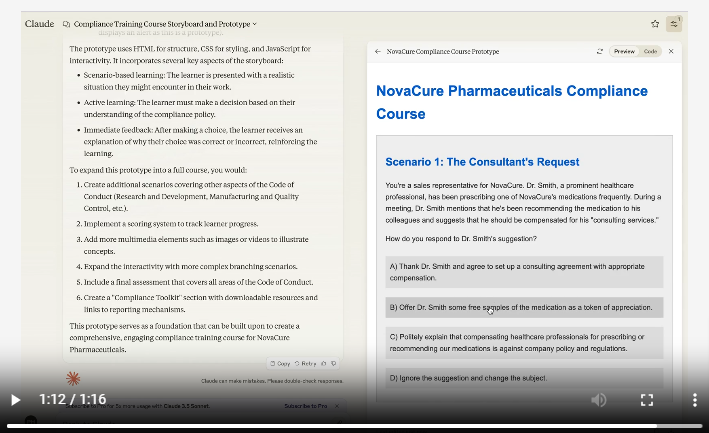
    How I Used AI to Turn a Document into a Course Storyboard & Prototype in <10 Mins

    Dr. Philippa Hardman shares an innovative approach using AI to transform a dense document into a comprehensive study guide. By leveraging AI tools, she streamlined the content organization, enhanced readability, and created interactive elements that engage learners effectively. This method not only saves time but also improves the overall learning experience by making complex information more accessible and manageable.

    🎯 Take away: AI can turn dry documents into engaging, user-friendly content, revolutionizing the way we approach learning design.


    How to Highlight Text for Clarity When Designing a Presentation

    In this video, Nolan Haims shares practical tips for highlighting key text in presentations. He demonstrates how minor copy edits and strategic re-arranging can effectively draw attention to important information, making your slides more impactful and focused.

    🎯 Take away: Learn these simple tips to make key text in presentations stand out through minor copy edits and re-arrangements.


    The Elegant Strategy To Overcome “Information Overload” (And How To Do It Almost Overnight)

    Struggling with information overload? The solution may lie in categorizing info into three buckets: knowledge, entertainment, and implementation. Focus on enjoying knowledge and entertainment without feeling the need to remember or act on everything. For implementation, prioritize small, actionable items to keep things manageable and productive. This simple strategy helps you stay relaxed and effectively handle the flood of information.

    🎯 Take away: Manage information overload by categorizing inputs and prioritizing actionable items.


    Do you want great leaders in your organization?

    The legendary American football coach Vince Lombardi once said, “Leaders aren’t born; they are made.” But how are they made? Find out how to leverage leadership training to grow great leaders!


    🧰 Tech Tools & Tips

    If tools are your jam, check out my new Work Smarter newsletter.

    Sender: Email Marketing Software

    Kickstart your email campaigns with Sender’s free plan offering 15,000 monthly emails. All the features, none of the cost!

    www.sender.net

    .

    PodSnacks

    Love podcasts but don’t have time to listen to them all? PodSnacks will send you summaries so you can keep up and dive into the ones that pique your interest.

    www.podsnacks.org


    Create interactive content in minutes without limits. Transform your content with AI-powered quizzes and tests – drive learning, engage audiences, and boost your L&D results.


    🎧 Podcast

    This is the conversation that caught my ear this week. Check out previous episodes in the Friday Finds podcast playlist.

    Organisational Learning Communities With Andy Lancaster

    In this episode, Andy Lancaster discusses learning communities and how we need to empower different types of learning communities. Learning communities share knowledge, spearhead practice, solve problems, seed innovation, and supercharge development.


    Inclusive By Design: Enhancing Accessibility in Elearning Environments

    Do you want to create learning experiences that embrace diversity and accessibility holistically?

    Then join the upcoming webinar with Jogen Paolo L. Atienza, an experienced Learning and Organizational Development Professional, Instructional Designer, and eLearning Developer. You’ll discover how to build an inclusive design strategy and transform your eLearning platforms into truly inclusive spaces.

    Here’s what Jogen will cover:

    • The differences between integration and inclusion in accessibility.
    • The best practices for designing accessible eLearning materials.
    • Inclusive design principles to enhance the user experience for all learners, and more.

    When: Thursday, July 25, at 11:00 AM ET.


    🧳 Where’s Mike?

    If you or your event needs a speaker or workshop that is highly interactive and super practical, we should talk.


    Like this post? Share it with someone you love. Don’t like it? Share it with someone you don’t!

    Friday Finds is an independent publication that I produce in my free time. You can support my work by sharing it with the world, booking an advertising spot, or buying me a coffee.

  • Friday Finds — Beautiful Documents, Memorable Images, Curation vs Creation

    Friday Finds — Beautiful Documents, Memorable Images, Curation vs Creation

    Sponsored by iSpring

    Sign up here to get Friday Finds in your inbox every Friday.

    “Even when we can’t become the best, we can still be a little better at the things that matter most to us. A little better is often enough.”

    — Scott H. Young

    I’ve been test-driving the Arc browser now that it’s available for Windows, and it’s been quite an experience! Two of its standout features are the Command Bar, which allows you to quickly navigate through tabs, bookmarks, and perform searches, making browsing faster and more efficient, and Spaces, which lets you organize your tabs into different workspaces, keeping your browsing organized and reducing clutter. It’s worth checking out if you’re looking for a fresh take on web browsing.

    Thanks for reading!


    🎶 What I’m Listening To

    This morning I’m enjoying some indie music with relatable lyrics by Claire Rosinkranz


    👆 Last Week’s Most Clicked

    Use This Framework for Fascinating & Memorable Presentations (Backed by Science)


    📰 News & Notes

    Creating beautiful documents in PowerPoint

    PowerPoint isn’t just for presentations! It can be a powerful tool for crafting visually engaging reports, proposals, tip sheets, handouts, and more. Combine clear, concise text with stunning visuals to get your message across effectively. Want to see how this can work? BrightCarbon shows you how and even includes how BrightSlide helps you set up easy-to-follow guides to maintain a professional look throughout your document.

    🎯 Take away: PowerPoint can be a great option for creating impactful reports, proposals, and other documents.


    7 Tips for Memorable and Easy-to-Understand Imagery

    Nielsen Norman Group offers advice on enhancing content comprehension and memorability through strategic visual use. Key tips include choosing relevant visuals, avoiding stock photos, displaying products in realistic contexts, placing visuals close to relevant text, using a limited number of high-resolution images, and considering cultural interpretations. Testing visuals for comprehension and memorability is also recommended.

    🎯 Take away: A few relevant, high-quality visuals placed next to associated text can boost users’ comprehension of your content and its memorability.


    Content Curation vs. Creation: Which Is Better for L&D?

    The article discusses the benefits of content curation versus creation in learning and development (L&D). While AI has made both easier, the human touch is crucial in deciding when to curate or create content. Content curation is generally faster and cheaper, ideal for common industry topics and rapidly changing fields. Creation is better for niche, advanced, or company-specific content. Effective curation involves organizing content into meaningful pathways and engaging learners with clear, relevant, and actionable information.

    🎯 Take away: Content curation often provides faster, cheaper, and more engaging learning solutions than content creation.


    Shop for your learning platform with confidence!

    Our series covers how to shop for, demo, purchase, and implement a new online learning platform – so you can make a sound decision for your organization.


    🧰 Tech Tools & Tips

    If tools are your jam, check out my new Work Smarter newsletter.

    Arc from The Browser Company

    Experience a calmer, more personal internet in this browser designed for you. Let go of the clicks, the clutter, the distractions.

    https://arc.net

    Download 10,000+ free illustrations to power up your designs

    Customize and download thousands of illustrations available in a dozen styles: Flat, Isometric, Monochromatic, and more.

    https://pixels.market


    Jotform Tables transforms your form data into a powerful workspace in seconds. With three new collaboration features, collecting, managing, and organizing your data has never been easier.


    🎧 Podcast

    This is the conversation that caught my ear this week. Check out previous episodes in the Friday Finds podcast playlist.

    Is positive psychology practical?

    If you’re thinking, isn’t positive psychology a bit ‘woo woo’, and a bit like forcing yourself to take a sunny outlook, then this episode is for you. As an approach to a happier, more balanced inner and outer life, positive psychology is not woo – it has a solid scientific foundation with practical methodologies.


    🧳 Where’s Mike?

    If you or your event needs a speaker or workshop that is highly interactive and super practical, we should talk.


    Crafting Your iSpring Portfolio

    Are you an instructional designer in search of new clients and better projects? Take a closer look at your portfolio — this is a crucial part of your pitch and a way to show potential clients and employers what you can offer.

    Join iSpring’s webinar, hosted by Holly Owens, to master the art of building a standout instructional design portfolio. In this hands-on workshop, Holly will delve into the powerful features of iSpring Suite, a leading eLearning tool, and explain how to leverage it to showcase your instructional design excellence to advance your ID career.


    Like this post? Share it with someone you love. Don’t like it? Share it with someone you don’t!

    Friday Finds is an independent publication that I produce in my free time. You can support my work by sharing it with the world, booking an advertising spot, or buying me a coffee.