In our digital age, we’re constantly bombarded with information. Articles, videos, podcasts, tweets – it’s a never-ending firehose of content. But how do we capture the good stuff and make it useful? That’s where online bookmarking tools come in, and trust me, they’re not just about saving links anymore.
Why Online Bookmarking Tools Rock
- Organize Like a Pro: Say goodbye to chaotic browser bookmarks. These tools let you tag, categorize, and structure your saved content in ways that make sense to you.
- Access Anywhere: Your bookmarks live in the cloud, so you can access them from any device, anywhere. No more “I’ll send that link to myself later” moments.
- Search and Discover: Powerful search features mean you can find that article you saved months ago in seconds. Plus, many tools offer discovery features to surface relevant content you might have forgotten about.
- Collaborate and Share: Knowledge sharing becomes a breeze. Create shared collections for your team or curate public lists on topics you’re passionate about.
- Capture More Than Links: Many modern tools let you save full-page content, add notes, and even highlight text within web pages.
Top Use Cases
- Research Projects: Gather and organize sources for your next big project or paper.
- Learning Pathways: Curate resources for personal learning journeys or create curriculum outlines.
- Content Curation: Build themed collections to share with your audience or team.
- Reading Lists: Never lose track of that “read it later” content again.
- Team Knowledge Bases: Create shared repositories of useful resources for your organization.
Now, let’s look at three standout bookmarking tools that can supercharge your PKM game:
Raindrop.io: The All-Rounder

Raindrop.io is my personal favorite, and for good reason. It offers a slick, user-friendly interface coupled with powerful features:
Strengths:
- Beautiful visual organization with customizable views
- Robust tagging system and nested collections
- Full-text search of your saved pages
- Web clipper for easy saving
- Collaborative features for team use
- Integrations with popular tools like Notion and Zapier
- Mobile app lets you save and manage your info from anywhere
Aboard.com: The Visual Thinker’s Dream
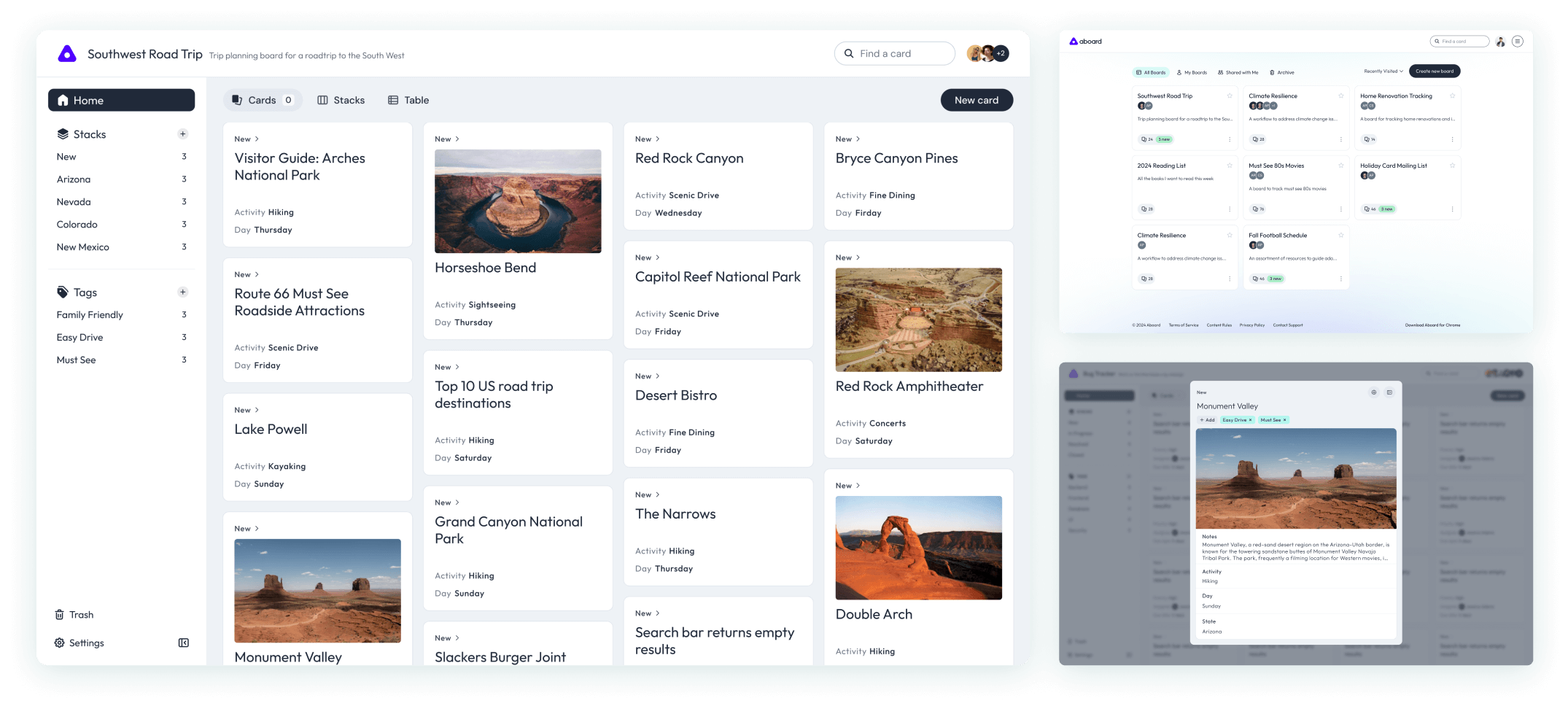
Aboard.com takes a unique approach, focusing on visual organization:
Strengths:
- Canvas-based interface for spatial organization
- Excellent for mind-mapping and connecting ideas
- Real-time collaboration features
- Supports various content types beyond just links
- Great for project planning and brainstorming sessions
- Web clipper for easy saving
- Mobile app lets you save and manage your info from anywhere
Bookmarkish.com: Simplicity Meets Social

Bookmarkish.com offers a straightforward approach with a social twist:
Strengths:
- Clean, no-frills interface
- Easy sharing and discovery of public bookmarks
- Simple tagging system
- Quick to set up and start using
- Good for those who want a more social bookmarking experience
Wrap Up
Online bookmarking tools have evolved far beyond simple link saving. They’re now powerful allies in our quest for effective knowledge management and sharing. Whether you’re a solo learner, content creator, or part of a team, there’s a tool out there that can help you wrangle the wealth of information at your fingertips.
My advice? Give one (or all) of these tools a spin. Start small, perhaps with a single project or learning goal, and see how it transforms your ability to capture, organize, and utilize information. Your future self will thank you for the well-organized treasure trove of knowledge you’re about to build!
Remember, the best tool is the one you’ll actually use. So find what fits your workflow and happy bookmarking, folks!
 Mike Taylor
One thought on “Curate Your Digital World: A Pro’s Guide to Smart Bookmarking”