In our digital age, we’re constantly bombarded with information. Articles, videos, podcasts, tweets – it’s a never-ending firehose of content. But how do we capture the good stuff and make it useful? That’s where online bookmarking tools come in, and trust me, they’re not just about saving links anymore.
Why Online Bookmarking Tools Rock
Organize Like a Pro: Say goodbye to chaotic browser bookmarks. These tools let you tag, categorize, and structure your saved content in ways that make sense to you.
Access Anywhere: Your bookmarks live in the cloud, so you can access them from any device, anywhere. No more “I’ll send that link to myself later” moments.
Search and Discover: Powerful search features mean you can find that article you saved months ago in seconds. Plus, many tools offer discovery features to surface relevant content you might have forgotten about.
Collaborate and Share: Knowledge sharing becomes a breeze. Create shared collections for your team or curate public lists on topics you’re passionate about.
Capture More Than Links: Many modern tools let you save full-page content, add notes, and even highlight text within web pages.
Top Use Cases
Research Projects: Gather and organize sources for your next big project or paper.
Learning Pathways: Curate resources for personal learning journeys or create curriculum outlines.
Content Curation: Build themed collections to share with your audience or team.
Reading Lists: Never lose track of that “read it later” content again.
Team Knowledge Bases: Create shared repositories of useful resources for your organization.
Now, let’s look at three standout bookmarking tools that can supercharge your PKM game:
Raindrop.io: The All-Rounder
Raindrop.io is my personal favorite, and for good reason. It offers a slick, user-friendly interface coupled with powerful features:
Strengths:
Beautiful visual organization with customizable views
Robust tagging system and nested collections
Full-text search of your saved pages
Web clipper for easy saving
Collaborative features for team use
Integrations with popular tools like Notion and Zapier
Mobile app lets you save and manage your info from anywhere
Online bookmarking tools have evolved far beyond simple link saving. They’re now powerful allies in our quest for effective knowledge management and sharing. Whether you’re a solo learner, content creator, or part of a team, there’s a tool out there that can help you wrangle the wealth of information at your fingertips.
My advice? Give one (or all) of these tools a spin. Start small, perhaps with a single project or learning goal, and see how it transforms your ability to capture, organize, and utilize information. Your future self will thank you for the well-organized treasure trove of knowledge you’re about to build!
Remember, the best tool is the one you’ll actually use. So find what fits your workflow and happy bookmarking, folks!
If you’ve ever wanted to start your own personal curation/PKM practice but weren’t sure how to get started, this post is just for you!
TL:DR Get my top 10 L&D sources by downloading this OPML file. Import it into an RSS reader like Feedly and BAM! you’re all set.
In the ever-evolving landscape of learning and development (L&D), the ability to curate a personalized learning journey is not just a luxury but a necessity. Harold Jarche’s Personal Knowledge Mastery (PKM) model brilliantly encapsulates this idea, emphasizing the continuous process of seeking, sensing, and sharing knowledge. It’s about creating a personal “knowledge flow,” a stream of valuable information tailored to your unique interests and professional needs.
Harold Jarche’s Personal Knowledge Mastery (PKM) model is a framework designed to help individuals take control of their professional development through continuous learning. The model comprises three core processes:
Seeking: This involves finding and gathering information and knowledge. It’s about staying updated with the latest trends, research, and insights in one’s field of interest or profession. This process emphasizes the importance of diversity in information sources to ensure a broad and comprehensive understanding of various topics.
Sensing: Once information is gathered, the sensing process involves making sense of it. This means reflecting on, analyzing, and synthesizing the information to derive meaningful insights. It often involves personal interpretation, connecting the dots between different pieces of information, and contextualizing knowledge to one’s own experiences or professional challenges.
Sharing: The final step is about sharing knowledge with others. This could be through blogs, social media, professional networks, or direct collaboration. Sharing not only helps others but also reinforces one’s own learning and establishes the individual as a contributor to the wider knowledge community.
Jarche’s PKM model is particularly relevant in today’s fast-paced digital world, where the ability to adapt, learn continuously, and leverage a network of information is crucial for professional growth and success.
Harold Jarche’s next PKM workshop starts in February
In this digital age, where information is abundant but often scattered, developing a personal curation practice is akin to building your own compass to navigate the vast ocean of knowledge.
Why Feedly?
To start your personal curation journey, it’s essential to have a tool that can help you streamline your information intake process. Feedly is an excellent option as it allows you to combine various sources of information into a single stream. It acts like a personalized digital library that provides real-time updates with the content you want and ONLY the content you want.
A free Feedly account can help you streamline your information intake process.
If you’re new to personal curation and want to make the most of your efforts, my best advice is to “curate the curators.” This means leveraging the work of others to increase the effectiveness and reach of your own curation practice.
For a great start, here are ten great people/sources you can follow. Over time, you can add more based on your personal interests and preferences.
Top 10 Recommended Sources for L&D Professionals
Ethan Mollick’s One Useful Thing Ethan Mollick’s Substack serves as a platform where he distills research into concise and practical advice or commentary. Each post is dedicated to “One Useful Thing,” offering bite-sized insights. The primary focus of this content is on Artificial Intelligence and its significant effects on the realms of work and education. https://www.oneusefulthing.org/
Dr. Philippa Hardman Dr. Philippa Hardman is renowned for her expertise in integrating technology (especially AI) with education. She offers insightful commentary and practical strategies, bridging the gap between academic research and real-world learning applications. https://drphilippahardman.substack.com/
The Learning Scientists Blog The Learning Scientists are a group of experts committed to making scientific research on learning more accessible. Their blog is a must-follow for evidence-based learning practices. https://www.learningscientists.org/blog/
Elearning Coach Connie Malamed’s site is dedicated to the field of e-learning and instructional design. It is a great resource for L&D professionals, providing insights, tips, and best practices for creating effective and engaging e-learning experiences. She is known for her practical approach, focusing on real-world applications and innovations in digital learning. https://elearningcoach.com
Learning Guild The Learning Guild is a hub for professionals in workplace learning and development, offering a rich mix of research, online events, conferences, and publications. I particularly appreciate the resources they share from their conferences. https://learningguild.com
WonderTools Jeremy Caplan’s newsletter provides a curated list of digital tools that can revolutionize how you approach learning and development. It’s all about discovering tools that make learning more engaging and efficient. https://wondertools.substack.com
Product Hunt This site is a great way to keep up with new apps, tools, and technologies that can enhance your L&D toolkit. https://www.producthunt.com/
BrightCarbon I love PowerPoint, and like many people, I use it frequently. When it comes to finding helpful information about PowerPoint, I highly recommend checking out BrightCarbon. They offer a free add-in called BrightSlide that you should definitely download if you haven’t already! https://brightcarbon.com
Deep Culture This weekly newsletter contains 10 interesting, useful and fun-to-read items. It’s perfect for those with curious minds who want a quick read. https://deepculture.substack.com/
Mike Taylor If you don’t already know, my site is dedicated to sharing insights, tips, and tools for effective learning design and technology integration in educational and corporate settings. https://mike-taylor.org
Your Curation Quick Start: The OPML File
To help you kick-start your personal curation practice, I’m giving you an exclusive OPML file. This file is a gateway to subscribing to my top 10 recommended sources quickly and easily. You can download the OPML file here and import it into Feedly to instantly follow all ten of these sources.
An OPML (Outline Processor Markup Language) file is a format used to exchange lists of web feeds between web feed aggregators.
Starting a personal curation practice in L&D is more than just staying informed; it’s about shaping your professional narrative and growth. With this L&D Curation Starter Pack and the power of Feedly, you’ll be well-equipped to navigate the dynamic world of L&D and more!
Happy curating!
P.S. - Share your favorite sources and experiences with personal curation in the comments below. I’d love to hear about the hidden gems you’ve discovered, whether it’s a book, podcast, or website. Your recommendations help others find new and exciting content. So, inspire others with your personal gems and share your insights in the comments.
Since I haven’t written a blog post in a while, I thought it was time to dust off the cobwebs. I wanted to answer one of the questions I get asked the most. In this post, I’ll share a bit about my curation process and how I choose the things I share in my weekly newsletter.
While that may sound like a lot and something that consumes massive amounts of time – it really isn’t. Not if you know some of the tools and strategies I’m about to share with you. The good news is that even if you’re not looking to publish a newsletter, these concepts can help anyone who would like to improve their own personal process for consuming content from the web more efficiently.
Seeking is finding things out and keeping up to date.
Sensing is how we personalize information and use it. (Including managing & organizing)
Sharing includes exchanging our resources, ideas, and experiences with others.
The most effective thing you can do to keep up with whatever you’re interested in is to make the process as efficient as possible. Obviously, most of us have jobs and other responsibilities that limit the amount of time we have to spend on keeping up. We never have as much time to spend on it as we’d like. Fortunately, with a good process you can do very well in whatever small windows of time you’re able to manage a few times a week.
There are 3 key steps you can take to significantly reduce the amount of time you need to spend on keeping up:
Don’t go looking for information–let it come to you.
Filter out as much noise as possible.
Consolidate the number of “inboxes” you use.
Information Delivery & Filtering
The first step is to change the way you consume information. Instead of going out and looking for stuff, having the stuff you want come to you is WAAAAYY better. The most efficient way to make that happen is to use an app like Feedly. (Inoreader is another good option.) This step alone is a big step in the right direction towards efficiency.
Note: I’m on a free account but it is a grandfathered version that is no longer available. The current free version will give you up to 100 sources and 3 boards. Which is plenty for most people just starting out. If you need more than that, it is absolutely worth the few dollars a month to upgrade to a paid plan.
Consolidate Your Inboxes
Think about how many different places you look for information. Most of us visit a fairly large number of places daily including: our email inboxes (work & personal), social media sites, Amazon, news sites, weather sites, financial information sites and I could go on. You get the idea.
Most of these sites have a feed you can subscribe to which eliminates the need for you to go visit all these sites individually. Instead, by subscribing to their feeds, you can create a personalized information consumption system and organize it any way you like.
RSS is the magic that enables us to consolidate so many information sources into a single “inbox” (Feedly). Whether the information you want comes from a blog, a news site, Twitter, YouTube, newsletters, Reddit, podcasts or just about anything else, you can follow them in Feedly. (You can learn more here: 11 types of sources you can add on Feedly)
Here is how it works with Feedly. (Other feed reading tools work similarly.)
Following a new source
Here is a short video showing how you can find and follow new sources. You can discover feeds right from within Feedly which is great when you’re first starting out. Or more commonly for me, just add a site that you already know.
Here is a short video showing how you can find and follow new sources. You can discover feeds right from within Feedly which is convenient when you’re first starting out. Or more commonly for me, just add a site that you already know.
For starters, I highly recommend using the Feedly browser extension. It makes following sources quick & easy.
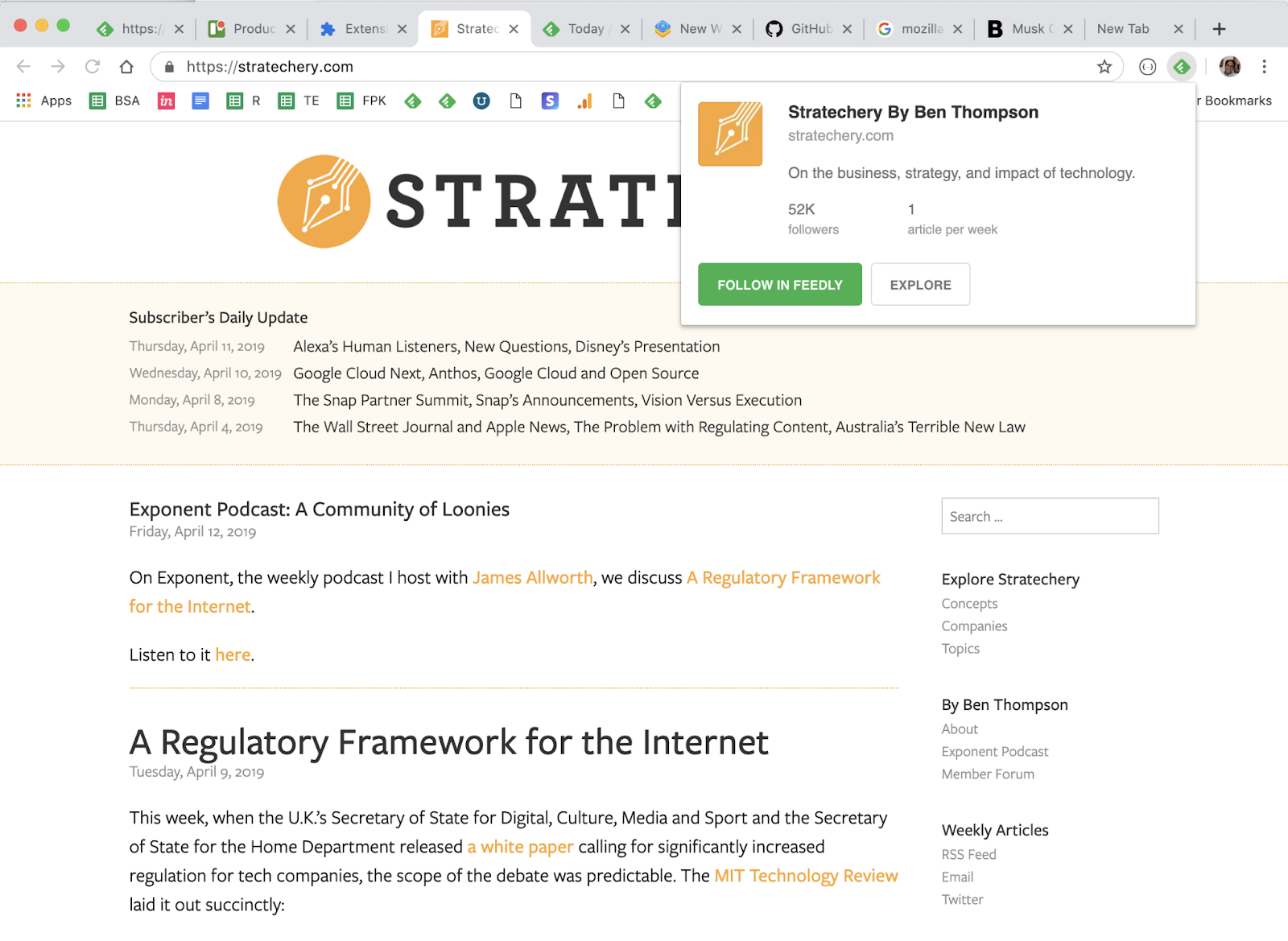
For the majority of sites the Feedly mini browser extension is all you need. Feedly Mini is a Chrome and Firefox extension. It automatically detects the RSS feed of the site/blog you are browsing and gives you the option to open it in Feedly, and add it to your feeds.
*Note that you can also save things to your Boards from anywhere with Feedly Mini. We’ll talk about those shortly.
Imagine that you are browsing the Web and you find a new source you want to follow in Feedly. When you click on the Feedly Mini icon, Feedly Mini will automatically discover the RSS feed for the page you are reading. It will show you a popup with information about that source. You can click on Follow in Feedly to preview the RSS in Feedly and add it to one of your feeds.
Sometimes you’ll run into a site that isn’t quite so “friendly” and the feed is hidden from the Feedly extension. This is where the RSS Subscription Extension comes in handy.
The RSS Subscription Extension auto-detects RSS feeds on the page you are reading and upon finding one will display an RSS icon in the Omnibox, allowing you to click on it to preview the feed content and subscribe. The extension comes with a few feed readers predefined (including Feedly) and it also allows you to add any web-based feed reader of your choice to the list.
If you ever find a site that neither of the extensions above can identify a feed or the site simply doesn’t have one, there are tools like Fetch RSS and others that let you generate a feed yourself that you can use to follow updates for that site.
Email Newsletters
The ability to subscribe to email newsletters and keep them out of my inbox is one of my favorite things to do with Feedly. This allows me to control when I want to read a newsletter and find it much easier than if it is in my inbox. Who doesn’t want to declutter their inbox, right?!?!
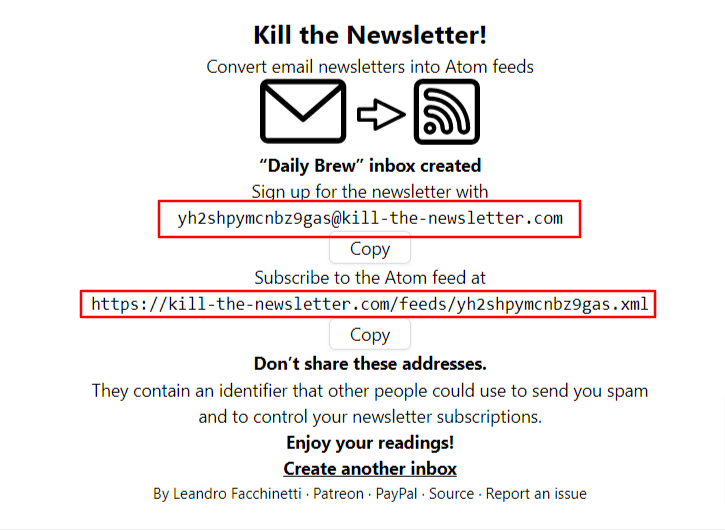
If you’re on the free version, don’t worry, you can still read your email newsletters in Feedly by using Kill the Newsletter. This site converts any email newsletter subscription into an RSS feed you can subscribe to in Feedly.
Instead of using your personal email address to subscribe to email newsletters, go to the Kill the Newsletter site and enter the name of the newsletter. This will generate a custom email to subscribe with along with the feed where all the newsletters will be sent.
Efficiency + Serendipity
This type of setup is very efficient. 90-something percent of the things I consume come through Feedly. But I also want to retain an element of serendipity. That is why I’ll occasionally dip into some of the “randomness” from places like Twitter and LinkedIn. Not everyone publishes to a blog or website and there are some super smart people who only share their knowledge via social media.
SIDE NOTE: Using Twitter Lists allows you to customize, organize and prioritize the Tweets you see in your timeline similar to how Feedly does that for everything else.
Discovering new stuff
I try to intentionally find content and avoid getting stuck in a ‘filter bubble’ by using some sites and tools to help me discover new things including:
Refind is a cool service that serves up 7 new links to you every day based on your interests. .
The Sample will pick a newsletter to deliver to you every day—sometimes related to your current interests, sometimes completely different. If you find one you like, it only takes one-click to subscribe. .
Deep Culture is a great weekly newsletter that gives you 20 interesting things in each issue.
Organizing & Prioritizing Your Feeds
Another great thing about Feedly is how it enables me to organize and prioritize all of my feeds. In essence I have organized all of my subscriptions in a way that prioritizes them into three categories:
A-List A small number of feeds that I want to see every day. These are my favorites and the best of the best.
B-List A larger number of feeds that I read if I have a bit of extra time. I probably get to these 2-3 times a week.
Everything Else These are the “nice to have” feeds. Maybe they are just for fun, or maybe there are a few random things to add that sense of serendipity I mentioned earlier. I read these whenever I get to them. Maybe on a weekend or sometimes never and that’s ok.
So now that you know how I keep up with things, the next step is keeping track of the good stuff so I can find it later. For the newsletter, I use a Feedly board to save the collection of things I’m considering each week.
Boards are like libraries of high-value content. When you find something that’s valuable, save it to a Board for future reference. You can create multiple boards to collect related items you want to save. Sort of like your browser bookmarks.
I also save things for other purposes like projects, workshops, research, conference sessions, etc using Bublup and Walling.App. There are tons of options for saving links, notes, etc. Way too many to cover here. I feel like I’ve tried almost all of them, so if you have any questions feel free to send them my way.
An important part of curating things for a newsletter or any other purpose is to provide some context about why it is important and how it relates to the people in your audience. For my newsletter, that happens as part of writing the content in a Google Doc that I’ll touch on in more in the section below.
For some people, this last step is the one that may be the hardest – myself included. Once upon a time, I had a thought in my head that went something like this: “I don’t know anything special…why would anyone want to see what I say/share?” And that is exactly NOT the point. The thing that changed the game for me was when I realized that the things I find valuable may also be valuable to others. So if you find something that helps you, share it so it might help others.
As long as you’re learning, you’ll always have valuable things to share no matter who you are.
Depending on what you want to share and who you want to share it with, sharing can literally happen with the click of a button. so time should not be an issue. With tools like Buffer and others, you can click a button to quickly queue up a post that includes the url and title from the site you want to share. It will often serve up an image you can include along with an opportunity for you to add a note on why you think it is valuable. Quick, easy – done! It doesn’t need to be anything more than that.
Some forms of sharing may require long-form options such as creating blog posts, videos, etc. This obviously takes more time and commitment than simply sharing links but it is also an opportunity to add more value and infuse more of your personal thoughts and knowledge.
There are too many options for sharing to list and new ones cropping up every day. I can tell you from experience that sharing what you learn is a valuable thing to do. It has given me opportunities that I could never have imagined were even possible.
Not only are you helping others when you share. You’re also helping yourself by building your visibility and the credibility of being a professional. Simply sharing one thing per week on LInkedIn can raise your visibility and potential opportunities. For example, people who share content on LinkedIn at least once a week are nearly 10 times more likely to be contacted for new opportunities than people who don’t share. (1)
Putting the Newsletter Together
Usually sometime on Wednesday or Thursday I’ll start pulling together the contents of the newsletter using the items I’ve saved to my Newsletter board in Feedly. There are almost always more than enough items so it is just a matter of selecting the best ones. The newsletter recipe I use is five articles, 3 podcasts and 5 new tools with a playlist of the music I’m listening to while I work.
Some people may wonder how the heck music got into a newsletter about learning, design and technology and it is an interesting story. As a reader of many newsletters, I’m always on the lookout for good ideas for mine and the “What I’m Listening To” idea comes from Tim Ferris’ “5-Bullet Friday” newsletter. I thought it was neat and tried it out…then not long after that I thought it was a bit silly and was going to take it out. Before I did, I took a peek at the statistics and was surprised to learn that the music list is consistently among the most clicked links in the newsletter. So the music lives on!
Anyway, I have a Google Doc template that I use to create posts for my website which runs on WordPress. For a long time, I used a plugin that would publish this Google Doc directly to WordPress as a new post. But that has stopped working and until I find a replacement, I just do a simple Copy/Paste into a new post.
During the week prior, I save the best things I find to my newsletter board in Feedly. Then when it is time to assemble the newsletter, all I have to do is browse the small number of candidates from the current week and pick the best. It usually takes me about 30 minutes to pull everything together into a post.
When I started sending out my newsletter back in 2015, I simply posted it to my WordPress website. Shortly after that I connected it up via RSS with a free Mailchimp account. This is easy to set up and automated once it is up and running. Mailchimp looks at my website every morning at 8am and if it finds any new posts, sends them out to my email subscribers.
Tips to Help You Get Started
If this sounds like something you’d like to try (I think everyone should!) here are a few helpful tips to give you a head start:
Signup for Feedly and follow your ‘must see’ sources. This could be your favorite authors, top experts in your field, a professional/industry organization, or anything else that always want to see. You don’t need a lot. Think quality over quantity. Even just five really good ones is a nice start.
Curate the curators If you want a bigger bang for the buck, follow really good curators. They’re already covering a lot of ground, which means you’re also covering a lot.
Strive for 25 If you can smartly select 25 good sources on any topic, you’ll be far ahead of most people with similar interests.
Use browser extensions and mobile apps Looking for ways to be ruthlessly efficient and tapping into your windows of opportunity (like waiting in line, riding the bus, etc.) can have a big impact.
Block time on your calendar Make it a habit. Trust me. Even if you can only spare 10 minutes a day, it is an investment that you’ll reap great returns on.
Share what you learn When you find something helpful, pass it along to your network with a note about how it helped. You’ll be surprise how valuable this can be.
Whether you’re just starting to think about your own process or looking to improve what you’re already doing, I’m happy to help in any way I can. Please feel free to send me any questions or comments you have.
Whew! That was a lot more than I thought it would be when I started it. Thanks for sticking with me all the way to the end.
What do you think? Do you do any of this? Do you have any better ideas or things that work better for you? What tips can you share? What questions do you have?
“A walk about Paris will provide lessons in history, beauty, and in the point of Life.” – Thomas Jefferson.
We took several long, hot walks exploring Paris this week. The views were fabulous, the lessons were plentiful and I’m grateful for the opportunity to share them with my family. (I’m also grateful we’re back home to a place that has air conditioning.) Here are a few of the things I found this week in the world of learning, design, and technology! J’espère que tu passeras un bon weekend!
Keeping Up With Cardiology: Old-School Learning Versus the Twittersphere
“there’s an old saying that 50% of what they teach you in medical school is wrong. The problem is you don’t know which 50%.”
This article by Yael L. Maxwell (@TCTMD_Yael) is about cardiologists, but the lessons apply to us all. As we proceed through our careers “we should expect that things should be challenged and updated throughout our lifetime, and we have to be open to all different avenues. Critical thinking is more important now than ever before.”
This post by Tanmay Vora (@tnvora) reminds me that you don’t have to be a genius to share what you learn. Just be yourself and share anything you discover, experience, read or anything else that worked for you or those around you. There is probably someone out there it can help. And by helping them, you’re helping yourself.
How to Publish Regularly, Even If You Lack Writing Confidence
This article by Sonia Simone (@soniasimone) on @Copyblogger is another one that resonates with me and is a lesson that I had to learn myself. Whatever your reasons for not being comfortable with it, just do it. Click that Publish button — even if you’re not a “great writer” yet. If nothing else, you owe it to yourself to hear what Ira Glass has to say about it. It is one of my favorite things in the world.
This short piece by Phillip VanDusen (@philipvandusen) is totally spot on. The secret is founded on learning and assuming that one day you’ll be laid off. Well worth a few minutes of your time and I’ll bet you can think of at least one other person who could benefit from seeing this as well. Why not share it with them?
If you want to add a nice touch to your next project, grab this free PowerPoint animated text template from PowerPoint School (@pptschool). (The download link is just below the video in the comments area.)
Another virtual conference worth checking out it the Uppercase Conference by MissingLettr (@missinglettr), with more than 100 speakers over 2 weeks, there is something for just about everyone.
Looking for your next conference? I’ve added some new events recently to my global collection of L&D events.
Zave – I’m checking this out as a potential replacement for my current curation tool, Zeef. They say Zave is a “…place to save the web in private or with the world.”
Loom – Coming back to this one again to try it out as a better workflow for creating and sending videos.
I enjoy sharing my ideas and experience with corporate professionals via workshops, keynote presentations, podcasts, and webinars. Learn more in mySpeaking and Workshop Information Sheet.
“There are two powers in the world; one is the sword and the other is the pen. There is a great competition and rivalry between the two. There is a third power stronger than both, that of the women.” —Muhammad Ali Jinnah
In honor of this week’s International Women’s Day, this week I’ve got a totally awesome all-star line-up of great stuff from some amazing rock star women for you.
How to design software training (part 1): Do everything except “train”
Cathy Moore (@catmoore) takes a look at good training design for new software and the right balance between help screens, job aids, and training. In short, her answer is “Try everything but training.” Hop on over and check it out.
Have you ever felt like a total slacker because you’re not working on mobile gamified Augmented Reality microlearning projects? Fortunately, your success has much less to do with trends or tools than you think. One of the things separating the best learning pros from everyone else is knowing when not to build a course. (Hint: Training is pretty low on the performance improvement checklist.)
Do you #lrnchat? #lrnchat is an online Twitter chat that goes down Thursdays from 8:30-9:30pm ET Last night was a particularly rich session about managing information (digital and otherwise) including a lot of good tips and tool suggestions. You’ll be hard-pressed to not find something worthwhile from this one.
This one could get quite large and is ever evolving but here are a few of the places that I frequently find myself. YouTube, Wikipedia, blogs from people in my PLN (see the news & curation section below), and Stitcher for listening to podcasts and other audio resources.
I haven’t spent much time on any web course platforms but I’ve found some real gems on Lynda.com (aka LinkedIn Learning). I get free access via our totally amazing local library. Check with yours to see if you can too.
Social Networks
Twitter is the social network that regularly gives me the most value. LinkedIn is the other one that I am active on and you should be too. (LinkedIn is often one of the highest search results for most people. So if you haven’t polished up your profile it is well worth investing some time to do that now.)
Personal Information System/Blogging & Website Tools
For me, these two categories have merged together. My website, run with WordPress, is the hub for my personal information. I keep notes and write blog posts in Google Docs. Other personal information sources you’ll find here include slide decks and documents hosted on Slideshare and resources curated on Zeef.
Smart Device
I use my older model iPhone to capture ideas and drop in on what’s happening while I’m on the go. I do a lot of my reading on my iPad.
Productivity Tools & Apps
This is another large and ever evolving category. In addition to the Google Suite, a few of my current favorites include Grammarly, Buffer, and Sortd.
Lots of things to fit in this one. As I mentioned, the collaboration features of Google Docs can be a huge time-saver. I do a lot of file sharing with Dropbox and Box.com. Conversations happen on Skype and Slack with meetups via Google Hangouts, YouTube Live, Zoom and others.
As Thanksgiving approaches here in the US, I hope you’ll join me in appreciating the many things we have to be grateful for. There was such a cornucopia of great things to share this week it was a tough job deciding which ones to include. Except for this first one. That’s a no-brainer…and by far the thing I’m most grateful for every day of the year!
What’s the organizing principle of today’s digital workplace?
Community expert Rachel Happe (@RachelHappe)shared this article by Dion Hinchcliffe (@dhinchcliffe) which is a nice way of thinking about how to organize the digital workplace and manage digital transformation.
Motion pictures, radio, television, computers and more. Over the years, many technologies have promised to revolutionize education, but so far none of them have been able to do it. This video by Derek Muller (@veritasium) is a brief exploration into what could revolutionize education?
When it comes to learning, it’s not the technology but how you use it that matters most.
The third in a series by Good Practice, this report aims to answer key questions about managers perceptions of learning technologies. Check it out to gain some insights into what managers think of mobile learning, their openness to various mediums and more. For an even deeper dive, join the conversation via the #gpwrmt hashtag.
When Dropbox and Google Drive retired they web hosting services, a lot of e-learning pros were scrambling to find a cost-effective way to share their e-learning courses with others. This week I kicked the tires on a free (or low-cost) option that may be new to many of you – Google Cloud Platform. Check out this post to walk through the entire process – from creating an account to uploading and sharing your files and e-learning courses. (Don’t worry. It is really easy!)
Lead by Martin Couzins (@martincouzins), Sukh Pabial (@sukhpabial) and Debbie Carter (LinkedIn), this community of learning professionals, comes together to grow the capabilities, thinking & development of the profession every Friday 8am GMT. You can also plugin via the LD Insight LinkedIn group
While it has gained a lot of attention in recent years, curation has always been an important part of an effective learning and development practitioners toolkit. If you think about it, aren’t courses just another form of searching, organizing, and sharing information?
Good instructional designers, trainers, teachers, facilitators, and public speakers are curators by nature. Personally, it seems there is always more valuable resources on a topic than I can ever present in a given time frame without overwhelming the audience.
That’s why for a long time now, I’ve turned to social bookmarking for saving, organizing and sharing the “extra” resources. Yes, there are a plethora of ways you can do this and here are a few of the criteria that I use when choosing from among the sea of options.
1. Publish and point
Over time you find more, better resources. How can you make those available to the cohort you trained last year or even yesterday? Ideally, you’ve given them one place they can follow to stay up on changes to your resources. I often use the phrase “publish and point” for the idea of maintaining a single, up-to-date location for housing links, resources, and additional supporting materials.
This can be done with simple tools like a Google Doc, Evernote, OneNote, etc. etc. Just share the link and when you update the resources that link never changes — therefore ‘publish and point’.
2. Make it easy to follow
While simple options like a Google Doc meet the ‘publish and point’ criteria, they place the burden on your audience because they don’t have any way of knowing when updates are made without periodically remembering to go back and manually check it. While the knowledge your sharing is valuable it will quickly be forgotten.
Fortunately, there are more ‘social’ options that address this challenge. Social bookmarking tools like Diigo, Pinterest and others allow your audience to follow the topics they’re most interested in and get notifications of new additions without requiring them to remember anything. (You can supercharge this idea by plugging these into an RSS reader like Feedly.)
For example, if you want to keep an eye on the things I’m finding about elearning, you can easily follow everything I apply the #elearning tag to in my Diigo account. (Plug it into your RSS reader and voila! Instant notifications delivered directly to you.)
If you have a lot of additional resources like I do, people can discover other, related resources by browsing the tags associated with each resource. In this case, you might branch off into the #Storyline tag from something in the #elearning resources.
3. Tap the wisdom the crowd
If you’ve ever done any teaching or training you probably know what a rich resource of learning the people in your classes and audiences are. I don’t think I’ve ever taught anything where I haven’t learned something new myself. To that end, there is a huge benefit from other people being able to contribute to your collection. And it is even better if they have the option to do it anonymously.
This video from Kevin Jones is one of the best I’ve ever found that illustrates the idea of including others so everyone can save time and work smarter!
If you’ve given open editing access to people in a Google Doc, anyone can add to it. The counterpoint to this type of open access is it could potentially devolve into chaos if your contributors are not quite as thoughtful of their contributions as you’d like.
Zeef for the win!
I’ve been curating things for a loooong time. Way back in the dark ages it began with a combination of email and a Lotus Notes database. Since then, I’ve been on a quest for a really good way to handle the management of links and resources around a particular topic. Over the course of the past couple years, I’ve come to really love the approach that Zeef has taken. It meets my big three criteria discussed above and then some.
Let me start off our tour of Zeef with how it handles my top 3 requirements:
Publish and point
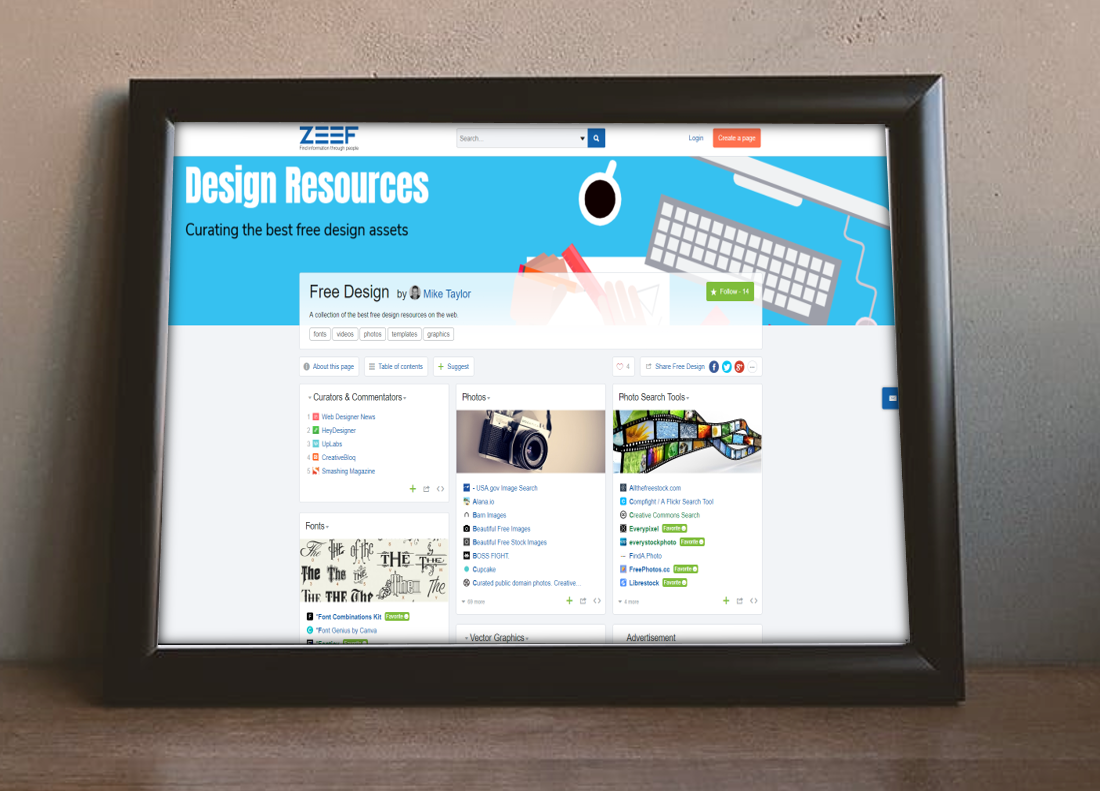
This is the easiest bar to clear and Zeef does this really well. When you create a page you’ll get a URL that looks something like yourtopic.zeef.com. The thing I like best about how Zeef presents the links is the ability to organize likes into subtopics. (Zeef calls them blocks.) You can also add descriptions and image headers for each block. Compare the display of this Zeef page to a similar collection of Diigo bookmarks.
Easy to follow
All Zeef pages have a Follow button that will let you get an email notification anytime new items are added to the page. No need to make any wasted visits looking for new stuff! Here’s what a notification looks like in your inbox.
The wisdom of the crowd
Similar to the follow button, every Zeef page also has a Suggest button that allows anyone to make contributions to your pages. A nice thing about this is that they can submit thinks anonymously if they like. It also helps out by automatically pulling in a title and description of the link and lets contributors indicate which block it fits with or if it should be in a new block of its own (optional).
Pretty nice, right!? Well, there are still more Zeef features any curator would love. Let’s check them out…
Highlights new links: If you only want the newest additions look for the links in green. Those are the most recently added ones.
Avoiding link rot: One of the challenges with curated collections is that over time some of your resources vanish from the web leaving you with dead links. Zeef keeps an eye on your links and notifies you if any of them go bad.On your page look for any links that have turned red.
Responsive Design: Zeef pages are built with a responsive design making them easy to use on smartphones and other mobile devices.
Easy sharing options: You’ll find built-in social media sharing buttons on every page.
Contact Information: Gives you the ability to include your own contact info and social media accounts
Embed blocks: Want to post your resources on your website or intranet page? Use the embed code and whenever your Zeef page is udated, so is the site where you embedded your block.
Analytics: There are some basic analytics that can give you some useful insights like where your page visitors are coming from, what links they are clicking on, etc.
If you’re a trainer, teacher, facilitator, speaker or anyone else who ever needs to share links and resources you’ve likely give this some thought. I’m always super curious to hear what is working for others. Are you doing anything like this? Do you have similar criteria or others? What are you using and how it is working?
It’s my favorite time of year again. School is back in session, the summer heat is giving way to comfortably cool evenings and it’s time to make my annual contribution to Jane Hart’s Annual Learning Tools survey.
1. Feedly
[ Personal, Workplace ]
Simply the best way to keep up with the things you’re interested in. Feedly lets you track updates from your favorite blogs, websites and a whole host of other sources in a single interface. Organize everything into folders, flag items to read later, tag them for easy retrieval and share the best on social media.
In the right hands, PowerPoint is an amazingly powerful and super flexible tool. I’ve used PowerPoint to create everything from presentations, videos, eLearning, graphics and workbooks to software simulations, marketing materials, and even t-shirts!
I’ve even setup a WordPress site to run an online social learning course, Learn Camp, which has attracted participants from around the world.
4. Google Suite (Docs, Sheets, Forms, etc)
[ Personal, Workplace ]
Why do people still insist upon the painful and unnecessary process of emailing file attachments around to others for collaboration? Really! I’d love to know. Working with others is so much easier and more efficient when you all work in the same document. The collaboration and co-editing features alone should make the Google apps part of your toolkit. (Or any other similar alternative.) And I agree that Google Forms might be the most underrated tool of the whole set.
This is an email marketing tool that you should definitely steal. From communications campaigns and hands-off subscription management to autoresponders and email courses, you’ll find how easy MailChimp can make you look like a rock star! Use if for pre- and post- event content and followup or as a stand alone “course” option.
This is my absolute all-time favorite way to curate the best resources around a topic. Zeef lets you organize items similar to other bookmarking tools like Diigo, Pinterest, etc. Where Zeef excels is with the ability for people to interact and stay connected to what you’re sharing.
For example:
By following you’ll get a notification whenever new items are added.
Anyone can make suggestions for adding other items
This is a relatively new one for me and I’ve been totally loving it. If you do any kind of speaking, presenting or training where you provide followup resources, you owe it to yourself to check out TalkBook. TalkBook automates the distribution of your contact info, slides, handouts, links, resources, etc. Also, you’ll have to option of collecting feedback and comments from your audience via the web on their smartphone.
Everyone needs graphics, but not everyone is a graphic designer. Canva is a dead simple solution. Anyone can make pro graphics with Canva — even the most design-challenged among us.
The democratization of multimedia creation tools is steaming full speed ahead. Biteable is one of the latest examples of free, online tools that lets anyone create “pro” videos quickly and easily. Choose from hundreds of animated, live action or photo scenes in lots of different styles, or try one of their stylish, pre-made templates and you’re off to the races.
Similar to Canva, Crello is a great another option for anyone who wants an easy way to create their own eye-catching graphics. Even the most design-challenged among us can easily create great looking graphics by simply selecting a template and filling in the blanks.
Google’s Digital Garage
Upgrade your digital skills with Google’s Digital Garage. You’ll find free tutorials on everything from your website to online marketing and beyond. Just pick the topics you want to learn or complete the whole online course for a certification from Google and IAB Europe.
Would you like to find a better, more efficient way to keep up with all the stuff that is important to you? I’m a big fan of Feedly because it puts me in control of what I read and when I want to read it. I’ve shared how Feedly fits into my own personal information flow, but don’t just take my word for it. Here is Matt Guyan sharing his thoughts as he is getting started with Feedly.


















 On your page look for any links that have turned red.






You must be logged in to post a comment.