Tag: curation

  • The LinkedIn Feature Nobody Tells You About: How to Build a Feed of Only the People Worth Your Attention

    The LinkedIn Feature Nobody Tells You About: How to Build a Feed of Only the People Worth Your Attention

    You open LinkedIn, looking for one person’s take on one topic. Twenty minutes later, you’ve read four unrelated hot takes, a humble-brag about a promotion, and an AI-generated poem about “leadership.” The person you actually wanted to hear from? Buried three scrolls back, if you find them at all.

    That’s not an accident. It’s not even really a feed — it’s a guess, made fresh every time you open the app, about what will keep you scrolling the longest. Sometimes that guess overlaps with what you actually wanted to read. Often it doesn’t.

    Here’s the fix, and it’s been sitting inside LinkedIn’s search bar the whole time.

    What we’re actually building

    A feed made of only the people you chose — bookmarked, one click away, refreshed every time you open it. It’s not an official LinkedIn feature; there’s no button that says “Save My Custom Feed.” What you’re doing is building a very specific search, then bookmarking the URL it produces. LinkedIn doesn’t advertise this, but it works, and once it’s set up, it feels like cheating.

    The real reason this is worth five minutes

    Your feed is optimized to grab the fast, reactive part of your brain — the part that reacts to a bold claim or a hot take before you’ve decided whether it’s worth your time. That’s useful for the platform. It’s not useful for you.

    A curated feed flips who’s in charge of that decision. Instead of your attention getting grabbed post by post, you decide up front, once, whose thinking is worth more of your time. Then the feed just… does that. Every time. That’s a small decision that keeps paying off — less noise, more signal, and twenty minutes back that used to disappear into the scroll.

    How to build it

    You’ll need two things: a list of names and about five minutes.

    Step 1: Open a search.
    Click into the LinkedIn search bar at the top of the page and hit enter without typing anything — or type a + and hit enter. Either tells LinkedIn: don’t filter by keyword, just give me a raw search I can build on.

    Step 2: Filter to Posts.
    You’ll land on a results page with tabs across the top — People, Jobs, Companies, and so on. Click Posts. Without this, you’ll get a mix of profiles and posts, and the feed you’re building needs to be posts only.

    Step 3: Change the sort to Latest.
    By default, LinkedIn sorts by “Top Match” — the algorithm making judgment calls again. Switch it to Latest so you’re seeing things in the order they were posted, not the order LinkedIn thinks you’ll like.

    Step 4: Add your people.
    Open All Filters and look for From Member (sometimes labeled “Posted by”). Start typing a name and select the right match — LinkedIn will often show several people with the same name, so check the photo or headline before you click. Repeat for everyone you want in the feed. There’s no cap most people will ever hit.

    Step 5: Bookmark the result.
    Once your filters are set, you’ll see your custom feed. Bookmark that exact URL. That bookmark is now a live, standing search — click it any time, and LinkedIn re-runs it fresh, pulling in new posts from your list automatically.

    That’s it. Five minutes, and LinkedIn is now working for you instead of the other way around.

    What to know before you rely on it

    A workaround has edges. This one lives in a bookmarked URL, not an account setting, so two things follow. First: it can break if LinkedIn changes how its search URLs are structured, which platforms do periodically — you’ll know because the bookmark dumps you on an error page or a blank results screen instead of quietly failing. Don’t panic, just rebuild the search; same five minutes it took the first time. Second: adding someone new means updating that URL yourself — right-click the bookmark, choose Edit, paste in the refreshed link, or just rebuild the whole filter from scratch once your list has grown enough to be worth it.

    Make it work harder

    Build more than one of these. A feed of five industry voices you trust. A separate one for people talking specifically about your niche topic. A third for competitors or peers you want to keep half an eye on — each is its own bookmark, and none of them cost you more than the five minutes it took to build the first.

    You can also pair a feed with a keyword instead of the blank search: start with a topic — “instructional design,” in quotes for an exact match — then layer the From Member filters on top. Now you’re seeing only your chosen people, talking about only the topic you actually care about.

    Check it on a schedule, not a compulsion. The whole point here is breaking the scroll habit, not building it a new home. Once a day, on purpose, beats the general feed on autopilot.

    The bigger point

    This is a small hack standing in for a bigger habit: deciding, on purpose, what gets your attention instead of letting a feed decide for you. LinkedIn happens to be where this particular trick lives right now. The instinct behind it — curate before you consume — is the same one worth applying everywhere your attention is for sale. Twenty minutes back, every time you open the app, adds up faster than you’d think.

  • Stop Creating Content From Scratch: The L&D Strategy That Marketing Has Perfected

    Stop Creating Content From Scratch: The L&D Strategy That Marketing Has Perfected

    Your employees waste nearly 10 hours every week hunting for information they need to do their jobs. (1) That’s more than a full workday spent searching instead of performing.

    But here’s the counterintuitive truth: The problem isn’t too little content. It’s too much.

    While L&D teams scramble to create more content, smart organizations have discovered a different path. They’ve stopped building everything from scratch. Instead, they’re mastering content curation—the strategic art of finding, filtering, and delivering exactly what learners need, exactly when they need it.

    And they’re stealing proven strategies from an unexpected source: marketing teams who solved this problem years ago.

    The Marketing Blueprint L&D Should Copy

    Content marketers cracked the curation code long before L&D recognized the challenge. They learned to navigate information abundance, engage distracted audiences, and drive behavior change through strategic content selection rather than endless creation.

    Their secret? Understanding that curation isn’t about collecting links—it’s about becoming the trusted filter that transforms noise into signal.

    Bersin by Deloitte captured this perfectly: content curation is “the art/science of identifying the best information for the organization and providing context and order to it.” But marketing teams operationalized this definition through systematic processes that L&D can adapt immediately.

    The CURATED Model: Your Systematic Framework

    Every great learning professional already has the soul of a curator. When you design courses, you’re sifting through information, selecting the best pieces, and serving them in digestible formats. That’s curation—you’ve been doing it without realizing it.

    The challenge lies in making this process systematic and scalable. That’s where the CURATED model provides your roadmap to curation mastery:

    • C – Clarify learning objectives based on needs assessments and goals
    • U – Unearth relevant content via research, recommendations & user-generated sources
    • R – Review and refine content for relevance, accuracy, engagement & diversity
    • A – Arrange content systematically into logical categories, sequences & integrations
    • T – Transform the presentation for the delivery platform & optimize user experience
    • E – Engage learners through interactivity, feedback loops & social learning
    • D – Develop & deliver curated content while incorporating ongoing reviews & feedback

    This model takes the guesswork out of curation while incorporating the best practices that marketing teams have perfected. The framework is flexible enough to work for any content type—articles, videos, podcasts, interactive tools—while ensuring you create customized learning experiences that meet genuine learner needs.

    Marketing Connection: Notice how this mirrors marketing’s audience-first approach. Just as marketers start with buyer personas and customer journey mapping (Clarify), then source content strategically (Unearth), L&D professionals can apply the same systematic thinking to learning outcomes.

    The contextualization step distinguishes professional curators from content collectors. As Robin Good explains:

    “In times of information super-abundance, people look for trusted, expert guides who provide ‘intellectual binoculars.’”

    You’re not just finding content—you’re serving as that trusted guide who helps learners understand why specific information matters, how it applies to their work, and what they should do next.

    Marketing teams excel at this through editorial calendars that map content themes to audience needs throughout the year. L&D can steal this approach by creating “learning calendars” that align curated content with business cycles, product launches, and seasonal skill demands—perfectly supporting the Transform and Engage steps of the CURATED model.

    Why Curation Outperforms Creation

    Smart L&D teams have discovered what marketing proved years ago: strategic curation beats content creation across every metric that matters.

    Speed Advantage in Fast-Moving Markets

    Content creation requires months. Curation requires days.

    This speed difference becomes critical when expertise exists outside your organization. New technologies, regulatory changes, emerging methodologies—external experts often know more than your internal team. Curation lets you access that expertise immediately rather than waiting for lengthy development cycles.

    Learning Cafe’s research confirms this advantage: 38% of L&D professionals report that curation delivers high-quality content significantly faster than traditional development.

    Marketing teams measure “time-to-publish” as a core metric, often achieving dramatically faster deployment through curation versus creation. L&D teams can adopt similar velocity tracking to demonstrate speed-to-competency improvements.

    Engagement Through Diversity

    Curated content naturally incorporates multiple perspectives, formats, and teaching approaches that single-source materials can’t match.

    Industry leader videos. Research-backed articles. Practitioner podcasts. Interactive tools from innovative companies. This variety creates richer learning experiences while exposing learners to external best practices your organization might miss.

    Marketing teams master this multi-format approach because they understand audience engagement increases when content flows through varied channels and formats. They’ve perfected repurposing strategies that L&D should adopt immediately.

    Personalization That Scales

    Unlike generic off-the-shelf content, curation enables personalized learning pathways addressing specific challenges and goals.

    Filtered’s research reveals compelling learner preferences: in 92% of cases, reviewers preferred structured pathways over simply relevant content.

    People want thoughtfully curated experiences, not random resource collections.

    This preference creates opportunity. Learning Cafe’s survey found that organizations implementing content curation report 42% of benefits come from driving continuous learning behaviors—fundamentally shifting from episodic training events to embedded learning culture.

    Transform L&D Into Internal Marketing

    The most successful L&D teams recognize a fundamental truth: they’re internal marketers who must “sell” learning to busy employees competing for attention across multiple priorities.

    Learning Cafe’s survey of 100+ L&D professionals reveals this transformation’s scope:

    81% have adopted content curation as part of their learning strategy, while 78% believe L&D should develop curation as a core professional skill.

    Think Audience-First, Not Content-First

    Marketing’s greatest lesson for L&D is audience obsession. Top content marketers develop detailed buyer personas including pain points, preferred formats, and consumption behaviors.

    L&D professionals should create equally detailed “learner personas”—but most stop at job titles and skill gaps. Effective learner personas map:

    • Consumption patterns: When, where, and how they prefer learning
    • Workplace challenges: Specific problems they need to solve
    • Motivation triggers: What drives them to engage with content
    • Format preferences: Visual, audio, text, interactive, or mixed media
    • Application context: How they’ll use new knowledge in their roles

    Case Example: Instead of creating generic “sales manager” content, develop personas like “Remote Sales Manager Sarah”—manages distributed team, prefers 10-minute video updates during commute, struggles with virtual team motivation, needs immediately applicable techniques for next team call.

    Master Agile Response to Learning Needs

    Business environments demand employees who adapt quickly. Traditional development cycles can’t keep pace.

    Marketing teams excel at rapid content response to trending topics and audience needs. Their ability to quickly identify, curate, and distribute relevant content during critical moments provides L&D’s blueprint for just-in-time learning support.

    L&D professionals must become skilled information architects who filter signal from noise.

    Scale Through Employee Curator Networks

    Rather than centralizing all curation responsibility, successful L&D teams train subject matter experts (SMEs) throughout the organization to become content curators for their domains.

    This mirrors marketing’s employee advocacy programs, where team members become brand ambassadors and content sources. The approach transforms knowledge sharing from centralized bottleneck into distributed capability that grows organizational learning capacity.

    Implementation Strategy: Start with one SME per function who commits to curating one pathway monthly. Provide templates, quality criteria, and success metrics. As SMEs develop curation skills, they train others in their departments, creating sustainable knowledge-sharing systems.

    Your 90-Day Curation Launch Plan

    Content curation represents L&D’s future competitive advantage. Here’s your systematic implementation approach using proven marketing strategies:

    Phase 1: Foundation (Days 1-30)

    Week 1-2: Build Learner Personas

    Create comprehensive profiles beyond job titles. Interview 5-10 learners per major role to understand consumption patterns, workplace challenges, and format preferences. Document when, where, and how they prefer learning.

    Week 3-4: Establish Quality Framework

    Define content evaluation criteria: relevance to business goals, source credibility, recency, actionability, and format quality. Create simple scoring rubric for consistent evaluation across curators.

    Phase 2: Pilot Programs (Days 31-60)

    Week 5-6: Launch Single-Topic Pilot

    Choose high-priority skill area where external expertise exceeds internal knowledge. Create structured pathway with 5-7 curated resources, including contextualizing commentary explaining relevance and application.

    Week 7-8: Deploy Multi-Channel Distribution

    Test different delivery methods: email newsletters, Slack channels, learning platform integration, and social networks. Track engagement across channels to identify optimal distribution for different learner segments.

    Phase 3: Scale and Optimize (Days 61-90)

    Week 9-10: Train SME Curators

    Select one subject matter expert per key function. Provide curation training, templates, and success metrics. Have them create their first pathway with your support.

    Week 11-12: Implement Marketing Analytics

    Track engagement rates, application behaviors, and content lifecycle performance. Use data to optimize curation frequency, format mix, and distribution timing.

    Advanced Strategies for Ongoing Success

    Content Repurposing Systems:

    Transform high-value curated pieces across multiple formats—summary emails, discussion prompts, workshop materials, quick-reference guides.

    Editorial Calendar Integration:

    Align curated content with business cycles, product launches, performance review periods, and seasonal skill demands.

    A/B Testing Protocol:

    Test different curation approaches, contextualization styles, and distribution frequencies to optimize engagement and application rates.

    The Curation Imperative

    Organizations mastering content curation today will lead workforce development tomorrow. Skills’ half-lives continue shrinking while change accelerates. Your ability to curate, contextualize, and deliver relevant learning experiences efficiently—using proven marketing methodologies—determines your impact as an L&D professional.

    The question isn’t whether content curation will become essential to L&D. Marketing teams have already proven its effectiveness at scale. The question is whether you’ll develop this capability before your competition does.

    Your learners are drowning in content chaos while struggling to find what actually matters. Stop adding to the flood. Become their trusted guide to exactly what they need, exactly when they need it.

    Start small. Test systematically. Scale strategically.

    The future of L&D belongs to master curators.


    1 – Multiple reputable sources (Glean, WoodWing, Valamis) cite a McKinsey figure of 1.8 hours per day (~9.3 hours/week) spent by employees searching for information—though I’m still tracking down the original McKinsey report for full citation.


  • How I Create My Weekly Newsletter (and personal curation tips you should steal)

    How I Create My Weekly Newsletter (and personal curation tips you should steal)

    Image from https://blog.feedly.com/

    Since I haven’t written a blog post in a while, I thought it was time to dust off the cobwebs. I wanted to answer one of the questions I get asked the most. In this post, I’ll share a bit about my curation process and how I choose the things I share in my weekly newsletter.

    You may know that I publish a newsletter called “Friday Finds” every Friday morning. Each week, I scan nearly 800 sources to pick the 5 most noteworthy items along with 3 podcasts and 5 tech tips or tools.

    Subscribe to my free newsletter.

    While that may sound like a lot and something that consumes massive amounts of time – it really isn’t. Not if you know some of the tools and strategies I’m about to share with you. The good news is that even if you’re not looking to publish a newsletter, these concepts can help anyone who would like to improve their own personal process for consuming content from the web more efficiently. 

    I’ve organized this into three sections modeled on Harold Jarche’s Seek-Sense-Share framework. 

    • Seeking is finding things out and keeping up to date. 
    • Sensing is how we personalize information and use it. (Including managing & organizing)
    • Sharing includes exchanging our resources, ideas, and experiences with others.

    The most effective thing you can do to keep up with whatever you’re interested in is to make the process as efficient as possible. Obviously, most of us have jobs and other responsibilities that limit the amount of time we have to spend on keeping up. We never have as much time to spend on it as we’d like. Fortunately, with a good process you can do very well in whatever small windows of time you’re able to manage a few times a week. 

    There are 3 key steps you can take to significantly reduce the amount of time you need to spend on keeping up: 

    1. Don’t go looking for information–let it come to you. 
    2. Filter out as much noise as possible.
    3. Consolidate the number of “inboxes” you use.

    Information Delivery & Filtering

    The first step is to change the way you consume information. Instead of going out and looking for stuff, having the stuff you want come to you is WAAAAYY better. The most efficient way to make that happen is to use an app like Feedly. (Inoreader is another good option.) This step alone is a big step in the right direction towards efficiency. 

    Note: I’m on a free account but it is a grandfathered version that is no longer available. The current free version will give you up to 100 sources and 3 boards. Which is plenty for most people just starting out. If you need more than that, it is absolutely worth the few dollars a month to upgrade to a paid plan.

    Consolidate Your Inboxes

    Think about how many different places you look for information. Most of us visit a fairly large number of places daily including: our email inboxes (work & personal), social media sites, Amazon, news sites, weather sites, financial information sites and I could go on. You get the idea. 

    Most of these sites have a feed you can subscribe to which eliminates the need for you to go visit all these sites individually. Instead, by subscribing to their feeds, you can create a personalized information consumption system and organize it any way you like.  

    RSS is the magic that enables us to consolidate so many information sources into a single “inbox” (Feedly). Whether the information you want comes from a blog, a news site, Twitter, YouTube, newsletters, Reddit, podcasts or just about anything else, you can follow them in Feedly. (You can learn more here: 11 types of sources you can add on Feedly)

    Here is how it works with Feedly. (Other feed reading tools work similarly.)  

    Following a new source

    Here is a short video showing how you can find and follow new sources. You can discover feeds right from within Feedly which is great when you’re first starting out. Or more commonly for me, just add a site that you already know. 

    Here is a short video showing how you can find and follow new sources. You can discover feeds right from within Feedly which is convenient when you’re first starting out. Or more commonly for me, just add a site that you already know. 

    For starters, I highly recommend using the Feedly browser extension. It makes following sources quick & easy. 

    (If you’re curious, there are a variety of options for adding a new source to follow in Feedly.)

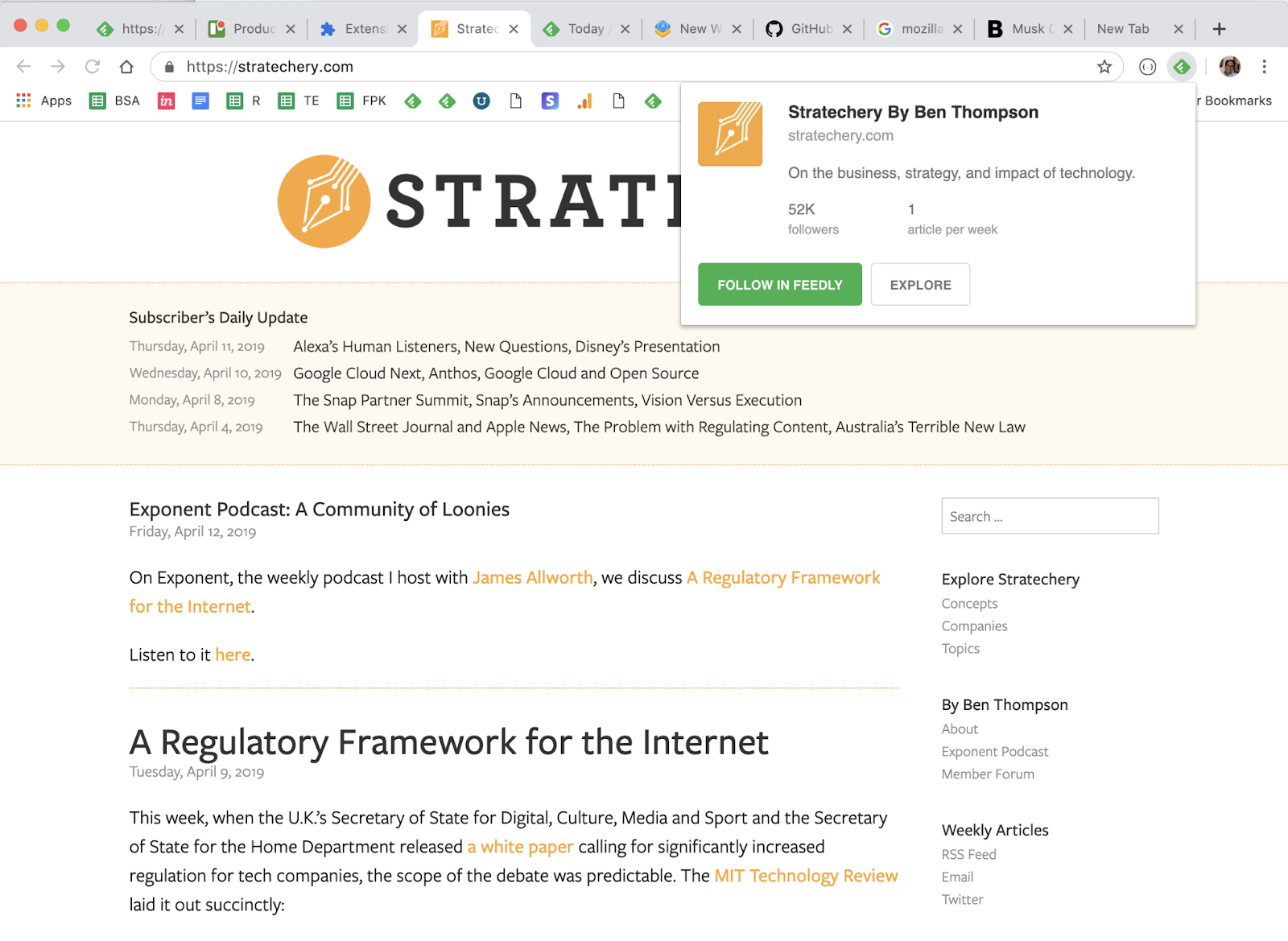
    For the majority of sites the Feedly mini browser extension is all you need. Feedly Mini is a Chrome and Firefox extension. It automatically detects the RSS feed of the site/blog you are browsing and gives you the option to open it in Feedly, and add it to your feeds. 

    *Note that you can also save things to your Boards from anywhere with Feedly Mini. We’ll talk about those shortly.

    Imagine that you are browsing the Web and you find a new source you want to follow in Feedly. When you click on the Feedly Mini icon, Feedly Mini will automatically discover the RSS feed for the page you are reading. It will show you a popup with information about that source. You can click on Follow in Feedly to preview the RSS in Feedly and add it to one of your feeds.

    Dealing with “hidden” feeds

    Sometimes you’ll run into a site that isn’t quite so “friendly” and the feed is hidden from the Feedly extension. This is where the RSS Subscription Extension comes in handy. 

    The RSS Subscription Extension auto-detects RSS feeds on the page you are reading and upon finding one will display an RSS icon in the Omnibox, allowing you to click on it to preview the feed content and subscribe. The extension comes with a few feed readers predefined (including Feedly) and it also allows you to add any web-based feed reader of your choice to the list.

    Sites Without a Feed

    If you ever find a site that neither of the extensions above can identify a feed or the site simply doesn’t have one, there are tools like Fetch RSS and others that let you generate a feed yourself that you can use to follow updates for that site. 

    Email Newsletters

    The ability to subscribe to email newsletters and keep them out of my inbox is one of my favorite things to do with Feedly. This allows me to control when I want to read a newsletter and find it much easier than if it is in my inbox. Who doesn’t want to declutter their inbox, right?!?!

    For paid subscribers, Feedly makes it easy by giving you a unique email address you can use to subscribe to newsletters. This routes them to your Feedly account instead of your email inbox. 

    Converting Emails into a Feed

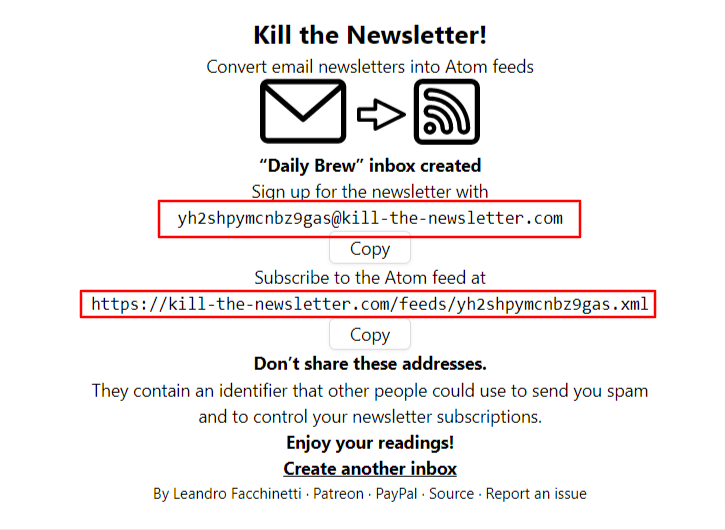
    If you’re on the free version, don’t worry, you can still read your email newsletters in Feedly by using Kill the Newsletter. This site converts any email newsletter subscription into an RSS feed you can subscribe to in Feedly. 

    Instead of using your personal email address to subscribe to email newsletters, go to the Kill the Newsletter site and enter the name of the newsletter. This will generate a custom email to subscribe with along with the feed where all the newsletters will be sent. 

    Efficiency + Serendipity 

    This type of setup is very efficient. 90-something percent of the things I consume come through Feedly. But I also want to retain an element of serendipity. That is why I’ll occasionally dip into some of the “randomness” from places like Twitter and LinkedIn. Not everyone publishes to a blog or website and there are some super smart people who only share their knowledge via social media.  

    SIDE NOTE: Using Twitter Lists allows you to customize, organize and prioritize the Tweets you see in your timeline similar to how Feedly does that for everything else. 

    Discovering new stuff 

    I try to intentionally find content and avoid getting stuck in a ‘filter bubble’ by using some sites and tools to help me discover new things including: 

    • Refind is a cool service that serves up 7 new links to you every day based on your interests.

      .
    • The Sample will pick a newsletter to deliver to you every day—sometimes related to your current interests, sometimes completely different. If you find one you like, it only takes one-click to subscribe.

      .
    • Deep Culture is a great weekly newsletter that gives you 20 interesting things in each issue.

    Organizing & Prioritizing Your Feeds

    Another great thing about Feedly is how it enables me to organize and prioritize all of my feeds. In essence I have organized all of my subscriptions in a way that prioritizes them into three categories:

    • A-List
      A small number of feeds that I want to see every day. These are my favorites  and the best of the best. 
    • B-List
      A larger number of feeds that I read if I have a bit of extra time. I probably get to these 2-3 times a week.
    • Everything Else
      These are the “nice to have” feeds. Maybe they are just for fun, or maybe there are a few random things to add that sense of serendipity I mentioned earlier. I read these whenever I get to them. Maybe on a weekend or sometimes never and that’s ok. 

    Feedly folders are an easy way to organize your feeds any way you want.  https://blog.feedly.com/feeds-and-folders/

    So now that you know how I keep up with things, the next step is keeping track of the good stuff so I can find it later. For the newsletter, I use a Feedly board to save the collection of things I’m considering each week. 

    Boards are like libraries of high-value content. When you find something that’s valuable, save it to a Board for future reference. You can create multiple boards to collect related items you want to save. Sort of like your browser bookmarks. 

    I also save things for other purposes like projects, workshops, research, conference sessions, etc using Bublup and Walling.App. There are tons of options for saving links, notes, etc. Way too many to cover here. I feel like I’ve tried almost all of them, so if you have any questions feel free to send them my way. 

    An important part of curating things for a newsletter or any other purpose is to provide some context about why it is important and how it relates to the people in your audience. For my newsletter, that happens as part of writing the content in a Google Doc that I’ll touch on in more in the section below. 

    For some people, this last step is the one that may be the hardest – myself included. Once upon a time, I had a thought in my head that went something like this: “I don’t know anything special…why would anyone want to see what I say/share?” And that is exactly NOT the point. The thing that changed the game for me was when I realized that the things I find valuable may also be valuable to others.  So if you find something that helps you, share it so it might help others. 

    As long as you’re learning, you’ll always have valuable things to share no matter who you are. 

    Depending on what you want to share and who you want to share it with, sharing can literally happen with the click of a button. so time should not be an issue. With tools like Buffer and others, you can click a button to quickly queue up a post that includes the url and title from the site you want to share. It will often serve up an image you can include along with an opportunity for you to add a note on why you think it is valuable. Quick, easy – done! It doesn’t need to be anything more than that. 

    Some forms of sharing may require long-form options such as creating blog posts, videos, etc. This obviously takes more time and commitment than simply sharing links but it is also an opportunity to add more value and infuse more of your personal thoughts and knowledge. 

    There are too many options for sharing to list and new ones cropping up every day. I can tell you from experience that sharing what you learn is a valuable thing to do. It has given me opportunities that I could never have imagined were even possible. 

    Not only are you helping others when you share. You’re also helping yourself by building your visibility and the credibility of being a professional. Simply sharing one thing per week on LInkedIn can raise your visibility and potential opportunities. For example, people who share content on LinkedIn at least once a week are nearly 10 times more likely to be contacted for new opportunities than people who don’t share. (1)

    Putting the Newsletter Together

    Usually sometime on Wednesday or Thursday I’ll start pulling together the contents of the newsletter using the items I’ve saved to my Newsletter board in Feedly. There are almost always more than enough items so it is just a matter of selecting the best ones. The newsletter recipe I use is five articles, 3 podcasts and 5 new tools with a playlist of the music I’m listening to while I work. 

    Some people may wonder how the heck music got into a newsletter about learning, design and technology and it is an interesting story. As a reader of many newsletters, I’m always on the lookout for good ideas for mine and the “What I’m Listening To” idea comes from Tim Ferris’ “5-Bullet Friday” newsletter. I thought it was neat and tried it out…then not long after that I thought it was a bit silly and was going to take it out. Before I did, I took a peek at the statistics and was surprised to learn that the music list is consistently among the most clicked links in the newsletter. So the music lives on! 

    Anyway, I have a Google Doc template that I use to create posts for my website which runs on WordPress. For a long time, I used a plugin that would publish this Google Doc directly to WordPress as a new post. But that has stopped working and until I find a replacement, I just do a simple Copy/Paste into a new post. 

    During the week prior, I save the best things I find to my newsletter board in Feedly. Then when it is time to assemble the newsletter, all I have to do is browse the small number of candidates from the current week and pick the best. It usually takes me about 30 minutes to pull everything together into a post.

    When I started sending out my newsletter back in 2015, I simply posted it to my WordPress website. Shortly after that I connected it up via RSS with a free Mailchimp account. This is easy to set up and automated once it is up and running. Mailchimp looks at my website every morning at 8am and if it finds any new posts, sends them out to my email subscribers.

    Tips to Help You Get Started

    If this sounds like something you’d like to try (I think everyone should!) here are a few helpful tips to give you a head start:

    1. Signup for Feedly and follow your ‘must see’ sources.
      This could be your favorite authors, top experts in your field, a professional/industry organization, or anything else that always want to see. You don’t need a lot. Think quality over quantity. Even just five really good ones is a nice start.
    2. Curate the curators
      If you want a bigger bang for the buck, follow really good curators. They’re already covering a lot of ground, which means you’re also covering a lot.
    3. Strive for 25
      If you can smartly select 25 good sources on any topic, you’ll be far ahead of most people with similar interests.
    4. Use browser extensions and mobile apps
      Looking for ways to be ruthlessly efficient and tapping into your windows of opportunity (like waiting in line, riding the bus, etc.) can have a big impact.
    5. Block time on your calendar
      Make it a habit. Trust me. Even if you can only spare 10 minutes a day, it is an investment that you’ll reap great returns on.
    6. Share what you learn
      When you find something helpful, pass it along to your network with a note about how it helped. You’ll be surprise how valuable this can be.

    Whether you’re just starting to think about your own process or looking to improve what you’re already doing, I’m happy to help in any way I can. Please feel free to send me any questions or comments you have.

    Whew! That was a lot more than I thought it would be when I started it. Thanks for sticking with me all the way to the end.

    What do you think? Do you do any of this? Do you have any better ideas or things that work better for you? What tips can you share? What questions do you have?

  • Getting Started With Curation

    Getting Started With Curation

    A Content Curation Roadmap: What You Need to Know to Get Started

    It was a lot of fun to be part of Robin Petterd’s Learning While Working Virtual Conference this week. This second edition was even bigger and better than the first. A huge thank you to Robin and everyone behind the scenes who make it all happen. What an amazing line-up of speakers and topics. I’m excited to watch the recordings of the sessions I missed and already looking forward to the next one.

    While the 30-minute time slots go by super fast, I think I may like those shorter sessions. Closer to the length of a TED talk you really don’t have time for any fluff. Plus you get to see more great speakers in a shorter amount of time. If you were there what did you think of the 30-minute sessions?

    I was very excited to be a part of this and talked about getting started with curation.

    You can grab the workbook that goes along with this talk and find more resources over at mike-taylor.org/curation.

  • Friday Finds | November 3, 2017

    Friday Finds | November 3, 2017

    It has been a very rich week around here. In addition to all the Halloween candy, we’ve got a lot of great stuff for presenters, training pros and other types of digital workers.

    59 Theses For the Future of Work

    Mathias Vermeulen surfaced this article containing 59 theses for the future of work. These are propositions that will give you some thoughts as the ongoing conversation takes place on the future of work, organizations, people and their happiness.

    A key takeaway:
    “Sustainable organizations put employees first”

    https://www.trifinance.be/items/fr-be/nieuws/news-item/59-theses-on-the-organization-of-the-future-present

    Learning objectives are like metadata – useful but best left unseen


    Viv Cole (@Viv_Cole) takes a questioning look at learning objectives by tapping into so valuable thoughts and information from Will Thalheimer’s overview of scientific research on learning objectives and Clive Sheppard’s Love-hate relationship with them. I like the general point that if you are presenting them to your audience, you should at least steal a trick from marketers and make them interesting/appealing instead of using a dry, boring bullet list.

    http://www.coleface.co.uk/learning-objectives-are-like-metadata-useful-but-best-left-unseen/

    What are your thoughts on learning objectives? How do you use them in your work?

    Working Out Loud to Build Skills & Relationships

    John Stepper’s (@johnstepper) Working Out Loud is a collaborative approach to building new skills and relationships through what he calls Work Out Loud Circles. This is a good conversation that explores the experience of some L&D pros (Ross Garner – @RossGarnerGP, Mike Collins – @Community_Mike, Ady Howes – @AdyHowes, Chris Coladonato – @ChrisCola, Hannah Wysome – @quinnite and Sam Burrough – @Burrough) as they made their way through a WOL Circle’s series of twelve weekly meetings and activities.

    http://podcast.goodpractice.com/69-working-out-loud-to-build-new-skills-and-relationships

    How to Create Personalized Documents from a Google Spreadsheet in Minutes


    I’m continually finding fewer and fewer reasons for  opening Microsoft Word ever again. The latest nail in that coffin is this time-saving jewel from Amit Agarwal’s (@labnol) Digital Inspiration site that adds powerful mail-merge features to Google Docs and Sheets.

    With Document Studio, you can create documents and reports using merge data stored inside Google Sheets, dynamically create documents from live data submitted via Google Forms, and automatically send them in personalized email messages using built-in Mail Merge.

    There are tons of uses for this including invoices, completion certificates, pre- and post-workshop reminders, and about a bazillion other things.

    https://www.labnol.org/software/google-document-generator/30258/

    Up Your Curation Game With ZEEF

    At some point, almost everyone can benefit from adding value to others by curating a set of helpful resources. This week I shared a few of the things that make ZEEF my favorite tool for this.

    Are you using anything different for this task? How does it compare?

    https://mike-taylor.org/2017/11/01/create-value-for-others-by-curating-information-with-zeef/

    Interested in more of the things I find each week including extras that don’t make the cut here? Subscribe to my newletter to get even more.

    Hope you have a fantastic weekend!

  • Keep Up With Your Twitter Lists (and a whole lot more) in Flipboad

    You know about Flipboard right? The super visual, great looking way to keep up on all the things you love and discover other new sources of news and learning? (If not, get over there now and check it out! )  Their iPad app is how I usually browser my Flipboard magazines, but you can call get them on the web at flipboard.com

    Right about now, you’re probably wondering what Flipboard does and why you should care? Flipboard aggregates news, images, video, social networking updates, and more in a slick, print style design that gives you an experience similar to having your own personalized magazine rack including your favorite blogs, news, Twitter accounts, etc.

    In a nutshell, it’s a visual way of flipping through content from a variety of sources.

    One of my favorite tricks for using Flipboard is to create a “magazine” out of a Twitter list.

    Add your Twitter list to Flipboard, and it will pull out all the great content and links that get shared through the list. Here is what my PowerPoint list from Twitter looks like:

    Web version: 

    BLog-FLipboard-TwitterListWeb

    iPad version:

    BLog-FLipboard-TwitterListIpad

    A few other things you might want to plug into and follow via Flipboard include:

    Here’s how to add Twitter lists to Flipboard and a few other relevant tutorials.

    You can also curate your own content into a custom magazine of your own. Check out what JD Dillon has created and follow his magazine here.

    Get started by signing up at https://flipboard.com/ and be sure to give the Flipboard app a test drive.