Category: WorkOutLoud

  • How I Create My Weekly Newsletter (and personal curation tips you should steal)

    How I Create My Weekly Newsletter (and personal curation tips you should steal)

    Image from https://blog.feedly.com/

    Since I haven’t written a blog post in a while, I thought it was time to dust off the cobwebs. I wanted to answer one of the questions I get asked the most. In this post, I’ll share a bit about my curation process and how I choose the things I share in my weekly newsletter.

    You may know that I publish a newsletter called “Friday Finds” every Friday morning. Each week, I scan nearly 800 sources to pick the 5 most noteworthy items along with 3 podcasts and 5 tech tips or tools.

    Subscribe to my free newsletter.

    While that may sound like a lot and something that consumes massive amounts of time – it really isn’t. Not if you know some of the tools and strategies I’m about to share with you. The good news is that even if you’re not looking to publish a newsletter, these concepts can help anyone who would like to improve their own personal process for consuming content from the web more efficiently. 

    I’ve organized this into three sections modeled on Harold Jarche’s Seek-Sense-Share framework. 

    • Seeking is finding things out and keeping up to date. 
    • Sensing is how we personalize information and use it. (Including managing & organizing)
    • Sharing includes exchanging our resources, ideas, and experiences with others.

    The most effective thing you can do to keep up with whatever you’re interested in is to make the process as efficient as possible. Obviously, most of us have jobs and other responsibilities that limit the amount of time we have to spend on keeping up. We never have as much time to spend on it as we’d like. Fortunately, with a good process you can do very well in whatever small windows of time you’re able to manage a few times a week. 

    There are 3 key steps you can take to significantly reduce the amount of time you need to spend on keeping up: 

    1. Don’t go looking for information–let it come to you. 
    2. Filter out as much noise as possible.
    3. Consolidate the number of “inboxes” you use.

    Information Delivery & Filtering

    The first step is to change the way you consume information. Instead of going out and looking for stuff, having the stuff you want come to you is WAAAAYY better. The most efficient way to make that happen is to use an app like Feedly. (Inoreader is another good option.) This step alone is a big step in the right direction towards efficiency. 

    Note: I’m on a free account but it is a grandfathered version that is no longer available. The current free version will give you up to 100 sources and 3 boards. Which is plenty for most people just starting out. If you need more than that, it is absolutely worth the few dollars a month to upgrade to a paid plan.

    Consolidate Your Inboxes

    Think about how many different places you look for information. Most of us visit a fairly large number of places daily including: our email inboxes (work & personal), social media sites, Amazon, news sites, weather sites, financial information sites and I could go on. You get the idea. 

    Most of these sites have a feed you can subscribe to which eliminates the need for you to go visit all these sites individually. Instead, by subscribing to their feeds, you can create a personalized information consumption system and organize it any way you like.  

    RSS is the magic that enables us to consolidate so many information sources into a single “inbox” (Feedly). Whether the information you want comes from a blog, a news site, Twitter, YouTube, newsletters, Reddit, podcasts or just about anything else, you can follow them in Feedly. (You can learn more here: 11 types of sources you can add on Feedly)

    Here is how it works with Feedly. (Other feed reading tools work similarly.)  

    Following a new source

    Here is a short video showing how you can find and follow new sources. You can discover feeds right from within Feedly which is great when you’re first starting out. Or more commonly for me, just add a site that you already know. 

    Here is a short video showing how you can find and follow new sources. You can discover feeds right from within Feedly which is convenient when you’re first starting out. Or more commonly for me, just add a site that you already know. 

    For starters, I highly recommend using the Feedly browser extension. It makes following sources quick & easy. 

    (If you’re curious, there are a variety of options for adding a new source to follow in Feedly.)

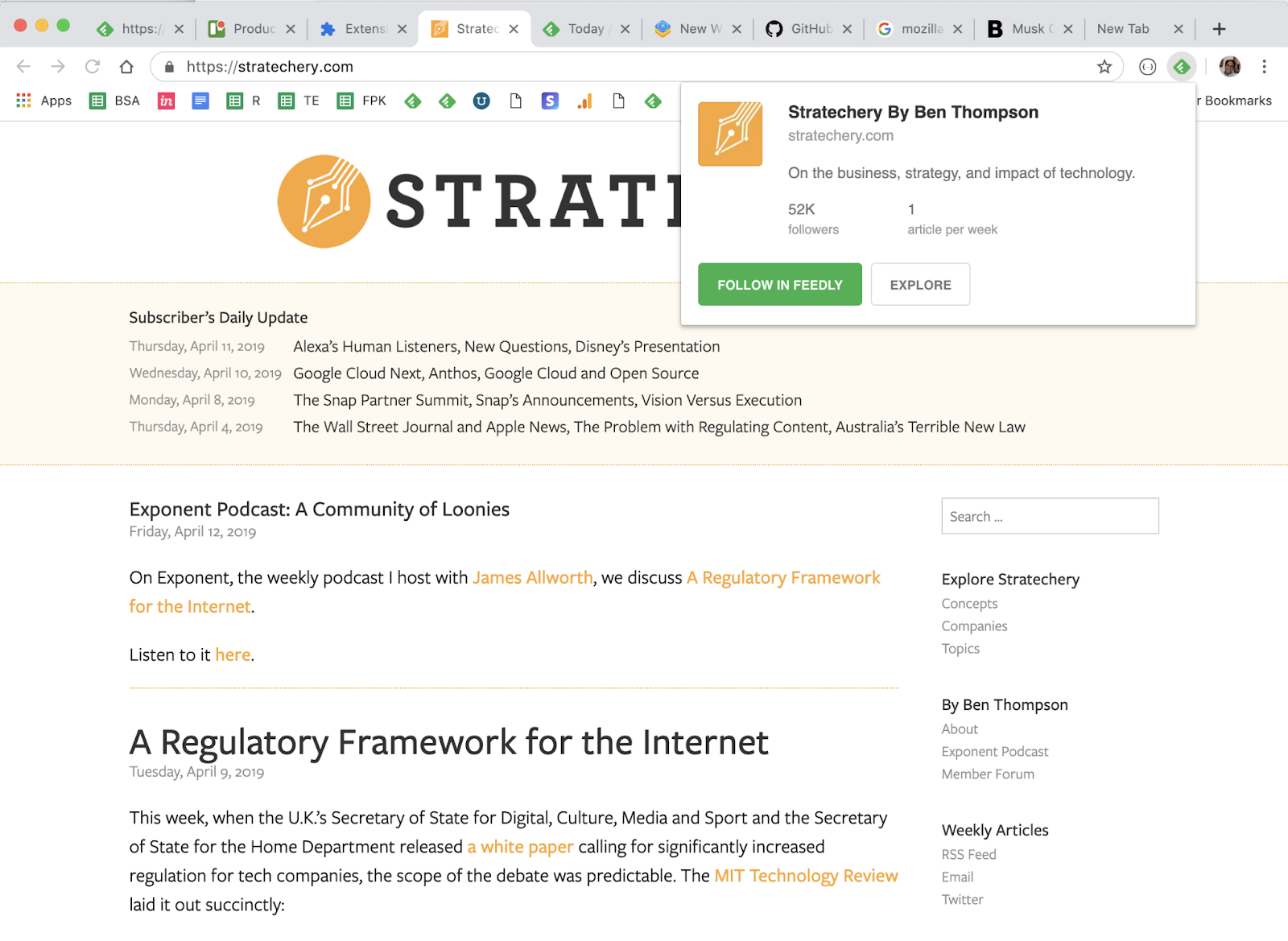
    For the majority of sites the Feedly mini browser extension is all you need. Feedly Mini is a Chrome and Firefox extension. It automatically detects the RSS feed of the site/blog you are browsing and gives you the option to open it in Feedly, and add it to your feeds. 

    *Note that you can also save things to your Boards from anywhere with Feedly Mini. We’ll talk about those shortly.

    Imagine that you are browsing the Web and you find a new source you want to follow in Feedly. When you click on the Feedly Mini icon, Feedly Mini will automatically discover the RSS feed for the page you are reading. It will show you a popup with information about that source. You can click on Follow in Feedly to preview the RSS in Feedly and add it to one of your feeds.
    Dealing with “hidden” feeds

    Sometimes you’ll run into a site that isn’t quite so “friendly” and the feed is hidden from the Feedly extension. This is where the RSS Subscription Extension comes in handy. 

    The RSS Subscription Extension auto-detects RSS feeds on the page you are reading and upon finding one will display an RSS icon in the Omnibox, allowing you to click on it to preview the feed content and subscribe. The extension comes with a few feed readers predefined (including Feedly) and it also allows you to add any web-based feed reader of your choice to the list.

    Sites Without a Feed

    If you ever find a site that neither of the extensions above can identify a feed or the site simply doesn’t have one, there are tools like Fetch RSS and others that let you generate a feed yourself that you can use to follow updates for that site. 

    Email Newsletters

    The ability to subscribe to email newsletters and keep them out of my inbox is one of my favorite things to do with Feedly. This allows me to control when I want to read a newsletter and find it much easier than if it is in my inbox. Who doesn’t want to declutter their inbox, right?!?!

    For paid subscribers, Feedly makes it easy by giving you a unique email address you can use to subscribe to newsletters. This routes them to your Feedly account instead of your email inbox. 

    Converting Emails into a Feed

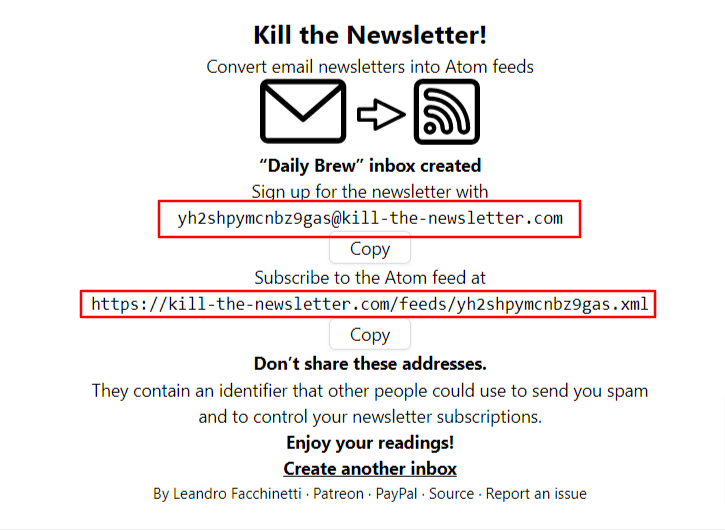
    If you’re on the free version, don’t worry, you can still read your email newsletters in Feedly by using Kill the Newsletter. This site converts any email newsletter subscription into an RSS feed you can subscribe to in Feedly. 

    Instead of using your personal email address to subscribe to email newsletters, go to the Kill the Newsletter site and enter the name of the newsletter. This will generate a custom email to subscribe with along with the feed where all the newsletters will be sent. 
    Efficiency + Serendipity 

    This type of setup is very efficient. 90-something percent of the things I consume come through Feedly. But I also want to retain an element of serendipity. That is why I’ll occasionally dip into some of the “randomness” from places like Twitter and LinkedIn. Not everyone publishes to a blog or website and there are some super smart people who only share their knowledge via social media.  

    SIDE NOTE: Using Twitter Lists allows you to customize, organize and prioritize the Tweets you see in your timeline similar to how Feedly does that for everything else. 

    Discovering new stuff 

    I try to intentionally find content and avoid getting stuck in a ‘filter bubble’ by using some sites and tools to help me discover new things including: 

    • Refind is a cool service that serves up 7 new links to you every day based on your interests.

      .
    • The Sample will pick a newsletter to deliver to you every day—sometimes related to your current interests, sometimes completely different. If you find one you like, it only takes one-click to subscribe.

      .
    • Deep Culture is a great weekly newsletter that gives you 20 interesting things in each issue.

    Organizing & Prioritizing Your Feeds

    Another great thing about Feedly is how it enables me to organize and prioritize all of my feeds. In essence I have organized all of my subscriptions in a way that prioritizes them into three categories:

    • A-List
      A small number of feeds that I want to see every day. These are my favorites  and the best of the best. 
    • B-List
      A larger number of feeds that I read if I have a bit of extra time. I probably get to these 2-3 times a week.
    • Everything Else
      These are the “nice to have” feeds. Maybe they are just for fun, or maybe there are a few random things to add that sense of serendipity I mentioned earlier. I read these whenever I get to them. Maybe on a weekend or sometimes never and that’s ok. 

    Feedly folders are an easy way to organize your feeds any way you want.  https://blog.feedly.com/feeds-and-folders/

    So now that you know how I keep up with things, the next step is keeping track of the good stuff so I can find it later. For the newsletter, I use a Feedly board to save the collection of things I’m considering each week. 

    Boards are like libraries of high-value content. When you find something that’s valuable, save it to a Board for future reference. You can create multiple boards to collect related items you want to save. Sort of like your browser bookmarks. 

    I also save things for other purposes like projects, workshops, research, conference sessions, etc using Bublup and Walling.App. There are tons of options for saving links, notes, etc. Way too many to cover here. I feel like I’ve tried almost all of them, so if you have any questions feel free to send them my way. 

    An important part of curating things for a newsletter or any other purpose is to provide some context about why it is important and how it relates to the people in your audience. For my newsletter, that happens as part of writing the content in a Google Doc that I’ll touch on in more in the section below. 

    For some people, this last step is the one that may be the hardest – myself included. Once upon a time, I had a thought in my head that went something like this: “I don’t know anything special…why would anyone want to see what I say/share?” And that is exactly NOT the point. The thing that changed the game for me was when I realized that the things I find valuable may also be valuable to others.  So if you find something that helps you, share it so it might help others. 

    As long as you’re learning, you’ll always have valuable things to share no matter who you are. 

    Depending on what you want to share and who you want to share it with, sharing can literally happen with the click of a button. so time should not be an issue. With tools like Buffer and others, you can click a button to quickly queue up a post that includes the url and title from the site you want to share. It will often serve up an image you can include along with an opportunity for you to add a note on why you think it is valuable. Quick, easy – done! It doesn’t need to be anything more than that. 

    Some forms of sharing may require long-form options such as creating blog posts, videos, etc. This obviously takes more time and commitment than simply sharing links but it is also an opportunity to add more value and infuse more of your personal thoughts and knowledge. 

    There are too many options for sharing to list and new ones cropping up every day. I can tell you from experience that sharing what you learn is a valuable thing to do. It has given me opportunities that I could never have imagined were even possible. 

    Not only are you helping others when you share. You’re also helping yourself by building your visibility and the credibility of being a professional. Simply sharing one thing per week on LInkedIn can raise your visibility and potential opportunities. For example, people who share content on LinkedIn at least once a week are nearly 10 times more likely to be contacted for new opportunities than people who don’t share. (1)

    Putting the Newsletter Together

    Usually sometime on Wednesday or Thursday I’ll start pulling together the contents of the newsletter using the items I’ve saved to my Newsletter board in Feedly. There are almost always more than enough items so it is just a matter of selecting the best ones. The newsletter recipe I use is five articles, 3 podcasts and 5 new tools with a playlist of the music I’m listening to while I work. 

    Some people may wonder how the heck music got into a newsletter about learning, design and technology and it is an interesting story. As a reader of many newsletters, I’m always on the lookout for good ideas for mine and the “What I’m Listening To” idea comes from Tim Ferris’ “5-Bullet Friday” newsletter. I thought it was neat and tried it out…then not long after that I thought it was a bit silly and was going to take it out. Before I did, I took a peek at the statistics and was surprised to learn that the music list is consistently among the most clicked links in the newsletter. So the music lives on! 

    Anyway, I have a Google Doc template that I use to create posts for my website which runs on WordPress. For a long time, I used a plugin that would publish this Google Doc directly to WordPress as a new post. But that has stopped working and until I find a replacement, I just do a simple Copy/Paste into a new post. 

    During the week prior, I save the best things I find to my newsletter board in Feedly. Then when it is time to assemble the newsletter, all I have to do is browse the small number of candidates from the current week and pick the best. It usually takes me about 30 minutes to pull everything together into a post.

    When I started sending out my newsletter back in 2015, I simply posted it to my WordPress website. Shortly after that I connected it up via RSS with a free Mailchimp account. This is easy to set up and automated once it is up and running. Mailchimp looks at my website every morning at 8am and if it finds any new posts, sends them out to my email subscribers.

    Tips to Help You Get Started

    If this sounds like something you’d like to try (I think everyone should!) here are a few helpful tips to give you a head start:

    1. Signup for Feedly and follow your ‘must see’ sources.
      This could be your favorite authors, top experts in your field, a professional/industry organization, or anything else that always want to see. You don’t need a lot. Think quality over quantity. Even just five really good ones is a nice start.
    2. Curate the curators
      If you want a bigger bang for the buck, follow really good curators. They’re already covering a lot of ground, which means you’re also covering a lot.
    3. Strive for 25
      If you can smartly select 25 good sources on any topic, you’ll be far ahead of most people with similar interests.
    4. Use browser extensions and mobile apps
      Looking for ways to be ruthlessly efficient and tapping into your windows of opportunity (like waiting in line, riding the bus, etc.) can have a big impact.
    5. Block time on your calendar
      Make it a habit. Trust me. Even if you can only spare 10 minutes a day, it is an investment that you’ll reap great returns on.
    6. Share what you learn
      When you find something helpful, pass it along to your network with a note about how it helped. You’ll be surprise how valuable this can be.

    Whether you’re just starting to think about your own process or looking to improve what you’re already doing, I’m happy to help in any way I can. Please feel free to send me any questions or comments you have.

    Whew! That was a lot more than I thought it would be when I started it. Thanks for sticking with me all the way to the end.

    What do you think? Do you do any of this? Do you have any better ideas or things that work better for you? What tips can you share? What questions do you have?
  • The Show: Learning Design Competition

    The Show: Learning Design Competition

    If you work in Learning & Development, you owe it to yourself to check out “The Show”. Cath Ellis and Kim Tuohy have created a totally brilliant learning design competition that is currently running as part of the lead up to The Learning Conference 2020.

    https://www.youtube.com/watch?v=4bRkCXORU1E&feature=youtu.be

    It is like “March Madness” but for learning pros. It all started with 64 designers facing off against one another, designing learning solutions based on fictional briefs that change from round to round. The top vote-getters of each round advance as the field is narrowed down each week until the ultimate winner is crowned. Every episode is jam-packed with great tips and tricks

    I had the honor of being a guest for this week’s “Elite 8” round and was blown away by the submissions. This is one of the best things I’ve seen in a long time. One of my favorite things is the community that has formed around this and the opportunity to see so much great work being shared.

    Each week a design brief is shared and the designers set off to work. The result is a rich collection of designs offering a fantastic opportunity for anyone to learn about the thinking that went into each submission. This wonderful example of “working out loud” offers a chance for anyone to glean some practical takeaways that they can apply to their own work. From instructional design and project proposals to multimedia creation and content creation tools, I guarantee you’ll find something of value in here.

    A great resource for tools and ideas

    For example, the submissions we looked at in this round all had ideas anyone could use to improve any online course. Things like extending the course to an online community the way Amanda set up the pledge using Padlet, the way Emma added the ability to submit questions, or how Troy created the leaderboard with Google Sheets.

    Boost your own portfolio

    You could also use these briefs to flex your own design muscles and to create your own work and add it to your portfolio. If you don’t have a portfolio yet, this is a great opportunity to start one.

    Watch ‘The Show’

    Treat yourself and block some time to cruise through the YouTube channel and see what ideas you can take away from this amazing collection of work.

    If you’d like to learn even more, browse the briefs from each round and learn more about the participants and more over here in Milanote. (You can even learn something just from that app and how they organized all the content so nicely!)

    The Show Milanote

    So kudos to Cath and Kim! Now head on over and follow THE SHOW and vote for your favorite learning designs to help crown the Best Learning Designer 2020.


  • Friday Finds: The Best of Learning, Design & Technology | February 22, 2019

    Friday Finds: The Best of Learning, Design & Technology | February 22, 2019

    ” There are no educators, but only people who show others how they can educate themselves.” —Jean Guitton

    Today is my last day at Mindset Digital. As I turn to look for my next adventure, I have an appreciation for people and organizations who are passionate about what they do, do it well, and are able to have fun along the way. Seems like finding that type of place shouldn’t be too hard right? In the meantime, if you know of any places like that let me know. And if you or anyone you know could use a helping hand let’s talk.

    How to write scripts for webinars, videos and eLearning

    To paraphrase Michelle Parry-Slater (@mips1608), what Bright Carbon (@BrightCarbon) doesn’t know about making fabulous things isn’t worth knowing. Check out Hannah Brownlow’s (@Il_Brownlow) has to say about writing better scripts for webinars, videos, and elearning.

    https://www.brightcarbon.com/blog/writing-scripts-webinars-videos-elearning/

    What is Working Out Loud?

    If you aren’t following John Stepper (@johnstepper) you should really watch this and then go read his book. He shares some really easy steps you can take to get started that will benefit both you and your organization.

    https://workingoutloud.com/blog//new-video-what-is-working-out-loud

    Don’t Feel Like an Expert? Share Anyway

    This article captures the way I feel about sharing your knowledge and expertise. In short, as John Stepper says: You don’t need to be a genius to share your work. Just be yourself.

    “The stuff you get up and do every day that is as natural to you as breathing? There are thousands of people who want to know about that.”   — Kristina Halvorson

    http://bit.ly/2twLll7

    Digital Learning Realities Research

    If you’re interested in research on the digital learning market you should check out what the Fosway Group has done with “the largest cross-section of digital learning customers and suppliers in the world, to create a much needed independent barometer of the digital learning market.”

    http://www.fosway.com/research/next-gen-learning/digital-learning-realities-2019/

    They’re still collecting data, so why not take a few minutes and add your voice.

    Interested in even more research? Check out these too:

    Microsoft Teams vs. Yammer vs SharePoint vs Email: WTH? A Short and Sweet Guide

    I think everyone has asked about what the best tool for a particular task is. The folks from AvePoint have shared this helpful guide to help you navigate the Microsoft stack of options.

    https://www.avepoint.com/blog/microsoft-teams/microsoft-teams-vs-yammer/

    Non-Designers Guide to Crafting Beautiful Elearning

    Bianca Baumann (@biancabaumann) and I recently did a webinar for I4PL on some easy to implement tips for improving the design of your elearning (or anything else for that matter.)

    https://www.slideshare.net/tmiket/a-nondesigners-guide-to-crafting-beautiful-elearning

    Learning, Design & Technology Miscellany

    A few other things just because I can.

    Design Resources

    Apps & Tools

    • Forms.id – a powerful alternative to Google Forms with a look.
    • SmallPDF – Don’t have Adobe’s Acrobat Pro?  Smallpdf makes it super easy to convert and edit all your PDF files solving all your PDF problems in one place.

    Books, Podcasts, Courses:

    What I’m listening to:

    Conference News

    Here’s a peek at the conference action for this week and next:

    Looking for your next conference? I’ve recently updated my global collection of L&D events with new 2019 dates. Let me know if you see one I missed or have a new one to add.

    Speaker Proposals:

    Thanks for reading! If you found anything good, forward it to a friend or spread the word with a tweet.

    You can find me at these UPCOMING EVENTS:


    Interested in the things that didn’t make the cut here? Follow me on Twitter or even better, subscribe to my newsletter.

    I’m looking for great people and organizations who want to help people learn and work better. If you’re one of them, let’s talk! Speaking and Workshop Information Sheet.

    Looking for a previous edition? Check out the archives

  • Social Bookmarking: Your Favorites Really Want to be Free

    Social Bookmarking: Your Favorites Really Want to be Free

    Raise your hand if you’ve ever experienced any of these things:

    • A computer crash wiped out all of the favorites from your web browser
    • You wanted to access a bookmark on your work computer from home (Or vice versa)
    • You couldn’t find a bookmark you know you saved because there are too many or you didn’t remember which folder you put it in.

    For those of you raising your hand, this post is for you. For everyone else, you’re lucky (so far) and this post is for you too. Keep reading to find out why.

    Social bookmarking can solve all of those problems and bring you additional benefits you probably haven’t even thought of. Your first question may be, “What the heck is social bookmarking?”

    TLDR: If you’re short on time grab this quick start guide to social bookmarking

    Quick Start-Social Bookmarking

    What is Social Bookmarking?

    Social bookmarking is a better way to save the websites and online resources you want to keep track of. Instead of your bookmarks being locked away in the browser your computer, social bookmarks live online where they can be accessed from anywhere and easily shared with others.

    This makes your bookmarks available to you anywhere in the world you have an internet connection and 100% immune to computer failures. It also makes finding that one unique site you bookmarked 3 years ago easier to find. Here’s how…

    The only option for organizing the bookmarks in your browser is to put them into folders. The challenge with that is a bookmark can only live in one folder. Social bookmarking improves upon this by letting you tag the things you find with multiple keywords or tags. Tagging can eliminate (or at least minimize) time-sucking searches for that elusive bookmark you know is in there somewhere. Let’s see how.

    Tagging

    Tagging is a flexible, informal way of categorizing that allows you to associate keywords with online content (web pages, pictures & posts). Even if you’re not sure what tagging is, you’ve already seen it in action on sites like Twitter, YouTube, Flickr, Diigo, and many others.

    Unlike library subject cataloging, which follows a strict set of guidelines (i.e., Library of Congress subject headings), tagging is completely unstructured and freeform, allowing you to create connections between data any way you want. (BTW, the art of tagging by folks who are not librarians or catalogers is called “folksonomy.”)

    Tagging helps bring order to online content. You can think of a tag as a topic. Adding a tag (or #hashtag) to your tweet, blog post, photo, video, etc makes it easier for people to find and follow the content related to a certain topic. For example, you might want to tag that cool elearning example you found with tags like elearning, storyline, xapi, etc.

    Watch this video to learn more about how social bookmarking works.
    (NOTE: Delicious isn’t a thing anymore but Diigo works the same way.)

    https://www.commoncraft.com/video/social-bookmarking

    While the video uses delicious to demonstrate social bookmarking, it isn’t around anymore and I recommend another one called Diigo (pronounced Dee-go).

    Here’s a walkthrough of how you can use Diigo to collect and organize online resources.

    Sharing

    Diigo has some additional features that are nice including the ability to share bookmarks with a group of people. ( Feel free to join our Learn Camp group and share your links with us! ) As Harold Jarche says, social bookmarks are “the simplest way to start sharing organizational knowledge”.

    Social bookmarks are “the simplest way to start sharing organizational knowledge”.

    Social bookmarks are fantastic for L&D pros. Especially for anyone who likes to share links and resources along with their workshops or conference presentations and the like. Whenever I lead one of the ATD Certificate Workshops I share a collection of examples, job aids, and other resources with everyone.

    By using Diigo, I can share a single link that provides everything I want to share. That link never changes and the best part is that after the workshop is over I can add new things and the collection is automatically updated. People from last years workshop will see the latest and greatest. If they join the group or follow via RSS, they’ll also get notifications when something new is added. How sweet is that?

    Yes, you can also save private bookmarks.

    You can find me and the rest of my bookmarks on Diigo at http://diigo.com/user/tmiket.

    Discovery & Following

    As if all of that isn’t enough, another big benefit is the ability to see what other smart people are bookmarking. Here are a couple great examples of smart people sharing great bookmarks:

    Pro Tip: Follow these or any of your other favorites in Feedly and you’ll always know when any new items are added.

    3 Reasons to Try Social Bookmarking

    To wrap things up, here are 3 reasons you really should give social bookmarking a try:

    1. You’ll free your bookmarks from your computer so they are safer and you can access them from anywhere
    2. Tagging makes it is easier to actually find what you save when you need it
    3. Sharing your bookmarks with others is MUCH easier and this is a great way to start working out loud to help others learn along with you.

    Getting Started

    I’m confident that once you try social bookmarking, you’ll never want to go back to the old way.

    For me, the key is making the process as frictionless as possible. Grab the browser extension or the bookmarklet to make saving a 1-click deal. Add the app to your mobile device to organize resources even when you’re away from your computer.

    Here are a couple of the most common apps for changing the way you save and organize your online resources:

    Diigo

    1. Sign up
    2. Grab the browser extension, bookmarklet, and/or the mobile app
    3. Start saving
    4. (Optional) Learn more about getting started

    Pinterest

    1. Sign up
    2. Grab the browser extension, bookmarklet, and/or the mobile app
    3. Start saving
    4. (Optional) Learn more about getting started

    Now It’s Your Turn

    Do you already use any social bookmarking tools such as Diigo, delicious or Pinterest?

    What benefits could you see from having access to what others are bookmarking?

    How could this be used for learning/training?

    What else would you like to know?

  • Fresh Finds: The Best of Learning, Design & Technology | September 7, 2018

    Fresh Finds: The Best of Learning, Design & Technology | September 7, 2018

    Looking for a previous edition? Check out the archives

    Our ability to grow is directly proportional to our ability to share. — @GapingVoid

    Once again, it is time for the happy Friday dance! When you’re done dancing, here are some of the best things I found this week from the world or learning, design, and technology.  Hope you have a fantastic weekend. Cheers!

    Institutional Innovation

    Modern L&D should “facilitate interactions & relationships, allowing organizations to increase the flow of information within and across their organization’s walls to increase learning, adaptability, and … innovations.” This article by John Hagel (@jhagel) and John Seely Brown (@jseelybrown) is a must read for how we should be thinking about the future of workplace learning.

    https://www2.deloitte.com/insights/us/en/topics/innovation/institutional-innovation.html

    Networking for introverts, the shy and the socially anxious

    Networking can be intimidating for a lot of people. In this post, Richard Cosgrove (@rcosgrove) shares how preparation can be the secret to tackling a networking event if you’re a person who struggles with socializing.

    https://bit.ly/2wN0U9y

    The New Science of Building Great Teams

    This is an interesting and relevant finding from Alex “Sandy” Pentland (@alex_pentland)about the key to building great teams. Patterns of communication are the most important predictor of a team’s success. They are as significant as all the other factors—individual intelligence, personality, skill, and the substance of discussions—combined.

    https://hbr.org/2012/04/the-new-science-of-building-great-teams

    Tips to Improve Your PowerPoint Presentation from Cognitive Theory of Multimedia Learning

    In this guest post on the Learning Scientists blog, Anna Navin Young discusses some key points from Richard E. Mayer’s Cognitive Theory of Multimedia Learning and how “spicing up” your slides can actually negatively impact your audience’s learning.

    http://www.learningscientists.org/blog/2018/8/29-1

    Learning, Design & Technology Miscellany

    A few other things just because I can.

    Conference News

    Design Resources

    • Color Leap | Do a little time traveling and browse the colors of history with this fun, cool site.
    • If you ever need some fake data to mockup a project, Tabipsum can hook you up.

    Apps & Tools

    • Affinity Designer | download the beta for this free professional desktop publishing app.
    • iLoveIMG | A fast, free web app for easy image modification.

    Books/Courses/Podcasts

    What I’m listening too

    • I’m working along to “Summer Fridays” this morning. (Seems appropriate given how hot it has been here this week.)

    Thanks for reading! If you found anything good, forward it to a friend or spread the word with a tweet.


    Interested in the things that didn’t make the cut here? Follow me on Twitter or even better, subscribe to my newsletter.

    I enjoy sharing my ideas and experience with corporate professionals via workshops, keynote presentations, podcasts, and webinars. Learn more in my Speaking and Workshop Information Sheet.

    UPCOMING EVENTS:

  • The Best of Learning, Design & Technology | August 10, 2018

    The Best of Learning, Design & Technology | August 10, 2018

    Looking for a previous edition? Check out the archives

    “A walk about Paris will provide lessons in history, beauty, and in the point of Life.” – Thomas Jefferson.

    We took several long, hot walks exploring Paris this week. The views were fabulous, the lessons were plentiful and I’m grateful for the opportunity to share them with my family. (I’m also grateful we’re back home to a place that has air conditioning.) Here are a few of the things I found this week in the world of learning, design, and technology! J’espère que tu passeras un bon weekend!

    Keeping Up With Cardiology: Old-School Learning Versus the Twittersphere

    “there’s an old saying that 50% of what they teach you in medical school is wrong. The problem is you don’t know which 50%.”

    This article by Yael L. Maxwell (@TCTMD_Yael) is about cardiologists, but the lessons apply to us all. As we proceed through our careers “we should expect that things should be challenged and updated throughout our lifetime, and we have to be open to all different avenues. Critical thinking is more important now than ever before.”

    https://www.tctmd.com/news/keeping-cardiology-old-school-learning-versus-twittersphere

    Share to Learn

    This post by Tanmay Vora (@tnvora) reminds me that you don’t have to be a genius to share what you learn. Just be yourself and share anything you discover, experience, read or anything else that worked for you or those around you. There is probably someone out there it can help. And by helping them, you’re helping yourself.

    http://qaspire.com/2018/08/02/share-to-learn/

    How to Publish Regularly, Even If You Lack Writing Confidence

    This article by Sonia Simone (@soniasimone) on  @Copyblogger is another one that resonates with me and is a lesson that I had to learn myself. Whatever your reasons for not being comfortable with it, just do it. Click that Publish button — even if you’re not a “great writer” yet. If nothing else, you owe it to yourself to hear what Ira Glass has to say about it. It is one of my favorite things in the world.

    https://www.copyblogger.com/ready-to-publish/

    How to Future-Proof Your Career

    This short piece by Phillip VanDusen (@philipvandusen) is totally spot on. The secret is founded on learning and assuming that one day you’ll be laid off. Well worth a few minutes of your time and I’ll bet you can think of at least one other person who could benefit from seeing this as well. Why not share it with them?

    Watch it here.

    PowerPoint Text Animations

    If you want to add a nice touch to your next project, grab this free PowerPoint animated text template from PowerPoint School (@pptschool). (The download link is just below the video in the comments area.)

    Watch and download here.

    Learning, Design & Technology Miscellany

    A few other things just because I can.

    Conference News

    Design Resources

    Apps & Tools

    • Zave – I’m checking this out as a potential replacement for my current curation tool, Zeef. They say Zave is a “…place to save the web in private or with the world.”
    • Loom – Coming back to this one again to try it out as a better workflow for creating and sending videos.

    Books/Courses/Podcasts

    What I’m listening too

    Thanks for reading! If you found anything good, forward it to a friend or spread the word with a tweet.


    Interested in the things that didn’t make the cut here? Follow me on Twitter or even better, subscribe to my newsletter.

    I enjoy sharing my ideas and experience with corporate professionals via workshops, keynote presentations, podcasts, and webinars. Learn more in my Speaking and Workshop Information Sheet.

  • Using Subtle Animations & Transitions

    Using Subtle Animations & Transitions

    Animations and slide transitions are something that fall into the “just because you can doesn’t mean you should” category. However, when used well they can bring focus to the right things and add a degree of polish that can make your designs feel a bit more polished and professional. The key is to use animation for a purpose and avoid “decorative” animations.

    This week, David Anderson is crossing the 200 mark for his popular Weekly Challenge series over in the Articulate Elearning Heroes community by challenging designers to share an example of practical entrance and exit animations for slide content.

    Morph Transitions For the Win!

    One of my favorite animation examples is this Before & After sequence, I created for an Analyst & Investor Meeting with American Electric Power.

    This deck was created for a Wall Street investors meeting back in 2016. The key message AEP wanted to convey included some key things that had taken place since their previous meeting. The focus of this before and after sequence is to illustrate the changes and progress that had taken place.

    PowerPoint’s awesome Morph transition is the key to this animation sequence. Morph makes it super easy to animate smooth movement from one slide to the next. If you haven’t tried it out yet, you should go and do that right now. It is a must-have trick for anyone who builds PowerPoint slides and would like an easy way to let their creativity loose.

    Morph is available in the PowerPoint 2016 and Office 365 versions.

    This deck by InScale is a really nice example of the types of things you can do with Morph.

    Want to get your hands on another one of these to take a look under the hood?  Download this free Morph template from SlideSalad. (Requires a free user account.)

    Bonus Example + Free Animated Template

    As I went looking for my favorite animation example I found this deck of animation ideas that were ultimately never used, so I thought I’d share them with you in case you might be able to use them for one of your projects.  As you can see below there are a couple of animated title slides and a few more animated lower-thirds options.

    Note: There is some font wonkiness this embedded version.

    [office src=”https://onedrive.live.com/embed?cid=F05AA1386A632C68&resid=F05AA1386A632C68%217204&authkey=AOHX1m-4Y9TG-QI&em=2&wdAr=1.7777777777777777″%5D

    Download a copy of these animated PowerPoint slides

    Thanks for stopping by!

  • 5 More Great Books for Your Learning & Development Bookshelf

    5 More Great Books for Your Learning & Development Bookshelf

    In case you missed it, Connie Malamed and JD Dillon both recently recommended 5 good books for Learning & Development pros. You should definitely slide over to their sites and check these out.

    While I haven’t read a couple of the newest ones, I’ve read most of them and I’ll second those recommendations. Of course, everyone’s list will be slightly different based on things like the type of work you do, your experience level, interests and other factors.

    Since Connie and JD got me thinking about it, I thought I’d share five books that have been helpful for me. So without further delay, here is my own take on the five books modern workplace professionals should read:

    Analyzing Performance Problems:
    Or, You Really Oughta Wanna–How to Figure out Why People Aren’t Doing What They Should Be, and What to do About It
    Robert Mager & Peter Pipe

    Not only does this classic have the best subtitle of all time, it also provides a fantastic step-by-step process for solving performance problems. Mager and Pipe do this from a holistic perspective focused on finding the true problem and then looking for the most effective and efficient solution.

    Personally, I think everyone involved with any kind of training or performance should have a copy of the Performance Analysis Flow Diagram posted on their wall. This is a visual representation of their 7 step model shown below and detailed here.

    https://hptmanualaaly.weebly.com/mager-and-pipes-model.html

    Find it in a library | Amazon

    Performance Consulting:
    A Strategic Process to Improve, Measure, and Sustain Organizational Results
    Dana Gaines Robinson, James Robinson, Jack Phillips Partricia Phillips & Dick Handshaw

    This book is a logical next step from Mager’s. Once you’re armed with a little understanding and a performance mindset, you’ll find super useful advice in this book about how to reframe conversations with SMEs and stakeholders away from predetermined solutions and towards the most effective/efficient options. There are a number of valuable learnings you’ll be able to apply right away. Things like the SHOULD-IS-CAUSE logic Gaps Map and tips for reframing conversations are things that everyone in any training/L&D organization can easily apply to make noticeable improvements.

    Find it in a library | Amazon

    E-learning and the Science of Instruction:
    Proven Guidelines for Consumers and Designers of Multimedia Learning
    Ruth Clark & Richard Mayer

    This is an essential research-based guide on designing multimedia learning content. This book is the place to start for understanding how best to present content with text, graphics, and audio as well as considerations for when these guidelines are most effective. The latest update includes relevant insights from psychology and the Cognitive Theory of Multimedia Learning principles that every designer should know.

    Find it in a library | Amazon

    Nobody Wants to Read Your Sh*t:
    Why That Is And What You Can Do About It
    Steven Pressfield

    Even if all you read is the title of this book, you’ll learn an important lesson the author learned when he started out in advertising – nobody wants to read anything. The point is people are busy and the sooner we recognize that and act accordingly the better off we will be.

    His simple approach can easily be summed up in these three steps:

    1. Streamline your message.
    2. Make its expression fun. Or sexy or interesting or scary, etc. (Tap into emotions.)
    3. Apply #1 and #2 to everything you do.

    Find it in a library | Amazon

    Visual Design Solutions:
    Principles and Creative Inspiration for Learning Professionals
    Connie Malamed

    When it comes down to it, everyone is a designer. (Many people just don’t realize it.) There is research that says of all the factors impacting first impressions, 94% are design-related. No matter what medium you work in from elearning and multimedia to documents and email, if the visual design fails, you’re chances for success are greatly diminished.

    Almost everyone realizes that the right design can have a huge impact, many of those same people don’t know where to start learning the foundational principles to help them up there design game. This is that starting point.

    This book blends the process and principles of graphic design with accessible ways to apply those sometimes fuzzy concepts to your own actual, real world projects. Add a boatload of practical examples to illustrate each concept and you’ve got a ‘must have’ for your book collection.

    Find it in a library | Amazon

    How many of these have you read? What is your top 5? What books have you read that have been the most valuable to you personally?

  • Visualize Your Training Data with an Infographic Report + Free Template

    Visualize Your Training Data with an Infographic Report + Free Template

    Virtually every training department in the world does some form of post-event evaluation. Instead of giving your stakeholders data that looks something like this…

    Egad….nobody is going to read that! Which is exactly why it is a wise investment of time to transform this information into something more digestible. Think about the top things you want people to take away from your data are and create reports that highlight those things. If you make them do the work of figuring that out, you’ve already failed.

    Here’s an example of the infographic dashboard report I created for a series of workshops we did for Nationwide last year.

    Based on conversations with stakeholders, we highlighted three key items and supplemented those with some representative comments. Of course, they also got a copy of the detailed data in spreadsheet form if anyone ever wanted to dig deeper into the details.

    This format gives a nice “at a glance” perspective on each workshop we ran. We created it in PowerPoint and delivered it as an easily shareable PDF.

    Grab a free training evaluation report template

    Here’s the template I built. Feel free to download a copy and tweak it to make it work for you. Change the color scheme, add your own logo, adjust the slide layout…whatever. Let me know if you have any questions or trouble.

    Download my Training Report Infographic PowerPoint Template

    Once you’ve landed on a template that works, save it as a PowerPoint template (.potx) in this location on your hard drive (Windows) so that it is instantly available whenever you need it:

    C:\Users\[username]\Documents\Custom Office Templates

    Ann Emery outlines a similar approach in her excellent “How to Visualize Workshop Evaluation Results” post.

    Other Helpful Resources

    Need to include a bit more data or experiment with more options? You might want to check out this KPI Report template from YouExec.

    Also worth a look:

    I’d love to see what others are doing. What does yours look like?

  • Time to Retire Your Business Card

    Time to Retire Your Business Card

    Why do people still use business cards? Other than leaving them in a bowl trying to win a free lunch, I’m not sure.

    Gary Vee doesn’t know either. (Language warning)

    Let’s think about it for a second. What is the first thing you do when you’re meeting with someone new? If you’re like me, you look them up on LinkedIn. If they’re not there, it’s not a deal breaker but I’m a little suspicious. You do have a thoughtfully crafted LinkedIn profile, right?

    From there I’ll move on to a general web search. If I still can’t find you I’m seriously reconsidering whether or not I even want to keep that meeting at all. When was the last time you Googled yourself? If you haven’t done it, go do it now. (Don’t worry I’ll wait.) Do the results represent the best of what you do and what you want people to know about you?

    Either way, I’ve usually got your contact information well BEFORE I ever meet you. If our meeting goes well, I’ll invite you to connect on LinkedIn and maybe follow you via social media. No business card required.

    I have a confession. I don’t want your business card. If you give it to me, it probably won’t make it home. And even if it does, the most likely place for it to end up is in the bottom of a junk drawer. Am I the only one like that?

    Don’t you think that in today’s digital world it is time to find a better alternative to paper business cards? I do.

    Here’s an idea that might change your life. OK, maybe not, but I think you’ll find it pretty darn helpful.

    Haystack: Digital Business Cards

    I use an app called Haystack as an easy way to share my contact information with people I meet at conferences and other places. Instead of schlepping a bulky stack of business cards, Haystack lets me put my contact information directly into someone’s phone as a stored contact. Where it is MUCH more likely to actually get used.

    The best thing about this approach is that I can share my information with anyone on any device.

    Here’s how it works.

    Create your digital card

    Start by downloading the free Haystack app (iOS or Android) and create your new digital card by entering your contact information, social media accounts and don’t forget to add a good photo.

    How to create a digital business card in haystack

    Once you’ve wrapped that up you’re ready to ditch your old printed business cards and start sharing digitally. The next time you meet someone you want to give your contact information to, ask them how they’d prefer to get it and use Haystack to share it via SMS or email. If you and the people you meet are tech savvy, you can even send it to them via Slack, Airdrop, Trello, Whatsapp, or whatever other channels you’re on.

    Haystack App-Sharing Your Contact Info

    I haven’t been able to personally confirm it, but they claim the app will automatically update your information on other people’s devices when you update your details, and it will update your contacts directory when other people’s details change. (Let me know if you’d like to test it out with me.)

    How cool is that?

    You can even create more than one digital card if you want. For example, in addition to the one for your day job, might also want one for your side hustle.

    By now you may be wondering what to do with the cards you receive. After all, not everyone can be as smart and with it as you, right!? 8-) Haystack can help you with that too.

    Just use the scanner option in Haystack to automatically convert this…

    …into an actionable contact on your phone that looks like this.

    After scanning a card, Haystack will even ask if you want to send them your contact information in return.

    Bing. Bang. Zoom. How easy is that?


    What about you? Do you still prefer physical cards? Have you found another way you like better? Let me know! I’d love to hear what is working best for you.