Curating a collection of videos for learning purposes is part of many L&D professionals toolkit. While video platforms like YouTube, Vimeo, and Wistia can be a rich source of valuable content, you don’t have many good options for organizing them, virtually no control over access (unless they’re yours) and no way to know who is watching what, for how long. Enter Vimsy.
Vimsy is a service that lets you create a portal for your training videos. Imagine all of your training videos together in one place — nice and easy to find with valuable insights into who’s watching what, when and for how long.
Organize & Enhance
While simply bringing relevant videos together in one place is a good start, there’s more. Vimsy will also enable you to supplement your videos by adding Chapters and Resources. Chapters let your viewers jump between predetermined sections of your videos and avoid the painful, time-consuming process of finding exactly the right clips you want them to see. Resources allow you to attach documents, like Office files and PDFs, to your videos for viewers to download. Now we’re really getting somewhere, right!?
Access & Analytics
If these videos are already available online, why would you want to manage access to them? Beyond keeping certain videos private, by managing access via Vimsy you’ll also be able to track who is watching what and get access to analytics about how they are watching.
You can get started for free without needing a credit card and no downloads required. Like many services, Vimsy is run on a freemium model. The free version gives you up to 150 videos with up to 1 document each. Paid accounts add features like additional documents per video, support for custom domains, the ability ‘white-label’ the interface and more.
As you may already know, every Friday I post a weekly recap of the best articles, posts, and resources I find. I try to keep tabs on things related to workplace learning, technology, social tools and anything that generally helps people work smarter.
In case you missed any or could use a refresh, here are all the things I found this year related to workplace learning.
Training Tips Weekly by Chris Mattia
Whether you’re a corporate trainer or a teacher, Chris Mattia can help you make enhancements to your instructional materials, and connect with your learners in a more meaningful way. Each week, Chris offers a new and actionable tip for creating high-quality instructional materials on any budget. He discusses designing effective lessons, creating assets for those lessons, leveraging mobile devices for instructional design, tackling instructional video production, and more. Tune in every Monday for a new tip.
Be sure to check with your local library accessing Lynda.com for free!
Lifelong learning is becoming an economic imperative
This Economist article by Andrew Palmer outlines how today’s technological change demands stronger and more continuous connections between education and employment. I’d argue that this is not a new development but it is definitely accelerating. Considering the fact that we are tasked with educating our children for jobs which don’t even exist yet, how could this not be true?
Tools, Lifelong Learning, & The Mike Taylor Method of Social Media Curation
This week I had the honor of hanging out with Brent Schlenker, Cara North and the rest of the TLDC crew. I was a lot of fun and we had a great discussion on learning tools, social media, curation and more. Check out the recording for the context or jump over and check out all the great stuff we covered.
Learn why learning science works. Explore the foundational principles of cognition, memory, and intelligence. Breakthroughs coming out of university learning labs teach us how we really learn, how the mind works, and what we can do to accelerate learning.
How To Learn In 2 Days What Normally Takes 6 Months
Research has found that having clarity about your goals is essential to having the motivation to achieve those goals.(This one is another gem from the Learning Experience Friday newsletter by Anna Sabramowicz.)
Despite its mainstream popularity, the Myers-Brigg personality types are as scientific as a childish parlor game.
Why Successful People Spend 10 Hours A Week On “Compound Time”
By far, the biggest excuse I hear from L&D practitioners is “I don’t have time for that.” Instead of SPENDING our time, we should all be INVESTING out time. As this article by Michael Simmons shows, it is worthwhile to spend some time every day on things that are not on your to-do list.
Despite having way more responsibility than anyone else, top performers in the business world often find time to step away from their urgent work, slow down, and invest in activities that have a long-term payoff in greater knowledge, creativity, and energy. As a result, they may achieve less in a day at first, but drastically more over the course of their lives.
This post from Gary Wise explores the role of L&D as “key enabler” vs “owner”. One of his key takeaways is that L&D organizations taking orders for training only perpetuates the myth that training drives performance.
Consider this question – Would it be a problem if L&D never developed another course?
Have you shared your top learning tools with Jane Hart for her annual survey of the Top 100 Learning Tools? If not, you should head on over there now and contribute. She makes it super easy, so no excuses! I’ve contributed to every one of the 11 surveys so far and this year’s edition has a couple of interesting newcomers.
Learning & Development departments in corporate America face a lot of challenges. Tune into my conversation with Pete Brown as we explore how some of these challenges can be met by stealing tactics from the marketing department. I also share a few specific tools that will give your training an immediate boost in production value and visual appeal.
Why is it that some people seem to be hugely successful and do so much, while the vast majority of us struggle to tread water? The answer is complicated and likely multifaceted. One aspect is mindset—specifically, the difference between amateurs and professionals.
The Science of Storytelling: Why Telling a Story is the Most Powerful Way to Activate Our Brains
A good story can make or break a presentation, article, or conversation. But why is that? Buffer co-founder Leo Widrich shares the science of why storytelling is so uniquely powerful.
Image credit: Digital Transformation Machine by Bryan Mathers on Flickr
Digital transformation isn’t primarily about either “digital” or “transformation.” It’s about adaptation. It is not a process that will ever be complete.
I had a lot of fun being part of the Elearning Guild’s Learn from Marketing Summit this week. On Wednesday, I shared “A Few Things L&D Should Steal From the Marketing Department”. The cliff notes version is that we should emulate how marketers streamline their message and appeal to the lizard brain by tapping into emotions instead of simply repeating a stream of boring facts and figures. We also explored some easy to use marketing tools like MailChimp that are great for learning pros. I even built a free email course with all the key takeaways so you can see how it works.
Google Is Giving Away Its Best Tools for Managers Absolutely Free
Google has spent years studying the attributes of effective managers for its Project Oxygen and found that, technical expertise is less important than more mundane attributes like consistency, delegation, and basic human decency.
Fortunately, Google has applied the insights they gained to develop a collection of freely available training and support documents to help newer managers learn the tricks of the trade, elicit great feedback, mentor colleagues, and run effective one-on-ones. Among the resources you’ll find are:
Manager feedback survey [Google Forms survey]
New manager training course materials [slides, facilitator guide, and student workbook]
Jane Hart (@c4lpt) has been polling learning pros about their top learning for 11 years. This week she published this year’s edition and as always, it is definitely worth a look.
I’ve contributed to all 11 of Jane’s surveys and recently shared a few observations on my decade+ of learning tools usage.
Why Training Fails: 11 Truths That Most Good Leaders Don’t Even Know
If you’re involved with training programs, you should give this list some consideration. Thinking about these elements and how they fit together help you get the most out of your training efforts.
As you read this, consider any type of classroom training, not just college lectures. When well done, online options can offer “arguably much more interaction than you’d ever find from an ordinary in-person course.” Interactive online courses continuously force attention back to the actual material.
This is the first in The Vanishing University, a four-part series exploring the tech-driven future of higher education in America. Here is part two.
Earlier this week I had a chance to talk with Robin Petterd of Sprout Labs about some of the marketing tools and concepts and how they can be used for learning. It is a short, fun (at least for me!) and relevant chat made all the better by Robin’s Australian accent. Who can resist an Australian accent?! Be sure to check out some of the other episodes and subscribe in your favorite podcast player.
Mark your calendar for the next #LrnSciChat that is going down on Monday, 23 Oct @ 4pm (Easter time / 9pm London time). Head on over to Twitter and follow them now! Dr Yana Weinstein – @doctorwhy, Carolina Kuepper-Tetzel @pimpmymemory and the Learning Scientists account at @acethattest. Also, don’t forget to subscribe to the Learning Scientist blog!
Will Design Thinking Replace Instructional Design? No. Here’s Why…
Charbel Semaan @charbeljs explores the question of whether or not design thinking will replace instructional design.
Design thinking won’t replace instructional design in the same way design thinking would never replace something like graphic design. You do graphic design within the design thinking methodology.
The empty brain: Your brain does not process information, retrieve knowledge or store memories.
In short: your brain is not a computer
For a long time now, people have been asserting that the human brain works like a computer. That is not true and this is a great article by Dr. Robert Epstein (@DrREpstein) that will set you on the correct path for thinking about how the brain does and doesn’t’ work.
We don’t store words or the rules that tell us how to manipulate them. We don’t create representations of visual stimuli, store them in a short-term memory buffer, and then transfer the representation into a long-term memory device. We don’t retrieve information or images or words from memory registers. Computers do all of these things, but organisms do not.
I was quite happy to stumble upon this site in my adventures this week. Whether you plug-in via email, Twitter or feed reader, this will be something you’ll always look forward to seeing the latest from Virpi Oinonen (@voinonen).
Mathias Vermeulen surfaced this article containing 59 theses for the future of work. These are propositions that will give you some thoughts as the ongoing conversation takes place on the future of work, organizations, people and their happiness.
Learning objectives are like metadata – useful but best left unseen
Viv Cole (@Viv_Cole) takes a questioning look at learning objectives by tapping into so valuable thoughts and information from Will Thalheimer’s overview of scientific research on learning objectives and Clive Sheppard’s Love-hate relationship with them. I like the general point that if you are presenting them to your audience, you should at least steal a trick from marketers and make them interesting/appealing instead of using a dry, boring bullet list.
What are your thoughts on learning objectives? How do you use them in your work?
Working Out Loud to Build Skills & Relationships
John Stepper’s (@johnstepper) Working Out Loud is a collaborative approach to building new skills and relationships through what he calls Work Out Loud Circles. This is a good conversation that explores the experience of some L&D pros (Ross Garner – @RossGarnerGP, Mike Collins – @Community_Mike, Ady Howes – @AdyHowes, Chris Coladonato – @ChrisCola, Hannah Wysome – @quinnite and Sam Burrough – @Burrough) as they made their way through a WOL Circle’s series of twelve weekly meetings and activities.
At some point, almost everyone can benefit from adding value to others by curating a set of helpful resources. This week I shared a few of the things that make ZEEF my favorite tool for this.
Are you using anything different for this task? How does it compare?
Personally, I believe that learning is one of the most important skills for anyone in any profession. If you expect to be treated as a professional you’ve got to continuously keep pace with important developments in your field. To help you with that, Jane Hart (@C4LPT) has assembled a Modern Professional Learners Toolkit based on results from here Top 100 Learning Tools survey.
It is no surprise to anyone to hear that the world is awash in bullshit. From “alternative fact” politicians to any of the man other bullshit-rich modern environments we have to navigate, this University of Washington course aims to help you identify bullshit, see through it, and combat it with effective analysis and argument. All 10 lectures are available on YouTube via the UW iSchool channel.
Most people I talk with are surprised to find out that Twitter is a great way to network and learn with others in your field. Did you know that Twitter was the #1 learning tool in Jane Hart’s Top 100 Learning Tools survey for a number of years and still sits in the top 5? If you’ve never participated in a Twitter chat, you are really missing out on a valuable opportunity. Fortunately, Sam Rogers (@snapsynapse) has a nice guide to get you started.
21 questions to ask before designing any training program
Stakeholders often come to us asking for courses, but the courses are either overkill or aren’t what is needed. And sometimes they do need “courses,” but only to check off a box. In either case, developing courses ties up resources (including learners’ time) that we could use for better purposes. When we are asked to build courses, we have a responsibility to challenge and validate that creating a course is the most effective and efficient approach. These are 21 questions, originally created by Nannette Minor (aka The Training Doctor), that will help you determine whether or not training
What’s the organizing principle of today’s digital workplace?
Community expert Rachel Happe (@RachelHappe)shared this article by Dion Hinchcliffe (@dhinchcliffe) which is a nice way of thinking about how to organize the digital workplace and manage digital transformation.
Motion pictures, radio, television, computers and more. Over the years, many technologies have promised to revolutionize education, but so far none of them have been able to do it. This video by Derek Muller (@veritasium) is a brief exploration into what could revolutionize education?
When it comes to learning, it’s not the technology but how you use it that matters most.
Learning Technologies: What Managers Really Think
The third in a series by Good Practice, this report aims to answer key questions about managers perceptions of learning technologies. Check it out to gain some insights into what managers think of mobile learning, their openness to various mediums and more. For an even deeper dive, join the conversation via the #gpwrmt hashtag.
Coming in at over 100 pages, this one is definitely one for a lazy weekend or some other bigger window when you’ve got some time to take it in. The essence of what appeals to me in this piece edited by Esko Kilpi ( @EskoKilpi ) is captured in by this line:
Smarter and smarter tools surround us, but if we don’t want to learn the new practices and take up the new roles that the new technologies make possible, they might as well not be there.
Laptops Are Great. But Not During a Lecture or a Meeting.
This NY Times article by Susan Dynarski ( @dynarski ) takes a look at the growing body of evidence showing that overall, students learn less when they use computers or tablets during lectures.
The Science of Learning 101: When to Build Performance Support
Which is better? Training or performance support. Patti Shank (@pattishank)shares what the research says about the factors to consider when making your decision. Jump over to her post on the new ATD website and join the discussion of when and why performance support is needed and how performance support and training target different aspects of performance. And this is just part 1 – there’s more great stuff from Patti on the horizon! (as always)
How Lifelong Learning and a Growth Mindset Can Propel Your Career
Since you’re here reading this, you probably aren’t someone who believes that your learning days ended when you got your degree or even if you’re already in your dream job. Especially these days as technologies and business models are changing so fast.
“The pace of change is accelerating, and to succeed in any industry, and to be ready to participate in the next evolution of it, professionals must adopt habits and practices that empower lifelong learning.”
This article by Chris Messina (@chrismessina) looks at how the conventional seams between disciplines are fraying, and the set of skills necessary to succeed are broader and more nebulous than ever before. He makes the point that to stand out you’ve got to be a “real polymath” or what he calls a full-stack employee.
Jane Hart has chosen her favorite 30 posts and articles that have been featured in the MWL Newsletter this year. Subscribe to Jane’s Modern Workplace Learning newsletter to stay up-to-date all year long.
Thomas Gilbert’s Behavior Engineering Model on the Learning Innovations Podcast
If you are in a role even remotely related to training and you should know about Thomas Gilbert’s Behavioral Engineering Model. In the latest episode of the Learning Innovations podcast. Doug Bushée (@Doug_Bushee) and Mike Lenz (@MLenzVoice ) talk about Gilbert’s model from his book “Human Competence”
Thomas Gilbert’s Behavior Engineering Model is one that everyone who works in learning and development should know and apply to their work. If that’s not immediately ringing a bell for you, stop what you’re doing and go check it out. Gilbert’s model is a foundational principle for this talk “Getting BETTER Results by Doing LESS Training” that I originally did with Patti Shank ( @pattishank ) at the Elearning Guild’s Learning Solutions Conference.
It’s been quite cold around here lately, which is a great reason for me to sneak away next week to a warmer climate and enjoy a butter beer or two. 8-) If you’re anywhere on the chilly side of the thermometer I hope you’re nestled in a nice warm place as you read this week’s findings. Cheers!
“I am so clever that sometimes I don’t understand a single word of what I am saying.”
― Oscar Wilde
How long does it take to create one hour of training?
If you’ve been involved with creating training for any length of time at all, you’ve probably seen some numbers around how long it takes to build an hour worth of training. The numbers from the Chapman Alliance I’m familiar with are starting to get a bit dated so it is nice to have some newer numbers to consider. Fellow Columbus learning pro, Sandra Colley in partnership with the Society of Insurance Trainers & Educators (SITE) has published a new version that even includes a comparison to the older numbers.
LinkedIn has just released their annual Top Voices lists. These are people who’ve shared the most engaging things (at least as measured by LinkedIn) curating things to help you stay ahead of the crowd. You can check out the overall list or drill down into any of several different categories including Education, Management & Workplace, Marketing & Social Media, and more.
Be sure to peek in on Karl Kapp (@kkapp). I think you’ll find him and his articles worth following.
Typography That Works: Classic Fonts That Will Never Let You Down
This post by Grace Fusell (@gfussellstudio) on the Shutterstock blog suggests ten top fonts that will look great in any design along with some helpful tips for using them.
Filling Your Design Toolkit: Premium Assets on a Shoestring Budget
I’ve collected my favorite sources for finding the best photos, fonts, icons, vector graphics and more into a free ebook. Grab a free copy and start tapping into great, free design assets your next project.
ATD held an event in Belgium this week to explore important trends in the talent development field and new learning technology. Peek in on what Shannon Tipton (@stipton), Ger Driesen (@gerdriesen) and were talking about there.
During a recent trail run, it dawned on me that this weekly roundup could be even better if the people reading it could contribute. So if you uncover something you think is worth sharing, send it my way. I’ve added a submission form at the bottom of this post.
“To be yourself in a world that is constantly trying to make you something else is the greatest accomplishment.” ― Ralph Waldo Emerson
The Science of Learning 101: When to Build Performance Support
Which is better? Training or performance support. Patti Shank (@pattishank)shares what the research says about the factors to consider when making your decision. Jump over to her post on the new ATD website and join the discussion of when and why performance support is needed and how performance support and training target different aspects of performance. And this is just part 1 – there’s more great stuff from Patti on the horizon! (as always)
How Lifelong Learning and a Growth Mindset Can Propel Your Career
Since you’re here reading this, you probably aren’t someone who believes that your learning days ended when you got your degree or even if you’re already in your dream job. Especially these days as technologies and business models are changing so fast.
“The pace of change is accelerating, and to succeed in any industry, and to be ready to participate in the next evolution of it, professionals must adopt habits and practices that empower lifelong learning.”
How to not suck at design, a 5-minute guide for the non-designer.
In this post, Mark Hemeon (@hemeon) shares some key design principles that anyone can learn and apply to their work. (Everyone is a designer. Most people just don’t realize it.) Definitely worth a few minutes for a basic knowledge of practical design tips you can start using today (and impress your design friends).
If those 5 minutes of design tips above left you wanting more, dive into these typography tips from Nick Babich (@101babich ) over on the Marvel App blog. If you write emails, you are designing with text and these tips can help you.
Properly using white space between paragraphs has been proven to increase comprehension up to 20%
Whenever I speak or facilitate workshops, etc I’m a big proponent of involving the audience as much as possible. Currently, I’m using a combination of PollEverywhere for audience interaction and TalkBook for delivering handouts, contact information and other relevant information. But I’m always on the lookout for new ways of doing that and I recently discovered Hypersay, a new option that takes an interesting approach.
Here’s how it works:
Upload your slides to your free Hypersay account.
Add interactive elements (they call them ‘atoms’) to any or all of your slides.
Quizzes
Questions
Text (supports links and markdown)
YouTube or Vimeo Video
Connect your audience via a link or access code.
During your session, participants can ask questions and take private notes.
When you’re done participants get a feedback form and you’ll get a session report that includes things like the number of participants and the number of interactions with answers submitted, etc.
Check it out at http://hypersay.com and if you try it, I’d love to hear your thoughts.
Presentation & E-learning Starter Kit
As I recently told someone, I may not know much, but I know enough to borrow from the best. That’s exactly what I did to assemble this Starter Kit. If you do any speaking, presenting or slide-based course building these resources will go a long way towards helping you create a killer project.
This starter kit is a collection of my favorite tools and resouces that help with audience analysis, organizing your message, finding the right visual voice and the design assets you need for building it.
Peek in on the happenings of Computer Science Education Week (CSEdWeek) which is an annual program dedicated to inspiring K-12 students to take interest in computer science. Even the Google Doodle can teach us how to code.
If you’re a believer of John Stepper (@johnstepper) and the concept of Working Out Loud, you might like tuning in to the back channel from this week’s #WOLCON
As Thanksgiving approaches here in the US, I hope you’ll join me in appreciating the many things we have to be grateful for. There was such a cornucopia of great things to share this week it was a tough job deciding which ones to include. Except for this first one. That’s a no-brainer…and by far the thing I’m most grateful for every day of the year!
What’s the organizing principle of today’s digital workplace?
Community expert Rachel Happe (@RachelHappe)shared this article by Dion Hinchcliffe (@dhinchcliffe) which is a nice way of thinking about how to organize the digital workplace and manage digital transformation.
Motion pictures, radio, television, computers and more. Over the years, many technologies have promised to revolutionize education, but so far none of them have been able to do it. This video by Derek Muller (@veritasium) is a brief exploration into what could revolutionize education?
When it comes to learning, it’s not the technology but how you use it that matters most.
The third in a series by Good Practice, this report aims to answer key questions about managers perceptions of learning technologies. Check it out to gain some insights into what managers think of mobile learning, their openness to various mediums and more. For an even deeper dive, join the conversation via the #gpwrmt hashtag.
When Dropbox and Google Drive retired they web hosting services, a lot of e-learning pros were scrambling to find a cost-effective way to share their e-learning courses with others. This week I kicked the tires on a free (or low-cost) option that may be new to many of you – Google Cloud Platform. Check out this post to walk through the entire process – from creating an account to uploading and sharing your files and e-learning courses. (Don’t worry. It is really easy!)
Lead by Martin Couzins (@martincouzins), Sukh Pabial (@sukhpabial) and Debbie Carter (LinkedIn), this community of learning professionals, comes together to grow the capabilities, thinking & development of the profession every Friday 8am GMT. You can also plugin via the LD Insight LinkedIn group
While the mercury in the thermometers around here is heading south, that won’t stop us from warming up with the best things of the week for trainers, instructional designers, presenters, and lots of other digital workers.
A Modern Professional Learner’s Toolkit for 2018
Personally, I believe that learning is one of the most important skills for anyone in any profession. If you expect to be treated as a professional you’ve got to continuously keep pace with important developments in your field. To help you with that, Jane Hart (@C4LPT) has assembled a Modern Professional Learners Toolkit based on results from here Top 100 Learning Tools survey.
The Best Browsers, Compared with Data: Chrome, Firefox, Edge, Opera, Safari, and Vivaldi
These days most of us spend a lot of time working in our web browsers. When you’re spending that much time in your browser, it is obviously a good idea to find the fastest, most capable option that suits your needs. Process Street has done the heavy lifting for you so you can find the best browser option for you. If you’re looking for something new and like to customize things, you might like to check out Vivaldi.
It is no surprise to anyone to hear that the world is awash in bullshit. From “alternative fact” politicians to any of the man other bullshit-rich modern environments we have to navigate, this University of Washington course aims to help you identify bullshit, see through it, and combat it with effective analysis and argument. All 10 lectures are available on YouTube via the UW iSchool channel.
Most people I talk with are surprised to find out that Twitter is a great way to network and learn with others in your field. Did you know that Twitter was the #1 learning tool in Jane Hart’s Top 100 Learning Tools survey for a number of years and still sits in the top 5? If you’ve never participated in a Twitter chat, you are really missing out on a valuable opportunity. Fortunately, Sam Rogers (@snapsynapse) has a nice guide to get you started.
21 questions to ask before designing any training program
Stakeholders often come to us asking for courses, but the courses are either overkill or aren’t what is needed. And sometimes they do need “courses,” but only to check off a box. In either case, developing courses ties up resources (including learners’ time) that we could use for better purposes. When we are asked to build courses, we have a responsibility to challenge and validate that creating a course is the most effective and efficient approach. These are 21 questions, originally created by Nannette Minor (aka The Training Doctor), that will help you determine whether or not training
It has been a very rich week around here. In addition to all the Halloween candy, we’ve got a lot of great stuff for presenters, training pros and other types of digital workers.
59 Theses For the Future of Work
Mathias Vermeulen surfaced this article containing 59 theses for the future of work. These are propositions that will give you some thoughts as the ongoing conversation takes place on the future of work, organizations, people and their happiness.
A key takeaway:
“Sustainable organizations put employees first”
Learning objectives are like metadata – useful but best left unseen
Viv Cole (@Viv_Cole) takes a questioning look at learning objectives by tapping into so valuable thoughts and information from Will Thalheimer’s overview of scientific research on learning objectives and Clive Sheppard’s Love-hate relationship with them. I like the general point that if you are presenting them to your audience, you should at least steal a trick from marketers and make them interesting/appealing instead of using a dry, boring bullet list.
What are your thoughts on learning objectives? How do you use them in your work?
Working Out Loud to Build Skills & Relationships
John Stepper’s (@johnstepper) Working Out Loud is a collaborative approach to building new skills and relationships through what he calls Work Out Loud Circles. This is a good conversation that explores the experience of some L&D pros (Ross Garner – @RossGarnerGP, Mike Collins – @Community_Mike, Ady Howes – @AdyHowes, Chris Coladonato – @ChrisCola, Hannah Wysome – @quinnite and Sam Burrough – @Burrough) as they made their way through a WOL Circle’s series of twelve weekly meetings and activities.
How to Create Personalized Documents from a Google Spreadsheet in Minutes
I’m continually finding fewer and fewer reasons for opening Microsoft Word ever again. The latest nail in that coffin is this time-saving jewel from Amit Agarwal’s (@labnol) Digital Inspiration site that adds powerful mail-merge features to Google Docs and Sheets.
With Document Studio, you can create documents and reports using merge data stored inside Google Sheets, dynamically create documents from live data submitted via Google Forms, and automatically send them in personalized email messages using built-in Mail Merge.
There are tons of uses for this including invoices, completion certificates, pre- and post-workshop reminders, and about a bazillion other things.
At some point, almost everyone can benefit from adding value to others by curating a set of helpful resources. This week I shared a few of the things that make ZEEF my favorite tool for this.
Are you using anything different for this task? How does it compare?
While it has gained a lot of attention in recent years, curation has always been an important part of an effective learning and development practitioners toolkit. If you think about it, aren’t courses just another form of searching, organizing, and sharing information?
Good instructional designers, trainers, teachers, facilitators, and public speakers are curators by nature. Personally, it seems there is always more valuable resources on a topic than I can ever present in a given time frame without overwhelming the audience.
That’s why for a long time now, I’ve turned to social bookmarking for saving, organizing and sharing the “extra” resources. Yes, there are a plethora of ways you can do this and here are a few of the criteria that I use when choosing from among the sea of options.
1. Publish and point
Over time you find more, better resources. How can you make those available to the cohort you trained last year or even yesterday? Ideally, you’ve given them one place they can follow to stay up on changes to your resources. I often use the phrase “publish and point” for the idea of maintaining a single, up-to-date location for housing links, resources, and additional supporting materials.
This can be done with simple tools like a Google Doc, Evernote, OneNote, etc. etc. Just share the link and when you update the resources that link never changes — therefore ‘publish and point’.
2. Make it easy to follow
While simple options like a Google Doc meet the ‘publish and point’ criteria, they place the burden on your audience because they don’t have any way of knowing when updates are made without periodically remembering to go back and manually check it. While the knowledge your sharing is valuable it will quickly be forgotten.
Fortunately, there are more ‘social’ options that address this challenge. Social bookmarking tools like Diigo, Pinterest and others allow your audience to follow the topics they’re most interested in and get notifications of new additions without requiring them to remember anything. (You can supercharge this idea by plugging these into an RSS reader like Feedly.)
For example, if you want to keep an eye on the things I’m finding about elearning, you can easily follow everything I apply the #elearning tag to in my Diigo account. (Plug it into your RSS reader and voila! Instant notifications delivered directly to you.)
If you have a lot of additional resources like I do, people can discover other, related resources by browsing the tags associated with each resource. In this case, you might branch off into the #Storyline tag from something in the #elearning resources.
3. Tap the wisdom the crowd
If you’ve ever done any teaching or training you probably know what a rich resource of learning the people in your classes and audiences are. I don’t think I’ve ever taught anything where I haven’t learned something new myself. To that end, there is a huge benefit from other people being able to contribute to your collection. And it is even better if they have the option to do it anonymously.
This video from Kevin Jones is one of the best I’ve ever found that illustrates the idea of including others so everyone can save time and work smarter!
If you’ve given open editing access to people in a Google Doc, anyone can add to it. The counterpoint to this type of open access is it could potentially devolve into chaos if your contributors are not quite as thoughtful of their contributions as you’d like.
Zeef for the win!
I’ve been curating things for a loooong time. Way back in the dark ages it began with a combination of email and a Lotus Notes database. Since then, I’ve been on a quest for a really good way to handle the management of links and resources around a particular topic. Over the course of the past couple years, I’ve come to really love the approach that Zeef has taken. It meets my big three criteria discussed above and then some.
Let me start off our tour of Zeef with how it handles my top 3 requirements:
Publish and point
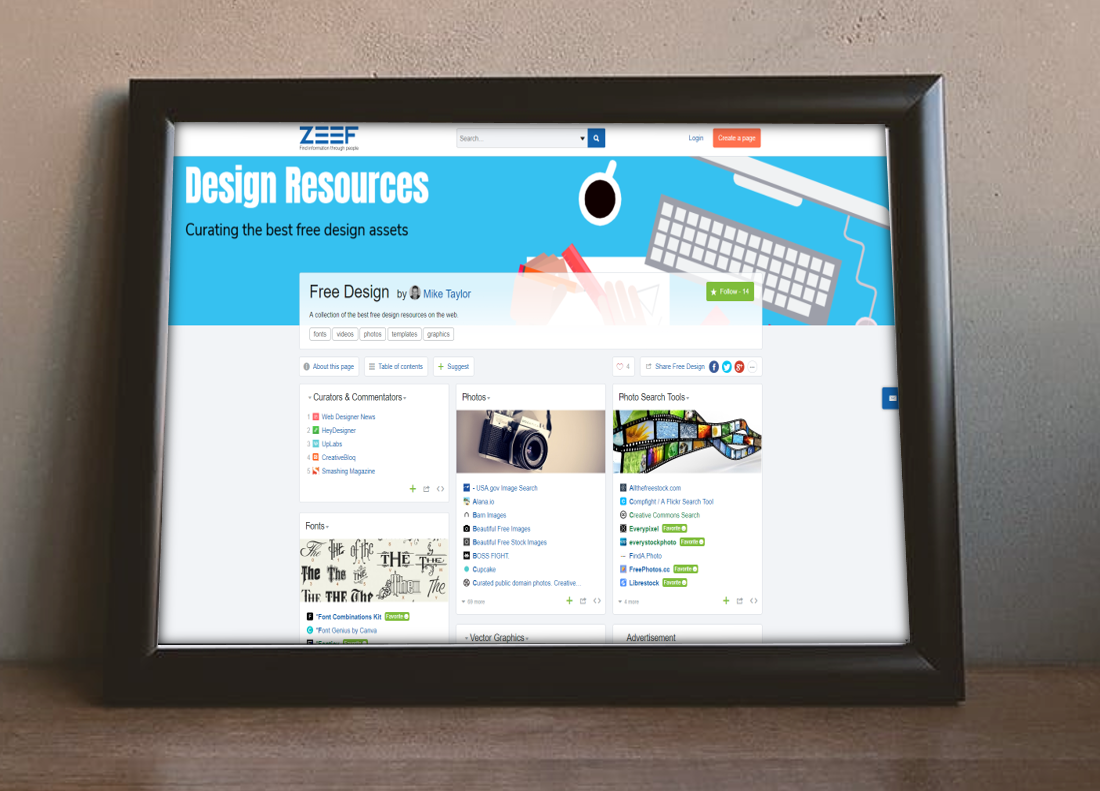
This is the easiest bar to clear and Zeef does this really well. When you create a page you’ll get a URL that looks something like yourtopic.zeef.com. The thing I like best about how Zeef presents the links is the ability to organize likes into subtopics. (Zeef calls them blocks.) You can also add descriptions and image headers for each block. Compare the display of this Zeef page to a similar collection of Diigo bookmarks.
Easy to follow
All Zeef pages have a Follow button that will let you get an email notification anytime new items are added to the page. No need to make any wasted visits looking for new stuff! Here’s what a notification looks like in your inbox.
The wisdom of the crowd
Similar to the follow button, every Zeef page also has a Suggest button that allows anyone to make contributions to your pages. A nice thing about this is that they can submit thinks anonymously if they like. It also helps out by automatically pulling in a title and description of the link and lets contributors indicate which block it fits with or if it should be in a new block of its own (optional).
Pretty nice, right!? Well, there are still more Zeef features any curator would love. Let’s check them out…
Highlights new links: If you only want the newest additions look for the links in green. Those are the most recently added ones.
Avoiding link rot: One of the challenges with curated collections is that over time some of your resources vanish from the web leaving you with dead links. Zeef keeps an eye on your links and notifies you if any of them go bad.On your page look for any links that have turned red.
Responsive Design: Zeef pages are built with a responsive design making them easy to use on smartphones and other mobile devices.
Easy sharing options: You’ll find built-in social media sharing buttons on every page.
Contact Information: Gives you the ability to include your own contact info and social media accounts
Embed blocks: Want to post your resources on your website or intranet page? Use the embed code and whenever your Zeef page is udated, so is the site where you embedded your block.
Analytics: There are some basic analytics that can give you some useful insights like where your page visitors are coming from, what links they are clicking on, etc.
If you’re a trainer, teacher, facilitator, speaker or anyone else who ever needs to share links and resources you’ve likely give this some thought. I’m always super curious to hear what is working for others. Are you doing anything like this? Do you have similar criteria or others? What are you using and how it is working?
Designing for Brains: the Psychology of User Experience
In this talk, Marissa Epstein takes a look at some fundamental principles of cognitive and behavioral psychology and how to human-proof your designs by feeding the lizard brain. Check out the lovely slides too.
In this bookmark-worthy guide, Robin Good dissects curation for you and shows how to create value for others by collecting, verifying and organizing existing information. Particularly useful for journalists, publishers, educators, and change-agents.
Retrieval Practice: The Most Powerful Learning Strategy You’re Not Using
In recent years, cognitive psychologists have been comparing retrieval practice with other methods of studying—strategies like review lectures, study guides, and re-reading texts. And what they’re finding is that nothing cements long-term learning as powerfully as retrieval practice.
Savvy Learning Pros Know About the Lizard Brain. Do You?
It is important to note that our logical mind is not in control of our actions. And logic is not what persuades others. For most people, it is surprising to learn that the subconscious mind controls 95% to 99% of human behavior.
Even if you aren’t on Twitter yourself, you can still use it to learn a lot of great things. For example, browse the hashtag stream for these conferences that went down this week.
School is back in session here and we’re celebrating our amazing daughter’s birthday. There is a lot to be thankful for including some of these things that surfaced on my radar this week. Cheers!
Does eLearning Work? What the Scientific Research Says!
What does the scientific research tell us about elearning effectiveness, particularly as it compares with classroom instruction? Mirjam Neelen & Janet Benson recap Will Thalheimer’s recent research on this.
SPOILER ALERT: It’s NOT the eLearning that improves learning effectiveness, it’s the LEARNING METHODS that are typically used in eLearning that impact eLearning’s benefits.
Google Is Giving Away Its Best Tools for Managers Absolutely Free
Google has spent years studying the attributes of effective managers for its Project Oxygen and found that , technical expertise is less important than more mundane attributes like consistency, delegation, and basic human decency.
Fortunately, Google has applied the insights they gained to develop a collection of freely available training and support documents to help newer managers learn the tricks of the trade, elicit great feedback, mentor colleagues, and run effective one-on-ones. Among the resources you’ll find are:
Yet another addtion to the seemingly constant stream of great, free design resources. Stockio gives you access to thousands of free photos, vectors,icons, fonts and videos for personal and commercial use
Why Training Fails: 11 Truths That Most Good Leaders Don’t Even Know
If you’re involved with training programs, you should give this list some consideration. Thinking about these elements and how they fit together help you get the most out of your training efforts.
Advanced Eyedropper Tip + 29 More Expert PowerPoint Hacks
Bryan Jones pulled together tips from 29 expert PowerPoint pros and I added one more to make it a nice round number. Check out these 30 tips to level up your slide building game. Watch the video and don’t forget to grab the ebook too!
Next week, I’m speaking as part of the Elearning Guild’s Learning from Marketing Summit. There are a lot of steal worthy tools and concepts you should be stealing from your marketing friends and applying to your learning and development efforts. Join me on Wednesday for ” A Few Things L&D Should Steal from Marketing” and I’ll also be part of the panel discussion wrapping things up on Thursday.











 On your page look for any links that have turned red.






You must be logged in to post a comment.