A practical guide to designing learning people actually notice
Learners don’t ignore content because they’re lazy. They ignore it because your design makes them guess what matters.
That’s the signaling principle (cueing).
Signaling means you guide attention—on purpose. You make the important parts easy to spot and the unimportant parts easy to ignore.
Why it works is simple: attention is limited. Working memory is limited. When learners waste effort searching for relevance, they have less capacity left to understand, connect, and remember.
If they have to hunt for meaning, you’ve already made learning harder.
The one question every screen must answer
Every slide, screen, or interaction triggers a silent question:
“What should I focus on right now?”
Good signaling answers that question instantly. Poor signaling makes learners answer it themselves—while also trying to learn.
That’s a bad trade.
What counts as a signal
Signals come in three main forms. None need to be fancy. Use fewer than you want to. Make them earn their keep.
1) Visual signals
Use visuals to point, not decorate.
Effective examples:
One arrow pointing to one element
A highlight on the exact part being discussed
A “spotlight” effect: dim everything except the target
Step-by-step reveals (one idea at a time)
Ineffective examples:
Highlighting everything
Three arrows competing on one screen
Motion that means nothing
Rule: One screen, one focal point.
2) Textual signals
Text is a quiet power tool.
Effective uses:
Headings that state the takeaway (not the topic)
Bold for key terms or decisions (sparingly)
Bullets to group ideas, numbers to show sequence
Preview lines: “There are three things to watch for…”
Avoid:
Paragraph walls
Bold-as-decoration
Vague headings like Overview
If everything is emphasized, nothing is.
3) Verbal signals
Your voice is part of the design.
Signals include:
A pause before the key point
A slower pace on the “why”
Phrases like “Here’s the part people miss…”
One clean repetition
Monotone narration forces learners to guess importance. If something matters, it should sound like it matters.
Where signaling matters most
Signaling helps almost everywhere, but it matters most when:
The material is complex or dense
The medium is fast or transient (video, animation, demos)
Learners are novices
Visuals have many parts or relationships
Novice learners don’t yet know what to pay attention to. That’s not their flaw. That’s the assignment.
When signaling helps less (and can backfire)
Be cautious when:
Learners already know the domain well
The content is simple or familiar
Signals pile up and create clutter
Here are red flags:
If your slide has five highlights, it has zero.
If the cue stays after the moment passed, it becomes noise.
If learners ask “which one?” your cues are competing.
More cues doesn’t mean more learning. It usually means more distraction.
Quick diagnostics before you ship
Use these tests before finalizing any learning artifact.
The 5-second test
Show the screen for five seconds. Can a learner say what matters? If not, redesign.
The pointer test
When the narration references something, could a learner point to it instantly? If not, add or improve the cue.
The squint test
Squint at the screen. Does the focal element still pop? If not, simplify and re-signal.
The timing test
Does the cue appear exactly when the narration references it? If it shows up early or late, learners still have to search.
🔍 Sidebar: What signals really do
Most people think signaling just means “point here.” It does more than that.
Signals perform three jobs:
1) Guide attention They reduce search. Search is wasted effort.
2) Show structure They tell learners how ideas are organized: steps, parts, priorities. Headings, previews, and numbering aren’t decoration. They’re a map.
3) Help integration They make relationships obvious. Words match visuals. Narration matches action. Cause links to effect.
Good signaling doesn’t just say look here. It also says this belongs with that.
Common design mistakes
Highlighting entire screens
Using color or motion without meaning
Assuming learners will “figure it out”
Confusing engagement with clarity
Learning often fails quietly. Confusion looks like compliance.
The mindset shift that matters
Stop thinking like a content expert. Start thinking like a guide with a flashlight.
Your job isn’t to show everything. It’s to guide attention, moment by moment, so learners can use their limited cognitive resources for understanding and integration.
Bottom line (and a challenge)
Design is a series of attention decisions. Signaling makes those decisions visible.
Now do this: take one messy slide you’ve made before. Redesign it using two signals max.
You spent three weeks on that compliance module. Got the objectives perfectly clear. Slide two, exactly where Gagne said they should be. Your instructional design was textbook.
Then you watched what happened: Learners skimmed the objectives and jumped ahead. Exit interviews revealed the pattern: “I knew what I was supposed to learn, so I didn’t pay attention to how.” Poor retention. Minimal application on the job.
Meanwhile, your colleague’s module—the one that starts with no objectives, just a failure scenario—had learners leaning forward, engaged, completing it in one sitting. Quiz performance was stronger. Six months later, managers reported better application.
It breaks every rule you were taught.
It works anyway.
Why?
The answer isn’t about engagement tactics or making training “fun.” It’s about something most instructional designers fundamentally misunderstand about how curiosity affects learning.
We think curiosity is the appetizer.It’s actually the main course.
The Conventional Wisdom Makes Perfect Sense
Robert Gagne’s Nine Events of Instruction have anchored systematic design for 40 years. For good reason. Event #2—”State the Objectives”—makes logical, ethical sense:
Learners deserve to know what’s expected. Objectives reduce anxiety. Clear expectations help learners organize information. Transparency respects their time.
Every instructional design certification teaches this. Every ADDIE process includes it. Lead with learning objectives? You’re being a responsible designer.
You’re also sabotaging the learning.
Not for the reason you think.
What We Got Wrong About Curiosity
Most of us carry the same assumption: Curiosity is an engagement tactic. Gets attention. Makes training feel less boring. It’s the motivational wrapper around the real content.
Curiosity = appetizer. Learning = main course.
That’s backwards.
What if curiosity isn’t decoration for learning—what if curiosity is how learning happens?
What Loewenstein Actually Discovered
In 1994, Carnegie Mellon psychologist George Loewenstein published research that should have changed everything.
Most people know the sound bite: curiosity is a “cognitive itch.”
They miss why that matters.
Loewenstein showed that curiosity isn’t a personality trait. Not a motivational boost. It’s a specific cognitive state triggered by a knowledge gap—the uncomfortable distance between what you know and what you realize you must know.
The itch only happens when you perceive something’s missing.
The critical insight: Curiosity requires just enough knowledge to recognize that the gap exists.
Too little knowledge? Confusion. Too much knowledge? No gap. Curiosity lives in between.
Most training never enters that zone.
Lead with learning objectives? You fill the hole before learners know there’s a hole to fill. You answer questions they haven’t asked yet. You solve problems they don’t feel.
The gap closes before it opens.
The Thing We’ve Been Getting Wrong
The conventional wisdom: Curiosity captures attention, then objectives structure the learning.
Twenty years after Loewenstein’s psychological framework, neuroscientists at UC Davis finally measured what curiosity does to memory. Matthias Gruber, Bernard Gelman, and Charan Ranganath put people in a brain scanner and had them learn trivia facts—some they were intensely curious about, others they didn’t care about at all.
The results were clear.
When people were curious, their brains showed two things: First, the same reward circuits that activate for food or money lit up for information. Curiosity isn’t just mental—it’s rewarding at a neurological level.
Second, and more importantly, the brain regions involved in memory formation showed dramatically enhanced activity.
Curious brains form stronger memories.
But here’s the finding that changes everything:
The memory enhancement wasn’t limited to the information they were curious about. When learners were in a curious state, they formed stronger memories for related information too—including details they weren’t specifically trying to learn.
Your compliance module just changed.
When you open with a knowledge gap about the $2M invoice error—before you explain the approval process—you’re potentially creating the same memory-enhancing state Gruber observed in the lab. While the research tested trivia, the underlying mechanism appears domain-general: the brain doesn’t distinguish between “curiosity about Beatles trivia” and “curiosity about approval checkpoints.” It responds to the knowledge gap itself.
The evidence suggests that curiosity-driven learning creates conditions where information sticks more effectively—not just the answer to the question, but the surrounding procedures, policies, and protocols you teach while learners are actively working to close the gap.
Loewenstein predicted this in 1994. Psychology. Neuroscience confirmed it in 2014. Biology. Most instructional designers still haven’t caught up.
Watch what happens in real time:
The learner sees three URLs. Almost identical. One cost $2M.
I know URLs. I know phishing. But I don’t know WHICH character matters.
Prior knowledge: activated. Gap: perceived.
They lean forward. Character by character. Domain by domain. What am I missing?
Questions generated. Attention locked.
When they spot it—that tiny subdomain difference—resolution floods in.
There.
That’s when memory formation happens most effectively. Not when they read the objectives slide listing “three types of phishing patterns to identify.” When they discover the pattern themselves while actively hunting for it.
That’s not engagement theater.
That’s learning.
The curiosity gap creates the conditions for deep processing—the productive mental work of building understanding that lasts.
Lead with objectives? Learners passively receive information. Lead with gaps? They actively construct meaning.
This is why the “wrong” design wins.
Not because it’s more engaging. Because the design creates the cognitive conditions where memory formation is most effective.
The Gagne Question: Is This a Contradiction?
If you’re a Gagne loyalist—and if you’ve been trained in systematic instructional design—this sounds like throwing out proven frameworks for trendy engagement tactics.
It’s not.
Loewenstein didn’t disprove Gagne. He updated him with 30 years of neuroscience Gagne didn’t have in 1985.
Gagne was right that learners need objectives. Right that systematic design matters. Right that structure reduces cognitive load.
He just put Event #2 in the wrong spot.
Gagne assumed learners needed the destination before they’d take the first step. Loewenstein proved they need to want the destination first.
The objectives aren’t wrong. The timing is.
The synthesis instructional design has been missing:
Keep Gagne’s structure. Create Loewenstein’s gap. Flip the sequence.
Traditional approach:
State objectives (Event #2)
Present content
Practice
Assess
Updated approach:
Activate schema (give just enough context to perceive the gap)
Open the gap (present the failure, anomaly, or question)
Sustain the gap (reveal information gradually as they work to close it)
Close the gap (NOW state the objectives—as the earned answer)
Transfer the gap (create a new scenario where they apply the pattern)
The objectives still exist. Still provide structure and clarity.
They’re just repositioned as the answer to a question the learner is already asking.
The Implementation Problem: Why Most Designers Get This Wrong
Some designers try this once and fail.
What usually goes wrong? They confuse mystery with confusion—threw learners into a vague scenario where nobody knew what domain they were in, what to pay attention to, or whether they could even solve the problem, and working memory collapsed under the weight of too many unknowns competing for too few cognitive resources.
The training didn’t just fail to engage. It actively overwhelmed.
Then they concluded: “Curiosity gaps don’t work. Gagne was right all along.”
But that’s like saying vegetables don’t work because you served raw, unwashed potatoes.
The implementation was wrong. Not the principle.
Loewenstein’s research was clear. Curiosity only works when the gap is:
Perceivable (learners can tell what they don’t know)
Specific (the missing information is bounded, not infinite)
Closeable (learners believe they can find the answer)
You can’t just throw learners into ambiguity and hope curiosity emerges. You need just enough frame to direct attention without spoiling the answer.
The frame prevents confusion. The gap triggers curiosity.
Compare these:
Bad gap (creates confusion):
“Here’s a $2M invoice error. Figure out what went wrong.”
What domain? Accounting? Data entry? Fraud? What am I looking for? Everything? One thing? Can I even solve this with what I know?
Anxiety spikes. Working memory overloads.
Good gap (creates curiosity):
“Three people approved this invoice before it went out. The amount was wrong from the first click. Your job: find which approval checkpoint failed—and why everyone missed it.”
Domain: clear (approval process) Task: specific (identify the failed checkpoint) Scope: bounded (it’s about process, not everything) Gap: present (I don’t know which checkpoint or why it failed)
The second version gives learners orientation without answers. They know what to pay attention to. They don’t know what they’re going to discover.
That’s where curiosity lives.
Why Your SME Will Hate This (And How to Win Them Over)
The SME conversation usually goes like this:
“Why waste time on mystery? Just tell them what they need to know.”
Fair objection.
Here’s the reframe:
When you lead with answers, you’re adding to the pile of 2,000 things they’re supposed to remember. Most of it disappears within a week—you’ve seen the post-training assessment data.
When you lead with the problem, something different happens. The information you give them isn’t competing with 2,000 other facts. It’s the answer to a question they’re actively trying to solve. Research shows memory formation is more effective when learners encounter information in a curious state—when they’re working to close a knowledge gap.
The SME’s content doesn’t change. The sequence does.
You’re still giving them all five vulnerability types. Still covering every approval checkpoint. Still delivering the same expertise.
We’re just repositioning it from “information to memorize” to “answer to a problem they’re trying to solve.”
And the sequence determines whether their expertise becomes information that fades or knowledge that sticks.
The Working Memory Question You Can’t Ignore
Picture your learner staring at that objectives slide.
Their brain is working. But on what?
Reading the bullet points. Trying to figure out why this matters. Wondering when the real content starts. Checking Slack.
That’s mental effort. But it’s not productive mental effort. It’s not building understanding. It’s just… busy work for the brain.
Cognitive load theory has a name for this: extraneous load. Mental effort wasted on poor design instead of directed toward learning.
Now picture the same learner encountering the $2M invoice error scenario.
Their brain is still working. But now it’s working on: What checkpoint failed? Why did everyone miss it? What pattern am I not seeing?
That’s also mental effort. But this time, the effort IS the learning.
Current cognitive load theory distinguishes between two types of load:
Intrinsic load (inherent complexity of the material)—UNAVOIDABLE Extraneous load (wasted mental effort from poor design)—ELIMINATE THIS
The goal isn’t to reduce all cognitive load. It’s to eliminate wasteful load so learners can direct their limited working memory toward productive cognitive processing.
Create a boring objectives slide? Extraneous load.
Create a confusing, unbounded mystery? Also extraneous load.
Create a bounded, directed knowledge gap? You minimize extraneous load while creating optimal conditions for learning.
The critical factor: Working memory capacity is limited. Research suggests we can hold about four chunks of information at once. During a curiosity gap, learners are holding:
The question or problem
Their activated prior knowledge
Attention to relevant cues
Meta-cognitive monitoring
Manageable—if you’ve provided the frame.
Without the frame? Add uncertainty about domain, confusion about task, anxiety about solvability. Working memory exceeds capacity. Extraneous load spikes. Confusion replaces curiosity.
The design principle:
Bounded + directed + solvable = optimal conditions for learning.
From Theory to Monday Morning: Redesigning Your Next Module
You probably have a module you’re working on right now.
Right now, it probably starts with objectives. A dutiful list of what learners will know and be able to do.
Your redesign framework:
Phase 1: Don’t Delete the Objectives—Delay Them
Your objectives aren’t wrong. Just premature. Move them from slide 2 to the moment after learners have encountered the problem the objectives solve.
Phase 2: Replace Event #2 with “Frame the Gap”
Open with three elements:
Domain specification (what realm are we in?)
Specific question (what don’t I know?)
Bounded scope (how big is this problem?)
Traditional objectives: “By the end of this module, you will identify three types of phishing URLs and explain how each exploits user behavior.”
Framed gap: “Three employees clicked three different links last month. One lost their password. One leaked quarterly forecasts. One triggered a $2M breach. The URLs looked almost identical. Your job: find what the security team missed.”
Same learning outcome. Different entry point.
One spoils the answer. One creates the itch to know.
Phase 3: Reveal Information Gradually
Don’t dump the content. Unfold it.
Let learners predict before you explain. Show examples before you give the pattern. Make the resolution earned rather than delivered.
Phase 4: State Objectives as Resolution
NOW—after they’ve wrestled with the problem—tell them what they just learned:
“Those are the three phishing patterns most employees miss: subdomain spoofing, homograph attacks, and URL parameter injection. You just learned to identify all three in context. Now let’s practice on new examples.”
The objectives become the answer, not the assignment.
The One Thing to Audit Right Now
You don’t need to redesign your entire curriculum today.
Start with one diagnostic question:
In your next module, are you answering questions learners haven’t asked yet?
If yes, you’ve found your gap opportunity.
The fix isn’t complicated. It’s sequential. You’re not removing information. You’re reordering when it appears.
I’ve built a tool that walks you through exactly how to audit your modules for curiosity gaps—and how to redesign them without starting from scratch.
It’ll show you where you’re spoiling answers, where you’re creating confusion instead of curiosity, and where you’re missing opportunities to turn passive content into active problem-solving.
The Bigger Picture
This isn’t about making training “fun.”
Not about engagement metrics or completion rates.
It’s about designing for how memory actually works.
The research is clear: Curiosity creates conditions where memory formation is enhanced. When you create the gap first, you’re not just capturing attention—you’re creating the conditions where the information you worked so hard to design actually sticks.
The question isn’t whether to use systematic design or curiosity-first design.
It’s how to synthesize both.
Structure that creates productive cognitive processing instead of passive information consumption.
If you aren’t digging holes before you fill them, you aren’t teaching. You’re just reciting.
Your next module starts Monday.
Slide two is waiting.
What will you do with it?
References
Gagné, R. M., Briggs, L. J., & Wager, W. W. (1992). Principles of instructional design (4th ed.). Fort Worth, TX: Harcourt Brace Jovanovich College Publishers.
Gruber, M. J., Gelman, B. D., & Ranganath, C. (2014). States of curiosity modulate hippocampus-dependent learning via the dopaminergic circuit. Neuron, 84(2), 486-496. https://doi.org/10.1016/j.neuron.2014.08.060
Sweller, J., van Merriënboer, J. J. G., & Paas, F. (2019). Cognitive architecture and instructional design: 20 years later. Educational Psychology Review, 31(2), 261-292. https://doi.org/10.1007/s10648-019-09465-5
Want more like this? The thinking in this post comes from Think Like a Marketer, Train Like an L&D Pro—a deeper dive into applying behavioral science and marketing psychology to learning design.
A practical crash course in performance-first thinking
It’s Tuesday at 2:47 PM when the Slack message arrives.
“We need a two-hour eLearning course on communication skills. By Friday.”
If you’re in L&D or instructional design, you probably fire back: What content should it include? Video or scenarios? Self-paced or instructor-led?
Here’s the uncomfortable truth: those questions, though they feel responsible, are the wrong starting point.
By asking them, you’re not diagnosing a problem. You’re taking an order.
I spent the first few years of my career as an order taker. Built beautiful courses. Stakeholders loved them—at first. Then nothing happened. The training became shelfware. And I couldn’t figure out why.
The answer had been sitting in performance improvement research for decades. Thomas Gilbert, Robert Mager, Peter Pipe, Roger Kaufman, Geary Rummler—these researchers documented a simple, counterintuitive insight:
Training is almost never the problem. So it’s rarely the solution.
What follows are the frameworks that help you figure out when training will actually work—and when it won’t.
The Big Idea: Performance Over Courses
Training is not the goal. Performance is.
That sounds obvious. But the implications are radical: if performance is the goal, then training is just one intervention among many—and usually not the most powerful one.
The Human Performance Technology (HPT) movement emerged from a frustrating pattern: organizations kept throwing training at problems, and the problems kept not getting solved.
What researchers found changed how I think about my entire job.
Part 1: Start With Results, Not Courses (Roger Kaufman)
Needs vs. Wants
Roger Kaufman had a gift for dismantling comfortable language.
In organizations, we say: “We need a leadership workshop.” “We need communication training.” “We need a new LMS.”
Kaufman would stop you. Those aren’t needs, he’d say. They’re wants—preferred solutions dressed up as problems.
Here’s the distinction:
A Want: A specific solution (training, tools, systems) A Need: A measurable gap between current results and desired results
When a stakeholder requests a course, they’re handing you a solution before anyone has defined the gap. Your job is to backtrack and find the actual result that’s missing.
The Outside-In Mindset
Kaufman’s Organizational Elements Model gives you a map for thinking backward from outcomes:
Mega: What value are we delivering to customers or society? Macro: What must the organization produce to deliver that value? Micro: What do people need to do daily to make that happen?
Most training starts at Micro—”employees need to learn X”—without confirming X actually drives results.
Here’s an example: A client asked for “better presentation skills training” for account managers. When I pushed to Macro level, the real organizational result they wanted was shorter sales cycles. When we dug into the data, presentations weren’t the problem. The proposal approval process was taking 18 days on average.
Takeaway: Never start with the course. Start with the measurable result the organization is missing.
Part 2: Check the Environment First (Thomas Gilbert)
You’ve identified a real performance gap. Now comes the next trap: assuming the gap exists because people don’t know how to do something.
Thomas Gilbert spent years studying human performance and landed on a blunt conclusion:
Most performance problems are caused by the environment, not the individual.
He’d measured it. Environmental factors drive performance roughly 75% of the time. Knowledge and skill? About 25%.
The Behavior Engineering Model
Gilbert organized this into six factors:
The Environment (fix these first):
Data – Do people know what’s expected? Do they get clear, fast feedback?
Instruments – Do they have the tools, systems, time, and resources to do the job?
Incentives – Are we rewarding the right behaviors? Or accidentally punishing them?
The Individual (address these last):
Knowledge – Do they know how to do the task?
Capacity – Are they physically and mentally capable?
Motives – Do they personally value the outcome?
Training primarily targets Box 4: Knowledge.
If Boxes 1, 2, or 3 are broken, training makes people better informed and still stuck.
Carl Binder adapted Gilbert’s original model to make it usable in real workplaces. The six boxes translate performance theory into a fast, practical diagnostic—so teams can spot the real constraint without becoming performance experts. Learn more at sixboxes.com
What This Looks Like
A sales team was consistently missing quota. Leadership wanted “advanced negotiation training.”
But when we mapped the situation to Gilbert’s model, the problem was in Box 2—Instruments.
The CRM required 47 clicks to generate a customer proposal. By the time a salesperson assembled the pricing data, prospects had often moved on or gone around them to customer support.
We didn’t build a negotiation course. We fixed the CRM workflow and reduced proposal generation to eight clicks.
Quota problems disappeared within a quarter.
Takeaway: You can’t train your way out of unclear expectations, broken tools, bad incentives, or sabotaged workflows.
Part 3: Decide If It’s “Can’t Do” or “Won’t Do” (Mager & Pipe)
You’ve checked the environment. The tools work. Expectations are clear. Incentives align.
But the performance gap persists.
Robert Mager and Peter Pipe gave us something rare: a practical diagnostic tool you can use in real time. A flowchart. (I think it is the best flowchart of all time!)
I keep a copy on my desk. It’s saved me from building useless training more times than I can count.
The Mager & Pipe Performance Flowchart
The genius of this flowchart is how it systematically walks you through a performance problem, ruling out non-training solutions one by one. Training only appears at the very end.
Here’s how it works:
Q1: Is the gap worth fixing? If the cost of fixing exceeds the cost of ignoring it, stop.
Q2: Could they do it if their life depended on it? (The “Gun Test”)
If YES → It’s a “won’t do” problem. Check consequences and obstacles.
If NO → It’s a “can’t do” problem. Continue below.
Q3: Are consequences aligned? Is doing it right rewarding? Is doing it wrong punishing? Or is it backwards?
Q4: Are there obstacles? Policies that contradict performance? Workflows that make the right thing harder? Remove obstacles first.
Q5: Did they ever do it correctly? If yes, they need practice or feedback—not necessarily training.
Q6: Can the task be simplified? Job aids, checklists, or workflow redesign often beat training.
Q7: Do they have the potential to learn it?Now training makes sense—with practice and feedback built in.
The Flowchart That Saved $200,000
A logistics company asked for “forklift safety recertification” for 400 warehouse workers. Budget: $200K. Reason: rising accident rates.
Here’s what walking the safety director through the flowchartmight look like.
Q1: Worth fixing? “Yes—insurance and damaged inventory are costing us more than training would.”
Q2: Could they do it safely if their life depended on it?
Long pause. “Actually… yes. When OSHA inspectors are on site, accidents drop to zero.”
Boom. That’s “won’t do,” not “can’t do.”
Q3: Consequences aligned?
Not even close. Productivity bonuses rewarded speed. Safe operation was slower—and therefore financially punished. Accidents had no real consequences.
Fixed incentives (tied bonuses to productivity and safety)
Improved lighting and warehouse layout
Provided visible daily safety scoreboards
Cost: $35,000. Results: 60% drop in accidents within three months. Training budget: $0.
How to Use This
Get the flowchart from Mager and Pipe’s Analyzing Performance Problems (Chapter 2) or search “Mager Pipe performance flowchart” online. Print it. Keep it visible.
Next time someone requests training, walk through it together. Takes a little bit of time but saves months of wasted effort.
The flowchart turns “I think we need training” into an objective diagnostic. And here’s what you’ll discover: training is the solution to exactly one branch of that tree.
Takeaway: Training fixes “can’t do.” Management, systems, incentives, and workflow design fix “won’t do.” The flowchart tells you which one you’re dealing with.
Part 4: Fix the Workflow, Not Just the Worker (Geary Rummler)
Even with skilled people and clear goals, performance can still crater. Why?
Geary Rummler pointed out what most organizations miss: the structure fights the work.
Mind the White Space
Organizations are designed vertically—departments, functions, reporting lines. But work happens horizontally, across handoffs.
Marketing hands off to Sales. Sales hands off to Operations. Operations waits on IT. Everyone waits on approvals.
The gaps between these handoffs are what Rummler called the “white space” on the org chart. And they’re where work goes to die.
You can have brilliant performers, but if the process they’re trapped inside is broken, performance will suffer.
A Quick Example
An onboarding team was consistently missing deadlines. HR wanted “time management training.”
But when they mapped the workflow:
HR completed paperwork (3 days)
IT provisioned accounts (7 days)
Facilities ordered equipment (5 days)
The new hire’s manager was never told when to expect them
Total: 15+ days. Time management training wouldn’t have saved a single day—the problem wasn’t individual time management. It was a sequential process with no coordination.
They redesigned the workflow so steps happened in parallel and added automated notifications.
Onboarding time dropped to 5 days. No training required.
Takeaway: Before blaming individuals, look at the process they’re trapped inside.
When Training Actually Works
Let me be clear: I’m not anti-training.
Training can be the right solution—when conditions support it.
Training tends to work when:
The task or system is genuinely new
People get practice and feedback after training
The environment already supports correct performance
The problem is truly a knowledge or skill gap
Training is often necessary. It’s just rarely sufficient on its own.
A Simple Performance-First Decision Path
Here’s how to pull these frameworks together:
1. What result is missing? (Kaufman) Define the measurable gap in performance—not the training, the outcome.
2. Is the environment set up for success? (Gilbert) Check Data, Instruments, and Incentives before assuming it’s a knowledge problem.
3. Under ideal conditions, could people do the task? (Mager & Pipe) If yes, fix the system. If no, consider training.
4. Is the workflow sabotaging performance? (Rummler) Look at handoffs, delays, and white space—not just individual tasks.
Only then should you even think about opening your authoring tool.
Real-World Example: Communication Training That Wasn’t
A client contact center was drowning in customer complaints. The operations VP requested “communication skills training” for all 120 agents. Urgent, two-week turnaround.
They could have built it. Would’ve been a nice project fee.
But they used the frameworks:
Kaufman: The real result wasn’t “better communication”—it was a 30% reduction in repeat complaints within 60 days.
Gilbert (Data): Agents had no shared definition of “good communication.” Some were measured on call speed, others on satisfaction. The metrics conflicted.
Gilbert (Instruments): The CRM hid key customer information three clicks deep. Agents were asking customers to repeat information the company already had.
Gilbert (Incentives): Fast call resolution was rewarded. Thorough problem-solving wasn’t.
Mager & Pipe: When we asked, “Could agents resolve issues well if conditions were perfect?” the answer was yes—they already did when supervisors were watching.
Rummler: The workflow required agents to log issues in one system, but solutions were stored in another. No integration.
They didn’t build a communication course.
Instead:
Defined clear communication standards
Fixed the CRM interface
Aligned metrics to prioritize resolution quality
Integrated the ticketing and knowledge systems
Complaints dropped dramatically in a matter of weeks. Not a single PowerPoint slide required.
The Job You Were Actually Hired to Do
Moving from “course builder” to “performance consultant” can feel uncomfortable. It means asking harder questions, pushing back on stakeholders, sometimes saying “Training won’t fix this.”
But the pioneers of HPT taught us something crucial:
Our job isn’t to fill heads with knowledge. Our job is to improve performance.
Sometimes that means training. More often, it means fixing the world people work in.
The next time someone asks you for a course, pause.
Ask about the result they’re missing. Check the environment. Test whether it’s “can’t do” or “won’t do.” Look at the workflow.
You might still build training. But if you do, it’ll be the right training, at the right time, with the environment ready to support it.
You’re in a kickoff meeting. Someone suggests, “Let’s find out everyone’s learning style first. Then we can tailor the training.”
Heads nod. It sounds thoughtful. It sounds learner-centered. And you feel that small, nagging voice: Is this actually a thing?
If you’ve been in L&D for a while, you’ve probably been in that room.
It felt like good practice.
Here’s the hard part: Decades of research say it doesn’t actually improve learning.
This is not a “you’ve been doing everything wrong” moment. It’s a “the field has moved on—and now we get to move with it” moment.
Let’s unpack why learning styles are so tempting, what the research really says, and what to use instead that does help people learn.
Why Learning Styles Feel So Right
The core promise of learning styles is simple and attractive:
“If we know how someone learns best, we can design just for them.”
Who wouldn’t want that?
It also fits a story we like to tell about ourselves: “I’m a visual learner.” “I’m an auditory learner.” It sounds like knowing your Hogwarts house. It gives you an identity.
From an L&D point of view, it can feel:
Human.
Personalized.
Modern.
The problem is that the evidence never caught up with the marketing.
Large reviews—like Coffield et al. (2004) and a widely cited paper from Pashler and colleagues in 2008—have looked for a “learning styles boost” over and over again.
They didn’t find it.
What the Research Actually Tested
Researchers didn’t just ask, “Do people have preferences?” That answer is easy: yes, they do.
They asked a tougher question:
“If we match instruction to a person’s preferred learning style, do they learn better than if we don’t?”
This is sometimes called the “meshing hypothesis.”
To support learning styles, we’d need to see a clear pattern:
Label learners by style (visual, auditory, etc.).
Teach some people in their preferred style and some in a non-preferred style.
See better test results for the “matched” group.
Across many studies and reviews, that pattern just doesn’t appear.
Learners often feel better when things match their preference. But when you look at performance—recall, problem solving, transfer—the “style match” doesn’t provide a consistent boost.
The careful conclusion from these reviews is:
There is no strong evidence that designing training to match learning styles improves learning outcomes.
That’s the myth-busting part.
Now let’s talk about what to do with it.
The Hidden Cost of Chasing Styles
You might be thinking, “Okay, fine. But what’s the harm? Isn’t it at least harmless?”
Not always.
Here’s what happens in real L&D work:
We spend time building “What’s your style?” quizzes instead of tightening our examples.
We create three versions of content—visual, audio, and kinesthetic—instead of creating one clear, well-designed flow.
We talk about “styles” in stakeholder meetings instead of talking about spacing, practice, or how this connects to real work.
The problem isn’t that learning styles are evil. The problem is opportunity cost.
Every hour we invest in a model that doesn’t add value is an hour we don’t spend on things that do.
So What Should We Do Instead?
The good news: We are not starting from scratch. Learning science has a lot to offer us here.
We have decades of evidence for strategies that help most learners, across jobs and contexts, without trying to label them.
Here are a few of the heavy hitters.
Combine Words and Visuals (Dual Coding)
People tend to learn better when we pair clear visuals with clear words.
A simple diagram plus a short explanation.
A screenshot with a brief, focused caption.
A process map plus a short story that walks through it.
Not decoration. Not stock photos. Visuals that actually carry meaning.
Use Worked Examples
Before you ask a novice to “jump in and try it,” show a complete example.
A finished email with comments on why it works.
A full call script with callouts for each step.
A solved problem with the thinking made visible.
Research shows that worked examples reduce overload and help people build mental models faster than throwing them into full problems too soon.
Manage Cognitive Load
Our learners aren’t broken. Their attention is just busy.
You can help by:
Making one key point per slide.
Cutting cute but irrelevant details.
Removing extra animations and noise.
Using plain language instead of jargon.
You don’t need a style label to do this. You just need to respect the limits of working memory.
Use Spaced and Retrieval Practice
Cramming feels productive. It’s not.
Two simple shifts make a big difference:
Spaced practice: Spread learning over days or weeks instead of one long hit.
Retrieval practice: Ask learners to recall information (mini-quizzes, quick scenarios) instead of only re-reading or replaying.
Meta-analyses on practice testing and spacing show reliable benefits for long-term retention. They’re not flashy, but they work.
How to Talk About This Without Shaming Anyone
Here’s the most important part for our field culture: Most people who use learning styles do it because they want to help.
So when you talk about this with stakeholders or peers:
Assume good intent.
Aim for curiosity, not “gotcha.”
Focus on the upgrade: “Here’s something that works even better.”
You don’t have to call anyone out. You can simply say:
“The research on learning styles never really held up. Instead of investing in that, we can use strategies like examples, visuals plus words, and spaced follow-ups that have a much stronger track record.”
You’re not taking something away. You’re offering an upgrade.
The Bottom Line
Learning styles feel intuitive and kind. They give us labels and the illusion of precision.
But large reviews—from Coffield and colleagues, from Pashler and others—keep telling us the same thing: matching instruction to a preferred style doesn’t reliably improve learning.
The real opportunity is not arguing about who is a “visual learner.” It’s designing for how learning works:
Clear, meaningful visuals plus words.
Worked examples before solo practice.
Spaced and retrieval practice.
Respect for cognitive load.
You don’t need a style quiz to do that. You just need to shift your time and energy away from labels and toward strategies that actually pay off for your learners.
Future-you—and your learners—will be glad you did.
Emails. Social feeds. Notifications piling on notifications.
You look away for one minute and miss three posts from a writer you actually wanted to read—because an algorithm decided you needed fourteen kitchen remodeling hacks instead.
There’s a better way to keep up with the things you care about. No fuss. No overwhelm.
It’s called RSS.
If the name sounds technical, relax. This guide is for regular humans, not engineers.
Let’s get you set up in the next few minutes.
What RSS Actually Is (In Plain English)
RSS is basically a “follow” button for the entire internet.
Any time a site you follow publishes something new, RSS quietly pulls it into one clean feed. You stay in control.
No algorithm deciding what you see. No ads wedged between articles. No emotional manipulation engineered to keep you scrolling.
Just updates from the places and people you choose.
Why RSS Is the Best Way to Keep Up With What Matters
You never miss posts from your favorite creators.
Everything shows up in order. Nothing gets buried by a feed curated for engagement metrics instead of your interests.
You get a quieter, calmer reading experience.
No autoplay videos. No “recommended for you” rabbit holes. No rage-bait in your peripheral vision.
You can ditch email for newsletters (if you want).
Some RSS readers let you follow newsletters directly inside the app. That means you enjoy your favorite writers without choking your inbox. This feature usually costs a few bucks a month (Feedly, Inoreader, and Readwise Reader all offer it), but even free RSS plans give you the bigger win: clarity and control.
You build your own personal internet.
Your interests. Your pace. Your feed.
Step 1: Pick Your Reader
Here are my three favorites:
Feedly — Best for most people. Simple, works everywhere, beginner-friendly.
Inoreader — Great if you love organizing. Powerful filters and folders once you’re comfortable.
Readwise Reader — Premium “everything in one place” tool. Combines RSS, newsletters, YouTube, PDFs, and highlights.
Any of these will work beautifully. Pick one and create a free account. You can’t go wrong.
Step 2: Add Your First Site
This is where it gets fun.
In your reader’s search bar, type the name of a site you love. Or paste the full URL. The reader will find the feed automatically.
To test it out, here is one you can add right now:
mike-taylor.org — Hand-picked research, tools, tech, and weekly discoveries.
You just built the foundation of your feed.
Step 3: Add a YouTube Channel (Optional)
Copy the link to any YouTube channel you follow. Paste it into your reader.
Done.
Every new video from that creator will now show up like a regular post. No ads. No “Up Next” spiral. No algorithm trying to keep you watching.
Step 4: Add a Newsletter (Optional—Usually a Paid Feature)
If your reader supports it, you can follow email newsletters directly in RSS.
Just paste the newsletter signup link or use your reader’s “Add Newsletter” option. Future issues arrive in your RSS feed instead of your email inbox.
Your inbox stays clean. Your brain stays focused.
Step 5: Create a Few Simple Folders
Don’t overthink this part. Start with something like:
A-List — Sources you’d actually miss if you skipped a day.
B-List — Great content, but you won’t lose sleep if you fall behind.
News
Learning & Ideas
Creators I Follow
This structure keeps RSS from becoming its own kind of overwhelm. You’re curating as you go, not drowning in a new flood.
Step 6: Let It Run
Give it a day.
Tomorrow, you’ll open your reader and see a clean feed of exactly the things you care about—and none of the things you don’t.
RSS feels like magic once the posts start flowing in.
How to Use RSS Comfortably Every Day
Here’s a routine that keeps things peaceful:
Daily (10 minutes)
Scan your A-List folders for anything new. If you have extra time, browse your B-List and explore.
As you discover new sites, creators, and sources you like, add them. You’re building your own personal internet, one feed at a time.
What This Actually Feels Like
You open your reader.
Twelve new posts.
Every single one from someone you chose to follow.
No ads wedged between you and the ideas. No algorithm guessing what you want. No dopamine-engineered infinity scroll.
Just signal. Just substance.
It’s your internet now—built by you, for you.
If you start using RSS after reading this, I’d love to hear what feeds you added first. Drop me a note and tell me what you’re following.
Sarah’s quarterly review went well. Her compliance training program had a 94% completion rate. Everyone passed the quiz. Leadership was pleased.
Three months later, a manager made a comment that clearly crossed the line. Nobody reported it.
When HR investigated, five employees gave the same answer: “I didn’t know that counted as harassment.” They’d all completed Sarah’s training. Every single one passed the final quiz. They remembered nothing.
Sarah knew the problem wasn’t her slides. The content was clear. The examples were relevant. The quiz tested the right material.
The problem was deeper: her learners never actually learned.
They recognized information during training. They forgot it afterward. And Sarah had no way to tell the difference until it was too late.
This is the central paradox of workplace training. We measure completion. We get forgetting. We design for immediate performance. We need lasting retention. We think we’re building knowledge. We’re building illusions.
The solution isn’t better videos or clearer slides. The solution is counterintuitive. Less presenting. More testing.
How This Fits: Building on What You Know
If you’ve read earlier articles in this series, you know effective learning often requires productive struggle. We explored how worked examples reduce cognitive load for novices, making complex skills more learnable. We examined how desirable difficulties enhance retention when applied correctly.
Testing—specifically, retrieval practice—belongs in the desirable difficulties family. It’s harder than reviewing notes. Less comfortable than rereading. And dramatically more effective than both.
Here’s the key insight: retrieval practice and worked examples aren’t contradictory. They’re complementary partners in a learning sequence.
Use worked examples when learners face genuinely novel material. Reduce extraneous load. Build initial schemas. Then—and this is critical—use retrieval practice to cement those schemas into long-term memory.
Think of it as two-stage construction. First, reduce unnecessary difficulty during initial learning. Then introduce productive difficulty during practice. The worked example teaches the concept. The retrieval practice makes it stick.
Timing matters. Sequence matters. Understanding when to scaffold and when to challenge separates effective training from theater.
Now let’s examine why retrieval works so powerfully—and why most organizations still aren’t using it.
The Evidence That Should Have Changed Everything
In 2006, Henry Roediger and Jeffrey Karpicke ran an experiment that should have revolutionized workplace training.
It didn’t. At least not yet.
They had college students read passages about sea otters and the sun. After reading, students were randomly assigned to one of two groups:
Group 1: Study the passage four times
Group 2: Study once, then take three practice tests (no feedback)
Five minutes later, Group 1 crushed it. They recalled more information. This makes intuitive sense—more exposure, more learning, right?
One week later, both groups returned for a surprise test.
The results flipped.
Students who took practice tests remembered 50% more than students who studied repeatedly (Roediger & Karpicke, 2006). Testing once produced better retention than studying four times.
Let that sink in. The students who studied less remembered more.
This wasn’t a fluke. The testing effect—also called retrieval practice—has been replicated hundreds of times across different ages, materials, and contexts. The meta-analyses are overwhelming:
Rowland (2014) analyzed dozens of studies comparing testing to restudying. Medium-to-large effect size (g = 0.50). Adesope et al. (2017) examined 217 studies spanning lab and classroom settings. Testing won consistently. Agarwal et al. (2021) conducted a systematic review focusing specifically on applied educational contexts—real classrooms, not just labs. The effect held.
The evidence is bulletproof. When you force learners to retrieve information from memory—to actively recall without looking—you create stronger, more durable learning than any passive review strategy.
But why? What happens during retrieval that makes it so powerful?
What Retrieval Actually Does to Your Brain
Most people think of tests as measurement tools. Ways to assess what learners know. But testing is a learning event. The act of retrieval physically changes the brain.
Let’s experience this directly.
Try this right now: Without looking back, write down the three groups from the Roediger and Karpicke study I just described. What did each group do?
Go ahead. Try it.
Notice what just happened in your mind. You had to search for the information. Maybe you pictured the paragraph where I described it. Maybe you remembered “Group 1 studied more” but couldn’t recall the exact number. Maybe you struggled.
That struggle? That’s retrieval. And it’s completely different from what happens when you reread.
Now scroll up and check your answer.
You just experienced three phenomena that make retrieval practice work:
The Effort Changes Everything
When you reread material, your brain takes a shortcut. You see information and think, “Yes, I know this.” You’re using recognition pathways. Recognition is passive. Easy. Comfortable.
And almost useless for long-term retention.
Retrieval is different. You must reconstruct the memory from scratch. No cues. No hints. Just your brain searching through networks of associations trying to locate and rebuild the information.
This reconstruction requires effort. Real cognitive work. And that effort is what strengthens the neural pathway. Each successful retrieval makes the next one easier. The memory becomes more accessible (Bjork, 1994).
Think of it like a trail through woods. Walking the same cleared path repeatedly keeps it maintained. But bushwhacking through overgrowth to find the trailhead? That’s retrieval. It’s harder. You might get lost. But when you succeed, you’ve created a clearer, more distinct path.
The difficulty is the mechanism. No struggle, no strengthening.
You Activate More Than You Retrieve
Here’s where it gets fascinating.
When you struggle to retrieve information, you don’t just strengthen the direct memory. You activate related information through spreading activation in semantic memory (Carpenter, 2009, 2011).
Imagine you’re trying to remember your company’s incident reporting procedure. As you struggle to recall “Document the incident immediately,” your brain activates related concepts: “Notify supervisor,” “Preserve evidence,” “Photos if possible,” “Follow up within 24 hours.”
These related concepts become linked to your target memory. They create multiple routes to the same destination.
Carpenter (2011) demonstrated this with word pairs. When learners retrieved weakly associated pairs like “basket” and “bread,” they spontaneously activated semantic mediators—related concepts like “grocery” or “bakery.” These mediators later served as additional retrieval cues. Restudying didn’t produce this effect.
For workplace application, this is critical. Real problems don’t arrive with helpful labels. Your employees won’t see a notification saying “Time to use your de-escalation training!” They need to access that knowledge spontaneously when a customer starts yelling.
Multiple access routes make spontaneous recall possible.
You Learn What You Actually Know
When Sarah’s employees restudied her harassment prevention slides, everything looked familiar. They thought they knew it. Familiarity felt like learning.
It wasn’t.
Retrieval reveals the truth. It exposes the gap between what you think you know and what you can actually recall. This is a metacognitive benefit—your ability to judge your own knowledge (Bjork, 1994).
Karpicke et al. (2009) studied how college students prepare for exams. The results were striking:
– 84% relied primarily on rereading
– Only 1% used self-testing as their main strategy
When asked why, students said rereading “felt more productive.” But their predictions about their own learning were systematically wrong. Students thought repeated studying would help. Testing actually helped more.
This is the illusion that sabotages most training. Rereading feels smooth and confident. Testing feels choppy and uncertain. But feelings deceive. The uncertainty during retrieval is a signal of learning, not failure.
Sarah’s employees felt confident after reviewing her slides. They were wrong. The quiz after training measured recognition—can you identify the right answer when you see it?—not retrieval. Recognition and retrieval are different animals. One works on the job. One doesn’t.
The Resistance You’ll Face (And Why It Matters)
Here’s the problem Sarah discovered when she redesigned her training: retrieval practice feels wrong to learners.
She sent her first spaced quiz one week after training. Simple questions. No tricks. Just “From memory, list three behaviors that constitute reportable harassment under company policy.”
The responses she got weren’t quiz answers. They were complaints.
“I don’t remember this. Can you send the slides again?”
“This feels like a test. I thought we already passed the training.”
“Why are you testing us? Don’t you trust us?”
Sarah had anticipated resistance. She hadn’t anticipated how visceral it would be.
But the research predicted this reaction perfectly. When Karpicke et al. (2009) surveyed students about study strategies, they found learners overwhelmingly prefer rereading because it feels productive. It’s smooth. Information flows easily. Learners mistake this fluency for learning.
Testing feels terrible. You get stuck. You blank on answers you “knew” five minutes ago. You feel uncertain. Learners interpret this difficulty as failure.
But that difficulty is the entire point.
Bjork (1994) calls this “desirable difficulty”—obstacles that impair performance during practice but enhance long-term retention. The struggle to retrieve is what makes retrieval practice work.
This creates a massive challenge for L&D professionals. Your learners will actively resist the strategy that helps them most. They’ll gravitate toward strategies that feel productive but accomplish little.
Sarah learned to reframe retrieval practice. Not as testing. As a workout for memory. Nobody expects exercise to feel effortless. The challenge is the mechanism of growth.
She told her team: “If this feels hard, that’s good. If you’re struggling to remember, that’s the point. Your brain is working. That work is what makes knowledge stick.”
Some grumbled. But after two months, something shifted. Employees started noticing they could answer questions without looking things up. The knowledge was just… there.
One employee told Sarah: “I hated those pop quizzes at first. But now, when a situation comes up, I actually remember the policy. I don’t have to search for it.”
That’s when Sarah knew it was working.
How to Actually Do This: Two Detailed Applications
Enough theory. Let’s walk through exactly how Sarah implemented retrieval practice—first in her compliance training, then in her technical skills program.
Application 1: Compliance Training That Actually Sticks
What Sarah Changed
Her old approach was typical: 45-minute module, information-dense slides, final quiz with answers visible on the screen above the questions. Pass rate: 95%. Retention three months later: maybe 30%.
Her new approach eliminated the end-of-training quiz entirely. Instead:
Day 1 (during training session, last 15 minutes):
Sarah presented core policy information in 30 minutes instead of 45. Then she closed the slides.
“Put away your notes. Close the handout. For the next 10 minutes, write everything you remember about what constitutes reportable harassment under our policy.”
Silence. Discomfort. People looked around nervously.
“No looking back,” Sarah said. “This isn’t graded. Just write what you remember.”
People struggled. They wrote a few things, crossed them out, wrote more. After 10 minutes, Sarah gave them a one-page reference sheet showing the actual policy elements.
“Compare what you wrote to this. Notice what you got right. Notice what you missed. That’s your learning.”
Week 2 (5 minutes via email):
Sarah sent a scenario:
“You witness a colleague make an ambiguous comment to another employee. The recipient looks uncomfortable but doesn’t say anything. Is this reportable under company policy? What’s your next step? Reply with your answer.”
After people responded, she sent the correct answer with a brief explanation. No scoring. No judgment. Just feedback.
Month 2 (10 minutes in team meeting):
Sarah presented a realistic case study. Pairs worked together: one person explained the policy, the other identified gaps or errors, then they switched roles.
Month 3 (5 minutes via Slack):
“Real situation from this week: [describes actual ambiguous incident]. How does this relate to our harassment policy?”
Sarah’s Results
Three months after training, she ran an unannounced quiz using realistic scenarios. Retention: 78%. Nearly three times better than her previous approach.
More importantly: when actual incidents occurred, employees actually reported them. They recognized the behavior. They knew the procedure. The knowledge was accessible when they needed it.
Implementation Details Sarah Learned:
The free-recall brain dump (Day 1) was crucial. It revealed gaps immediately while the information was fresh enough to correct. But it required Sarah to create a clear reference sheet for self-comparison. Without that, learners felt lost.
The spaced quizzes (Week 2, Month 2, Month 3) worked best when they pulled from all previous content, not just recent material. This prevented learners from forgetting early content while learning later content.
Email delivery worked fine for simple questions. For complex scenarios, team meetings created better engagement because people could discuss answers.
The biggest challenge was getting managers to protect the 5-10 minutes required for retrieval activities. Sarah had to show retention data to prove the time was worth it.
Application 2: Technical Skills Training (CRM System)
What Sarah’s Colleague Marcus Changed
Marcus ran software training for their sales team. His old approach: a full-day session where he demonstrated features while learners followed along. “Sandbox environment available for practice.” About 20% actually used it. Within the first month, 60% called the helpdesk for procedures they should have remembered.
His new approach split the training across two weeks with retrieval built in:
Session 1 (2 hours):
Marcus demonstrated core workflows:
– Creating a contact (10 minutes demo)
– Logging a call (10 minutes demo)
– Creating an opportunity (10 minutes demo)
Then he closed his screen. “Now you try—from memory. Create a contact using your own information. I’m not showing you the steps. Pull from what you just saw.”
People fumbled. Clicked the wrong buttons. Got lost. Marcus circulated to help but didn’t re-demonstrate. He prompted: “What did you see me do? What was the first step?”
This immediate retrieval after each demo took 30 minutes total. Messy. Inefficient. Effective.
Week 1 (5 minutes each morning):
Marcus sent daily retrieval prompts:
Monday: “Don’t open the CRM yet. Write down the steps to create a contact.”
Tuesday: “Write the steps to log a call.”
Wednesday: “Write the steps to create an opportunity.”
Thursday: “Now combine them: Write the full workflow from new contact to logged opportunity.”
Friday: “Scenario: Client calls with interest in Product X. Write your complete CRM workflow.”
After each prompt, people opened the CRM and tried the procedure. They compared what they wrote to what they actually had to do.
Week 2 (Session 2, 90 minutes):
Marcus presented progressively harder scenarios. Each one required retrieving earlier knowledge:
“Client wants Product X but has budget concerns. Create the contact, log this call, create an opportunity with notes about the budget issue.”
People worked from memory. Real client data. Real consequences for errors. Marcus provided help only for genuine system bugs, not forgotten procedures.
Marcus’s Results
Within two weeks, 80% of the sales team was independently proficient. Previously this took two months. Helpdesk calls for “how do I…” questions dropped by 70%.
Sales reps could execute workflows without references. When weird edge cases appeared, they could figure them out because they understood the logic, not just the steps.
Implementation Details Marcus Learned:
The immediate retrieval after each demo (Session 1) was the most important intervention. It revealed mistakes while Marcus was there to help. Waiting until later would have let errors solidify.
The daily prompts required only 5 minutes but had to be consistent. Missing a day broke the spacing pattern. Marcus automated them using email scheduling.
The hardest part was resisting the urge to re-demonstrate when people struggled. His instinct was to jump in and show them again. But making them figure it out—with prompts, not answers—was what made knowledge stick.
Marcus learned to use two-part questions: “Write the steps” (retrieval) then “Now try it” (practice). The retrieval before practice was what made practice effective.
The Other Applications: Quick Hits
Product knowledge for customer service: Daily “customer question of the day” sent via Slack. Reps answer from memory. Correct answer shared after responses come in. Three months: customer satisfaction scores up 12% because reps can answer questions without putting customers on hold.
New hire onboarding: Weekly “teach-back” sessions where new hires explain company procedures to each other. Manager observes, corrects errors. Time to productivity: down 18 days compared to traditional onboarding.
The pattern is consistent. Replace review with retrieval. Space it out. Make it effortful. Measure retention, not completion.
The Bottom Line: What Changes in Your Training
Most organizations build training like this:
1. Deliver information
2. Check understanding with a quiz
3. Issue certificate
4. Hope learners remember
Sarah learned to flip this completely:
1. Deliver information (briefly)
2. Force immediate retrieval
3. Space retrieval over weeks
4. Measure actual retention weeks later
The shift is from “Did they complete it?” to “Can they recall it without help?”
This requires three fundamental changes in how you design training:
First, measure retention, not completion.
Stop celebrating 95% completion rates. Start measuring what learners remember two weeks, four weeks, and three months after training. Use unannounced quizzes with realistic scenarios. If completion is high but retention is low, your training failed.
Sarah now tracks two metrics: immediate quiz scores (which she expects to be high) and delayed retention scores (which reveal actual learning). Only the second metric matters for program success.
Second, replace every review session with retrieval.
Every time you’re tempted to “review the key points,” stop. Instead, ask learners to retrieve the key points from memory. No slides. No handouts. Just retrieval. Then show them what they missed.
Sarah eliminated all her “refresher” training. She replaced it with spaced quizzes that force retrieval of previous content. The time commitment is 20% of what refreshers required. The retention is 3x better.
Third, embrace forgetting as a feature.
The forgetting curve is your friend. Let learners forget a little between retrieval sessions. When they struggle to remember, that difficulty strengthens the memory.
Sarah spaces her quizzes strategically: 1 day, 1 week, 1 month, 3 months. Each retrieval resets the forgetting curve at a higher baseline. After four retrievals, knowledge sticks for 6+ months without additional intervention.
Your Checklist for the Next Training Program
You’re designing new training. Here’s what changes:
During Design:
– Cut your presentation time by 30%. Use that time for retrieval instead.
– Choose question formats: free recall for complex concepts, short answer for procedures, multiple choice only when you need to scale beyond what you can manually review.
– Plan feedback: immediate for high-stakes content (safety, compliance), delayed by one day for everything else.
During Rollout:
– Tell learners why you’re doing this: “This will feel hard. That means it’s working. The struggle is what makes knowledge stick.”
– Make first retrieval happen immediately after initial training, before learners leave.
– Monitor completion of spaced retrieval, not just initial training. If people skip the spaced quizzes, they’ll forget everything.
– Watch success rates. If below 40%, the questions are too hard. If above 90%, they’re too easy. Target 60-75% success.
During Measurement:
– Test retention at 2-4 weeks with unannounced quiz.
– Compare to previous version of same training (or to control group).
– Measure on-the-job application through manager observation or real performance data.
– Calculate time-to-proficiency versus your baseline.
During Iteration:
– Identify which specific content is forgotten most often.
– Add extra retrieval practice for those trouble spots.
– Experiment with spacing intervals (some content needs more frequent retrieval).
– Test different question formats to find what works for different content types.
Sarah now designs all training this way. Her programs take less time to deliver. They cost less to maintain. And they produce dramatically better retention.
Her secret? She makes learning uncomfortable. And she’s stopped apologizing for it.
The Uncomfortable Truth
Retrieval practice works. The evidence is overwhelming. Hundreds of studies. Multiple meta-analyses. Consistent effects across ages, materials, and contexts.
But it requires you to do something that feels wrong: make learning harder.
Your instinct is to make training smooth, easy, comfortable. Clear slides. Engaging videos. Lots of review. Retrieval practice is choppy, difficult, frustrating. Learners struggle. They forget. They complain.
And that’s exactly why it works.
When Sarah’s employees said “This is hard,” she learned to hear “This is working.” When they said “I don’t remember this,” she learned to hear “My brain is building stronger pathways.” When they complained about “too much testing,” she learned to hear “I’m experiencing desirable difficulty.”
The struggle is the signal.
Your job isn’t to make learning feel easy. Your job is to make learning last.
Sarah learned this when she stopped measuring completion rates and started measuring retention. When she stopped asking “Did they like the training?” and started asking “Can they actually do their jobs better?”
The answer surprised her. Her new training was less popular in post-training surveys. People complained about the quizzes. They wanted more slides, more review, more support.
But six months later, when she measured performance, her new approach won decisively. People retained more. They performed better. They needed less remedial training.
The training that felt worse worked better.
Sarah now tells new L&D professionals: “If learners say your training is too easy, you’re failing them. If they say it’s too hard, you might be failing them. But if they say it’s challenging but they can feel themselves getting better, you’re doing it right.”
Retrieval practice is how you do that. It’s how you build knowledge that lasts beyond the training room.
It’s how you turn completion into competence.
—
References
Adesope, O. O., Trevisan, D. A., & Sundararajan, N. (2017). Rethinking the use of tests: A meta-analysis of practice testing. *Review of Educational Research, 87*(3), 659–701.
Agarwal, P. K., Nunes, L. D., & Blunt, J. R. (2021). Retrieval practice consistently benefits student learning: A systematic review of applied research in schools and classrooms. *Educational Psychology Review, 33*(4), 1409–1453.
Bjork, R. A. (1994). Memory and metamemory considerations in the training of human beings. In J. Metcalfe & A. Shimamura (Eds.), *Metacognition: Knowing about knowing* (pp. 185–205). MIT Press.
Carpenter, S. K. (2009). Cue strength as a moderator of the testing effect: The benefits of elaborative retrieval. *Journal of Experimental Psychology: Learning, Memory, and Cognition, 35*(6), 1563–1569.
Carpenter, S. K. (2011). Semantic information activated during retrieval contributes to later retention: Support for the mediator effectiveness hypothesis of the testing effect. *Journal of Experimental Psychology: Learning, Memory, and Cognition, 37*(6), 1547–1552.
Karpicke, J. D., Butler, A. C., & Roediger, H. L. (2009). Metacognitive strategies in student learning: Do students practise retrieval when they study on their own? *Memory, 17*(4), 471–479.
Roediger, H. L., & Karpicke, J. D. (2006). Test-enhanced learning: Taking memory tests improves long-term retention. *Psychological Science, 17*(3), 249–255.
Rowland, C. A. (2014). The effect of testing versus restudy on retention: A meta-analytic review of the testing effect. *Psychological Bulletin, 140*(6), 1432–1463.
NOTE: I’ve updated this post from the previous version to incorporate some new research shared by Julie Dirksen & Will Thalheimer.
Every learning designer knows the temptation.
You’ve built a solid course… but it still feels a little flat. So you add a funny story. Or a dramatic photo. Or a splash of background music because “engagement!”
And just like that, you’ve stepped into one of the most reliable traps in instructional design: the seductive details effect—where interesting but irrelevant extras quietly pull attention away from the actual thing you need people to learn.
It’s one of those ideas that sounds small but has outsized consequences. And thanks to decades of research, we now know a lot more about when seductive details hurt learning, why they do it, and the few situations where they’re not as dangerous as they seem.
Let’s break it down.
Why Seductive Details Are So… Well, Seductive
Our brains love novelty. Tiny surprises. Little emotional jolts. Anything that fires up curiosity.
But in learning, that thrill comes at a cost.
When you add content that’s fun but not necessary—like a quirky anecdote or a dramatic image—it forces the brain to split attention. Working memory is limited, and every extra bit of processing devoted to something irrelevant is attention not available for the concepts that actually matter.
And the hit isn’t small. Across studies, irrelevant details reduce learning by an average of 15–40%, and the effect is even stronger when visuals and text fight for space on the same screen.
The punchline:
Attention spent elsewhere is learning lost.
What’s New (and Why the Story Isn’t as Simple as “Never Add Anything Fun”)
Older research painted seductive details as almost always harmful. Newer research gives us a more realistic picture.
Here’s the nuance:
1. Prior knowledge matters. A lot.
Novices get derailed easily. Their working memory is already full, so even small distractions knock them off track.
But experts? They can often handle a decorative detail or two because they already have mental models to fall back on.
2. Motivation and emotion change the equation.
Seductive details can boost interest and reduce boredom—especially in long, self-paced programs.
That emotional lift might help people stick with a course they’d otherwise abandon.
3. The “dose” and placement make a huge difference.
A single visual at the periphery? Probably fine.
A funny sidebar next to a complex diagram? Probably not.
A story that runs longer than the actual lesson? Definitely not.
4. The effect is strongest in high-load content.
If the topic is complex, dense, or unfamiliar, even tiny distractions pull cognitive resources away from meaning-making.
5. The research you often see quoted comes from very short lessons.
Most classic seductive-detail studies use 3–5 minute learning segments followed by immediate tests—not the messy, multi-hour reality of workplace learning.
So: the effect is real, but size and severity vary.
So When Can You Use Seductive Details Without Wrecking Learning?
Here’s the short list:
When learners already know enough to handle a little extra.
When motivation is the bigger barrier than comprehension.
When the detail creates emotional connection and you place it away from core content.
When the detail helps build a metaphor that actually clarifies meaning.
Everything else? Probably not worth it.
What to Do Instead: Design for Cognitive Interest, Not Entertainment
If you want engagement that builds learning instead of derailing it, focus on what researchers call cognitive interest—the kind of curiosity that points people directly at the idea you want them to understand.
Here are safer, stronger design moves:
Use visuals with a job.
Show relationships. Reduce complexity. Guide the eye.
Skip the clip art holding a magnifying glass.
Build relevance, not decoration.
A scenario that mirrors the real workplace beats a funny aside every time.
Use contrast and clarity to draw attention.
People engage longer when content feels simple to navigate and easy to grasp.
Space key ideas across time.
Your best “engagement hack” is giving the brain room to breathe.
If you do add a story, keep it tight and directly connected to the learning point.
You don’t need a Marvel-level backstory. One crisp, relevant setup is enough.
The Bottom Line
Seductive details aren’t evil. They’re just expensive. Sometimes the cost is worth paying—most of the time, it isn’t.
If your goal is learning that sticks, the safest bet is always the same:
Be intentional. Be relevant. Make the learning effortless to follow, and every detail earns its place.
Add delight, not distraction. Add meaning, not noise. That’s how you design content that respects attention—and actually gets results.
Picture Maria, three weeks into her new role as a financial advisor.
Her manager has just assigned her first real client—a 52-year-old teacher who needs retirement planning. Maria opens the spreadsheet. Stares at it. Closes it. Opens the training manual. Scans for the formula. Tries a calculation. Gets $847,000. Recalculates. Gets $1,200,000. Both numbers can’t be right.
Her hands are shaking. The client meeting is in two hours.
This isn’t learning. This is drowning.
But wait—didn’t we just establish that difficulty is essential for learning in the last article?
In the previous piece in this series, we looked at desirable difficulties: how struggle, errors, and effortful retrieval strengthen memory. The research is clear: when learning feels too easy, it often doesn’t stick.
So here’s the apparent paradox: I’m about to argue that worked examples—which feel easier to learners than problem-solving—actually produce better results for novices. In many studies, novices who study worked examples outperform those who only solve problems, often showing 20–40% better performance on delayed tests.
So how can both be true?
The answer lies in a critical distinction that even experienced learning pros often miss:
Not all difficulty is created equal.
There’s difficulty that builds expertise. And there’s difficulty that just overwhelms. There’s productive struggle and destructive struggle.
I this post, we’ll see how to tell the difference—and why worked examples eliminate the bad kind of difficulty while amplifying the good kind.
Because right now, scenes like Maria’s play out in training programs everywhere. We hand novices complex problems and expect them to “figure it out” because that’s how we think learning works.
Practice makes perfect, right?
Not for novices.
Research shows that jumping straight to problem-solving can actually impair learning by overwhelming working memory and blocking schema construction (Sweller & Cooper, 1985). Novices don’t need more practice problems. They need better examples.
In this article, we’ll unpack the Worked Example Effect: a robust finding from Cognitive Load Theory showing that novices learn complex skills faster and retain them longer by studying expert solutions than by solving problems independently.
Even better, you’ll see how to use progressive fading—a structured way to move people from full worked examples to independent problem-solving as their expertise grows.
The Problem With “Just Practice”
Here’s the standard approach to skills training:
Explain the principles
Show maybe one example
Hand learners a stack of problems
Repeat until time runs out
A cybersecurity module explains threat detection, shows one phishing email, then immediately asks learners to analyze 15 suspicious emails on their own.
On paper, this looks “active” and “hands-on.” In practice, it fails novices because they face heavy intrinsic cognitive load—the inherent difficulty of the material itself.
Without existing schemas to guide them, novices have to:
Decode what the problem is even asking
Recall the relevant principles
Decide which approach to use
Execute each step correctly
Monitor their progress
Check whether the solution makes sense
All at the same time.
That’s a lot.
Working Memory Has Real Limits
Working memory is the brain’s “mental workspace.” It’s where conscious thinking happens. But it has severe limits.
Under simple, familiar conditions, working memory can hold about four separate elements at once (Cowan, 2001). With complex, unfamiliar material—like Maria’s retirement calculation—that effective capacity can drop to one or two elements unless the learner already has helpful schemas.
So when we hand novices a complex problem and tell them to “figure it out,” we’re often pushing their working memory past its limits. Once that happens, learning stalls. Information doesn’t get organized and doesn’t transfer into long-term memory in a useful form.
The Result?
Random trial-and-error instead of systematic thinking
Focus on surface features, not deep principles
Weak schemas that don’t transfer to new situations
Slower time to competence
Higher frustration and lower confidence
A recent meta-analysis of worked-example studies found that students who learned only through problem-solving scored about 30% lower on delayed retention tests than those who studied worked examples (Barbieri, Clerjuste, & Chawla, 2023).
That’s not a rounding error.
Why such a big difference? To answer that, we need a closer look at how the brain handles complex information—and why “just practice” often violates the way our cognitive system actually works.
The Cognitive Architecture Behind Worked Examples
Cognitive Load Theory gives us a useful lens for this. Three key ideas explain why worked examples work so well for novices.
1. Working Memory Constraints
Working memory is:
Limited in capacity
Short in duration without rehearsal
Easily overloaded when tasks are complex
Again, “about four elements” is a best-case estimate for simple and familiar material. For complex tasks, those “elements” quickly multiply.
When a task demands more processing than working memory can handle, the system overloads. Learners may still do things, but they’re not encoding organized, stable knowledge.
2. Schema Construction
The long-term goal of learning isn’t “remember this slide.” It’s build schemas.
Schemas are organized knowledge structures in long-term memory that:
Chunk information (many elements → one meaningful unit)
Guide problem-solving (“when X, use Y”)
Support transfer across situations
For example:
A novice looking at a phishing email sees five separate items:
Sender address
Urgent language
Suspicious link
Spelling errors
Credential request
That’s five separate things to juggle.
An expert sees one thing: “Phishing attempt”
That single schema automatically activates the right response. Same input. Completely different cognitive load.
Experts don’t have a bigger working memory. They have better-organized knowledge that compresses complexity.
3. The Worked Example Effect
Here’s the core finding:
For novices, studying complete expert solutions leads to faster learning and better retention than solving equivalent problems from scratch.
Why? It’s about where mental effort goes.
When novices solve a complex problem on their own, their effort is split:
Search – “What should I do next?”
High cognitive load
Low learning value by itself
Execution – “Now I plug in this number, click this menu, send this email.”
Medium load
Medium learning value
Understanding – “Why this step? When does this approach apply?”
High learning value
Often skipped because there’s no capacity left
Worked examples change the game. They remove the need for search and lower execution effort. That frees up mental resources for understanding:
Why each step works
When this approach is appropriate
What to look for next time
In other words, worked examples let novices spend their scarce mental energy on building schemas, not just guessing what to do next.
The evidence here is strong: a meta-analysis across 55 studies and 181 effect sizes found a medium to large effect size (g = 0.48) for worked examples in math learning (Barbieri et al., 2023).
Research Spotlight: The Classic Evidence
In a classic geometry study, Sweller & Cooper (1985) compared two groups:
Worked Example Group: Studied complete, step-by-step solutions with explanations
Problem-Solving Group: Solved standard practice problems on their own
Results:
Immediate test: No big difference
One-week delayed test: Worked example group scored about 30% higher
Time required: Worked example group completed training in about half the time
The key twist:
This advantage is not permanent. It’s primarily a novice effect.
As learners gain experience, the same worked examples that once helped can start to get in the way. That’s the expertise reversal effect (Kalyuga et al., 2003).
Novices need guidance. Experts need room to think.
The Five-Stage Fading Framework
Effective worked-example instruction isn’t just “show some examples.” It’s a process of gradually fading support as learners build expertise.
Here’s a five-stage framework, inspired by Renkl, Atkinson, and colleagues (Atkinson, Renkl, & Merrill, 2003; Renkl, 2014).
Stage 1: Full Worked Examples (Novice)
Purpose: Build initial schemas and prevent overload.
You present complete solutions with every step visible and explained.
Workplace Example: Excel Data Analysis
Problem: Calculate quarterly sales growth.
Region A Q1 Sales: $125,000 Region A Q2 Sales: $142,000
Step 1: Calculate the change
Formula: Q2 Sales – Q1 Sales
Calculation: $142,000 – $125,000 = $17,000
Why: We need the absolute difference in dollars.
Step 2: Divide by the original amount
Formula: Change ÷ Q1 Sales
Calculation: $17,000 ÷ $125,000 = 0.136
Why: This gives growth as a proportion of the starting value.
Step 3: Convert to a percentage
Formula: Proportion × 100
Calculation: 0.136 × 100 = 13.6%
Why: Percentages are easier to interpret and compare.
Move forward when learners demonstrate mastery at the current level.
Mastery indicators:
They can explain why each step matters
They complete steps accurately and quickly
They can transfer the approach to slightly different problems
They can spot when a familiar approach does not apply
A simple approach:
After each stage, give 1–2 “check problems” at that same level.
If accuracy is ≥80%, move on.
If it’s <80%, stay at that stage and add more examples.
Principle 2: Include Self-Explanation Prompts
Learners learn much more from worked examples when you nudge them to explain the reasoning in their own words (Atkinson, Renkl, & Merrill, 2003; Renkl, 2014).
Some levels of prompts:
Surface-level (less effective)
“What is the next step?”
Principle-based (better): “Why is this step necessary? What would happen if we skipped it?”
Transfer-focused (best):
“In what other situations would you use this same approach?”
Implementation tips:
Add 2–3 prompts per worked example
Aim at decision points and key principles
Require a short written response, not just a checkbox
Show an expert explanation afterwards so learners can compare
Principle 3: Beware the Expertise Reversal Effect
The same worked examples that supercharge novice learning can hurt experts (Kalyuga et al., 2003).
In one line:
For experts, worked examples often become redundant and annoying.
They already have strong schemas, so walking through every step:
Wastes cognitive effort
Splits attention between “what I already know” and “what this example shows”
Reduces time for more challenging, meaningful practice
Think of it this way:
For novices, examples save mental effort.
For experts, examples cost mental effort.
Practical solution: route learners based on prior knowledge.
Quick pre-assessment (2–3 minutes):
Score 0–40% → Novice path (Stages 1–5, heavy scaffolding)
Score 41–70% → Intermediate path (start around Stage 2–3)
You can also offer learner choice, but give clear guidance:
“If you’ve done X many times before, skip ahead to practice. If this is new or fuzzy, start with the examples.”
Principle 4: Use the Completion Strategy for Complex Skills
For especially complex skills, van Merriënboer’s 4C/ID model is your friend (van Merriënboer & Kirschner, 2018).
At its core, 4C/ID is about:
Whole tasks that resemble real work
Broken down into manageable parts
Supported by just-in-time information and systematic fading
The completion strategy fits perfectly here:
Full worked examples for whole tasks
Completion assignments where learners finish partially-completed tasks
Conventional problems where they solve whole tasks independently
A useful twist:
Early on, give the strategic thinking and ask learners to complete execution.
Later, give the execution steps and ask learners for the strategy.
Example: Troubleshooting Network Issues
Early completion (strategy given, execution required):
Problem: Users can’t access SharePoint. Diagnosis: DNS resolution issue, not general connectivity. Evidence: Can ping IPs but not domain names.
Your task (execution):
What command checks current DNS settings?
What should the DNS server address be set to?
How will you verify the fix worked?
Later completion (execution given, strategy required):
Given steps:
Run ipconfig /all
Check DNS server addresses
If incorrect, run a command to set the right DNS
Your task (strategy):
Why is DNS the likely culprit for this symptom?
What other issues could look similar?
When would this fix not be appropriate?
Principle 5: Vary Examples at Each Stage
If every example looks almost identical, learners memorize procedures, not principles.
Poor variety:
Calculate percentage growth for:
Region A Q1→Q2
Region B Q1→Q2
Region C Q1→Q2
New numbers, same structure. The brain doesn’t have to generalize.
Better variety:
Region A quarterly sales growth
Department B annual turnover rate
Product C year-over-year market share change
Same underlying concept (percentage change), different contexts.
Best variety:
Calculate quarterly sales growth
Determine if growth is statistically meaningful
Compare growth rates across unequal time periods
Same core concept, but with increasing complexity and different demands.
Varied examples push learners to extract the deep structure, not just copy the surface pattern.
Common Mistakes (And How to Avoid Them)
Mistake 1: Too Few Examples Before Fading
The issue: Moving to faded examples after just one full worked example.
One example isn’t enough to build a robust schema, especially in complex domains.
Research guidance: Aim for 2–4 full worked examples before introducing completion problems (Atkinson et al., 2003).
How to decide:
If learners can explain why each step works → 2 may be enough.
If explanations only describe what happens → go to 3–4.
If they can’t transfer to slightly different problems → add more varied examples.
A simple sequence:
Examples 1–3: Full worked examples (varied)
Examples 4–6: Completion problems
Examples 7–9: Faded examples
Examples 10+: Independent problems
Mistake 2: Fading Too Quickly
Warning signs:
Accuracy drops below ~70% when you remove support
Learners keep asking for more examples
Time to complete tasks jumps up
Errors reveal real misunderstandings, not just typos
Fix: If performance tanks when you fade, go back one stage. Add more examples at that level before advancing.
Mistake 3: Examples Without Explanations
Just showing the final answer isn’t enough.
Weak version:
Problem: Calculate a 15% tip on $47.50 Solution: $7.13
Learner takeaway: “Type this into a calculator somehow.”
Stronger version:
Problem: Calculate a 15% tip on $47.50
Step 1: Convert the percentage to a decimal
15% = 15 ÷ 100 = 0.15
Why: We multiply using decimals, not percentage symbols.
Step 2: Multiply the bill by the decimal
$47.50 × 0.15 = $7.13
Why: “15% of $47.50” literally means 0.15 × 47.50.
Tip: $7.13
Explanations direct attention to principles, not just procedures.
Mistake 4: Ignoring the Expertise Reversal Effect
Forcing experienced people through novice-style worked examples is a great way to:
Waste their time
Frustrate them
Lower performance
Damage the credibility of your training
Always include a quick prior-knowledge check or a clear “choose your own path” option.
Putting It All Together: A Complete Example
Topic: Writing professional emails to executives Audience: New hires and junior employees (novices) Goal: Write concise, action-oriented emails that get responses
Stage 1: Full Worked Example
Scenario: Your executive wants a status update on the Q3 campaign.
Novice email (what they often write):
Subject: Update
Hi Sarah,
I wanted to reach out and touch base with you about the Q3 marketing campaign that we’ve been working on. So far things are going pretty well overall. We’ve been making good progress on a number of fronts. The team has been working really hard and putting in a lot of effort. There have been a few small challenges here and there but nothing we can’t handle. I think we’re generally on track to hit most of our goals, though there might be some slight adjustments needed as we move forward. Let me know if you want to discuss any of this in more detail.
Thanks! Mike
Expert email (model):
Subject: Q3 Campaign Status – On Track, One Risk
Sarah,
Q3 campaign status: ✓ Launched on time (Sept 1) ✓ 47,000 leads generated (goal: 40,000) ✗ Conversion rate at 2.1% (goal: 3.5%)
Action needed from you: Approve $15K additional budget for landing page optimization (approval attached).
Timeline: Results from the revised copy expected Oct 15.
Mike
Why this works:
Subject line as preview. “Q3 Campaign Status – On Track, One Risk” tells her what it’s about, that it’s mostly good news, and that there’s one thing to pay attention to—before she even opens it.
Bottom line up front. Status bullets are visible at a glance. No hunting.
Data over adjectives. “47,000 leads (goal: 40,000)” beats “making good progress.”
Clear action request. “Approve $15K additional budget” beats “Let me know if you want to discuss.”
Brevity. Fewer words, more clarity, less cognitive load.
You’d walk learners through each of these moves.
Stage 2: Completion Problem
Scenario: Your executive needs to decide whether to attend next week’s product demo.
Template:
Subject: [Your turn: write a specific subject line]
[Executive name],
[Your turn: 2–3 bullet status points with data]
Key issue: Product demo on Tuesday conflicts with board meeting.
Action needed from you: [Your turn: what decision do you need?]
Timeline: [Your turn: when do you need the decision?]
[Your name]
Then you show an expert version and a checklist so learners can compare.
Measuring Success: How to Know It’s Working
Don’t stop at “they finished the course.” Look for evidence that learning actually happened and sticks.
Useful measures:
Near transfer tests
New problems that share the same structure but different surface details.
Far transfer tests
New formats or situations that still rely on the same principles.
Delayed tests
Administered 1–2 weeks later to check durable learning, not just short-term memory.
Real-world performance metrics
Executive email response rates
Time to competency
Error rates
Number of help requests
Signs you’re on track:
≥80% accuracy on independent problems
Strong performance on transfer tasks
Good retention on delayed tests
Noticeable reduction in time to competence
Fewer “how do I…?” questions after training
Conclusion: The Paradox of Effort
In the last article, we talked about desirable difficulties: spacing, retrieval practice, interleaving—all the things that make learning feel harder but lead to stronger long-term memory.
That research is solid.
So, how can we also say that making early learning feel easier with worked examples is a good idea?
Here’s the key:
Desirable difficulties help once there’s something to retrieve and apply—when learners already have some schemas in place.
Worked examples help before that, by preventing overload and building those schemas in the first place.
Or in short:
First build the schema. Then make using it harder.
For novices, worked examples:
Reduce destructive cognitive load
Prevent drowning-by-problem-set
Build initial schemas efficiently
For developing learners and experts, desirable difficulties:
Make retrieval and application effortful
Strengthen and refine schemas
Support flexible transfer
Same learner. Different stage. Different needs.
Your Action Plan
Assess prior knowledge before assigning content
Start novices with 2–4 full worked examples that show expert thinking
Add self-explanation prompts to deepen understanding
Fade support gradually: full examples → completion problems → faded examples → independent practice
Vary examples to support transfer, not memorization
Measure transfer and retention, not just completions
Worked examples aren’t a shortcut or a cheat code. They’re a research-backed way to give novices the right kind of difficulty at the right time—and a faster, more reliable path to real expertise.
References
Atkinson, R. K., Renkl, A., & Merrill, M. M. (2003). Transitioning from studying examples to solving problems: Effects of self-explanation prompts and fading worked-out steps. Journal of Educational Psychology, 95(4), 774–783.
Barbieri, C. A., Clerjuste, S. N., & Chawla, K. (2023). A meta-analysis of the worked examples effect on mathematics performance. Educational Psychology Review, 35, Article 45.
Cowan, N. (2001). The magical number 4 in short-term memory: A reconsideration of mental storage capacity. Behavioral and Brain Sciences, 24(1), 87–114.
Kalyuga, S., Ayres, P., Chandler, P., & Sweller, J. (2003). The expertise reversal effect. Educational Psychologist, 38(1), 23–31.
Renkl, A. (2014). Toward an instructionally oriented theory of example-based learning. Cognitive Science, 38(1), 1–37.
Renkl, A. (2017). Instruction based on examples. In R. E. Mayer & P. A. Alexander (Eds.), Handbook of research on learning and instruction (2nd ed., pp. 325–348). Routledge.
Renkl, A., & Atkinson, R. K. (2003). Structuring the transition from example study to problem solving in cognitive skills acquisition: A cognitive load perspective. Educational Psychologist, 38(1), 15–22.
Sweller, J., & Cooper, G. A. (1985). The use of worked examples as a substitute for problem solving in learning algebra. Cognition and Instruction, 2(1), 59–89.
Sweller, J., van Merriënboer, J. J. G., & Paas, F. (2019). Cognitive architecture and instructional design: 20 years later. Educational Psychology Review, 31(2), 261–292.
van Merriënboer, J. J. G., & Kirschner, P. A. (2018). Ten steps to complex learning: A systematic approach to four-component instructional design (3rd ed.). Routledge.
van Merriënboer, J. J. G., Clark, R. E., & de Croock, M. B. M. (2002). Blueprints for complex learning: The 4C/ID-model. Educational Technology Research and Development, 50(2), 39–64.
The training session crushed it. Ninety-four percent completion. Satisfaction scores at 4.8 out of 5. Your VP sent a congratulatory email.
Three months later? Those same learners failed the audit. Couldn’t recall key steps. Couldn’t apply the principles they’d supposedly mastered.
What happened?
You fell into what cognitive scientist Robert Bjork calls the fluency trap. When learning feels smooth and effortless, it tricks everyone—trainers and learners alike—into believing real learning has occurred. The sensation of easy comprehension becomes a false signal. We mistake fluency for mastery.
We don’t just misread our learners. We misread ourselves.
The Problem With Smooth
For decades, L&D has optimized for one thing: comfort. Friction-free slides. Tidy sequences. Clear examples. Remove all obstacles. Make everything easy.
But here’s what the research keeps proving: Learning that feels easy tends to evaporate fast.
Bjork and his colleague Elizabeth Bjork spent decades studying this paradox. They discovered what they call “desirable difficulties”—specific challenges that make learning feel harder during training but dramatically improve retention and transfer afterward.
The term is precise. Not random obstacles. Not confusion or poor design—that’s undesirable difficulty. These are deliberate conditions that require learners to work just hard enough to deepen memory traces.
Think about the brain-muscle comparison you’ve probably heard. It’s useful shorthand, but the mechanisms work differently than simple resistance training. Neural strength doesn’t come from “resistance” the way muscles do. It comes from retrieval, reconsolidation, and re-encoding. Every time you force your brain to reconstruct knowledge from memory rather than simply recognize it, you strengthen the neural pathways. That effortful reconstruction is what builds durable learning.
Why Effort Builds Memory
When information flows too easily, your brain marks it as obvious. Disposable. “This is simple,” your working memory signals. “I won’t need to hang onto this long.”
But when retrieval or problem-solving takes real effort? Your brain flags that knowledge as important. That struggle triggers deeper encoding through what researchers call levels of processing. The harder your brain works to access information, the stronger the memory trace becomes.
Research from the testing effect studies proves this consistently. Learners who engage in effortful retrieval—even when they struggle initially—outperform their peers on every durable metric. Retention. Transfer. Novel problem-solving. The works.
The catch? They feel less confident during training. That’s the trap talking.
What Desirable Difficulty Looks Like
Let’s get concrete with two workplace scenarios.
Sales Training Showdown
Smooth Approach: Each day covers a single topic. Product features Monday. Objection handling Tuesday. Closing techniques Wednesday. Learners master one thing at a time, advance with confidence, leave feeling competent.
Feedback forms glow.
Strategic Difficulty: Mix everything from day one. Simulate real sales calls where features, objections, and closing blend unpredictably. Learners attempt tasks before you’ve finished teaching them. They fail. They wait a few days. They try again.
This feels messier. Harder. Less organized.
But field studies on interleaved practice show sales teams trained this way outperform traditional training by 20-25% on transfer tasks. They handle situations they’ve never encountered. The smooth-training group struggles when anything deviates from the script.
Software Training Reality Check
Smooth Approach: Polished screencasts. Expert demonstrations. Perfect walkthroughs. Learners follow along step by step. Easy to watch.
Easy to forget.
Strategic Difficulty: Start with a problem. “Here’s a business challenge. Solve it using the software.” No walkthrough. No guide. Just coaching.
Learners experiment. Make mistakes. Ask questions. Figure it out. You reveal job aids after they’ve wrestled with the problem.
This triggers what’s called the generation effect. When learners generate knowledge before receiving feedback—rather than just consuming pre-packaged information—retention shoots up. They’re not passengers. They’re drivers.
Eight weeks later, they’re solving novel problems independently while the screencast group keeps calling for support.
Four Techniques That Build Productive Struggle
Ready to redesign for retention? Start here.
1. Force Retrieval, Not Review
Recognition isn’t recall. When learners review notes, they recognize information: “Oh yeah, I’ve seen this before.” That recognition feels like learning. It isn’t.
Real learning happens when you close the notes and pull information from memory. When your brain has to reconstruct knowledge rather than simply recognize it. Testing knowledge before teaching it strengthens memory through what’s known as the pre-testing effect.
Try this: Begin modules with questions learners can’t yet answer. Let them struggle. Then reveal the answers. Studies show this alone can raise retention by roughly 30%.
The discomfort is the mechanism.
2. Mix Your Practice (Interleaving)
Grouping practice by topic feels tidy. Monday we practice scheduling. Tuesday we practice budgeting. Wednesday we practice risk assessment.
But this blocked practice hinders a critical skill: discrimination. When learners know in advance which tool they’ll need, they never learn to diagnose which situation calls for which solution.
Mixing related tasks forces learners to constantly decide which rule or skill fits each problem. That discrimination—figuring out what type of problem you’re facing—strengthens learning dramatically.
Try this: Combine scheduling, budgeting, and risk scenarios in unpredictable order. Every session should require all three skills mixed together. Just like real work.
3. Space Learning Over Time
Marathon workshops feel efficient. Get everyone in a room. Cover everything. Done.
Except it doesn’t work.
The spacing effect—one of the most robust findings in cognitive science—shows that distributed practice outperforms massed sessions every time. The mechanism isn’t about preventing forgetting. It’s about leveraging partial forgetting. When learners return after a delay, they’ve lost some information. Retrieving it takes effort. That effortful retrieval after partial forgetting builds more durable memory than continuous exposure ever could.
Try this: Replace your next eight-hour workshop with four two-hour sessions across four weeks. Watch retention scores climb.
4. Vary Your Examples Wildly
Using the same polished example repeatedly feels clear and consistent. But it builds narrow understanding.
When you show a concept working in radically different contexts, learners have to extract the underlying principle that works across situations. That extraction builds flexible schemas—mental models that transfer.
Teaching “clear communication”? Don’t show three email examples. Show clear communication in an email, a difficult conversation, a presentation, and a technical document. Force learners to figure out what makes communication clear regardless of medium.
Try this: For every principle, prepare three examples from completely different domains. Ask learners to explain how the same concept applies to each. That explanation strengthens their mental model.
The Satisfaction Score Trap
Here’s where you need courage.
Training that incorporates desirable difficulties often earns lower immediate satisfaction ratings. Learners don’t enjoy struggle. It feels harder. Less comfortable. It doesn’t produce that immediate “I’ve got this!” sensation.
And here’s the uncomfortable truth: Satisfaction scores don’t predict performance. In fact, research on metacognitive accuracy shows that confidence and actual competence often correlate negatively. The most confident learners sometimes learned the least.
So what should you measure?
Retention at 30, 60, 90 days
Transfer to novel contexts
Performance under pressure
On-the-job application
These metrics reveal whether training works. Satisfaction scores reveal whether it felt good. Sometimes you get both. Often you don’t.
Choose effectiveness.
Making the Shift
If you’ve spent years optimizing for ease, this requires a philosophical change. Here’s your roadmap.
Audit for over-smoothness. Look at your last course. Where did you make things too easy? Where could learners retrieve instead of review? Where did you organize practice too neatly?
Educate stakeholders early. Share this research before launch. Help leaders understand why short-term discomfort produces long-term results. Get buy-in for training that feels different.
Start small. Don’t overhaul everything at once. Add one desirable difficulty—retrieval practice, spacing, or variation—to your next project. Build confidence through experience.
Distinguish difficulty from confusion. This is critical. Not all difficulty is desirable. Confusing instructions aren’t productive struggle. Unclear objectives aren’t strategic challenge. Poor design isn’t cognitive load—or rather, it’s the wrong kind. Cognitive load that aids learning helps learners process and integrate information. Overload or unclear design just overwhelms. Know the difference.
The Choice You’re Already Making
Every time you design a learning experience, you’re making a choice—whether you realize it or not.
Do you want learners to feel confident today, or be competent three months from now?
You can optimize for comfort during training and watch everything evaporate within weeks. Or you can introduce strategic struggle during training and build capability that lasts for months.
Most organizations chase high satisfaction scores and smooth delivery without realizing they’re sacrificing actual learning. They wonder why training doesn’t transfer. Why performance doesn’t improve. Why they keep retraining the same content.
You now know why.
Desirable difficulties aren’t about making training arbitrarily hard. They’re about targeted challenge that strengthens memory. Strategic friction that builds capability. Productive struggle that produces lasting results.
Your learners might not thank you immediately. But three months later, when they’re the only ones who remember what they learned? When they’re solving problems their peers can’t touch? When they’re applying principles in situations you never trained them for?
That’s when the choice you made will prove itself.
This is the first in a series on foundational learning research. Each principle will challenge conventional L&D wisdom. Each will give you evidence-based tools to design training that actually works.
The question isn’t whether you’ll face this choice.
You’re facing it right now with your next course.
Choose wisely.
Key Research
Core Concept:
Bjork, R. A. (1994). Memory and metamemory considerations in the training of human beings. In J. Metcalfe & A. Shimamura (Eds.), Metacognition: Knowing about knowing. MIT Press.
Bjork, E. L., & Bjork, R. A. (2011). Making things hard on yourself, but in a good way: Creating desirable difficulties to enhance learning. In Psychology and the real world: Essays illustrating fundamental contributions to society. Worth Publishers.
Bjork, R. A., & Bjork, E. L. (2020). Desirable difficulties in theory and practice. Journal of Applied Research in Memory and Cognition, 9(4), 475-479.
Supporting Evidence:
Roediger, H. L., & Karpicke, J. D. (2006). The testing effect. Psychological Science, 17(3).
Rohrer, D., & Taylor, K. (2007). The shuffling of mathematics problems improves learning. Instructional Science, 35(6).
Cepeda, N. J., et al. (2006). Distributed practice in verbal recall tasks. Psychological Bulletin, 132(3).
AI has become the loudest voice in every room right now. Especially in learning and development. The headlines promise revolution. The vendors promise automation. And many of us quietly wonder what happens to our own value when machines can generate courses, videos, and entire learning modules faster than we can write a learning objective.
But here’s what most people miss: AI can actually help us be more human. Not through optimism. Through clarity. Through direction. If we’re willing to step into the role that matters most.
When Speed Becomes the Problem
We’ve all seen what happens when AI runs the show without guidance
.A module that technically checks every compliance box: covers the content, includes a quiz, and delivers on time. And nobody remembers it. A video that’s technically correct but leaves no one changed. A script that sounds like it was written by a robot (because it was).
This isn’t because AI is bad at speed. It’s the opposite. AI is fast. But fast doesn’t mean purposeful. Without someone steering the story—someone who understands what the learner actually needs to feel or do differently—you’re just automating the wrong things faster.
We’ve lived through this cycle before. Every new technology promises transformation. Television. Online learning. Mobile. But transformation doesn’t happen because the tool is faster. It happens because someone’s directing it.
The Real Job: Director, Not Technician
Think of your work this way: You’ve got all the tools. The camera. The lighting. An entire crew of AI capabilities at your fingertips.
They’re fast. Capable. Tireless.
But without a director—without someone making decisions about what matters, what gets cut, what gets emphasized—nothing meaningful happens.
That’s your role now. Not to do everything yourself. But to direct the process. To bring intent and perspective to the tools.
I realized this while leading a session at TechSmith’s Training Magazine event. I watched L&D professionals agree as I talked about this—not because the idea was new, but because they already knew they were directors. They just hadn’t named it yet. Every day, they cast the right tools, make judgment calls AI can’t make, and shape the emotional arc of learning. The difference is now they’re doing it consciously. With AI as the crew instead of the other way around.
How Directors Actually Work
In film, there’s a proven rhythm: pre-production, production, post-production.
Pre-Production: Get clarity first.
What’s the real story you’re trying to tell? Who’s in the room, and what should they understand differently when they leave? What should they feel? Not all learning needs the same tone. A module about safety protocols needs urgency and respect. A module about new software needs confidence and permission to mess up. The director knows this distinction before the camera rolls.
Production: This is where AI does its best work.
You write prompts. AI generates drafts. You read them and think: That’s too formal. Give me something more conversational. Or: I need three versions of this opening—make me laugh, make me scared, make me curious. Then I’ll pick. You’re directing the scene. Not just letting the camera roll and hoping something good happens.
Post-Production: Refine. Edit. Add what only you can add.
AI generates a script. You read it and hear where it needs your voice. Where it needs humor someone actually wrote. Where it needs a story that resonates because you lived it or witnessed it. You’re not rewriting everything. You’re adding the human judgment that turns “technically correct” into “actually moving.”
When you follow that rhythm, you stop treating AI like a vending machine. You start treating it like what it actually is: a talented, tireless crew waiting for direction.
What Only You Can Do
There’s a line I think about often, from Philippa Hardman: “AI doesn’t replace us. It replaces the parts of us that weren’t very human to begin with.”
That’s the opportunity.
Let AI handle the mechanical work. The formatting. The versioning. The 47 variations of the same slide so you can pick the best one. You keep what makes learning actually work: the judgment call about what matters, the empathy that makes a difficult topic feel approachable, the curiosity that asks why before it builds the solution.
That’s how AI helps us be more human.
Here’s what this looks like in practice:
AI drafts your script. You rewrite it so it sounds like someone who actually understands the problem—because you do.
AI generates design options. You choose the one that matches the tone of what you’re teaching.
AI creates variations. You pick the version that will actually land with your specific audience.
You’re not doing more work. You’re spending your time on decisions that matter. The parts that only a human director can make.
What Learners Actually Need
Here’s the thing: Your organization doesn’t need more content. It never did.
It needs better direction. Better judgment about what’s worth their time. Better stories. Better clarity about why this matters.
AI won’t close the gap between learning and performance. People will. But only if you direct it with clarity, intention, and something close to heart—the thing that says “I made this for you because I understand what you’re up against.”
That’s what today’s learners notice. Not more videos. They notice when something was made with them in mind. When the example isn’t generic. When the tone matches how they actually talk. When someone thought through not just what to teach but how to teach it so it sticks.
And that’s not something a machine can do alone.
Your Next Move
If you’re reading this, you’re already thinking like a director. You’re seeing AI as a crew, not a threat. You’re asking the right questions:
What’s the story? Who needs to hear it? What’s the point?
So here’s what I’d suggest for this week: Take one piece of learning you’re working on. One module. One email. One video script. And ask yourself: Where am I letting speed win? Where am I not directing? Find one moment where you can slow down, make a choice, and add something that only you can add.
Because when you do, something shifts. The technology doesn’t just make your work faster. It makes it matter more.








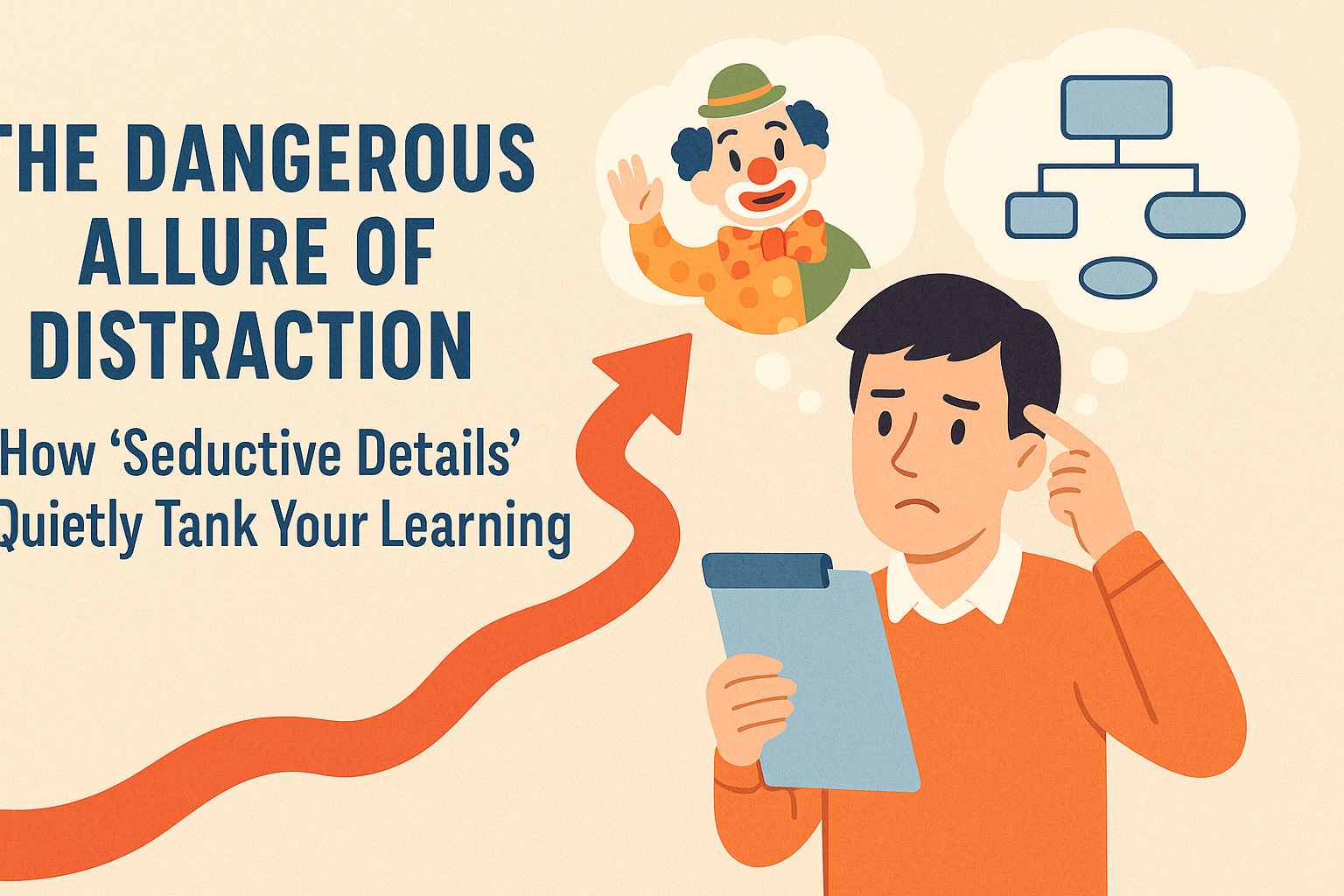





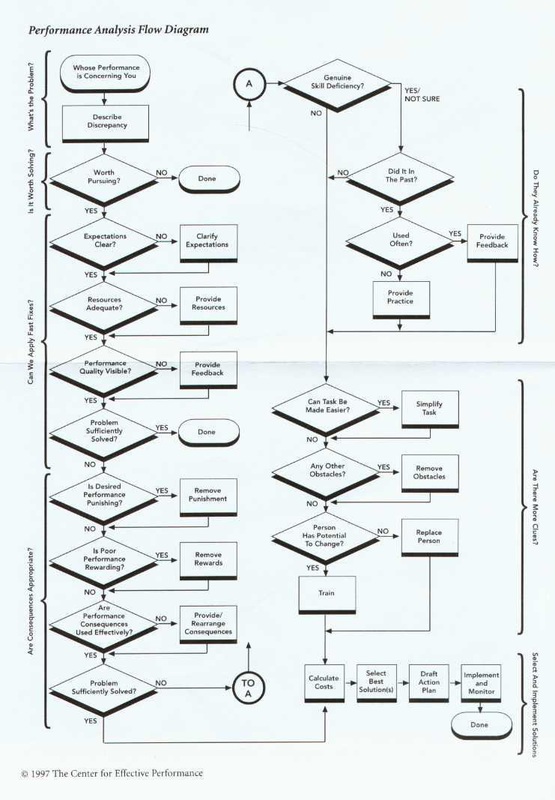
You must be logged in to post a comment.